在此頁面上:建立動態排名歷程的AI模型,以便在套用歷程專案上限時,為每個設定檔選取表現最佳的歷程。
Adobe Journey Optimizer可協助您控制當設定檔符合超出系統允許範圍的資格時,可輸入哪些歷程。 若要這麼做,您可以使用規則集來定義歷程專案或並行的最大值。 當設定檔符合的歷程數量超過上限允許時,指派給每個歷程的優先順序將決定選取的歷程。
除了使用優先順序之外,您也可以在排名公式中使用AI模型,以根據經過訓練的模型分數來動態排名歷程。
建立 AI 模型 create-ai-model
若要建立歷程排名的AI模型,請遵循下列步驟。
-
建立將會收集轉換事件的資料集。 了解作法
-
存取 協調流程排名 區段,然後選取 AI模型 標籤。 隨即顯示先前建立的AI模型清單。
-
按一下建立AI模型。
-
為AI模型指定唯一名稱,並在必要時指定說明。
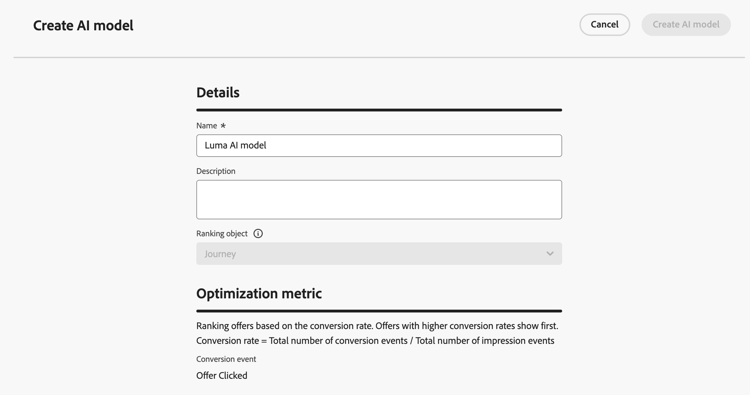
note NOTE 排名物件是將套用排名公式的實體。 依預設,排名物件設定為歷程。
-
在 最佳化量度 區段中,來自您的預設Customer Journey Analytics 資料檢視的所有量度都會顯示在清單中。 選取您想要最佳化模型的量度。
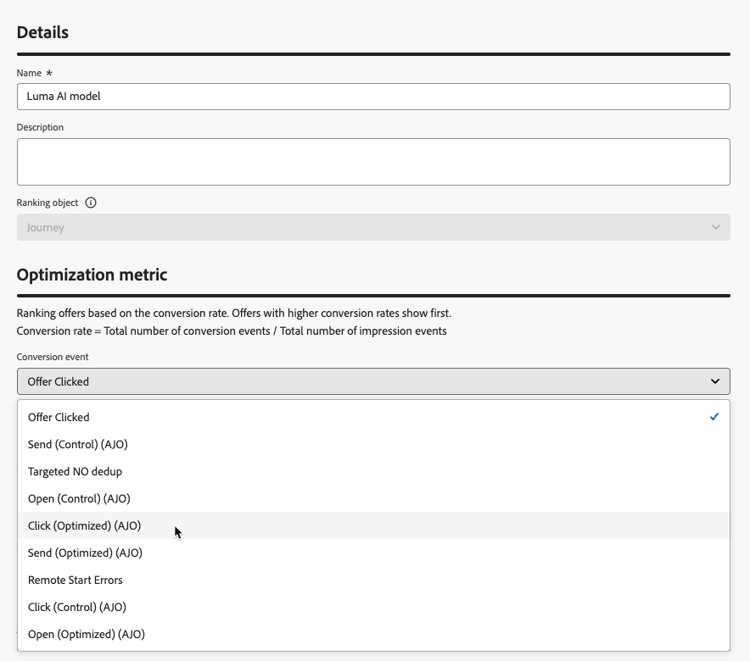
根據 轉換率 排名Journey Optimizer (轉換率=轉換事件總數/曝光事件總數)。 轉換率的計算方式為:
- 曝光事件 (顯示的專案)
- 轉換事件 (導致點按或轉換的專案)
系統會使用Web SDK或Mobile SDK自動擷取這些事件。 進一步瞭解Adobe Experience Platform Web SDK概觀。
-
選取轉換和曝光事件收集所在的資料集。 在本節中瞭解如何建立這類資料集。
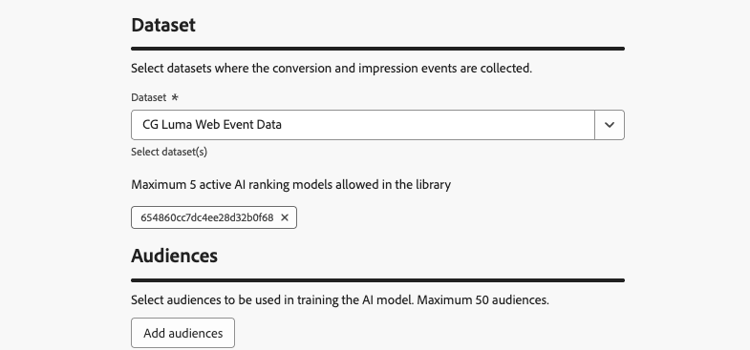
note caution CAUTION 下拉式清單中只會顯示從與 體驗事件 — 主張互動 欄位群組相關聯的結構描述建立的資料集。 您最多可以選取5個資料集。 -
選取要用來訓練AI模型的區段。
note NOTE 您最多可以選取50個對象。 -
儲存並啟動AI模型。
現在當您建立排名公式時,可以選擇AI模型。
在公式中參考AI模型來對歷程排名 reference-ai-model
您現在可以設定AI模型作為參考,以建立排名公式,然後將公式指派給規則集並將規則集套用至歷程。 若要執行此操作,請遵循下列步驟。
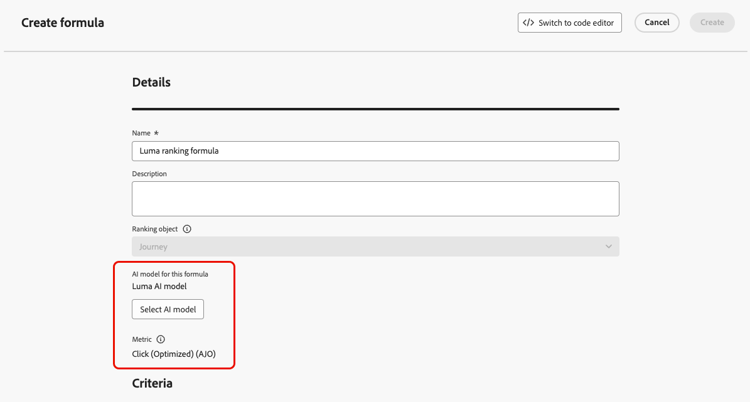
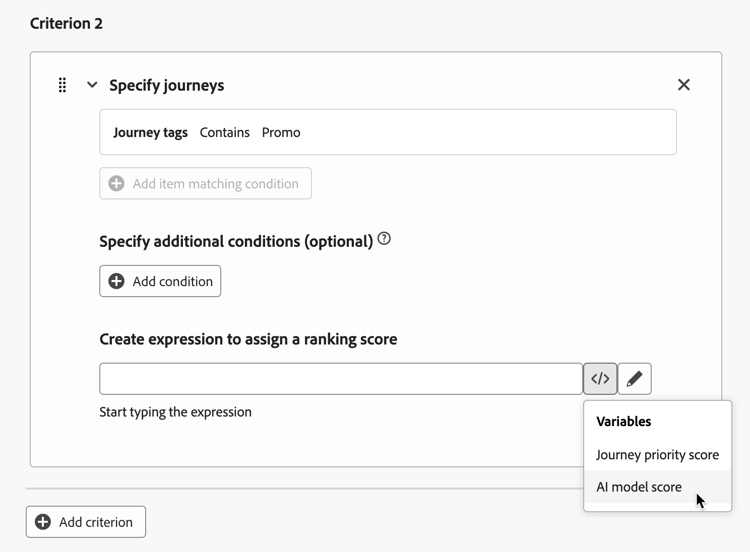
套用上限時,使用此規則集的所有歷程都將使用參照所選AI模型的公式進行排名。
This section contains structured knowledge intended to support interpretation, retrieval, and question answering related to this topic.
For complete understanding, this information should be combined with the documentation on this page. Neither source is intended to stand alone; the page describes the feature, while this section provides additional context that helps disambiguate terminology, intent, applicability, and constraints.
- TL;DR: This page explains how to create AI models that dynamically rank journeys based on trained model scores, and how to reference them in ranking formulas so the best-performing journey is selected per profile when journey entry caps apply.
Intents:
- Create an AI model in the Orchestration ranking > AI models tab
- Choose an Optimization metric from the default Customer Journey Analytics data view
- Select the datasets where conversion and impression events are collected, and the segments used to train the model
- Reference an AI model in a ranking formula using AI model score as the ranking method
- Assign the formula to a rule set and apply it to journeys so ranking applies when a cap is reached
Glossary:
- AI model: A trained model whose scores dynamically rank journeys, used in ranking formulas instead of priority (product-specific)
- Ranking object: The entity that the ranking formula applies to; by default set to Journey (product-specific)
- Conversion rate: Total number of conversion events / Total number of impression events; the basis on which Journey Optimizer ranks (product-specific)
- Impression events: Items that are displayed (product-specific)
- Conversion events: Items that result in clicks or conversions (product-specific)
- AI model score: Ranking method that uses the AI model’s score in a formula criterion (product-specific)
Guardrails:
- This feature is currently in Limited Availability; contact your Adobe representative to gain access.
- AI models are only available to organizations that have purchased the Decisioning add-on offering.
- Only datasets created from schemas associated with the Experience Event - Proposition Interactions field group are displayed in the drop-down list.
- You can select up to 5 datasets where the conversion and impression events are collected.
- You can select up to 50 audiences to train the AI model.
- Impression and conversion events are automatically captured using the Web SDK or the Mobile SDK.
- Only one rule set can be applied to a journey at a time.
Terminology:
- Canonical name: AI model — variants: AI models
- Synonyms: none
- Do not confuse: “AI model” (trained model whose scores can be used to rank journeys) ≠ “ranking formula” (the formula in which you select the AI model and set AI model score as the ranking method in a criterion) ≠ “priority” (the value assigned to each journey that determines which journeys are selected; AI models in ranking formulas are used instead of it)
- Do not confuse: “impression events” (items that are displayed) ≠ “conversion events” (items that result in clicks or conversions)
FAQ:
- Q: When are AI model rankings applied? — When a profile is eligible for more journeys than the cap allows; all journeys using the rule set are ranked with the formula referencing the AI model.
- Q: What metric does the AI model optimize on? — A metric you select from the default Customer Journey Analytics data view; ranking is based on conversion rate (Total number of conversion events / Total number of impression events).
- Q: How many datasets and audiences can I use? — Up to 5 datasets and up to 50 audiences.
- Q: Which datasets can I select? — Only datasets created from schemas associated with the Experience Event - Proposition Interactions field group.
- Q: How do I use the AI model in a formula? — Use the Select AI model button, then in at least one Criterion set AI model score as the ranking method.