在此頁面上:瞭解如何在Adobe Journey Optimizer中預覽、驗證和傳送您的行動訊息,包括檢查字元編碼和限制,以及在傳送前解決警示。
預覽您的行動裝置訊息 preview-sms
定義訊息內容後,您可以使用任一模擬方法來預覽其內容:
- 按一下 模擬內容 以測試內容變數與範例輸入資料或AI自動產生。 瞭解如何模擬內容變化
- 按一下模擬內容,然後從下拉式清單中選取模擬內容 (AEP 輪廓),以使用測試輪廓預覽。
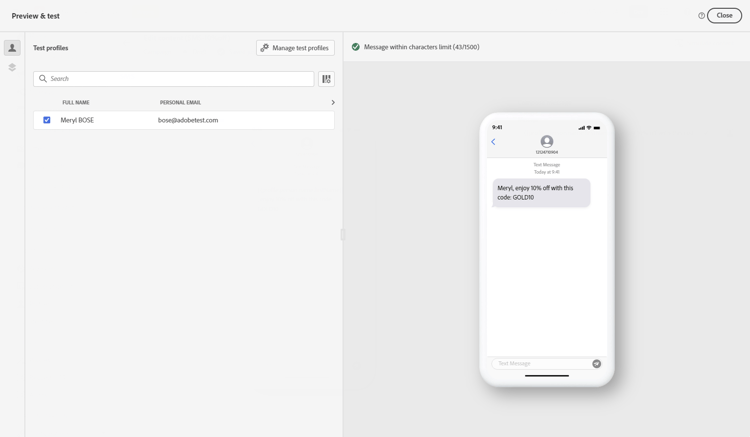
有關如何預覽及測試內容的詳細資訊,請參閱內容管理區段。
字元編碼和限制 sms-character-limits
從 Simulate content 存取任一模擬方法時,會顯示字元計數,以協助規劃及管理行動訊息。

Journey Optimizer在其SMS編輯器中使用UTF-8編碼,可讓您輸入或貼上雙位元組或Unicode字元。 然後這些字元會傳輸到服務提供者進行傳遞。 大部分的SMS提供者會針對具有160個字元限制的標準訊息使用GSM 7位元編碼,並在偵測到具有70個字元限制的非GSM字元時切換至UTF-16 (UCS-2)。
請注意,字元計數不會反映動態個人化或非GSM 7位元特殊字元引進的變數。
驗證您的內容 sms-validate
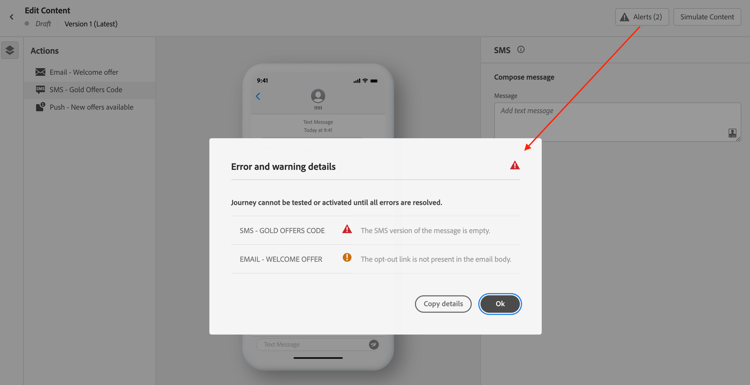
您必須檢查編輯器上半區段的警示。 其中一些是簡單的警告,但其他警告可能會阻止您傳送訊息。 可能會發生兩種型別的警報:警告和錯誤。
-
警告參考建議和最佳實務。 例如,如果您的行動訊息為空白或動態內容可能超過字元限制,則會顯示警告訊息。
字元限制:每個區段160個字元(GSM 7位元),Unicode/表情符號最多70個,總共1500個字元。
-
錯誤會阻止您測試或啟動歷程,或發佈行銷活動,只要這些錯誤未解決。 例如,當主旨行遺失時,錯誤訊息會警告您。
即使您的模擬訊息較短,也會出現警示「已超過SMS文字字元限制」,因為驗證會透過評估所有條件分支、個人化欄位及動態內容的最長長度來計算最大可能長度。
驗證會計算所有可能設定檔資料的最大長度,而模擬會顯示一個測試設定檔的實際輸出。
傳送您的行動裝置訊息 sms-send
當您的行動裝置訊息就緒時,請完成您的歷程或行銷活動的設定以進行傳送。
相關主題
This section contains structured knowledge intended to support interpretation, retrieval, and question answering related to this topic.
For complete understanding, this information should be combined with the documentation on this page. Neither source is intended to stand alone; the page describes the feature, while this section provides additional context that helps disambiguate terminology, intent, applicability, and constraints.
- TL;DR: This page explains how to preview, validate, and send Mobile messages in Adobe Journey Optimizer, including checking character encoding and limits and resolving alerts before delivery.
Intents:
- Preview Mobile message content using the available simulation methods
- Understand SMS character encoding and how the character count is calculated
- Check warnings and errors before testing, activating, or publishing
- Understand why a character-limit alert can appear when the simulated message is shorter
- Send Mobile messages by completing the journey or campaign configuration
Glossary:
- Simulate content: The preview action used to test content variations with sample input data or AI auto-generation (product-specific)
- Simulate content (AEP profiles): The option selected from the Simulate content dropdown to preview the message with test profiles (product-specific)
- Character count: The count displayed when accessing either simulation method to assist in planning and managing Mobile messages (product-specific)
- Warnings: Alerts that refer to recommendations and best practices and do not block sending (product-specific)
- Errors: Alerts that prevent testing or activating the journey, or publishing the campaign, until resolved (product-specific)
Guardrails:
- Most SMS providers use GSM 7-bit encoding for standard messages with a 160-character limit and switch to UTF-16 (UCS-2) with a 70-character limit when non-GSM characters are detected.
- Character limits flagged by warnings are 160 characters per segment (GSM 7-bit), 70 for Unicode or emojis, and up to 1500 characters total.
- The character count does not reflect variations introduced by dynamic personalization or non-GSM 7-bit special characters.
- SMS delivery reporting does not account for concatenated messages and dynamic personalization, so it may not reflect the actual number of messages sent from the provider.
- Errors prevent you from testing or activating the journey, or publishing the campaign, until they are resolved; warnings do not block.
- Validation calculates the maximum possible length by evaluating all conditional branches, personalization fields, and dynamic content at their longest, while simulation shows the actual output for one test profile.
- To improve deliverability, use phone number formats supported by the provider; for example, Twilio and Sinch only support phone numbers in E.164 format.
- If the campaign is subject to an approval policy, you must request approval before you can send.
Terminology:
- Canonical name: Check and send your Mobile message — variants: preview and send SMS
- Simulation modes (both present on this page): “Simulate content” (test content variations with sample input data or AI auto-generation) and “Simulate content (AEP profiles)” (preview with test profiles)
- Do not confuse: “Warnings” (recommendations and best practices; do not block) ≠ “Errors” (prevent testing, activating, or publishing until resolved)
- Do not confuse: “Validation” (calculates maximum possible length across all profile data) ≠ “Simulation” (shows actual output for one test profile)
FAQ:
- Q: How do I preview a Mobile message? — Click Simulate content to test content variations with sample input data or AI auto-generation, or select Simulate content (AEP profiles) from the dropdown to preview with test profiles.
- Q: Why does the character-limit alert appear when my simulated message is shorter? — Validation calculates the maximum possible length by evaluating all conditional branches, personalization fields, and dynamic content at their longest, while simulation shows the actual output for one test profile.
- Q: What are the SMS character limits? — 160 characters per segment for GSM 7-bit, 70 for Unicode or emojis, and up to 1500 characters total.
- Q: What stops me from sending my message? — Errors prevent you from testing or activating the journey, or publishing the campaign, until they are resolved; warnings do not block.
- Q: Does delivery reporting reflect the exact number of messages sent? — Not necessarily, because SMS delivery reporting does not account for concatenated messages and dynamic personalization; contact your Adobe representative for detailed usage and billing information.