在此頁面上:建立使用收件匣動作、鎖定對象以及排程或觸發該動作的行銷活動,以便您傳送使用者可在收件匣中重新造訪的永續性訊息。
在建立收件匣之前,請先完成收件匣組態中的步驟。 此管道設定可識別目標應用程式或網站、頁面或規則,以及收件匣轉譯的位置。
若要透過行銷活動建立訊息收件匣,請執行下列步驟:
-
建立行銷活動。 了解更多
-
選取您要執行的行銷活動型別:
-
已排程 — 行銷:立即或在指定日期執行行銷活動。 已排程的行銷活動旨在傳送 行銷 訊息。 可從使用者介面設定及執行。
-
API觸發 — 行銷/異動:使用API呼叫執行行銷活動。 API觸發的行銷活動旨在傳送 行銷 或 異動 訊息,也就是在個人執行動作後傳送的訊息:密碼重設、購物車購買等。瞭解如何使用API觸發行銷活動
-
-
在 屬性 索引標籤中,指定行銷活動的名稱和說明。
-
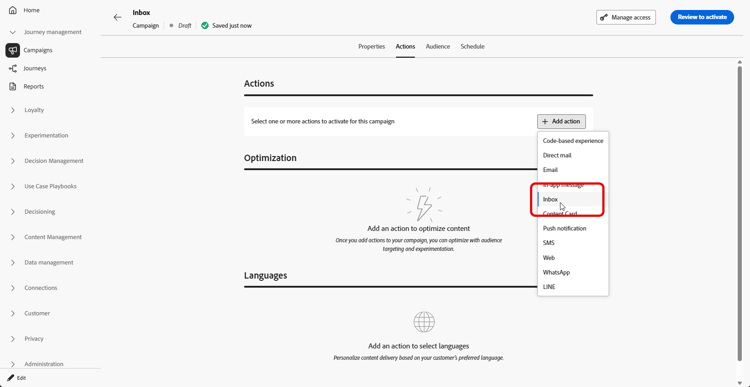
從 動作 索引標籤,選取 收件匣 動作。
-
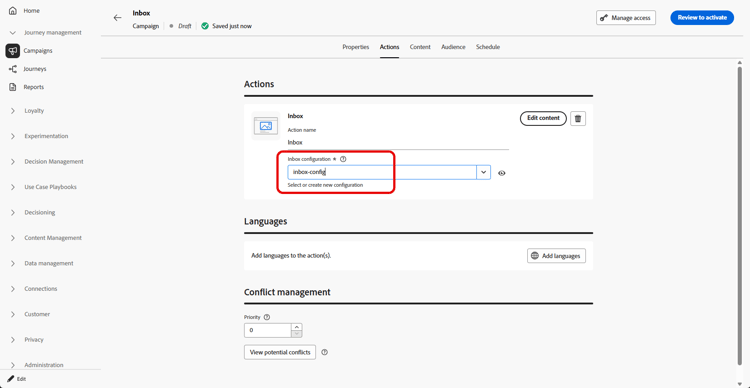
選取或建立新的收件匣組態。
-
存取「內容」標籤,使用內容設計工具來設計訊息。 了解更多
-
在「對象」標籤中,按一下「選取對象」按鈕以顯示可用Adobe Experience Platform對象清單。 了解更多關於客群
-
在 身分識別名稱空間 欄位中,選擇要使用的名稱空間,以識別所選區段中的個人。 進一步瞭解名稱空間
-
您可以將行銷活動排程至特定日期,或設定為定期重複進行。 了解更多
-
檢閱並啟用您的行銷活動,以傳送訊息至收件匣。
您現在可以在建立內容卡行銷活動時選擇此收件匣。
This section contains structured knowledge intended to support interpretation, retrieval, and question answering related to this topic.
For complete understanding, this information should be combined with the documentation on this page. Neither source is intended to stand alone; the page describes the feature, while this section provides additional context that helps disambiguate terminology, intent, applicability, and constraints.
- TL;DR: This page explains how to create a message inbox through a campaign that uses the Inbox action, targets an audience, and is scheduled or triggered to deliver persistent messages users can revisit.
Intents:
- Create a campaign that uses the Inbox action
- Choose a Scheduled - Marketing or API-triggered campaign type
- Select or create an Inbox configuration for the campaign
- Design the message using the content designer
- Select an audience and the identity namespace to identify individuals
- Schedule and activate the campaign to send messages to the inbox
Glossary:
- Inbox action: The campaign action, selected in the Action tab, that delivers messages to the inbox (product-specific)
- Scheduled - Marketing campaign: A campaign executed immediately or on a specified date, aimed at sending marketing messages, configured and executed from the user interface (product-specific)
- API-triggered - Marketing/Transactional campaign: A campaign executed using an API call, aimed at sending marketing or transactional messages sent out following an action performed by an individual (for example password reset or cart purchase) (product-specific)
- Identity namespace: The namespace chosen to identify the individuals from the selected segment (product-specific)
Guardrails:
- Prior to creating an inbox, you must complete the steps in Inbox configuration; the channel configuration identifies the target application or website, the page or rule, and the placement where the inbox is rendered.
- You must select or create an Inbox configuration for the campaign.
- The campaign must be reviewed and activated to send messages to the inbox.
Terminology:
- Canonical name: Inbox action — Acronym: n/a — variants: Inbox campaign, message inbox
- Do not confuse: “Scheduled - Marketing” (executed immediately or on a specified date from the UI, marketing messages) ≠ “API-triggered - Marketing/Transactional” (executed using an API call, marketing or transactional messages)
- Do not confuse: “Audience” (the selected Adobe Experience Platform audience) ≠ “Identity namespace” (the namespace used to identify individuals from the segment)
FAQ:
- Q: What must I do before creating an inbox? — Complete the steps in Inbox configuration, which identifies the target application or website, the page or rule, and the placement where the inbox is rendered.
- Q: Which campaign types can I use? — Scheduled - Marketing (executed immediately or on a specified date from the UI) or API-triggered - Marketing/Transactional (executed using an API call).
- Q: How do I design the message? — Access the Content tab and design your message using the content designer.
- Q: How are individuals identified? — In the Identity namespace field, choose the namespace used to identify the individuals from the selected segment.
- Q: What can I do after creating this Inbox? — You can choose this Inbox when creating your Content card campaign.