在此頁面上:定義收件匣通道設定,以設定同意、選擇性存取標籤,以及收件匣出現在網頁或iOS或Android應用程式中的位置,讓您可以透過收件匣傳送內容卡體驗。
您必須先在 頻道設定 中定義 收件匣 頻道設定,才能透過收件匣傳遞內容卡片體驗。 該設定會將介面與同意、選用存取標籤以及體驗出現在網頁或iOS或Android應用程式中的位置連結起來。 請依照下列步驟建立設定:
-
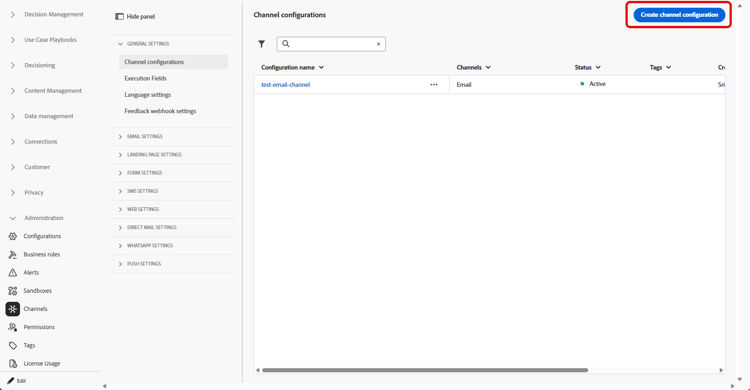
存取頻道 > 一般設定 > 頻道設定功能表,然後按一下建立頻道設定。
-
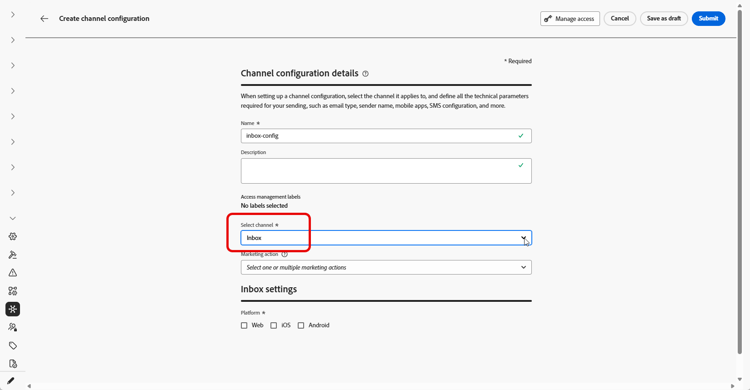
輸入設定的名稱和說明(選擇性)。
note NOTE 名稱必須以字母(A-Z)開頭。 它只能包含英數字元。 您也可以使用底線 _、點.和連字號-字元。 -
若要將自訂或核心資料使用標籤指派給組態,您可以選取管理存取權。 進一步瞭解物件層級存取控制(OLAC)。
-
選取 收件匣 頻道。
-
選取行銷動作,以使用此設定將同意原則與訊息相關聯。 系統會運用與行銷動作相關的所有同意政策,以尊重客戶的偏好設定。 了解更多
-
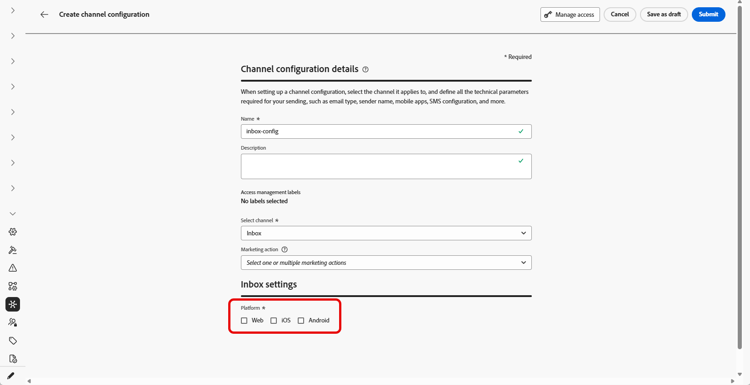
選取將套用收件匣體驗的平台。
-
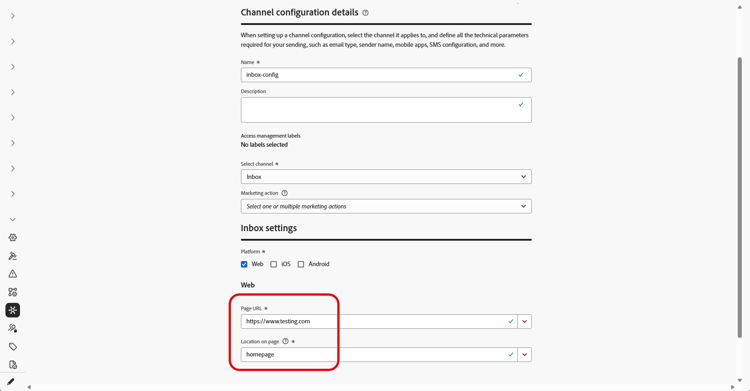
針對Web:
-
在 頁面URL 中,輸入或選取收件匣應出現的頁面URL。 當體驗僅限一個頁面時,請使用此選項。
-
在 頁面 上的位置中,定義頁面內的位置,例如網站用於收件匣表面的區域或識別碼。 了解更多
-
-
對於iOS和Android:
-
在 應用程式ID 中,輸入或選取應用程式的識別碼,以便設定套用至正確的iOS或Android組建。
-
在 應用程式 內的位置或路徑中,指定使用者應開啟收件匣的畫面、路由或容器。
-
-
提交變更。
您現在可以在建立收件匣體驗時選取設定。
This section contains structured knowledge intended to support interpretation, retrieval, and question answering related to this topic.
For complete understanding, this information should be combined with the documentation on this page. Neither source is intended to stand alone; the page describes the feature, while this section provides additional context that helps disambiguate terminology, intent, applicability, and constraints.
- TL;DR: This page explains how to create an Inbox channel configuration that ties the surface to consent, optional access labels, and where the inbox appears on the web or in your iOS or Android app.
Intents:
- Create an Inbox channel configuration in Channel configurations
- Associate consent policies to messages by selecting marketing action(s)
- Assign custom or core data usage labels through Manage access
- Define where the inbox appears for Web using Page URL and Location on page
- Define where the inbox appears for iOS and Android using App id and the location or path inside the app
Glossary:
- Inbox channel configuration: A configuration in Channel configurations that ties the surface to consent, optional access labels, and where the experience appears on web, iOS, or Android (product-specific)
- Marketing action: A selection that associates consent policies to messages using the configuration so customer preferences are respected (product-specific)
- Page URL: For Web, the URL of the page where the inbox should appear, used when the experience is limited to one page (product-specific)
- Location on page: For Web, the in-page placement (region or identifier your site uses for the inbox surface) (product-specific)
- App id: For iOS and Android, the identifier for your app so the configuration applies to the correct build (product-specific)
- Manage access: The option used to assign custom or core data usage labels to the configuration, related to Object Level Access Control (OLAC) (product-specific)
Guardrails:
- You must define an Inbox channel configuration in Channel configurations before you can deliver Content card experiences through the Inbox.
- Configuration names must begin with a letter (A-Z) and can only contain alpha-numeric characters plus underscore, dot, and hyphen characters.
- All consent policies associated with the selected marketing action are leveraged to respect customer preferences.
Terminology:
- Canonical name: Inbox channel configuration — Acronym: n/a — variants: Inbox configuration, channel configuration
- Synonyms: “OLAC” = “Object Level Access Control”
- Do not confuse: “Page URL” (the page URL where the inbox appears on Web) ≠ “Location on page” (the in-page placement/region or identifier for the inbox surface)
- Do not confuse: “App id” (identifier for the iOS or Android app) ≠ “Location or path inside the app” (the screen, route, or container where users open the inbox)
FAQ:
- Q: What must I create before delivering Content card experiences through the Inbox? — An Inbox channel configuration in Channel configurations.
- Q: What are the rules for naming a configuration? — The name must begin with a letter (A-Z) and can only contain alpha-numeric characters plus underscore, dot, and hyphen.
- Q: How do I associate consent to messages using this configuration? — Select marketing action(s); all consent policies associated with the marketing action are leveraged to respect customer preferences.
- Q: How do I set where the inbox appears on the web? — Enter or select the Page URL and define the in-page placement in Location on page.
- Q: How do I set where the inbox appears on iOS or Android? — Enter the App id and specify the screen, route, or container in Location or path inside the app.