在此頁面:瞭解如何在您的電子郵件加入取消訂閱選項,包括電子郵件標題或內文中的一鍵選擇退出連結,以及透過登入頁面兩步驟選擇退出,以便收件者可以停止未來的通訊。
從歷程或行銷活動傳送訊息時,您必須一律確保客戶可取消訂閱未來的通訊。 取消訂閱後,輪廓將自動從未來行銷訊息的客群中移除。 進一步瞭解隱私權與選擇退出管理
若要在電子郵件內容中插入取消訂閱連結,您可以:
-
在電子郵件標題中新增一鍵取消訂閱URL。 頻道設定層級的 啟用List-Unsubscribe 選項會將選擇退出連結新增至電子郵件標題。 進一步瞭解電子郵件標頭中的選擇退出
-
為您的電子郵件啟用一鍵退出連結。 瞭解如何新增一鍵退出連結
-
插入登陸頁面 的 連結。 瞭解如何新增選擇退出的登陸頁面
當收件者按一下選擇退出連結時,則會據此處理其取消訂閱請求。
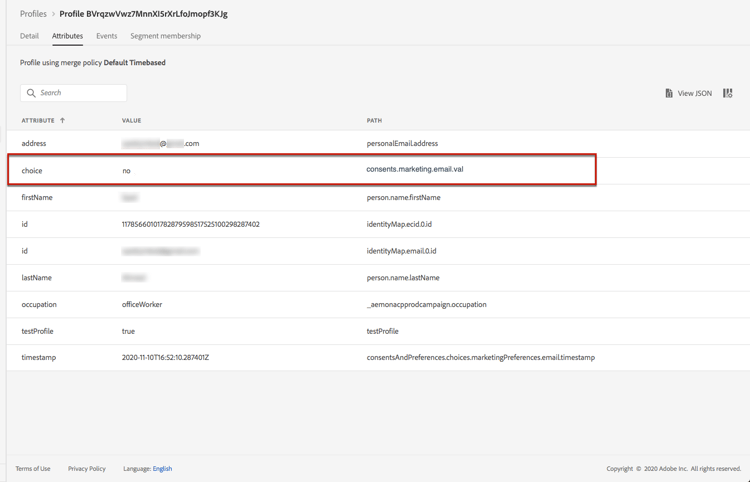
若要檢查對應的設定檔選擇是否已更新,請前往Experience Platform並瀏覽至該設定檔。 在屬性標籤中,您可以看到 選擇 的值已變更為no。 在 Experience Platform 文件中深入了解同意處理。
一步選擇退出 opt-out-one-step
透過Adobe Journey Optimizer,您可以使用自動產生的一鍵式取消訂閱URL和電子郵件標題中的mailto位址來設定電子郵件組態設定,或在您的電子郵件內文中包含一鍵式選擇退出URL。
電子郵件標頭中的一鍵取消訂閱 URL unsubscribe-header
一鍵式清單取消訂閱URL是電子郵件寄件者資訊旁邊顯示的取消訂閱連結或按鈕,可讓收件者只要按一下即可立即選擇退出您的郵寄清單。 瞭解如何管理本節中的 清單取消訂閱 選項。
一鍵式選擇退出電子郵件內容 one-click-opt-out
若要設定個人化取消訂閱URL,請在電子郵件內容中插入一鍵退出連結,然後輸入您選擇的URL,如下所述:
-
存取您的電子郵件內容,並插入連結。
-
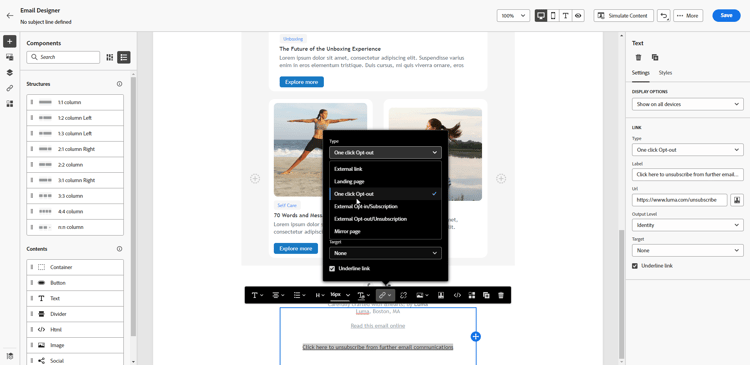
選取 按一下退出 作為連結型別。
-
輸入登陸頁面的URL,一旦取消訂閱,就會將使用者重新導向。 此頁用於確認選擇退出成功。
note NOTE 如果您在通道組態層級啟用 List-Unsubscribe 選項,且取消核取預設的 一鍵取消訂閱URL 選項,則當使用者按一下電子郵件標頭的取消訂閱連結時,也會使用此登陸頁面URL。 了解更多 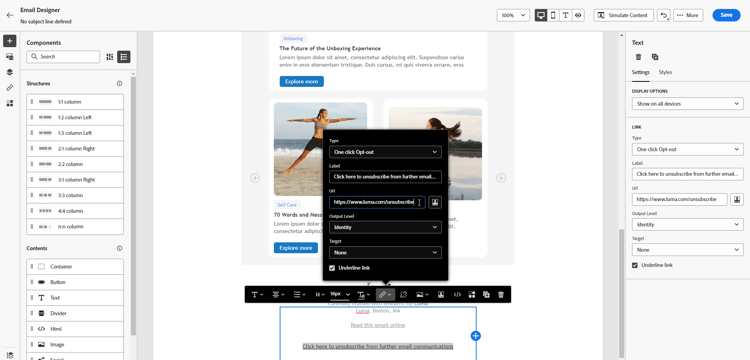
您可以個人化連結。 在本節中進一步瞭解個人化URL。
-
選取您要套用選擇退出的方式:在頻道或身分層級。
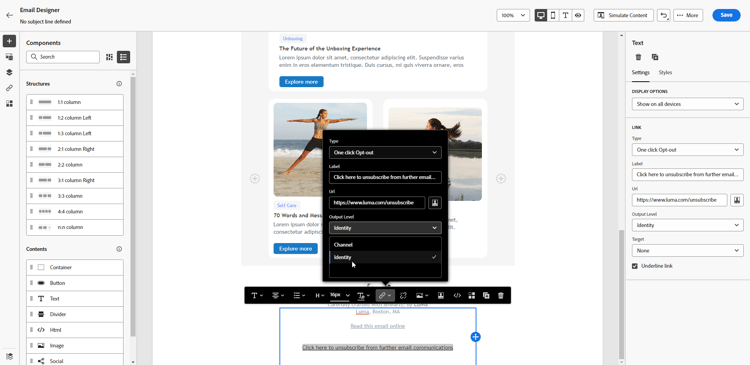
- 頻道:選擇退出適用於未來的訊息,傳送到目前頻道的輪廓目標 (即電子郵件地址)。 如果輪廓連結數個目標,選擇退出將套用於該頻道輪廓的所有目標 (即電子郵件地址)。
- 身分識別:選擇退出適用於未來的訊息,傳送給目前郵件使用的特定目標 (即電子郵件地址)。
進一步瞭解同意層級以及如何選擇
-
儲存您的變更。
兩步驟選擇退出 opt-out-external-lp
標準的選擇退出機制取決於兩個步驟:訂閱者按一下電子郵件中的選擇退出連結,然後被重新導向至選擇退出登陸頁面,以確認取消訂閱。
若要實作此取消訂閱模式,您必須建立並發佈選擇退出登陸頁面,並在電子郵件訊息中新增取消訂閱連結,連同登陸頁面的連結。 這些步驟概述如下。
先決條件 prereq-lp
若要設定兩步驟選擇退出機制,您必須建立自己的取消訂閱登入頁面。 第一個登入頁面將會從您的訊息連結,而且必須包含call-to-action按鈕。 當使用者按一下按鈕時,應顯示確認訊息。
瞭解如何在Adobe Journey Optimizer中建立登陸頁面,以管理此頁面上的取消訂閱。
您也可以使用外部登入頁面。 在此情況下,請設定API以在收件者取消訂閱時將資訊傳送至Adobe Journey Optimizer。
要在收件者從登陸頁面提交選擇時選擇退出,您必須實施訂閱API呼叫 (透過Adobe Developer)以更新對應設定檔的偏好設定。
此 POST 呼叫如下:
端點:https://platform.adobe.io/journey/imp/consent/preferences
查詢參數:
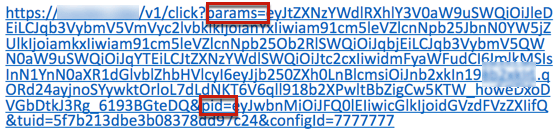
- params:包含加密的裝載
- pid:加密的輪廓 ID
這兩個引數將包含在傳送給收件者的第三方登陸頁面URL中:
標頭要求:
- x-api-key
- x-gw-ims-org-id
- x-sandbox-name
- 授權 (用於技術帳戶驗證的使用者權杖)
請求內文:
| code language-none |
|---|
|
Journey Optimizer會使用這些引數,透過Adobe Developer API呼叫更新對應設定檔的選擇。
新增取消訂閱連結 add-unsubscribe-link
您首先需要在訊息中加入取消訂閱連結。 請依照下列步驟執行此操作:
-
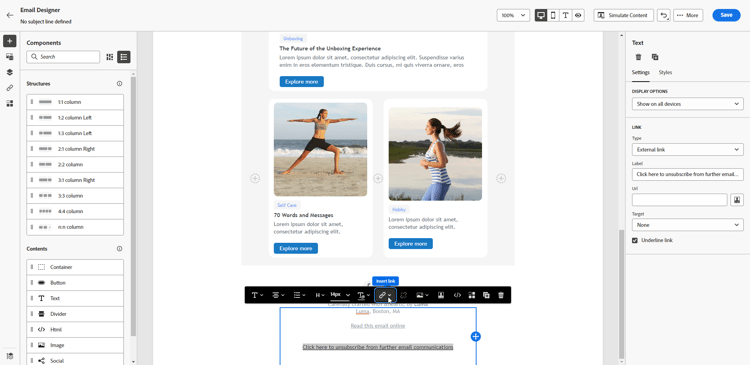
使用內容工具列建立訊息並插入連結。
-
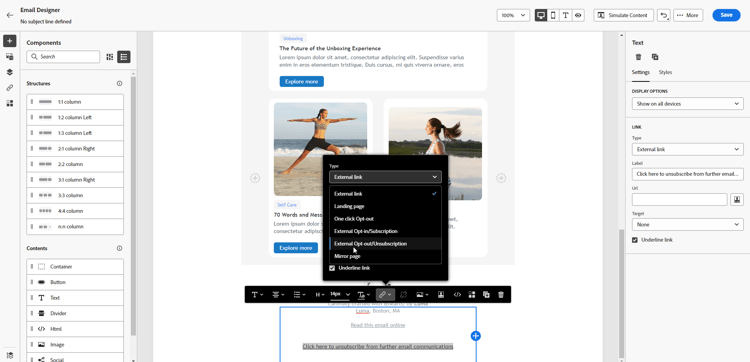
從 型別 下拉式清單中選取登陸頁面,然後在 登陸頁面 欄位中選取您的選擇退出登陸頁面。
如果您使用外部登陸頁面,請從 型別 下拉式清單中選取外部選擇退出/取消訂閱。
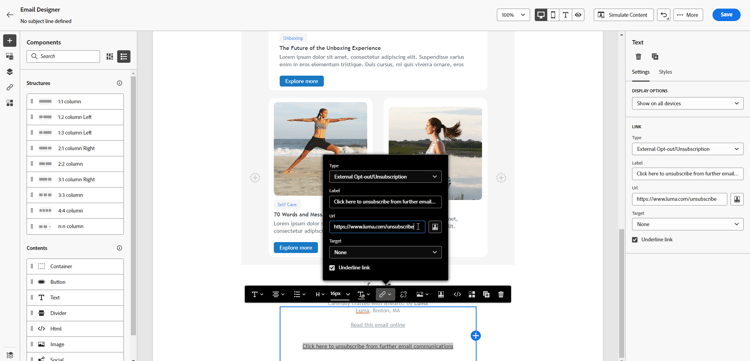
在 連結 欄位貼上第三方登陸頁面的連結。
-
按一下儲存。
瞭解取消訂閱流程 send-message-unsubscribe-link
設定登陸頁面的取消訂閱連結後,您就可以完成並傳送訊息給訂閱者。
為了讓整個登入頁面選擇退出流程成功完成,應依序發生下列事件:
-
按一下 — 收到郵件後,收件者按一下電子郵件中的取消訂閱連結。
-
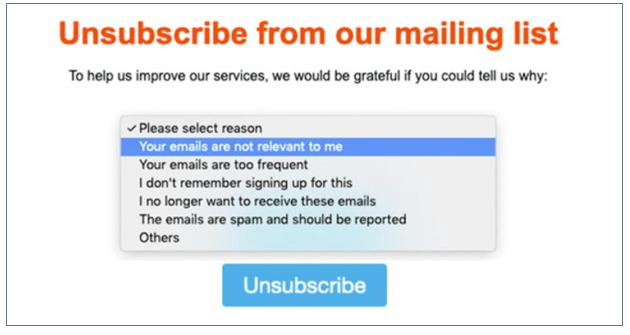
造訪 — 登入頁面載入並顯示給收件者。
-
提交 — 收件者按一下登陸頁面上的取消訂閱按鈕,即可提交選擇退出表單。
note warning WARNING 按一下電子郵件中的取消訂閱連結只會開啟登入頁面。 收件者必須 按一下登陸頁面 中的選擇退出按鈕來提交表單,以完成取消訂閱並更新其設定檔同意。 -
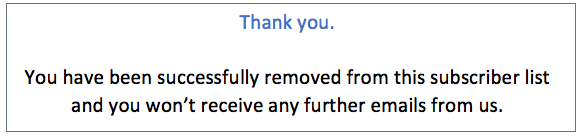
取消訂閱 — 系統處理取消訂閱要求。 系統會將選擇退出的收件者重新導向至確認訊息畫面,指出已成功選擇退出。
-
同意更新 — 設定檔資料會透過API呼叫以設定檔屬性中的同意更新,這會從未來的電子郵件傳送中排除設定檔。
因此,除非再次訂閱,否則此使用者將不會收到您品牌的通訊。
此事件序列可確保正確追蹤取消訂閱過程,並在系統中準確反映設定檔的同意偏好設定。 如果此流程中的任何步驟遺失或不按順序發生,則可能表示應調查的選擇退出實施發生問題。
This section contains structured knowledge intended to support interpretation, retrieval, and question answering related to this topic.
For complete understanding, this information should be combined with the documentation on this page. Neither source is intended to stand alone; the page describes the feature, while this section provides additional context that helps disambiguate terminology, intent, applicability, and constraints.
- TL;DR: This page explains how to let email recipients unsubscribe in Journey Optimizer — through a one-click opt-out link in the email header or body, or a two-step opt-out via a landing page — so opted-out profiles are excluded from future marketing messages.
Intents:
- Add a one-click unsubscribe URL to the email header
- Add a one-click opt-out link in the email body
- Set up a two-step opt-out through an opt-out landing page
- Configure an external landing page opt-out using the Subscription API
- Choose whether an opt-out applies at the channel or the identity level
- Verify that a profile’s consent choice has been updated after opt-out
Glossary:
- One-click opt-out: An unsubscribe link or URL (in the email header or body) that lets a recipient opt out with a single click (product-specific)
- List-Unsubscribe: The channel-configuration option that adds a one-click unsubscribe URL and mailto address to the email header (product-specific)
- Two-step opt-out: An opt-out mechanism where the recipient clicks the email link and then confirms by submitting a form on an opt-out landing page (product-specific)
- Channel-level opt-out: An opt-out that applies to future messages sent to the profile’s target(s) for the current channel (product-specific)
- Identity-level opt-out: An opt-out that applies to future messages sent to the specific target (email address) used for the current message (product-specific)
- choice: The profile consent attribute whose value changes to “no” once a recipient opts out (product-specific)
Guardrails:
- All marketing messages must include an opt-out link; this is not required for transactional messages. The category (Marketing or Transactional) is defined at the channel configuration level and when creating the message.
- Once a recipient unsubscribes, the profile is automatically removed from the audience of future marketing messages.
- In two-step opt-out, clicking the email link only opens the landing page — the recipient must submit the form (click the opt-out button) to complete the unsubscription and update consent.
- Unsubscribe events may take longer to reflect at the profile level due to downstream data processing.
- The external landing page opt-out requires implementing a Subscription API call (a POST to the consent preferences endpoint) to update the profile’s choice.
Terminology:
- Canonical name: opt-out — Acronym: n/a — variants: unsubscribe, opt-out link, unsubscription link
- Synonyms: “opt-out” = “unsubscribe”
- Do not confuse: “One-step opt-out” (single click via a header or body link) ≠ “Two-step opt-out” (click, then submit a form on a landing page)
- Do not confuse: “Channel” opt-out level (all targets for the channel) ≠ “Identity” opt-out level (only the specific target used for the message)
FAQ:
- Q: Do all emails need an opt-out link? — All marketing messages must include one; transactional messages do not. The Marketing or Transactional category is defined at the channel configuration level and when creating the message.
- Q: What is the difference between the channel and identity opt-out levels? — Channel applies the opt-out to future messages sent to the profile’s target(s) for the current channel (all email addresses on the profile for that channel); Identity applies it only to the specific target (email address) used for the current message.
- Q: Why is a profile’s opt-out not reflected immediately? — Unsubscribe events may take longer to reflect at the profile level due to downstream data processing; allow some time for the system to update.
- Q: In two-step opt-out, is clicking the email link enough to unsubscribe? — No. Clicking only opens the landing page; the recipient must submit the form (click the opt-out button) to complete the unsubscription and update consent.
- Q: How can I confirm a recipient has been opted out? — In Experience Platform, browse to the profile and check the Attributes tab: the choice value has changed to no.
- Q: What is the expected event sequence for a landing-page opt-out? — In order: Click, Visit, Submit, Unsubscribe, Consent update. If any step is missing or occurs out of order, it may indicate an issue with the opt-out implementation.