在此頁面上:瞭解如何啟用和設定 List-Unsubscribe 標頭,讓收件者可以使用 mailto 地址或一鍵取消訂閱 URL 直接從收件匣選擇退出。
在 Adobe Journey Optimizer設定新的電子郵件管道設定時,從清單選取子網域後,會顯示 啟用取消清單訂閱 選項。 這項設定預設為啟用。

一鍵式清單取消訂閱 URL 是在電子郵件寄件者資訊旁邊顯示的取消訂閱連結或按鈕,可讓收件者只需按一下即可立即選擇退出您的郵寄清單。
例如,一鍵取消訂閱 URL 會在 Gmail 顯示以下連結:

根據電子郵件用戶端和電子郵件組態取消訂閱設定,按一下電子郵件標頭的取消訂閱連結將產生下列影響:
- 啟用 Mailto (取消訂閱) 功能時,會根據您設定的子網域,將取消訂閱要求傳送至預設取消訂閱位址。
- 啟用一鍵取消訂閱 URL 功能時,或如果您在電子郵件內文內容插入取消訂閱 URL,當收件者按一下一鍵取消訂閱 URL (根據您設定的子網域) 時,收件者會直接在頻道層級或 ID 層級 (視同意的設定方式而定) 選擇退出。
在這兩種情況下,當收件者按一下選擇退出連結時,則會據此處理其取消訂閱請求。 會立即退出對應的輪廓,可在 Experience Platform 中更新此選項。 在 Experience Platform 文件中深入了解同意處理。
啟用取消清單訂閱 enable-list-unsubscribe
啟用 啟用清單取消訂閱 選項時,如果收件者的電子郵件用戶端支援,則電子郵件標頭預設會包含收件者可用以取消訂閱您郵寄清單的 mailto 和/或 URL。
「取消清單訂閱」標頭提供兩個選項,除非您取消選取其中一個或兩個選項,否則這兩個選項預設都會啟用:
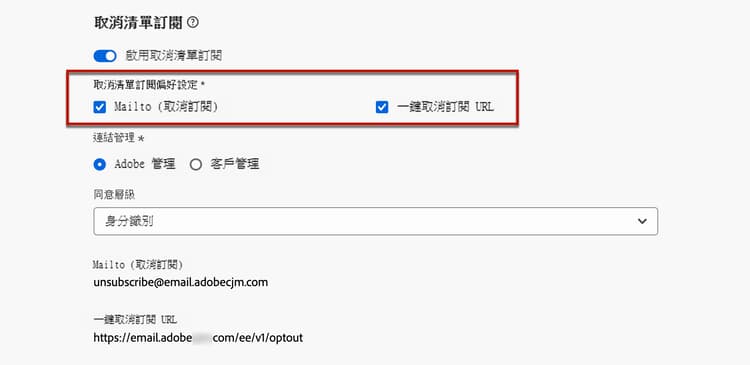
您可以從下拉式清單中,選取同意層級。 它可特定於管道或輪廓身分識別。 依據設定,當使用者使用電子郵件標題的「取消清單訂閱」URL 時,同意內容就會在 Adobe Journey Optimizer 中,按管道層級或 ID 層級更新。
- 管道:選擇退出適用於設定檔上的所有電子郵件地址。
- 身分:選擇退出僅適用於收到郵件的電子郵件地址。
護欄和推薦 list-unsubscribe-guardrails
一鍵清單取消訂閱 URL 功能可讓您的收件者輕鬆選擇退出通訊。 不過,由於並非所有電子郵件用戶端都在電子郵件標頭中支援此連結,因此 Adobe 建議您也在電子郵件內文新增一鍵選擇退出連結或 取消訂閱連結。
Mailto (取消訂閱) 功能和一鍵取消訂閱 URL 功能是選用功能。
-
如果您在電子郵件組態設定中啟用了 啟用清單取消訂閱 選項,我們建議您同時啟用這兩種方法 — Mailto (取消訂閱) 和一鍵取消訂閱 URL。 並非所有電子郵件用戶端都支援 HTTP 方法。 透過提供的 Mailto 清單取消訂閱功能,您可以選取替代方案,更好地保護您的寄件者信譽,並且您的所有收件者都能夠使用取消訂閱功能。
-
如果您不想使用預設產生的一鍵取消訂閱 URL,可以取消核取該功能。
-
在 啟用取消清單訂閱 選項處於開啟狀態且一鍵取消訂閱 URL 功能處於取消勾選的情況下,如果您在使用此設定所建立的訊息中新增一鍵選擇退出連結,則「取消清單訂閱」標頭會取得您在電子郵件內文插入的一鍵選擇退出連結,並將其用作一鍵取消訂閱 URL 值。

-
如果您未在訊息內容加入一鍵選擇退出連結,且管道設定中的預設一鍵取消訂閱 URL 取消勾選,則沒有 URL 會傳遞至「取消清單訂閱」標題的電子郵件標頭。
note NOTE 在 本章節之中,進一步了解訊息中的管理取消訂閱功能等更多資訊。 -
請在 Journey Optimizer 中,同意交由體驗平台 同意結構描述 處理。 預設情況下,如「同意」欄位值為空,則視為同意接受通訊。 您可以在上線時將此預設值修改為此處列出的可能數值之一,或使用同意策略來覆寫預設邏輯。
目前,Journey Optimizer未將特定標籤附加至清單取消訂閱功能所觸發的取消訂閱事件。 如果您需要區分清單取消訂閱點擊與其他取消訂閱操作,則必須在外部實施自訂標記,或利用外部登陸頁面進行追蹤。
從外部管理取消訂閱資料 custom-managed
如果您在 Adobe 外部管理同意,請選取 客戶管理 選項,即可輸入自訂取消訂閱電子郵件地址,還有自己的一鍵式取消訂閱 URL。

一鍵取消訂閱 URL 必須是 POST URL。
將自訂屬性附加至您的端點 custom-attributes
選取 客戶管理 的選項時,若您輸入會在行銷活動或歷程中使用的自訂端點,當收件者按一下「取消訂閱」連結時,Journey Optimizer 就會將一些輪廓專屬的預設參數新增到同意更新事件上 。
若要進一步個人化您的端點,您可以定義將要同時附加至同意事件的自訂屬性。
若要定義您端點的自訂屬性,請使用 URL 追蹤參數區段。 除了預設參數外,您在對應區段中定義的所有 URL 追蹤參數,還將附加至自訂端點的結尾。 了解如何設定自訂 URL 追蹤
設定解密 API configure-decrypt-api
當您的收件者按一下自訂取消訂閱連結時,附加至同意更新事件的參數將以加密方式傳送至端點。 因此,外部同意系統需要透過Adobe Developer,才能實施特定 API 來解密從Adobe 傳送的參數。
擷取這些參數的 GET 呼叫大多取決於目前正在使用的取消清單訂閱選項,一鍵取消訂閱 URL 或是 Mailto (取消訂閱)。
使用一鍵取消訂閱 URL 選項時,使用者按一下 [取消訂閱] 連結即可直接取消訂閱。
GET 呼叫如下:
端點:https://platform.adobe.io/journey/imp/consent/decrypt
查詢參數:
- params:包含加密的裝載
- pid:加密的輪廓 ID
這兩個參數包含在傳送到自訂端點的同意更新事件中。
標頭要求:
- x-api-key
- x-gw-ims-org-id
- 授權 (來自技術帳戶的使用者權杖)
以下是範例參數及同意回應:
| table 0-row-2 1-row-2 2-row-2 | |
|---|---|
| 查詢參數 | 範例有效承載 |
| pid | { “pid” : “5142733041546020095851529937068211571”, “pns” : “CRMID”, “e” : “john@google.com”, “ens” : “Email”, } |
| 參數 | { “m” : “messageExecutionId”, “ci” : “campaignId”, “jv” : “journeyVersionId”, “ja” : “journeyActionId”, “s” : “sandboxId”, “us” : “unsubscribeScope” } |
同意回應:
| code language-none |
|---|
|
使用 Mailto (取消訂閱) 選項時,按一下 [取消訂閱] 連結後將開啟一封預先填入的電子郵件,該電子郵件將傳送至指定的取消訂閱電子郵件地址。
GET 呼叫如下。
端點:https://platform.adobe.io/journey/imp/consent/decrypt
查詢參數:
- emailParams:包含 params (加密承載) 和 pid (加密輪廓 ID) 參數的字串。
params 和 pid 參數包含在傳送至自訂端點的同意更新事件中。
標頭要求:
- x-api-key
- x-gw-ims-org-id
- 授權 (來自技術帳戶的使用者權杖)
以下是範例參數及同意回應:
| table 0-row-2 1-row-2 | |
|---|---|
| 查詢參數 | 範例有效承載 |
| emailParams | { “p” : “profileId”, “pn” : “profileNamespace”, “en” : “emailNamespace”, “ci” : “campaignId”, “jv” : “journeyVersionId”, “ja” : “journeyActionId”, “si” : “sandboxId”, “us”: “unsubscribeScope” } |
同意回應:
| code language-none |
|---|
|
使用 Mailto (取消訂閱) 選項時,按一下 [取消訂閱] 連結後將開啟一封預先填入的電子郵件,該電子郵件將傳送至指定的取消訂閱電子郵件地址。
從 2025 年 10 月開始,如果對 Mailto (取消訂閱) 端點使用 客戶管理 的選項,您可以定義將附加至同意事件的自訂屬性。 在此情況下,您需要使用下列查詢參數。
| note availability |
|---|
| AVAILABILITY |
| 此功能為有限可用性。 請聯絡您的 Adobe 代表以取得存取權。 |
GET 呼叫如下。
端點:https://platform.adobe.io/journey/imp/consent/decrypt
查詢參數:
-
emailParamsSub:從在 Mailto 地址收到的電子郵件主旨擷取的字串。
-
範例:unsubscribev1.abc
-
剖析值:v1.abc
-
-
emailParamsBody:從電子郵件正文 (如果存在) 擷取的字串,格式為 unsubscribev1.xyz。
- 剖析值:v1.xyz
API範例:https://platform.adobe.io/journey/imp/consent/decrypt?emailParamsSub=v1.abc&emailParamsBody=v1.xyz
| note caution |
|---|
| CAUTION |
| 如果您使用先前的實施 (例如:https://platform.adobe.io/journey/imp/consent/decrypt?emailParams=<v1.xxx>),則需使用新的 emailParamsSub 和 emailParamsBody 參數,而非 emailParams。 請聯絡您的 Adobe 代表以取得更多資訊。 |
emailParamsSub 和 emailParamsBody 參數包含在傳送至自訂端點的同意更新事件中。
標頭要求:
- x-api-key
- x-gw-ims-org-id
- 授權 (用於技術帳戶驗證的使用者權杖)
同意回應:
| code language-none |
|---|
|
This section contains structured knowledge intended to support interpretation, retrieval, and question answering related to this topic.
For complete understanding, this information should be combined with the documentation on this page. Neither source is intended to stand alone; the page describes the feature, while this section provides additional context that helps disambiguate terminology, intent, applicability, and constraints.
- TL;DR: This page explains how to enable and configure the List-Unsubscribe header so recipients can opt out from their inbox using a Mailto (unsubscribe) address or a one-click unsubscribe URL, including the Adobe managed and Customer managed options and the decrypt API for external consent systems.
Intents:
- Enable the List-Unsubscribe header in an email channel configuration
- Configure the Mailto (unsubscribe) address and the One-click unsubscribe URL options
- Set the Consent level to channel or profile identity
- Manage unsubscribe data externally with the Customer managed option
- Configure the decrypt API to retrieve encrypted consent parameters for custom endpoints
- Append custom attributes to unsubscribe endpoints using URL tracking parameters
Glossary:
- List-Unsubscribe header: An email header that lets recipients opt out directly from their inbox; enabled via the Enable List-Unsubscribe option, on by default (product-specific)
- Mailto (unsubscribe): The destination address where unsubscribe requests are routed for auto-processing, based on the selected subdomain (product-specific)
- One-click unsubscribe URL: The one-click opt-out URL generated for the List unsubscribe header, based on the selected subdomain (product-specific)
- Consent level: A setting, specific to the channel or to the profile identity, that determines whether consent updates at channel level or ID level (product-specific)
- Adobe managed / Customer managed: Options defining whether consent data is managed within the Adobe system, or in an external system with no automatic synchronization to Adobe (product-specific)
- decrypt API: An API on Adobe Developer used by an external consent system to decrypt the encrypted parameters sent by Adobe to custom endpoints (product-specific)
Guardrails:
- The Enable List-Unsubscribe option is enabled by default; its two options (Mailto and One-click unsubscribe URL) are enabled by default unless one or both are unchecked.
- To display the one-click unsubscribe URL in the email header, the recipients’ email client must support this feature.
- The One-click Unsubscribe URL must use the POST request method.
- With the Customer managed option, Adobe does not store any unsubscribe or consent data; there is no auto synchronization, and the organization must initiate any data transfer to push consent data back into Journey Optimizer.
- Appending custom attributes to endpoints is available in Limited Availability (contact your Adobe representative to gain access).
- Starting October 2025, Customer managed Mailto (unsubscribe) with custom attributes requires the new emailParamsSub and emailParamsBody query parameters instead of emailParams.
- Journey Optimizer does not append a specific tag to unsubscribe events triggered by the List unsubscribe feature; differentiating these clicks requires custom external tagging or an external landing page.
- The order of UTM parameters appended to the URL is random and cannot be controlled; systems requiring a specific order must parse and reorder them.
- By default the consent field value is empty and treated as consent to receive communications.
Terminology:
- Canonical name: List-Unsubscribe header — Acronym: n/a — variants: List unsubscribe, one-click list unsubscribe URL
- Synonyms: “One-click unsubscribe URL” = “One-click opt-out URL” (when a one-click opt-out link inserted in the email body is picked up as the header value)
- Do not confuse: “Mailto (unsubscribe)” (routes an unsubscribe request to an address for auto-processing) ≠ “One-click unsubscribe URL” (directly opts the recipient out on click)
- Do not confuse: “Adobe managed” (consent data managed within the Adobe system) ≠ “Customer managed” (consent data managed in an external system, no auto synchronization)
FAQ:
- Q: Is the List-Unsubscribe header on by default? — Yes; the Enable List-Unsubscribe option is enabled by default, and both the Mailto and One-click unsubscribe URL methods are enabled by default unless unchecked.
- Q: Which methods should I enable? — Adobe recommends enabling both Mailto (unsubscribe) and One-click unsubscribe URL, since not all email clients support the HTTP method; also add a one-click opt-out or unsubscribe link in the email body.
- Q: What request method must a custom one-click unsubscribe URL use? — It must be a POST URL.
- Q: What happens to consent data with the Customer managed option? — Adobe stores no unsubscribe or consent data; there is no automatic synchronization, and you must initiate any transfer of consent data back into Journey Optimizer.
- Q: Can I tell List unsubscribe clicks apart from other unsubscribe actions? — Not by a built-in tag; Journey Optimizer does not append a specific tag, so you must implement custom tagging externally or use an external landing page for tracking.