在此页面上:了解如何使用内容决策活动在您的历程中包含个性化优惠,并将它们交付给符合条件的用户档案。
Journey Optimizer允许您通过历程画布中的专用 内容决策 活动在历程中包含优惠。 然后,您可以向历程中添加其他活动(如自定义操作),以使用这些个性化优惠定位受众。
要利用此功能,请创建一个历程,在此历程中添加内容决策活动以定义要提供给合格用户档案的优惠。
然后,您可以在以下位置使用内容决策活动的输出:
配置内容决策活动 add-content-decision-activity
使用内容决策活动,您可以定义一个决策策略,该策略允许您从Journey Optimizer决策中选择最佳项目并将它们交付给正确的受众。
要配置 内容决策 活动,请执行以下步骤。
-
展开 业务流程 类别并将 内容决策 活动拖放到画布中。
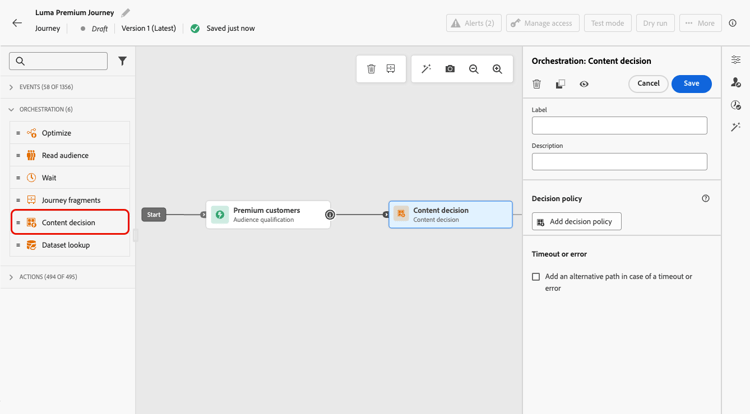
-
(可选)向活动添加标签和描述。
-
单击添加决策策略。 了解有关决策政策的更多信息
note NOTE 需要决策权限才能创作决策策略。 了解详情 -
选择要返回的项目数。 例如,如果您选择2,则会显示最佳的2个符合条件的优惠。 单击下一步。
-
在 策略序列 部分中,选择要与决策策略一起显示的决策项和/或选择策略。 了解详情
-
根据需要安排评估顺序。
添加多个决策项目和/或策略时,将按顺序评估它们,并以每个对象或对象组左侧的数字表示。 要更改默认顺序,您可以拖放对象和/或组以根据需要重新排序。 了解详情
-
(可选)添加后备优惠。 了解详情
-
查看并保存决策策略。

您现在可以在历程中利用此内容决策活动的输出。
护栏和限制 guardrails
同意政策
-
对同意政策的更新最多需要48小时才能生效。 如果决策策略引用与最近更新的同意策略关联的属性,则不会立即应用更改。
-
同样,如果将受同意策略约束的新配置文件属性添加到决策策略,则这些属性将可用,但只有在延迟过去后,才会实施与其关联的同意策略。
-
同意策略仅适用于具有Adobe Healthcare Shield或Privacy and Security Shield加载项的组织。
使用内容决策活动的输出 use-content-decision-output
内容决策的输出可用于多个历程活动。 例如,您可以使用具有条件🔗的优化活动,根据检索到的选件数,将用户档案移动到历程的特定分支。
您还可以向历程添加自定义操作,以将内容决策活动中的选件共享到外部系统。
在优化活动中(条件方法) add-condition-activity
要利用内容决策活动的输出,请添加 优化 活动,选择 条件 方法,并定义表达式以使用这些优惠中的数据将配置文件移动到特定路径。 请按照以下步骤操作。 有关更多条件类型和选项,请参阅条件。
-
从 业务流程 类别中,将 优化 活动拖放到画布中。 了解详情
-
(可选)将对应于您定义的第一个表达式的 Path1 重命名为更相关的标签。
-
对于第一个路径,单击 表达式 字段内部或使用“编辑”图标添加表达式。

-
在打开的弹出窗口中,切换到 高级模式 以使用高级表达式编辑器。
note caution CAUTION 内容决策节点的输出仅在 高级模式 下可用。 -
展开 Context 节点并导航到您的决策策略以显示优惠目录架构中的所有可用属性。
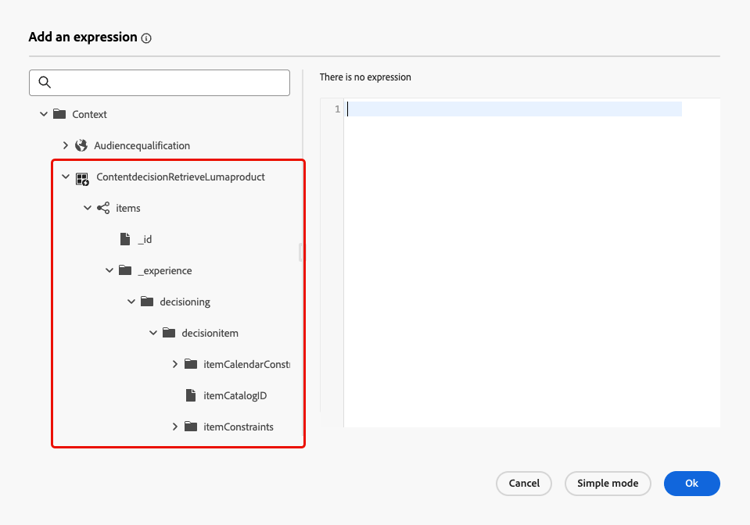
note NOTE 对属性定义的任何受限标签都可能导致违反DULE或同意的策略。 这适用于决策规则中使用的历程体验事件和优惠架构。 在本节中了解有关数据治理策略的更多信息。 -
要检查是否为进入历程的用户档案返回了任何选件,请使用具有以下语法的listSize函数:
listSize(@decision{ContentdecisionName.items})>0note NOTE 在此示例中, Name是您添加到历程的内容决策的标签。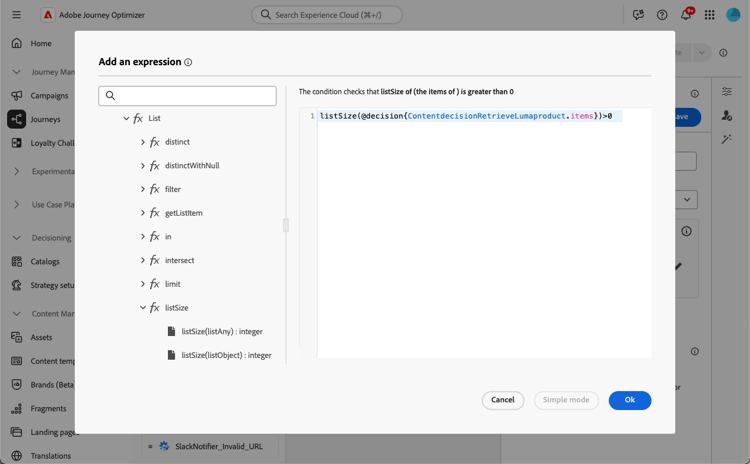
-
单击确定。
-
添加更多路径以根据需要定义其他条件。
您还可以通过选中为上述情况以外的其他情况显示路径,为不符合第一个条件的配置文件创建其他路径。
-
保存条件活动。
在自定义操作中 add-custom-action
要利用内容决策活动的输出,您可以向历程添加自定义操作,其中您会将定义的选件共享到外部系统。 请按照以下步骤操作。
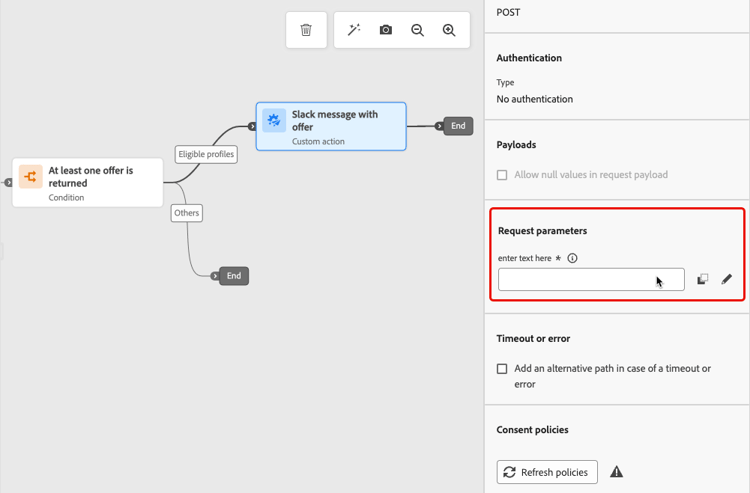

端到端示例 use-case
以下是历程的完整示例,该历程使用组合到条件活动和自定义操作的内容决策活动 — 如上所述。
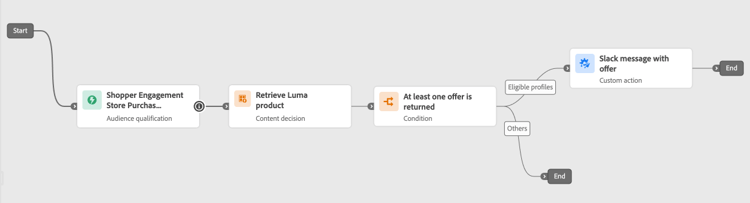
历程激活后🔗:
-
每次配置文件符合该受众的资格时,它都会进入历程。
-
通过内容决策活动,Journey Optimizer检索与每个配置文件相关的选件。
-
只有至少检索了一个选件的用户档案才会继续历程(通过“符合条件的用户档案”路径)。
-
如果满足条件,则相应的选件将通过自定义操作发送到外部系统。
在步骤事件中决策数据 decisioning-step-events
在历程中执行内容决策活动时,决策数据在历程步骤事件中可用。 此数据提供有关检索到的项目以及如何做出决策的详细信息。
对于每个内容决策活动,步骤事件包括顶级的决策数据(如 exdRequestID 和propositionEventType),以及 建议 的数组。 每个建议都具有id、scopeDetails(包括决策提供程序、关联ID和决策策略)和 项 数组。 每个项目都包含:
-
id:项目的唯一标识符
-
name:项目的名称
-
score:分配给该项的分数
-
itemSelection:与如何做出决策以及如何检索项目相关的数据,包括:
- selectionDetail:有关使用的选择策略的信息
- rankingDetail:有关排名过程的信息(策略、算法、步骤、流量类型)
步骤事件中决策数据的示例:
"decisioning": {
  "exdRequestID": "8079d2bb-a8b2-4ecf-b9e7-32923dd6ad4e",
  "propositions": [
    {
      "id": "f475cb21-0842-44da-b0eb-70766ba53464",
      "scopeDetails": {
        "decisionProvider": "EXD",
        "correlationID": "6940d1c46208f3c00dae2ab94f3cd31c601461b47bf6d29ff8af0d0806a9c204",
        "decisionPolicy": {
          "id": "b913f724-3747-447b-a51e-8a2f9178f0db"
        }
      },
      "items": [
        {
          "id": "dps:14c7468e7f6271ff8023748a1146d11f05f77b7fc1368081:1bebbf0b7e0f1374",
          "name": "My item name",
          "score": 0.93,
          "itemSelection": {
            "selectionDetail": {
              "strategyID": "dps:selection-strategy:1bebbfc9245cb35e",
              "strategyName": "My selection strategy",
              "selectionType": "selectionStrategy",
              "version": "latest"
            },
            "rankingDetail": {
              "strategyID": "4FyRZTmpjrbzuL7rX7gvmu",
              "algorithmID": "RANDOM",
              "step": "aiModel",
              "trafficType": "random"
            }
          }
        }
      ]
    }
  ],
  "propositionEventType": {
    "decision": 1
  }
}
This section contains structured knowledge intended to support interpretation, retrieval, and question answering related to this topic.
For complete understanding, this information should be combined with the documentation on this page. Neither source is intended to stand alone; the page describes the feature, while this section provides additional context that helps disambiguate terminology, intent, applicability, and constraints.
- TL;DR: This page explains how to configure and use the Content Decision activity in Journey Optimizer journeys to retrieve personalized offers via a decision policy and route or forward them using conditions and custom actions.
Intents:
- Add a Content Decision activity to a journey and configure a decision policy
- Select and sequence decision items and selection strategies within a decision policy
- Use the content decision output in an Optimize activity condition to branch profiles based on retrieved offers
- Forward retrieved offers to an external system using a custom action
- Inspect decisioning data in journey step events for audit and troubleshooting purposes
Glossary:
- Content decision activity: A journey orchestration activity that evaluates a decision policy and retrieves the best eligible offers for each profile (product-specific)
- Decision policy: A configuration that specifies which decision items and selection strategies to evaluate, and how many items to return (product-specific)
- Selection strategy: A ranked evaluation method used within a decision policy to determine which offers are eligible and how they are scored (product-specific)
- Proposition: The output unit of a decision policy execution, containing the selected items and associated scope and ranking metadata (product-specific)
- listSize function: An expression editor function used to count the number of items returned by a content decision, e.g.
listSize(@decision{Name.items})>0(product-specific) - Offers catalog schema: The schema that defines the attributes available on decision items; accessible via the Context node in advanced expression editor mode (product-specific)
Guardrails:
- The output of a Content Decision activity cannot be used in native channel activities (email, push, Mobile message, etc.)
- The content decision output is only accessible in Advanced mode of the expression editor; it is not available in simple mode
- Decisioning permissions are required to author a decision policy
- Consent policy updates take up to 48 hours to take effect for attributes referenced in a decision policy
- Consent policies are only available to organizations with the Adobe Healthcare Shield or Privacy and Security Shield add-on
- Restricted data usage labels (DULE) on offer schema attributes can result in governance policy violations
Terminology:
- Canonical name: Content decision activity — Acronym: none — variants: content decision node, decisioning activity
- Synonyms: “decision policy” = “offer selection policy” ; “proposition” = “decision output”
- Do not confuse: “Content decision activity” ≠ “native channel action” (content decision retrieves offers but does not deliver them directly; a custom action or condition is needed to act on the output)
FAQ:
- Q: Can I use the offers returned by a Content Decision activity directly in an email? — No, the output of a content decision activity cannot be used in native channel activities; you must pass the offers to a custom action to send them to an external system.
- Q: How do I check whether any offers were returned for a profile? — Use the listSize function in the advanced expression editor:
listSize(@decision{ContentdecisionName.items})>0. - Q: Where do I access content decision output in the expression editor? — Switch to Advanced mode, unfold the Context node, and navigate to your decision policy to see all available offer catalog schema attributes.
- Q: How long does it take for a consent policy update to apply to a decision policy? — Up to 48 hours after the consent policy is updated.
- Q: What decisioning data is available in journey step events? — Each step event includes exdRequestID, propositionEventType, and an array of propositions — each containing an id, scopeDetails (decision provider, correlationID, decision policy), and an items array with id, name, score, and itemSelection details.