在此页面上:了解如何在Adobe Journey Optimizer中预览、验证和发送移动消息,包括检查字符编码和限制以及在投放之前解决警报。
预览您的移动消息 preview-sms
定义消息内容后,您可以使用以下任一模拟方法预览其内容:
- 单击 模拟内容 以测试内容变体与样本输入数据或AI自动生成。 了解如何模拟内容变体
- 单击模拟内容,然后从下拉列表中选择 模拟内容(AEP 配置文件) 以使用测试轮廓进行预览。
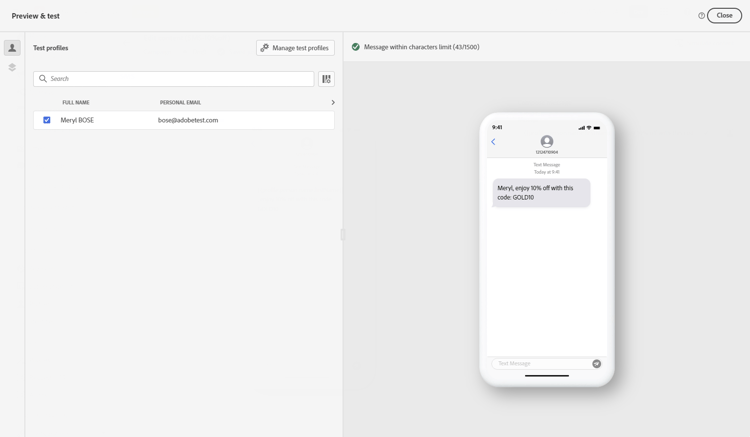
有关如何预览和测试内容的详细信息,请参阅内容管理部分。
字符编码和限制 sms-character-limits
从 Simulate content 访问任一模拟方法时会显示字符计数,以协助规划和管理移动消息。
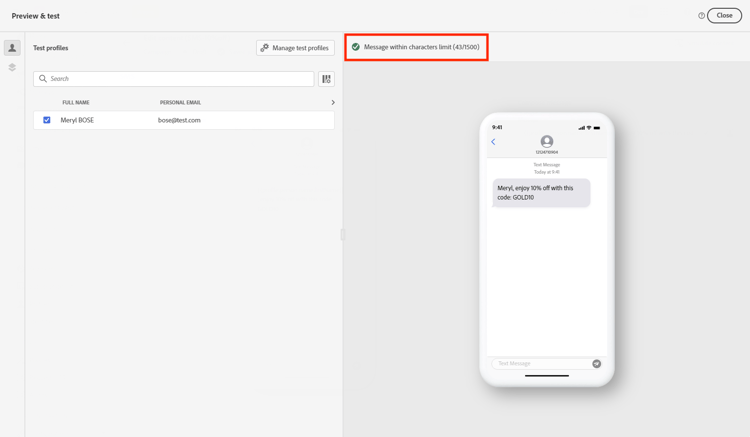
Journey Optimizer在其短信编辑器中使用UTF-8编码,允许您键入或粘贴双字节或Unicode字符。 这些字符随后被传输到服务提供商进行交付。 大多数SMS提供商使用GSM 7位编码处理具有160个字符限制的标准消息,并在检测到具有70个字符限制的非GSM字符时切换到UTF-16 (UCS-2)。
请注意,字符计数不反映动态个性化或非GSM 7位特殊字符引入的变体。
验证您的内容 sms-validate
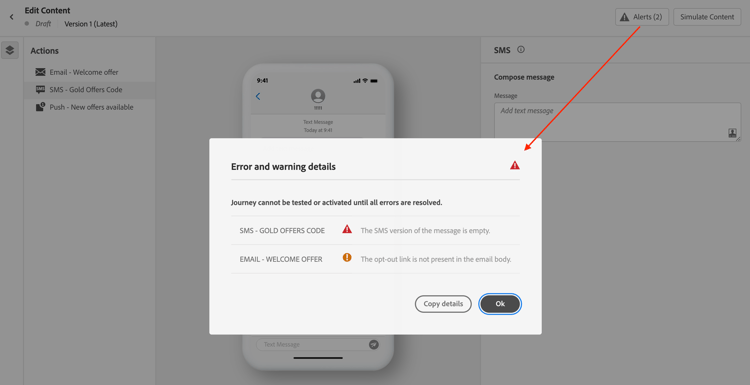
必须在编辑器的上半部分检查警报。 其中一些是简单的警告,但其他警告可能会阻止您发送消息。 可能会发生两种类型的警报:警告和错误。
-
警告参考推荐和最佳实践。 例如,如果您的移动设备消息为空或动态内容可能超过字符限制,则会显示警告消息。
字符限制:每个区段160个字符(GSM 7位),Unicode/表情符号最多70个字符,总共1500个字符。
-
错误会阻止您测试或激活历程,或发布营销活动,前提是这些错误未解决。 例如,当主题行缺失时,会有一条错误消息警告您。
即使您的模拟消息较短,也可能会显示警报“已超出短信文本字符限制”,因为验证会通过以最长时间评估所有条件分支、个性化字段和动态内容来计算最大可能长度。
验证会计算所有可能配置文件数据的最大长度,而模拟会显示一个测试配置文件的实际输出。
发送您的移动消息 sms-send
当您的手机消息就绪后,完成您的历程或营销活动的配置以发送该消息。
相关主题
This section contains structured knowledge intended to support interpretation, retrieval, and question answering related to this topic.
For complete understanding, this information should be combined with the documentation on this page. Neither source is intended to stand alone; the page describes the feature, while this section provides additional context that helps disambiguate terminology, intent, applicability, and constraints.
- TL;DR: This page explains how to preview, validate, and send Mobile messages in Adobe Journey Optimizer, including checking character encoding and limits and resolving alerts before delivery.
Intents:
- Preview Mobile message content using the available simulation methods
- Understand SMS character encoding and how the character count is calculated
- Check warnings and errors before testing, activating, or publishing
- Understand why a character-limit alert can appear when the simulated message is shorter
- Send Mobile messages by completing the journey or campaign configuration
Glossary:
- Simulate content: The preview action used to test content variations with sample input data or AI auto-generation (product-specific)
- Simulate content (AEP profiles): The option selected from the Simulate content dropdown to preview the message with test profiles (product-specific)
- Character count: The count displayed when accessing either simulation method to assist in planning and managing Mobile messages (product-specific)
- Warnings: Alerts that refer to recommendations and best practices and do not block sending (product-specific)
- Errors: Alerts that prevent testing or activating the journey, or publishing the campaign, until resolved (product-specific)
Guardrails:
- Most SMS providers use GSM 7-bit encoding for standard messages with a 160-character limit and switch to UTF-16 (UCS-2) with a 70-character limit when non-GSM characters are detected.
- Character limits flagged by warnings are 160 characters per segment (GSM 7-bit), 70 for Unicode or emojis, and up to 1500 characters total.
- The character count does not reflect variations introduced by dynamic personalization or non-GSM 7-bit special characters.
- SMS delivery reporting does not account for concatenated messages and dynamic personalization, so it may not reflect the actual number of messages sent from the provider.
- Errors prevent you from testing or activating the journey, or publishing the campaign, until they are resolved; warnings do not block.
- Validation calculates the maximum possible length by evaluating all conditional branches, personalization fields, and dynamic content at their longest, while simulation shows the actual output for one test profile.
- To improve deliverability, use phone number formats supported by the provider; for example, Twilio and Sinch only support phone numbers in E.164 format.
- If the campaign is subject to an approval policy, you must request approval before you can send.
Terminology:
- Canonical name: Check and send your Mobile message — variants: preview and send SMS
- Simulation modes (both present on this page): “Simulate content” (test content variations with sample input data or AI auto-generation) and “Simulate content (AEP profiles)” (preview with test profiles)
- Do not confuse: “Warnings” (recommendations and best practices; do not block) ≠ “Errors” (prevent testing, activating, or publishing until resolved)
- Do not confuse: “Validation” (calculates maximum possible length across all profile data) ≠ “Simulation” (shows actual output for one test profile)
FAQ:
- Q: How do I preview a Mobile message? — Click Simulate content to test content variations with sample input data or AI auto-generation, or select Simulate content (AEP profiles) from the dropdown to preview with test profiles.
- Q: Why does the character-limit alert appear when my simulated message is shorter? — Validation calculates the maximum possible length by evaluating all conditional branches, personalization fields, and dynamic content at their longest, while simulation shows the actual output for one test profile.
- Q: What are the SMS character limits? — 160 characters per segment for GSM 7-bit, 70 for Unicode or emojis, and up to 1500 characters total.
- Q: What stops me from sending my message? — Errors prevent you from testing or activating the journey, or publishing the campaign, until they are resolved; warnings do not block.
- Q: Does delivery reporting reflect the exact number of messages sent? — Not necessarily, because SMS delivery reporting does not account for concatenated messages and dynamic personalization; contact your Adobe representative for detailed usage and billing information.