在此页面上:为您选择的渠道设计并测试您的“操作”营销活动内容,以便在激活营销活动之前,每条消息都准备就绪。
要配置消息内容,请导航到 内容 选项卡或单击 编辑内容 按钮。
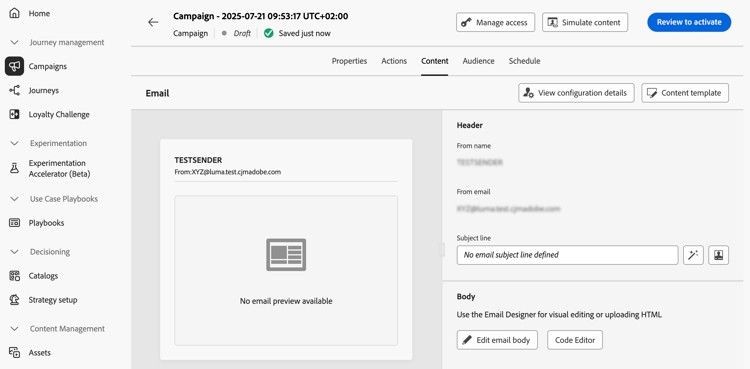
设计内容 action-campaign-channels
内容创建过程取决于您选择的渠道。 在以下页面中了解创建消息内容的详细步骤:






测试和检查您的内容
定义内容后,使用 模拟内容 按钮预览和测试内容。 您可以使用以下任一模拟方法:
- 单击 模拟内容 以测试内容变体与样本输入数据或AI自动生成。
- 单击模拟内容,然后从下拉列表中选择 模拟内容(AEP 配置文件) 以使用测试轮廓进行预览。
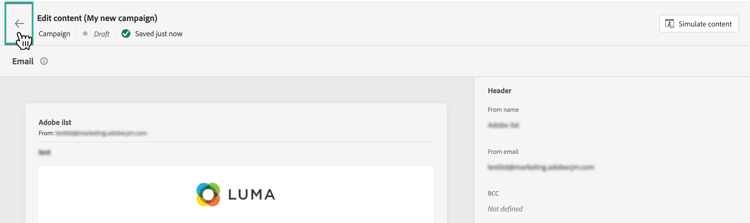
要浏览回促销活动创建屏幕,请单击向左箭头。
后续步骤 next
准备好操作营销活动的内容后,您可以定义营销活动受众。 了解详情
This section contains structured knowledge intended to support interpretation, retrieval, and question answering related to this topic.
For complete understanding, this information should be combined with the documentation on this page. Neither source is intended to stand alone; the page describes the feature, while this section provides additional context that helps disambiguate terminology, intent, applicability, and constraints.
- TL;DR: This page explains how to open the content of an Action campaign for the channel selected, find the channel-specific content creation pages, and preview and test the content with Simulate content.
Intents:
- Open the content of the campaign from the Content tab or the Edit content button
- Find the page that explains content creation for each channel
- Preview and test content with Simulate content
- Preview content with test profiles using Simulate content (AEP profiles)
- Go back to the campaign creation screen
Glossary:
- Simulate content: Button used to preview and test content; tests content variations with sample input data or AI auto-generation. (product-specific)
- Simulate content (AEP profiles): Option selected from the Simulate content dropdown; previews the content with test profiles. (product-specific)
Terminology:
- Canonical name: Action campaign content — variants: message content
- Acronym: AEP — Adobe Experience Platform
- Do not confuse: “Simulate content” (sample input data or AI auto-generation) ≠ “Simulate content (AEP profiles)” (test profiles)
FAQ:
- Q: How do I open the content of my Action campaign? — Navigate to the Content tab or click the Edit content button.
- Q: Where do I find how to create content for my channel? — The content creation process depends on the channel you selected; the page lists Email, Mobile message, Push notification, Direct mail, In-app, Web, Code-based experience, Content cards, LINE, and WhatsApp, each linking to its page.
- Q: How do I preview and test my content? — Use Simulate content to test content variations with sample input data or AI auto-generation, or select Simulate content (AEP profiles) from the dropdown to preview with test profiles.
- Q: How do I go back to the campaign creation screen? — Click the left arrow.
Related pages:
- Email content: Email (email/create-email.md)
- Mobile message content: Mobile message (mobile/create-mobile-message.md)
- Push content: Push notification (push/create-push.md)
- Direct mail content: Direct mail (direct-mail/create-direct-mail.md)
- In-app content: In-app (in-app/create-in-app.md)
- Web content: Web (web/create-web.md)
- Code-based content: Code-based experience (code-based/create-code-based.md)
- Content cards content: Content cards (content-card/create-content-card.md)
- LINE content: LINE (line/get-started-line.md)
- WhatsApp content: WhatsApp (whatsapp/get-started-whatsapp.md)
- Previewing and testing content: Learn how to preview and test content (content-management/preview-test.md)
- Next step, audience: Define the Action campaign audience (campaigns/campaign-audience.md)
Personas:
- marketer: Can open the content of an Action campaign from the Content tab or the Edit content button. Can use Simulate content to test content variations with sample input data or AI auto-generation. Can select Simulate content (AEP profiles) from the dropdown to preview with test profiles. Where: “Test and check your content”.
Onboarding:
- Level: Beginner
- First minimal step: Navigate to the Content tab or select the Edit content button to configure the message content.
- Success check: The content is defined, and Simulate content is available to preview and test it.
- Next: Learn how to preview and test content: Preview and test your content (content-management/preview-test.md); Once the content of the Action campaign is ready: Define the Action campaign audience (campaigns/campaign-audience.md)