在此页面上:了解 WhatsApp 渠道在 Journey Optimizer 中的工作方式及其先决条件和限制,以便您可以决定如何将 WhatsApp 添加到您的历程和营销活动中。
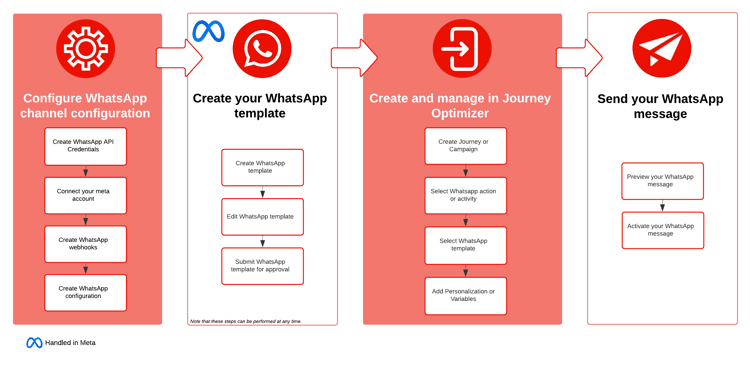
您现在可以使用 Meta 的 Cloud API 直接通过 Journey Optimizer 发送 WhatsApp 消息。 此功能可以将 WhatsApp 无缝集成到历程和营销活动中,加强与收件人的沟通,并增强其参与度。
-
在 历程 中。 创建历程、添加 WhatsApp 活动并定义基本设置,然后定位到操作:WhatsApp 右侧窗格,创建 WhatsApp 消息的内容。 在此页面中了解如何创建历程。
-
在 营销活动 中。 创建营销活动,选择 WhatsApp 作为您的操作并定义基本设置,然后编辑消息内容以定义要发送的 WhatsApp 消息。 了解如何创建操作营销活动 | API 触发的营销活动 | 编排的营销活动
用例 use-cases
当您的受众已使用 WhatsApp,并且您想要将丰富的内容与真正的双向对话结合起来时,该平台的效果最佳。
何时不使用 when-not-to-use
由于 WhatsApp 依赖于受众采用和明确同意,因此它并非适用于所有场景。 在以下情况下考虑其他渠道:
- 您的受众不使用 WhatsApp,因为其采用率因区域和人口统计特征而异
- 收件人没有明确同意选择启用,而这是 Meta 的消息政策所要求的
- 消息紧急,需要保证投放,在给定WhatsApp的投放和模板审核约束的情况下,移动消息或推送可更好地处理这些消息
- 内容较长或较复杂,更适合通过电子邮件发送,因为电子邮件可提供更大的空间和更丰富的格式
- 实时对话支持对您而言不可行,因为双向 WhatsApp 会话会带来及时回复的预期
先决条件 prereq
将 WhatsApp 与 Journey Optimizer 集成需要满足以下条件:
- Meta 企业管理帐户
- 经过发件人姓名和电话号码验证的 WhatsApp 商业帐户
- 具有适当权限的用户授权令牌
- 已批准的 Meta 模板
在继续集成之前,您还需要确认以下事项:
限制 limitations
以下限制适用于 WhatsApp 渠道:
-
Adobe Journey Optimizer 中的 WhatsApp 渠道已为 HIPAA 做好准备,但 Adobe BAA 未覆盖第三方供应商。 客户需对合规性和供应商验证自行负责。
-
请注意,尚不支持自动或预定义答复消息。
-
自 2025 年 4 月起,已暂时停止向使用美国电话号码(以 +1 拨号代码和美国区号组成的号码)的 WhatsApp 用户发送所有营销模板消息。 在 Meta 文档中了解详情
-
原生集成功能不允许与第三方业务服务提供商 (BSP) 集成。
操作方法视频 video
以下视频展示了如何将 WhatsApp 集成为 Adobe Journey Optimizer 中的原生渠道,从而大规模提供安全、实时、个性化的消息。
其他学习资源
浏览有关 WhatsApp 消息和配置的更多视频教程。
This section contains structured knowledge intended to support interpretation, retrieval, and question answering related to this topic.
For complete understanding, this information should be combined with the documentation on this page. Neither source is intended to stand alone; the page describes the feature, while this section provides additional context that helps disambiguate terminology, intent, applicability, and constraints.
- TL;DR: This page introduces the WhatsApp channel in Journey Optimizer, delivered through Meta’s Cloud API, covering how it works in journeys and campaigns along with its use cases, prerequisites, and limitations.
Intents:
- Understand how the WhatsApp channel works in Journey Optimizer via Meta’s Cloud API
- Decide how to add WhatsApp to journeys and campaigns
- Evaluate WhatsApp use cases and situations when not to use the channel
- Identify the prerequisites needed to integrate WhatsApp with Journey Optimizer
- Understand the limitations that apply to the WhatsApp channel
Glossary:
- WhatsApp channel: The Journey Optimizer channel that sends WhatsApp messages directly through Meta’s Cloud API (product-specific)
- Cloud API: Meta’s API through which Journey Optimizer sends WhatsApp messages (product-specific)
- WhatsApp Flow template: A template type that builds guided, multi-step interactions within the chat, such as surveys and lead capture forms (product-specific)
- WhatsApp Business Account: A WhatsApp Business Account with a verified sender name and phone number, listed as a prerequisite to integrate WhatsApp (product-specific)
Guardrails:
- Prerequisites: a Meta Business Manager account, a WhatsApp Business Account with verified sender name and phone number, a user authorization token with appropriate permissions, and approved Meta templates.
- You must acknowledge WhatsApp content rules, compliance with Meta policies, and 24 Hour conversation limits before proceeding with integration.
- The WhatsApp channel is HIPAA-ready, but third-party vendors are not covered under Adobe’s BAA; customers are responsible for their own compliance and vendor validation.
- Automated or predefined response messages are not yet supported.
- Starting April 2025, delivery of all marketing template messages to WhatsApp users with a United States phone number (a +1 dialing code and a US area code) has been temporarily suspended.
- The native integration does not allow integration with third-party Business Service Provider (BSP).
- Explicit recipient opt-in is required by Meta’s messaging policies.
Terminology:
- Canonical name: WhatsApp channel — Acronym: n/a — variants: WhatsApp
- Do not confuse: “BSP” (third-party Business Service Provider, not allowed by the native integration) ≠ “Cloud API” (Meta’s API used for the native integration)
FAQ:
- Q: How does Journey Optimizer send WhatsApp messages? — Directly through Meta’s Cloud API, integrating WhatsApp into journeys and campaigns.
- Q: What do I need before integrating WhatsApp? — A Meta Business Manager account, a WhatsApp Business Account with verified sender name and phone number, a user authorization token with appropriate permissions, and approved Meta templates.
- Q: Can I reach US phone numbers with marketing templates? — Starting April 2025, delivery of all marketing template messages to WhatsApp users with a US phone number (+1 dialing code and US area code) has been temporarily suspended.
- Q: Is the WhatsApp channel HIPAA-compliant? — It is HIPAA-ready, but third-party vendors are not covered under Adobe’s BAA, and customers are responsible for their own compliance and vendor validation.
- Q: Can I use a third-party BSP with this integration? — No, the native integration does not allow integration with third-party Business Service Providers.
- Q: When should I not use WhatsApp? — When your audience does not use it, recipients have not opted in, the message is urgent and needs guaranteed delivery, the content is lengthy or complex, or real-time conversational support is not feasible.