在此页面上:在“受众”选项卡中选择受众和身份类型,以便您的行动营销活动针对适当的个人。
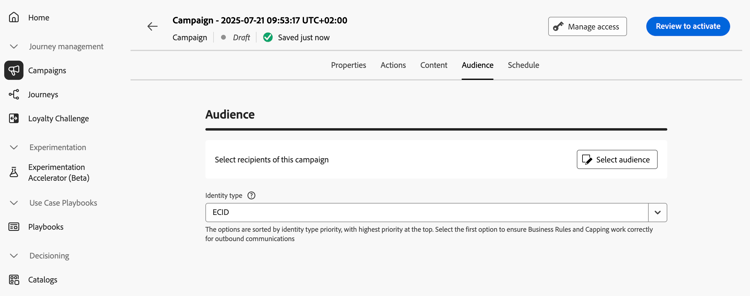
使用 受众 选项卡定义营销活动受众。
-
选择受众
对于营销活动,单击 选择受众 按钮以显示可用Adobe Experience Platform受众列表。 了解有关受众的详细信息。
note important IMPORTANT 来自受众合成的受众和属性当前不可用于Healthcare Shield或Privacy and Security Shield。 -
选择身份类型
在 标识类型 字段中,选择要用于标识选定受众中个人的密钥类型。 您可以使用现有的身份类型,也可以使用Adobe Experience Platform Identity服务创建新身份类型。 此页面上列出了标准身份命名空间。
每个营销活动只允许一个标识类型。 如果属于区段的个人在不同的身份中没有选定的身份类型,则无法将该群体作为目标。 在Adobe Experience Platform文档中了解有关身份类型和命名空间的更多信息。
后续步骤 next
活动受众准备就绪后,即可计划该活动。 了解详情
This section contains structured knowledge intended to support interpretation, retrieval, and question answering related to this topic.
For complete understanding, this information should be combined with the documentation on this page. Neither source is intended to stand alone; the page describes the feature, while this section provides additional context that helps disambiguate terminology, intent, applicability, and constraints.
- TL;DR: This page explains how to define the audience of an Action campaign in the Audience tab by selecting an audience and an identity type.
Intents:
- Select the audience of a Marketing campaign with the Select audience button, which displays the list of available Adobe Experience Platform audiences
- Choose the identity type used to identify the individuals of the audience
- Know that only one identity type is allowed per campaign
- Know that audiences and attributes from audience composition are unavailable with Healthcare Shield or Privacy and Security Shield
Glossary:
- Identity type: The type of key used to identify the individuals from the selected audience. It can be an existing identity type or a new one created using the Adobe Experience Platform Identity Service. (product-specific)
- Identity namespaces: Standard Identity namespaces are listed in the Adobe Experience Platform documentation. (product-specific)
Guardrails:
- Only one identity type is allowed per campaign.
- Individuals belonging to a segment that does not have the selected identity type among their different identities cannot be targeted by the campaign.
- The use of audiences and attributes from audience composition is currently unavailable for use with Healthcare Shield or Privacy and Security Shield.
Terminology:
- Canonical name: Action campaign audience — variants: campaign audience
FAQ:
- Q: How many identity types can a campaign use? — Only one identity type is allowed per campaign.
- Q: Why can an individual of my audience not be targeted? — Individuals belonging to a segment that does not have the selected identity type among their different identities cannot be targeted by the campaign.
- Q: Can I create a new identity type? — Yes, in the Identity type field you can either use an existing identity type or create a new one using the Adobe Experience Platform Identity Service.
- Q: Can I use audiences from audience composition with Healthcare Shield or Privacy and Security Shield? — No, audiences and attributes from audience composition are currently unavailable for use with them.
Related pages:
- Audiences: Learn more about audiences (audience/about-audiences.md)
- Audience composition: audience composition (audience/get-started-audience-orchestration.md)
- Next step, schedule: Schedule the Action campaign (campaigns/campaign-schedule.md)
Personas:
- marketer: Can select the audience of a Marketing campaign using the Select audience button, which lists available Adobe Experience Platform audiences. Can choose the identity type in the Identity type field, using an existing type or creating one with the Identity Service. The page states that only one identity type is allowed per campaign. Where: “Define the Action campaign audience”.
Onboarding:
- Level: Beginner
- First minimal step: Select Select audience to display the list of available Adobe Experience Platform audiences.
- Success check: The audience of the Action campaign is ready, so you can schedule the campaign.
- Previous: Learning about Adobe Experience Platform audiences before selecting one for the campaign: About Adobe Experience Platform audiences (audience/about-audiences.md); Using audiences and attributes from audience composition: Get started with audience composition (audience/get-started-audience-orchestration.md)
- Next: Scheduling the Action campaign once the audience is ready: Schedule the Action campaign (campaigns/campaign-schedule.md)