이 페이지에서: 여정 특성, 프로필 특성 또는 AI 점수를 기반으로 등급 수식을 만들어 여정 상한선이 적용될 때 각 프로필에 가장 적합한 여정을 선택합니다.
Adobe Journey Optimizer을(를) 사용하면 프로필이 시스템에서 허용하는 것보다 더 많은 여정에 대한 자격이 있을 때 프로필이 입력할 수 있는 프로필을 제어할 수 있습니다. 이렇게 하려면 규칙 집합을 사용하여 여정 항목 또는 동시 사용에 대한 제한을 정의할 수 있습니다. 여정이 상한선이 허용하는 것보다 더 많은 여정에 적격인 경우, 각 프로필에 할당된 우선순위에 따라 선택되는 여정이 결정됩니다.
우선 순위를 사용하는 대신 순위 수식을 사용하여 여정 특성, 프로필 특성 또는 AI 모델 점수를 기반으로 여정 순위를 동적으로 조정할 수도 있습니다.
수식을 사용하면 정적 우선 순위보다 더 유연합니다. 예를 들어 gold 충성도 멤버에 대한 여정을 높일 수 있습니다.
순위 공식 만들기 create-journey-ranking-formula
여정에 대한 순위 공식을 만들려면 아래 단계를 수행합니다.
-
오케스트레이션 등급 섹션에 액세스한 다음 등급 수식 탭을 선택하십시오. 이전에 만든 수식의 목록이 표시됩니다.
-
수식 만들기를 클릭합니다.
-
수식 이름을 지정하고 원하는 경우 설명을 추가합니다.
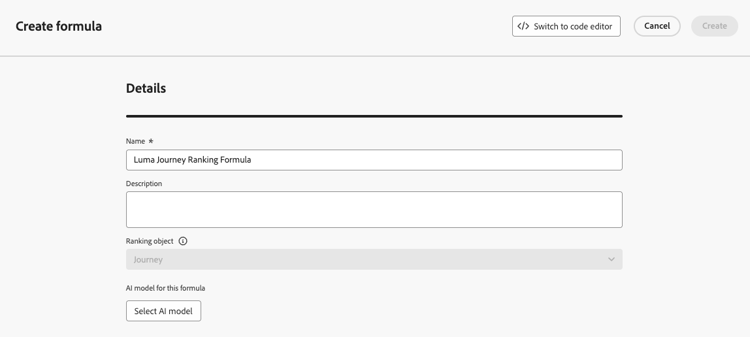
note NOTE 순위 객체는 순위 공식이 적용될 엔티티입니다. 기본적으로 순위 개체는 여정(으)로 설정됩니다. -
선택적으로 AI 모델 선택을 클릭하여 순위 공식을 만드는 데 참조로 사용할 모델을 설정합니다. 자세히 알아보기
-
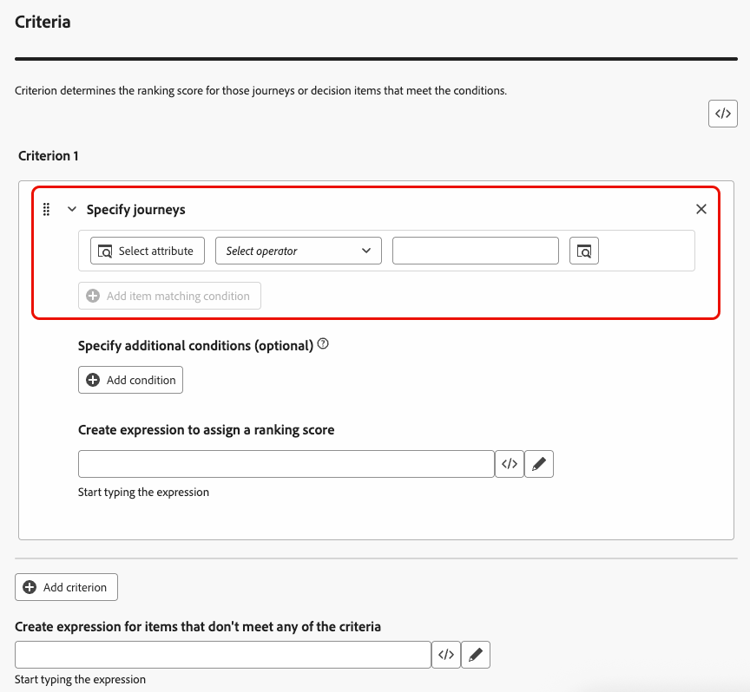
기준 1 섹션에서 다음을 수행하여 순위 점수를 적용할 여정을 지정합니다.
- 여정 특성(예: 여정 이름, 태그, 우선 순위 또는 기타 여정 속성)을 선택하십시오.
- 논리 연산자를 선택합니다.
- 일치하는 조건 추가 - 값을 입력/선택하거나 프로필 속성을 선택할 수 있습니다.
-
선택적으로 추가 요소를 지정하여 기준이 true가 되도록 일치하는 조건을 구체화할 수 있습니다.
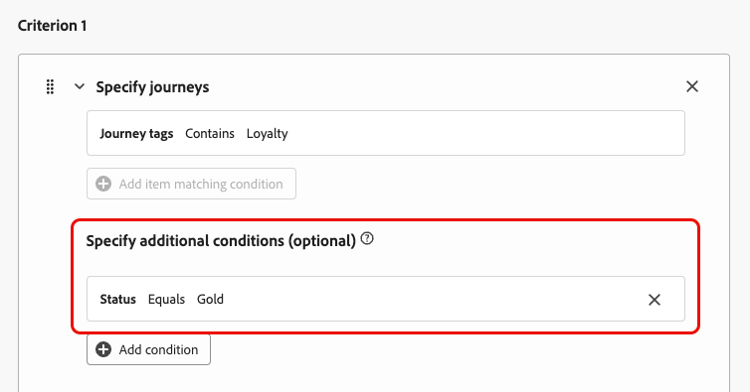
예를 들어, 여정 태그에 충성도가 포함되어 있는 것과 같은 기준 1을(를) 정의했습니다. 또한 충성도 상태가 골드인 경우 기준 1이 참인 경우와 같은 다른 조건을 추가할 수 있습니다.
-
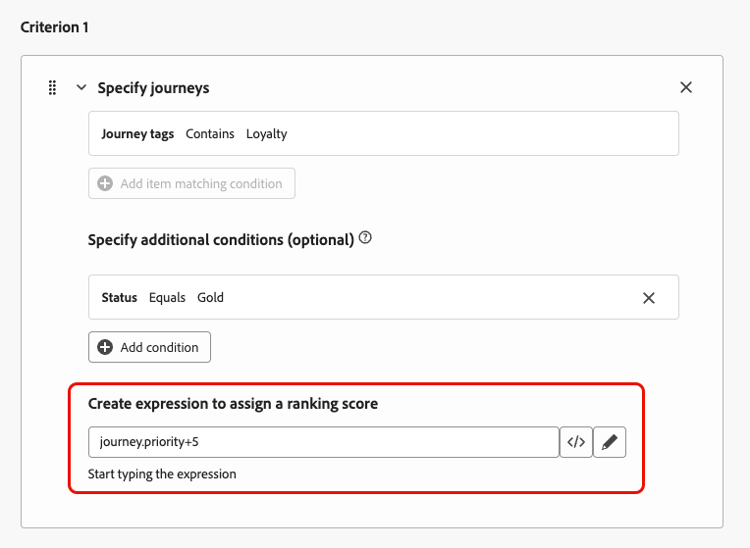
위에 정의된 조건을 충족하는 여정에 등급 점수를 지정할 표현식을 만듭니다. 다음 중 하나를 참조할 수 있습니다.
-
변수:
- 여정 우선 순위는 여정을 만들 때 여정에 할당된 수동 값입니다.
- 위에서 선택적으로 선택한 AI 모델에서 나온 점수
-
속성:
- 외부에서 파생된 성향 점수와 같이 프로필에 있을 수 있는 모든 속성
- 여정 속성;
-
자유 형식으로 할당할 수 있는 정적 값
-
위의 모든 조합을 구성합니다.
-
-
하나 이상의 기준을 필요한 횟수만큼 추가하려면 기준 추가를 클릭하십시오. 논리는 다음과 같습니다.
- 주어진 결정 항목에 대해 첫 번째 기준이 참인 경우 다음 기준보다 우선합니다.
- true가 아닌 경우 의사 결정 엔진이 두 번째 기준으로 이동합니다.
-
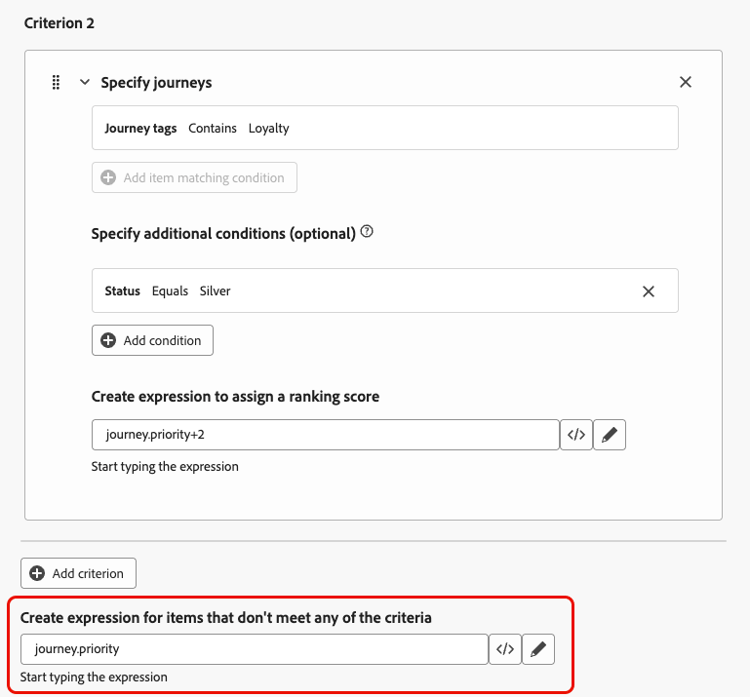
모든 기준을 정의하고 나면 마지막 필드에서 위의 기준을 충족하지 않는 모든 여정에 지정할 표현식을 작성할 수 있습니다.
조건을 충족하지 않는 여정에 대한
-
순위 공식을 완료하려면 만들기를 클릭하세요.
이제 목록에서 이 공식을 선택하여 세부 정보를 보고 편집하거나 삭제할 수 있습니다. 그런 다음 규칙 세트를 구성할 때 사용할 수 있습니다. 방법 알아보기
순위 공식 예 journey-ranking-formula-example
아래 예를 참조하십시오.
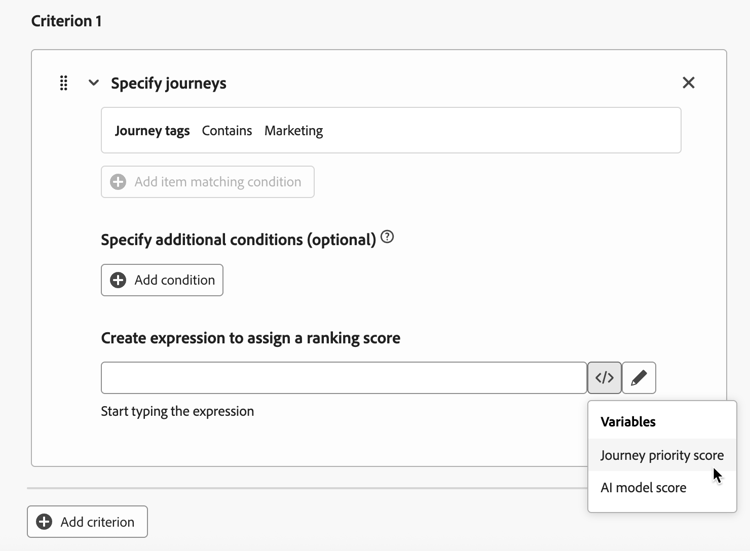
여정에 “마케팅” 태그가 있는 경우 순위 점수가 여정 우선 순위입니다.
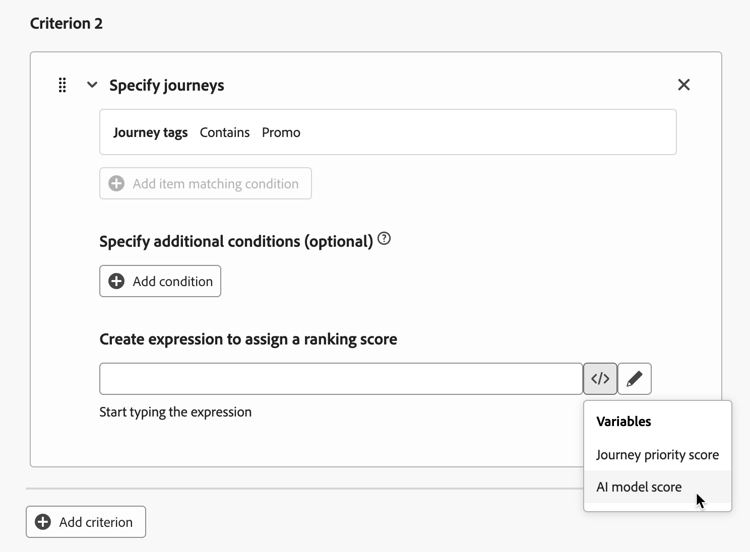
여정에 “프로모션” 태그가 있는 경우 순위 점수는 AI 모델 점수입니다.
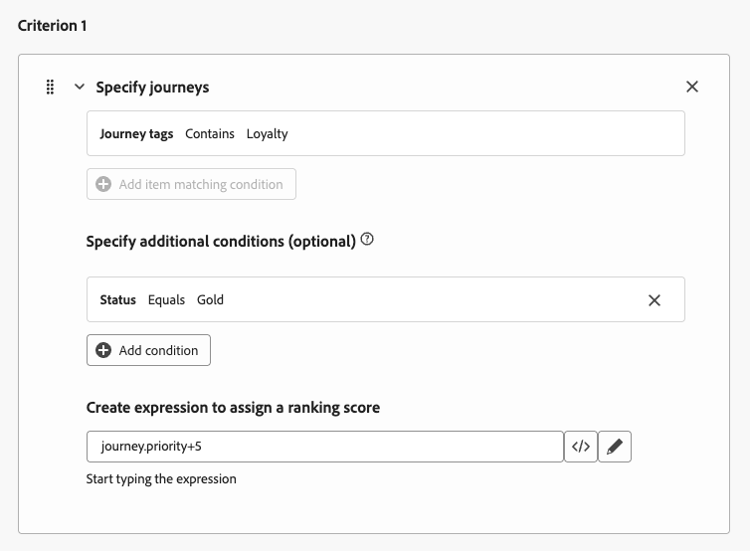
여정에 “충성도” 태그가 있고 프로필의 충성도 상태가 Gold인 경우 사용되는 순위 점수는 여정 우선 순위와 5를 더한 것입니다.
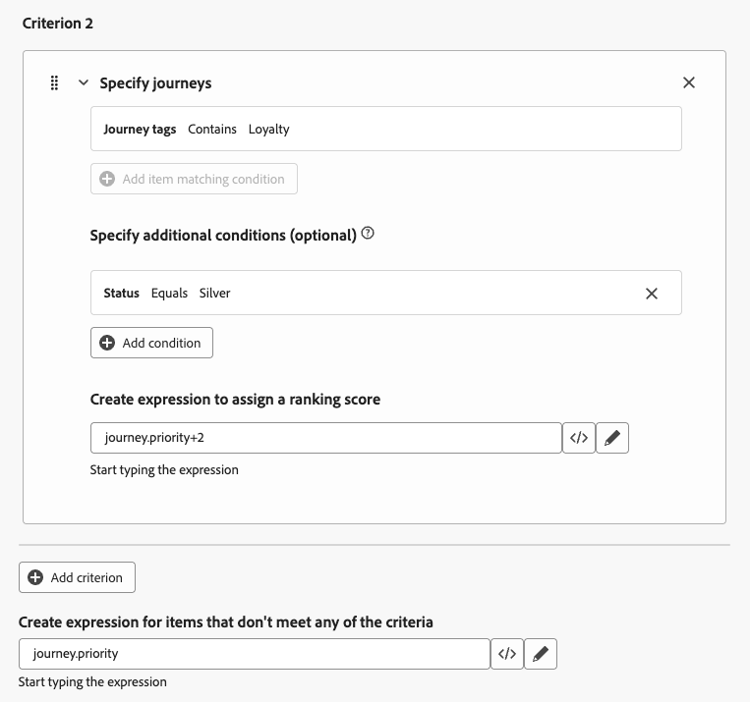
여정에 “충성도” 태그가 있고 프로필의 충성도 상태가 실버인 경우 순위 점수가 여정 우선 순위에 2를 더한 값입니다.
위의 조건 중 어느 하나도 충족되지 않는 경우 사용되는 순위 점수가 여정 우선순위가 된다.
코드 편집기 사용 journey-ranking-formula-code-editor
PQL 구문에서 등급 수식을 표현하려면 화면 오른쪽 상단의 전용 단추를 사용하여 코드 편집기로 전환하십시오. PQL 구문을 사용하는 방법에 대한 자세한 내용은 전용 설명서를 참조하세요.
그런 다음 여정 속성, 프로필 속성 및 정적 값을 활용하여 등급 공식을 작성할 수 있습니다.
규칙 세트에 공식 지정 assign-formula-to-ruleset
공식을 사용하여 규칙의 등급을 지정하려면 여정 세트에 지정해야 합니다.
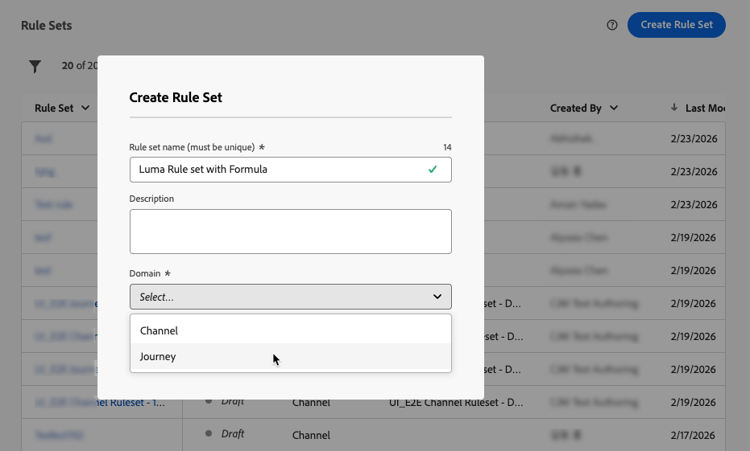
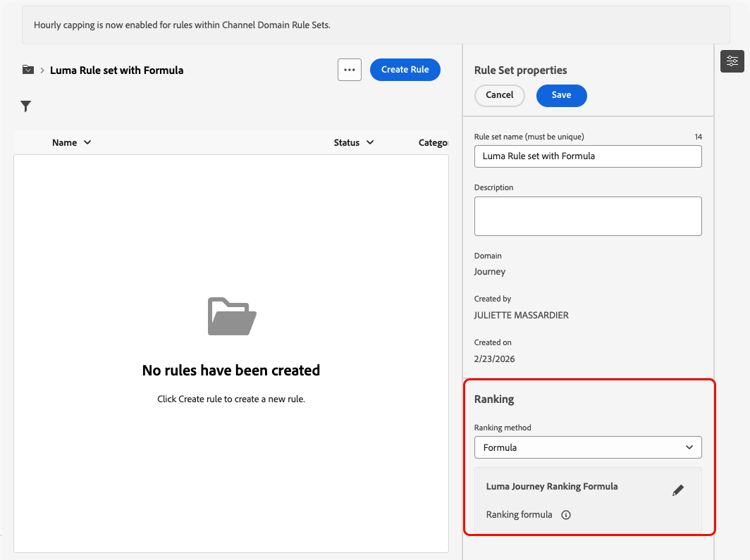
이제 공식이 규칙 세트에 지정됩니다. 그런 다음 해당 규칙 세트를 여정에 적용할 수 있습니다.
여정에 규칙 세트 적용 assign-rule-set-to-journey
여정에 규칙 세트를 지정하려면 아래 단계를 따르십시오.
-
규칙 세트를 할당할 여정을 만들거나 엽니다. 여정 만드는 방법 알아보기
-
여정 속성의 드롭다운 목록에서 규칙 세트를 선택합니다. 방법을 알아보세요.
note NOTE 한 번에 하나의 여정 세트만 규칙에 적용할 수 있습니다. -
여정을 저장합니다.
이 여정 세트를 사용하는 모든 규칙은 상한선이 적용될 때 선택한 수식으로 순위가 지정됩니다.
규칙 집합 및 등급 수식의 수행 방식을 모니터링하려면 개요 보고서의 여정 제한 및 충돌 섹션을 참조하십시오. 상한에 도달하여(CAP_REACHED) 또는 낮은 우선 순위(LOWER_PRIORITY)에 도달하여 프로필이 제외되었는지 여부를 확인하고 데이터 레이크 수준에서 discards를 조사하려면 이 섹션에서 사용할 수 있는 쿼리를 사용하십시오.
This section contains structured knowledge intended to support interpretation, retrieval, and question answering related to this topic.
For complete understanding, this information should be combined with the documentation on this page. Neither source is intended to stand alone; the page describes the feature, while this section provides additional context that helps disambiguate terminology, intent, applicability, and constraints.
- TL;DR: This page explains how to create ranking formulas that dynamically rank journeys based on journey attributes, profile attributes, or AI model scores, and how to assign them to a rule set so the best journey is selected per profile when journey caps apply.
Intents:
- Create a ranking formula with one or more criteria in Orchestration ranking > Ranking formulas
- Assign ranking scores using variables (journey priority, AI model score), attributes, static values, or a combination
- Optionally reference an AI model with Select AI model
- Express a formula in PQL syntax using the code editor
- Assign the formula to a journey-domain rule set and apply that rule set to journeys
Glossary:
- Ranking formula: Dynamically adjusts the ranking of journeys based on journey attributes, profile attributes, or AI model scores (product-specific)
- Ranking object: The entity that the formula applies to; by default set to Journey (product-specific)
- Journey priority: A manual value assigned to the journey when creating it (product-specific)
- Ranking method: Rule set setting that selects Formula instead of the default Priority (product-specific)
- Criterion: A condition (journey attribute, logical operator, matching condition) with an expression that assigns a ranking score (product-specific)
Guardrails:
- This feature is currently in Limited Availability; contact your Adobe representative to gain access.
- Ranking formulas are only available to organizations that have purchased the Decisioning add-on offering.
- Formulas are assigned at the rule set level, not on individual journeys.
- To use a formula, set the rule set Ranking method to Formula instead of the default Priority, and select the Journey domain.
- Switching to the code editor (PQL syntax) will prevent you from reverting back to the default builder view for this formula.
- Only one rule set can be applied to a journey at a time.
- Criterion logic: if the first criterion is true for a decision item it takes precedence over the next ones; otherwise the decisioning engine moves on to the next criterion, and so on.
- Examples on the page: journey priority; journey priority plus 5 (Loyalty tag with Gold status); journey priority plus 2 (Loyalty tag with Silver status).
Terminology:
- Canonical name: ranking formula — variants: ranking formulas, formula
- Synonyms: none
- Do not confuse: “ranking formula” (dynamically adjusts the ranking of journeys) ≠ “journey priority” (a manual value assigned to the journey) ≠ “AI model score” (the score that came out of the AI model, which can be referenced in a formula)
- Do not confuse: “Formula” ranking method ≠ “Priority” ranking method (the default)
FAQ:
- Q: What can a ranking formula reference? — A variable (journey priority or AI model score), an attribute (profile or journey attribute), a static value, or a combination of these.
- Q: How is precedence decided across criteria? — The first criterion that is true for a decision item takes precedence; otherwise the decisioning engine evaluates the next criterion.
- Q: Are formulas assigned per journey? — No, formulas are assigned at the rule set level; the rule set is then applied to journeys.
- Q: What happens if I switch to the code editor? — You express the formula in PQL syntax, and this prevents reverting back to the default builder view for that formula.
- Q: When is the formula applied? — When the cap is applied; all journeys using the rule set are ranked with the selected formula.