이 페이지에서: 여정 입력 상한이 적용될 때 각 프로필에 대해 성과가 가장 좋은 여정이 선택되도록 여정 등급을 동적으로 지정하는 AI 모델을 빌드합니다.
Adobe Journey Optimizer을(를) 사용하면 프로필이 시스템에서 허용하는 것보다 더 많은 여정에 대한 자격이 있을 때 프로필이 입력할 수 있는 프로필을 제어할 수 있습니다. 이렇게 하려면 규칙 집합을 사용하여 여정 항목 또는 동시 사용에 대한 제한을 정의할 수 있습니다. 여정이 상한선이 허용하는 것보다 더 많은 여정에 적격인 경우, 각 프로필에 할당된 우선순위에 따라 선택되는 여정이 결정됩니다.
우선 순위를 사용하는 대신 순위 공식에 AI 모델을 사용하여 훈련된 모델 점수를 기반으로 여정의 등급을 동적으로 지정할 수도 있습니다.
AI 모델 만들기 create-ai-model
여정 등급에 대한 AI 모델을 만들려면 아래 단계를 따르십시오.
-
전환 이벤트가 수집될 데이터 세트를 만듭니다. 방법 알아보기
-
오케스트레이션 순위 섹션에 액세스한 다음 AI 모델 탭을 선택하십시오. 이전에 만든 AI 모델 목록이 표시됩니다.
-
AI 모델 만들기를 클릭합니다.
-
고유한 이름을 지정하고 필요한 경우 AI 모델에 대한 설명을 지정합니다.
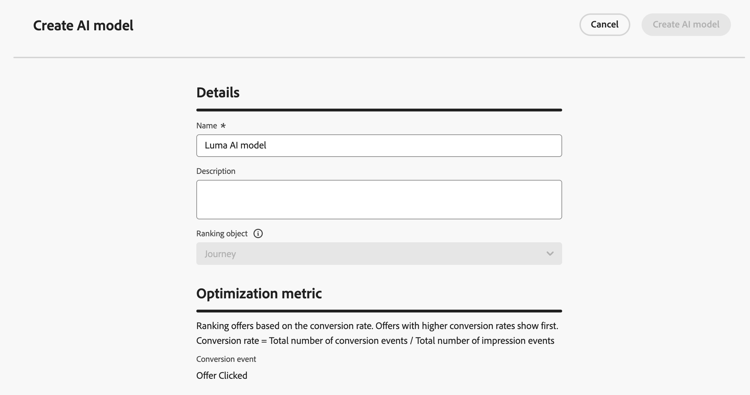
note NOTE 순위 객체는 순위 공식이 적용될 엔티티입니다. 기본적으로 순위 개체는 여정(으)로 설정됩니다.
-
최적화 지표 섹션에서 기본 Customer Journey Analytics 데이터 보기의 모든 지표가 목록에 표시됩니다. 모델을 최적화할 지표를 선택합니다.
AI 모델에 대한 Customer Journey Analytics 지표를 나열하는
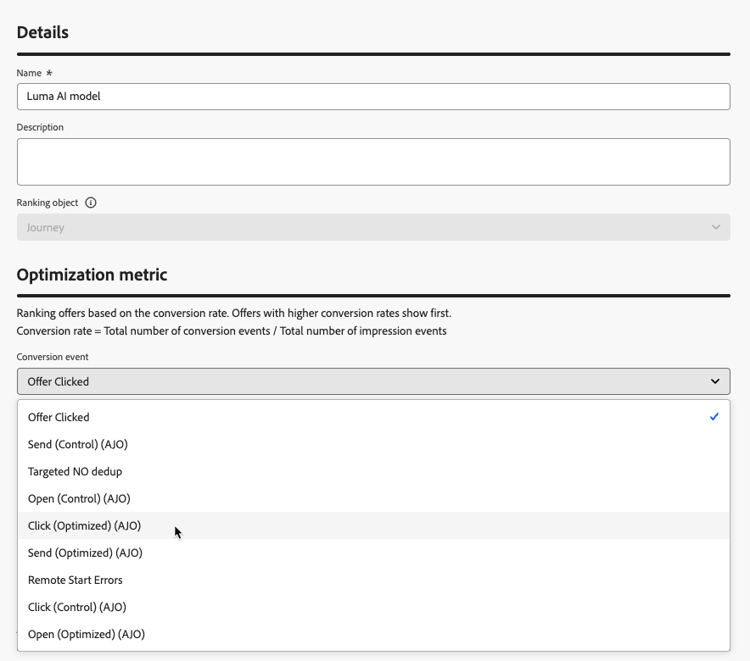
Journey Optimizer은(는) 전환율을(를) 기반으로 순위를 지정합니다(전환율 = 총 전환 이벤트 수 / 총 노출 이벤트 수). 전환율은 다음을 사용하여 계산됩니다.
- 노출 이벤트(표시되는 항목)
- 전환 이벤트(클릭 또는 전환을 초래하는 항목)
이러한 이벤트는 웹 SDK 또는 모바일 SDK을 사용하여 자동으로 캡처됩니다. Adobe Experience Platform Web SDK 개요에서 자세히 알아보세요.
-
전환 및 노출 이벤트가 수집되는 데이터 세트를 선택합니다. 이 섹션에서 이러한 데이터 세트를 만드는 방법을 알아보세요.
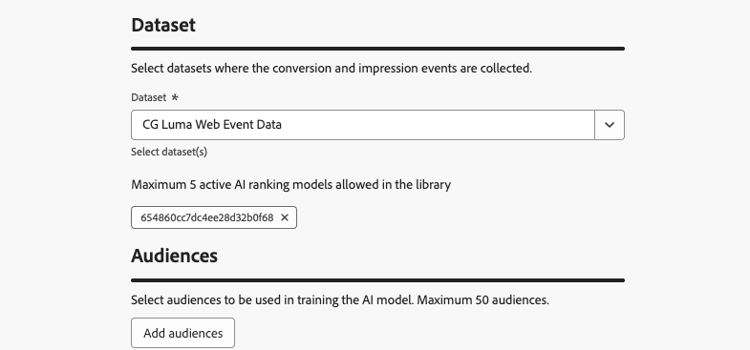
note caution CAUTION 경험 이벤트 - 제안 상호 작용 필드 그룹과 연결된 스키마에서 만든 데이터 세트만 드롭다운 목록에 표시됩니다. 최대 5개의 데이터 세트를 선택할 수 있습니다. -
AI 모델을 교육하는 데 사용할 세그먼트를 선택합니다.
note NOTE 최대 50개의 대상을 선택할 수 있습니다. -
AI 모델을 저장하고 활성화합니다.
이제 순위 공식을 만들 때 AI 모델을 선택할 수 있습니다.
여정의 등급을 지정하려면 공식에서 AI 모델을 참조하십시오 reference-ai-model
이제 AI 모델을 참조로 설정하여 등급 공식을 작성한 후 공식을 여정 세트에 지정하고 규칙 세트를 규칙에 적용할 수 있습니다. 그 방법은 다음과 같습니다.
-
순위 공식을 만듭니다. 방법 알아보기
-
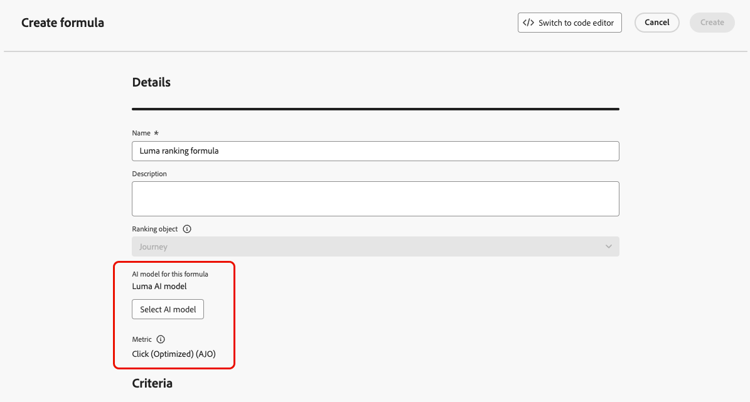
AI 모델 선택 단추를 사용하여 수식에 사용할 AI 모델을 선택합니다.
-
기준 섹션 중 적어도 하나에서 조건을 정의하고 AI 모델 점수를 순위 지정 방법으로 선택합니다. 예를 들어 여정에 “프로모션” 태그가 있는 경우 순위 점수는 AI 모델 점수입니다.
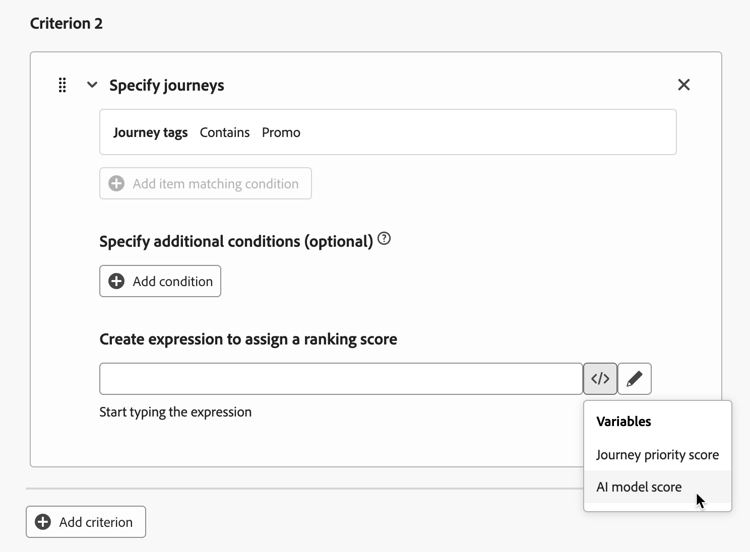
-
순위 공식을 완료하려면 만들기를 클릭하세요.
-
이제 규칙 세트를 만들고 순위 방법으로 만든 공식을 선택합니다. 방법 알아보기
-
여정 최대 가용량 규칙을 만들고 규칙 세트를 저장합니다.
-
원하는 여정에 규칙 세트를 적용하고 저장합니다. 방법 알아보기
note NOTE 한 번에 하나의 여정 세트만 규칙에 적용할 수 있습니다.
이 여정 세트를 사용하는 모든 규칙은 상한이 적용될 때 선택한 AI 모델을 참조하는 공식으로 순위가 지정됩니다.
This section contains structured knowledge intended to support interpretation, retrieval, and question answering related to this topic.
For complete understanding, this information should be combined with the documentation on this page. Neither source is intended to stand alone; the page describes the feature, while this section provides additional context that helps disambiguate terminology, intent, applicability, and constraints.
- TL;DR: This page explains how to create AI models that dynamically rank journeys based on trained model scores, and how to reference them in ranking formulas so the best-performing journey is selected per profile when journey entry caps apply.
Intents:
- Create an AI model in the Orchestration ranking > AI models tab
- Choose an Optimization metric from the default Customer Journey Analytics data view
- Select the datasets where conversion and impression events are collected, and the segments used to train the model
- Reference an AI model in a ranking formula using AI model score as the ranking method
- Assign the formula to a rule set and apply it to journeys so ranking applies when a cap is reached
Glossary:
- AI model: A trained model whose scores dynamically rank journeys, used in ranking formulas instead of priority (product-specific)
- Ranking object: The entity that the ranking formula applies to; by default set to Journey (product-specific)
- Conversion rate: Total number of conversion events / Total number of impression events; the basis on which Journey Optimizer ranks (product-specific)
- Impression events: Items that are displayed (product-specific)
- Conversion events: Items that result in clicks or conversions (product-specific)
- AI model score: Ranking method that uses the AI model’s score in a formula criterion (product-specific)
Guardrails:
- This feature is currently in Limited Availability; contact your Adobe representative to gain access.
- AI models are only available to organizations that have purchased the Decisioning add-on offering.
- Only datasets created from schemas associated with the Experience Event - Proposition Interactions field group are displayed in the drop-down list.
- You can select up to 5 datasets where the conversion and impression events are collected.
- You can select up to 50 audiences to train the AI model.
- Impression and conversion events are automatically captured using the Web SDK or the Mobile SDK.
- Only one rule set can be applied to a journey at a time.
Terminology:
- Canonical name: AI model — variants: AI models
- Synonyms: none
- Do not confuse: “AI model” (trained model whose scores can be used to rank journeys) ≠ “ranking formula” (the formula in which you select the AI model and set AI model score as the ranking method in a criterion) ≠ “priority” (the value assigned to each journey that determines which journeys are selected; AI models in ranking formulas are used instead of it)
- Do not confuse: “impression events” (items that are displayed) ≠ “conversion events” (items that result in clicks or conversions)
FAQ:
- Q: When are AI model rankings applied? — When a profile is eligible for more journeys than the cap allows; all journeys using the rule set are ranked with the formula referencing the AI model.
- Q: What metric does the AI model optimize on? — A metric you select from the default Customer Journey Analytics data view; ranking is based on conversion rate (Total number of conversion events / Total number of impression events).
- Q: How many datasets and audiences can I use? — Up to 5 datasets and up to 50 audiences.
- Q: Which datasets can I select? — Only datasets created from schemas associated with the Experience Event - Proposition Interactions field group.
- Q: How do I use the AI model in a formula? — Use the Select AI model button, then in at least one Criterion set AI model score as the ranking method.