이 페이지에서: 보낸 사람, 회신 대상, 오류 및 선택적 보낸 사람 필드를 포함하여 채널 구성에서 전자 메일 헤더 매개 변수를 설정하는 방법과 회신 처리 및 전자 메일 전달을 관리하는 방법을 알아봅니다.
새 전자 메일 채널 구성을 구성할 때 헤더 매개 변수 섹션에서 해당 구성을 사용하여 보낸 전자 메일 형식과 연결된 보낸 사람 이름 및 전자 메일 주소를 입력하십시오.
-
발신자 이름: 보내는 사람의 이름입니다. 브랜드 이름 등을 사용할 수 있습니다.
-
발신자 이메일 접두사: 커뮤니케이션에 사용할 이메일 주소입니다.
-
회신 대상 이름: 수신자가 이메일 클라이언트 소프트웨어에서 회신 버튼을 클릭했을 때 사용할 이름입니다.
-
회신 대상 이메일: 수신자가 이메일 클라이언트 소프트웨어에서 회신 버튼을 클릭했을 때 사용할 이메일 주소입니다. 자세히 알아보기
-
오류 이메일 접두사: 메일 전달 후 며칠 간 ISP에서 생성한 오류(비동기 바운스)는 모두 이 주소로 수신됩니다. 부재 중 알림 및 챌린지 응답도 이 주소로 수신됩니다.
Adobe에 위임되지 않은 특정 이메일 주소에 대한 부재 중 알림 및 문제 응답을 받으려면 전달 프로세스를 설정해야 합니다. 이 경우 해당 받은 편지함에 도착하는 이메일을 처리할 수동 또는 자동화된 솔루션이 있는지 확인합니다.
- contact를 발신자 이메일 접두사로 입력하면 발신자 이메일은 contact@marketing.luma.com입니다.
- error를 오류 이메일 접두사로 입력하면 오류 주소는 error@marketing.luma.com입니다.

_, 점 . 및 하이픈 -자를 사용할 수도 있습니다.필요한 경우 새 채널 구성을 만들지 않고 캠페인 또는 여정 작업 수준에서 이러한 헤더 값을 재정의할 수 있습니다.
다음 섹션에서 방법을 알아봅니다.
발신자 헤더 sender-header
일부 사용 사례에서는 메시지를 전송하는 사서함이 보낸 사람 작성자와 달라야 합니다(예: 자회사를 대신하여 보내는 상위 조직, 여러 브랜드의 공유 마케팅 팀 또는 여러 클라이언트의 에이전시에서 보내는 경우).
즉, 보낸 사람은(는) 메시지 작성자이고(“보낸 사람”) 보낸 사람은(는) 메시지 전송을 담당하는 에이전트입니다(실제로 보낸 사람). Sender 필드는 전송 엔터티가 작성자와 다른 경우에 사용하기 위한 것입니다.
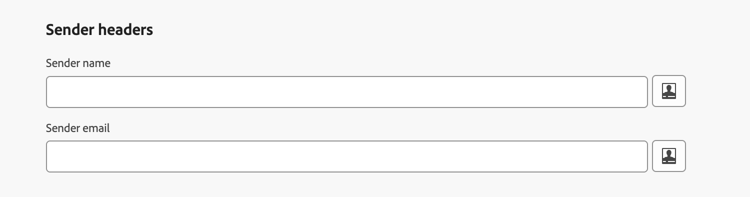
이 경우 보낸 사람 헤더 섹션의 다음 필드를 사용하여 전자 메일 헤더에 다른 보낸 사람 이름 및 전자 메일 주소를 추가하도록 설정할 수 있습니다.
-
보낸 사람 이름: 메시지를 보낸 사람이 보낸 사람 작성자와 다를 경우 메시지를 보낸 사람의 이름입니다.
-
보낸 사람 전자 메일: 해당 보낸 사람의 전자 메일 주소입니다.
보낸 사람 이름 및 보낸 사람 전자 메일이 설정되면 Journey Optimizer에서 보낸 사람 SMTP 헤더를 전자 메일에 추가합니다. 이를 지원하는 이메일 클라이언트에는 보낸 사람 대신 보낸 사람 또는 via 표시기와 같은 단어가 표시될 수 있습니다.
Sender 헤더를 구성할 때 다음 사항을 고려하십시오.
-
보낸 사람 이름 및 보낸 사람 전자 메일 필드를 모두 비워 두거나 확인된 보낸 사람이(가) 보낸 사람과(와) 동일한 경우 보낸 사람 헤더가 추가되지 않습니다.
-
Sender 주소는 SPF, DKIM 또는 DMARC 정렬에 사용되지 않습니다. format 유효성 검사만 수행됩니다. SPF, DKIM 및 DMARC은 시작 필드에 계속 의존합니다. 구성에 대해 선택한 위임된 하위 도메인은(는) 이러한 검사에 사용된 전송 도메인으로 유지됩니다.
-
Sender 헤더가 구성되어 있고 개인화가 받는 사람에 대한 값으로 확인되지 않으면 해당 받는 사람에게 메시지가 배달되지 않습니다.
회신 대상 이메일 reply-to-email
회신 대상 이메일 주소를 정의할 때는 어떤 이메일 주소든 유효한 주소이고 올바른 형식이며 오타가 없기만 하면 지정할 수 있습니다.
부재 중 알림 및 문제 응답을 제외한 모든 회신 이메일은 회신에 사용되는 받은 편지함에서 받게 되며, 부재 중 알림과 문제 응답은 오류 이메일 주소로 수신됩니다.
올바른 회신 관리를 위해서는 아래 추천 사항을 따라야 합니다.
-
전용 받은 편지함의 수신 용량이 이메일 구성을 사용하여 보내는 모든 회신 이메일을 받기에 충분한지 확인합니다. 받은 편지함에서 바운스를 반환하면 고객 회신이 수신되지 않을 수 있습니다.
-
답장에는 PII(개인 식별 정보)가 포함될 수 있으므로 개인 정보 및 준수 의무를 고려하여 처리해야 합니다.
-
회신 받은 편지함에서는 메시지를 스팸으로 표시하지 마십시오. 그렇게 하면 이 주소로 전송된 다른 모든 회신에 영향을 줍니다.
또한 회신 대상 이메일 주소를 정의할 때 유효한 MX 레코드 구성이 있는 하위 도메인을 사용해야 합니다. 그렇지 않으면 이메일 구성 처리가 실패합니다.
이메일 구성 제출 시 오류가 발생하면 입력한 주소의 하위 도메인에 대해 MX 레코드가 구성되지 않은 것입니다. 관리자에게 문의하여 해당 MX 레코드를 구성하거나, 유효한 MX 레코드 구성이 있는 다른 주소를 사용하십시오.
이메일 전달 forward-email
위임된 하위 도메인에 대해 Journey Optimizer에서 수신한 모든 이메일을 특정 이메일 주소로 전달하려면 Adobe 고객 지원 센터에 문의하십시오.
다음 사항을 입력해야 합니다.
- 원하는 전달 이메일 주소. 전달 이메일 주소 도메인은 Adobe에 위임된 하위 도메인과 일치할 수 없습니다.
- 사용자의 샌드박스 이름.
- 전달 이메일 주소를 사용할 구성 이름 또는 하위 도메인.
- 하위 도메인당 전달 이메일 주소는 하나만 있을 수 있습니다. — 여러 구성이 동일한 하위 도메인을 사용하는 경우 모든 구성에 대해 동일한 전달 이메일 주소를 사용해야 합니다.
- 전달을 사용하지 않으면 기본적으로 보낸 사람 전자 메일 주소로 직접 보낸 전자 메일은 무시됩니다.
전달 이메일 주소는 Adobe에 의해 설정됩니다. 3~4일 정도 소요될 수 있습니다.
완료되면 회신 대상 이메일 및 오류 이메일 주소에서 받은 모든 메시지와 발신자 이메일 주소로 보낸 모든 이메일이 사용자가 입력한 특정 이메일 주소로 전달됩니다.
This section contains structured knowledge intended to support interpretation, retrieval, and question answering related to this topic.
For complete understanding, this information should be combined with the documentation on this page. Neither source is intended to stand alone; the page describes the feature, while this section provides additional context that helps disambiguate terminology, intent, applicability, and constraints.
- TL;DR: This page explains how to set up the email header parameters in a channel configuration — the From, Reply to, Error, and optional Sender fields — and how to manage reply handling and email forwarding.
Intents:
- Configure the From name, From email prefix, Reply to name, Reply to email, and Error email prefix in a channel configuration
- Set optional Sender headers when the transmitting entity differs from the From author
- Manage where reply emails, out-of-office notifications, and challenge responses are received
- Set up an email forward process for the delegated subdomain
- Understand the formatting rules for email prefixes
Glossary:
- From name / From email prefix: The sender name and email address used for communications; the prefix uses the selected delegated subdomain (product-specific)
- Reply to name / Reply to email: The name and address used when the recipient clicks Reply in their email client (product-specific)
- Error email prefix: The address that receives asynchronous bounces (ISP errors after a few days), out-of-office notifications, and challenge responses (product-specific)
- Sender headers (Sender name / Sender email): Optional fields identifying the party responsible for transmitting the message when it differs from the From author; adds a Sender SMTP header (product-specific)
- Delegated subdomain: The subdomain used to send the email and used for SPF, DKIM, and DMARC checks (product-specific)
Guardrails:
- When editing an email configuration, you cannot add new profile attributes to header parameters; you must create a new channel configuration.
- For From email prefix and Error email prefix, values must begin with a letter (A-Z) and can only contain alphanumeric characters, plus underscore
_, dot., and hyphen-. - Sender name and Sender email must be configured together — both filled in or both empty; filling in only one prevents journeys and campaigns from being published with this channel configuration.
- If both Sender fields are empty, or the resolved Sender is identical to From, no Sender header is added.
- The Sender address is not used for SPF, DKIM, or DMARC alignment (only format validation is performed); those checks continue to rely on the From fields and the delegated subdomain.
- If Sender headers are configured and personalization does not resolve to a value for a recipient, the message is not delivered to that recipient.
- The Reply to email must be a valid, correctly formatted address on a subdomain with a valid MX record, otherwise email configuration processing fails.
- Forwarding is set up by Adobe (contact Adobe Customer Care) and can take 3 to 4 days; the forward email address domain cannot match any subdomain delegated to Adobe.
- There can be only one forward email address per subdomain; configurations sharing a subdomain must use the same forward email address.
- If forwarding is not enabled, emails sent directly to the From email address are discarded by default.
Terminology:
- Canonical name: Header parameters — Acronym: n/a — variants: sender headers, header fields
- Synonyms: “From” = “author of the message”; “Sender” = “agent responsible for transmitting the message”
- Do not confuse: “From” (author) ≠ “Sender” (transmitting party) ≠ “Reply to email” (address receiving replies) ≠ “Error email” (address receiving asynchronous bounces, out-of-office notifications, and challenge responses)
FAQ:
- Q: Which address receives asynchronous bounces and out-of-office notifications? — The Error email prefix address; out-of-office notifications and challenge responses are received there rather than on the Reply to email.
- Q: Can I fill in only the Sender name or only the Sender email? — No. Both must be configured together, or both left empty; filling only one prevents publishing journeys and campaigns with the configuration.
- Q: Does the Sender field affect SPF, DKIM, or DMARC? — No. Only format validation is performed on the Sender address; SPF, DKIM, and DMARC continue to rely on the From fields and the delegated subdomain.
- Q: Why did my email configuration fail on submission? — The MX record is likely not configured for the subdomain of the Reply to email address; contact your administrator or use an address with a valid MX record.
- Q: How do I forward emails received for the delegated subdomain? — Contact Adobe Customer Care to set up a forward process, providing the forward email address, sandbox name, and configuration name or subdomain; setup can take 3 to 4 days.
Personas:
- admin: Can configure the From name, From email prefix, Reply to name, Reply to email, and Error email prefix in a channel configuration. Can set the Sender name and Sender email fields when the transmitting entity differs from the From author. The page states that From email prefix and Error email prefix must begin with a letter and contain only alphanumeric characters, underscore, dot, or hyphen. Where: “Header parameters”.
Onboarding:
- Level: Experienced
- First minimal step: Enter the sender names and email addresses for a new email channel configuration in the Header parameters section.
- Success check: If you enter contact as the From email prefix with subdomain marketing.luma.com delegated, the sender email becomes contact@marketing.luma.com.
- Previous: Setting up a new email channel configuration: Configure email settings (email/email-settings.md); Delegating a subdomain for sending email: Subdomain delegation in Journey Optimizer (configuration/about-subdomain-delegation.md)
- Next: Personalizing header parameter fields: Personalize email configuration settings (email/surface-personalization.md); Editing an existing email channel configuration: Set up channel configurations (configuration/channel-surfaces.md)