このページでは、 ロイヤルティの課題の概要、プログラムの仕組み、前提条件の確認、課題の設定、作成、実行、測定に必要なドキュメントの確認について説明します。
概要 overview
ロイヤルティの課題を使用すると、顧客行動を推進し、ブランドとの関係を深める、魅力的でゲーミフィケーションを取り入れたロイヤルティプログラムを作成できます。 購入やレビューの書き込みから、ソーシャルメディアへの関与や友人の紹介まで、特定のアクションに対して顧客に報酬を与える課題を作成しましょう。
ロイヤルティの課題を活用することで、次のことが可能になります。
- 柔軟なチャレンジの種類をデザイン:ビジネス目標に合わせて、Standard、Streak、またはSequential チャレンジを作成します
- 報酬を戦略的に設定:タスクのマイルストーンまたは完全な完了時にポイントを提供して、エンゲージメントを維持します
- エクスペリエンスをパーソナライズ: コンテンツカードとマルチチャネルメッセージを使用して、没入感のあるブランド体験を構築します
- シームレスな統合:既存のロイヤルティプロバイダーとつながり、Experience Platform データを活用する
- 自動的に追跡: カスタム開発なしで自動生成されたジャーニーを通じて、顧客の進捗状況を監視します
- パフォーマンスを測定:組み込みのレポートダッシュボードを使用して、プログラム KPI、チャレンジの結果、タスクレベルの指標を追跡します
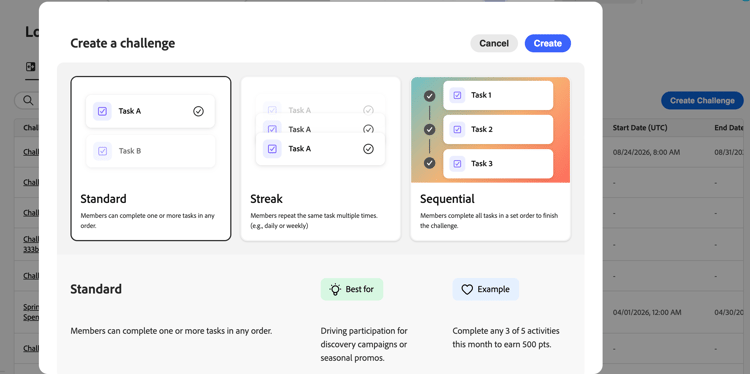
次のようなチャレンジエクスペリエンスを構築できます。
-
標準課題:お客様は、指定された数のタスクを任意の順序で完了できます。 このタイプは、柔軟性と複数のパスを補完する場合に使用します。
例:「サマーウェルネスチャレンジ」 - 5つのタスクのうち3つを完了する:健康製品の購入、ソーシャルメディアでの共有、友人への紹介、レビューの執筆、バーチャルイベントへの参加 -
連続する課題:顧客は同じタスクを複数回連続して完了します。 このタイプは、時間をかけて一貫性のある繰り返し行動を促すために使用します。
例:「Coffee Lover’s Week」 - 7日間連続でコーヒー製品を購入すると、無料のドリンク報酬が得られます -
連続した課題:顧客は定義された順序でタスクを完了します。 このタイプは、特定のジャーニーやオンボーディングプロセスを通じて顧客を導くために使用できます。
例:「新規会員ジャーニー」 – メールに登録する→初めての購入→商品レビューを書く→友達を紹介する(正確な順序で記入) -
独自のデータ課題を持ち込む (制限付き可用性): チャレンジフレームワーク(タスクと報酬)は、ロイヤルティチャレンジデータ統合から組み立てられます。 他のチャレンジタイプと同様に、設定、コンテンツ、メッセージを設定します。
➡️ 機能の概要を見る
仕組み how-it-works
ロイヤルティの活用には、設定、実行、測定の3つの段階があります。通常、管理者と実務担当者が共有します。
1. プログラムの設定 (管理者)
課題を作成する前に、管理者はプログラムの基礎(報酬プロバイダー、顧客の行動をタスクの完了にマッピングするイベントマッピング、製品在庫、除外リスト)を設定します。 ロイヤルティに関する課題を設定する方法について説明します。
2. 課題の作成と起動 (実務担当者)
マーケターは、タイプの選択(Standard、Streak、Sequential、Bring your own data)、設定の設定(audience、schedule、rules)、タスクや報酬の定義などにより、課題を生み出します。 オプションとして、コンテンツカードまたは コードベースのエクスペリエンス を使用して、メンバー向けインターフェイスで課題を表面化し、課題ライフサイクル全体の重要な瞬間に対するチャネル通知を設定することができます。 設定が完了したら、チャレンジを公開し、自動構築されたジャーニーを生成して公開し、チャレンジを公開します。 課題の作成方法を学ぶ。
3. パフォーマンスの監視 (実務担当者/アナリスト)
課題が公開されると、組み込みのレポートダッシュボードに、課題レベルの指標が表示されます。つまり、オーディエンスのfunnelパフォーマンス、タスクの完了率、報酬の発行、売上への影響などです。 また、AIを活用したインサイトエンジンは、プログラムのパフォーマンスを最適化するために、コンテキストに関する推奨事項を明らかにしています。 ロイヤルティパフォーマンスの調査。
前提条件 prerequisites
ロイヤルティの課題を使用する前に、次のことを確認してください。
ロイヤルティの課題を使用するには、ロイヤルティの役割を割り当てる必要があります。 デフォルトの役割は、プロダクトサンドボックスの管理者、実務担当者、アナリストが使用できます。 Prod以外のサンドボックスの場合、管理者は必要なロイヤルティ権限を持つカスタム役割を作成する必要があります。
機能にアクセスできない場合や、追加の権限が必要な場合は、管理者にお問い合わせください。 ロイヤルティチャレンジの権限を設定する方法について説明します。
管理者は、ロイヤルティ設定 メニューで、報酬プロバイダー、イベントマッピング、製品インベントリ、除外、およびグローバル設定を設定します。 課題のみを作成するマーケターは、このメニューにアクセスする必要はありません。 ロイヤルティに関する課題を設定する方法を学ぶ
左側のナビゲーションに「ロイヤルティ設定」メニューが表示されない場合は、管理者にお問い合わせください。
さらに深く掘り下げましょう lets-dive-deeper
ロイヤルティに関する課題とその仕組みを理解したところで、次はその詳細について説明します。 インターフェイスにアクセスし、最初の課題を作成し、顧客が完了するタスクを定義するには、次のトピックを参照してください。
報酬プロバイダー、イベントマッピング、組織設定の設定



開発者向けリソース developer-resources
ロイヤルティチャレンジは、課題をプログラムで管理し、プロファイル参加を追跡できるREST APIを公開します。
- ロイヤルティチャレンジメタデータ API – 課題の作成、取得、更新、公開、アーカイブ、複製。
- ロイヤルティチャレンジ状態API – 個々のプロファイルに対するチャレンジ参加状態のクエリと更新。
認証と必要なヘッダーについては、認証チュートリアル を参照してください。
チュートリアルビデオ video
ロイヤルティに関する新たな課題は何ですか? この概要では、次の機能とメリットについて説明します。
インタラクティブデモ demo
ロイヤルティの課題を実際に体験しましょう? インタラクティブデモ をご覧ください。
This section contains structured knowledge intended to support interpretation, retrieval, and question answering related to this topic.
For complete understanding, this information should be combined with the documentation on this page. Neither source is intended to stand alone; the page describes the feature, while this section provides additional context that helps disambiguate terminology, intent, applicability, and constraints.
- TL;DR: This page introduces Loyalty Challenges, a gamified loyalty program capability in Adobe Journey Optimizer, and explains the three phases of setup, authoring/launch, and measurement, along with prerequisites and where to find detailed documentation.
Intents:
- Understand what Loyalty Challenges are and the business outcomes they enable.
- Distinguish the four challenge types: Standard, Streak, Sequential, and Bring your own data.
- Understand the three broad phases of using Loyalty Challenges: setup, execution, and measurement, and which roles typically perform each.
- Identify the prerequisites needed before creating a challenge, including permissions, program configuration, and target audience.
- Locate developer resources (REST APIs) for managing challenges and profile participation programmatically.
Glossary:
- Loyalty Challenges: A capability for creating engaging, gamified loyalty programs that reward customers for specific actions such as purchases, reviews, social media engagement, and referrals (product-specific)
- Standard challenge: A challenge type where customers complete any specified number of tasks in any order (product-specific)
- Streak challenge: A challenge type where customers complete the same task multiple times consecutively (product-specific)
- Sequential challenge: A challenge type where customers complete tasks in a defined order (product-specific)
- Bring your own data challenge: A challenge type (restricted availability) where the challenge framework of tasks and rewards is assembled from a Loyalty Challenges data integration; Settings, Content, and Messaging are configured the same way as for other challenge types (product-specific)
- Loyalty Challenge Management: A tool within Coworker skills for loyalty that lets you create and manage loyalty challenges using natural language prompts (product-specific)
- Loyalty configurations: The menu where administrators configure reward providers, event mappings, product inventory, exclusions, and global settings (product-specific)
Guardrails:
- Bring your own data challenges have restricted availability.
Prerequisites and permissions:
- You must be assigned to a Loyalty role to use Loyalty Challenges.
- Default roles are available for administrators, practitioners, and analysts in the Prod sandbox.
- For non-Prod sandboxes, your administrator must create a custom role with the required Loyalty permissions.
- Administrators configure reward providers, event mappings, product inventory, exclusions, and global settings in the Loyalty configurations menu; marketers who only create challenges do not need access to this menu.
- The target audience that defines which customers are eligible to participate must exist in Adobe Experience Platform before creating a challenge.
Terminology:
- Canonical name: Loyalty Challenges
FAQ:
- Q: What challenge types are available? — Standard, Streak, Sequential, and Bring your own data (restricted availability).
- Q: What are the three phases of using Loyalty Challenges? — Set up your program (admin), author and launch challenges (practitioner), and monitor performance (practitioner/analyst).
- Q: What permissions do I need to use Loyalty Challenges? — You must be assigned to a Loyalty role; default roles exist for administrators, practitioners, and analysts in the Prod sandbox, and a custom role is required in non-Prod sandboxes.
- Q: Who needs access to the Loyalty configurations menu? — Administrators who configure reward providers, event mappings, product inventory, exclusions, and global settings; marketers who only create challenges do not need access.
- Q: Can I create challenges without an existing target audience? — No, the target audience must exist in Adobe Experience Platform before creating your challenge.
- Q: Can I manage loyalty challenges with natural language prompts? — Yes, using Loyalty Challenge Management in Coworker skills for loyalty.
Related pages:
- To configure reward providers, event mappings, product inventory, and exclusions: Learn how to configure loyalty challenges (loyalty-challenges/loyalty-admin.md)
- To build and configure your first loyalty challenge: Learn how to create challenges (loyalty-challenges/create-challenges.md)
- To track program KPIs, challenge results, and task-level metrics: Explore Loyalty performance (loyalty-challenges/loyalty-performance.md)
- To configure Loyalty Challenges permissions: Learn how to configure Loyalty Challenges permissions (loyalty-challenges/loyalty-permissions.md)
- To confirm a target audience exists before creating a challenge: Learn how to work with audiences (audience/about-audiences.md)
- To create and manage loyalty challenges with natural language prompts: Coworker skills for loyalty (loyalty-challenges/loyalty-coworker-skills.md)
- To see Loyalty Challenges in action: interactive demo (loyalty-challenges/loyalty-challenges-demo.md)
Personas:
- marketer: Can create challenges by selecting a type: Standard, Streak, Sequential, or Bring your own data. Can configure settings such as audience, schedule, and rules, then define tasks and rewards, and publish the challenge to generate the auto-built journey. The page states that Bring your own data challenges have restricted availability. Where: “How it works”.
Onboarding:
- Level: Intermediate
- First minimal step: Select a challenge type: Standard, Streak, Sequential, or Bring your own data.
- Success check: The challenge is live after you publish it and generate the auto-built journey.
- Previous: Confirm you have the required Loyalty role permissions: Loyalty Challenges permissions (loyalty-challenges/loyalty-permissions.md); Ensure the target audience exists in Adobe Experience Platform: About Adobe Experience Platform audiences (audience/about-audiences.md)
- Next: Build and configure your first loyalty challenge: Create loyalty challenges (loyalty-challenges/create-challenges.md); Track program KPIs, challenge results, and task-level metrics: Explore loyalty performance (loyalty-challenges/loyalty-performance.md)