このページについて:構成ワークフロー、カスタムアップロード、連合オーディエンス構成からオーディエンスエンリッチメント属性を使用して、Adobe Journey Optimizer でジャーニーパスを作成し、メッセージをパーソナライズする方法を説明します。
構成ワークフロー、カスタム(CSV ファイル)オーディエンスまたは連合オーディエンス構成を使用して生成されたオーディエンスをターゲティングする場合、これらのオーディエンスからのエンリッチメント属性を使用してジャーニーを作成し、メッセージをパーソナライズできます。
オーディエンスのエンリッチメント属性を使用して実行できるアクションは次のとおりです。
-
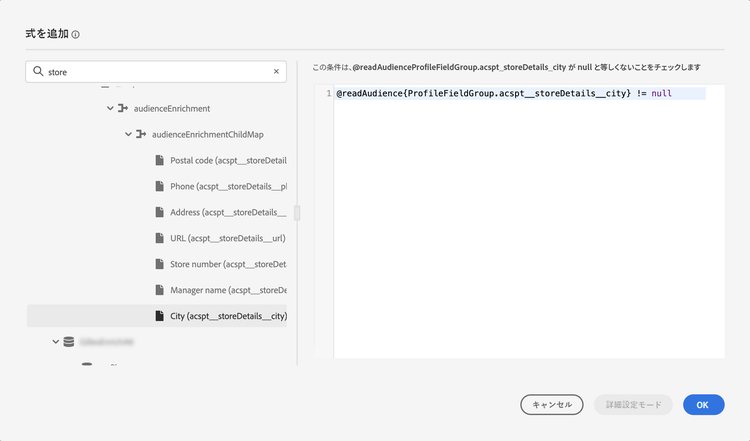
ターゲットオーディエンスのエンリッチメント属性を活用するルールに基づいて、ジャーニー内に複数のパスを作成します。 これを行うには、オーディエンスを読み取りアクティビティを使用してオーディエンスをターゲットにし、オーディエンスのエンリッチメント属性に基づいて最適化アクティビティでルールを作成します。
-
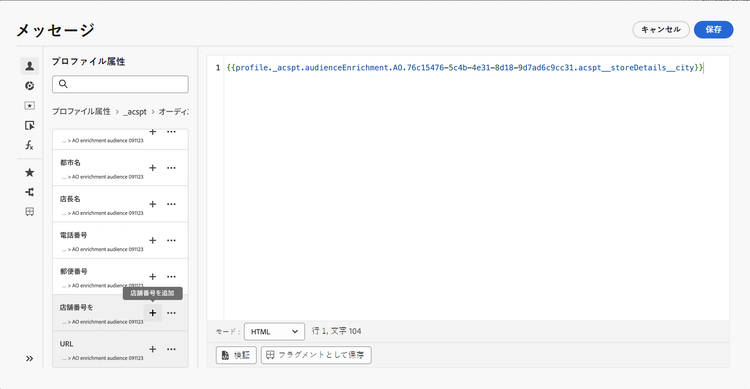
パーソナライゼーションエディターでターゲットオーディエンスからエンリッチメント属性を追加して、ジャーニーまたはキャンペーンの メッセージをパーソナライズ します。 パーソナライゼーションエディターの操作方法を学ぶ
| accordion |
|---|
| エンリッチメント属性をフィールドグループに追加する方法を学ぶ |
データソースについて詳しくは、次の節を参照してください。 |
よくある質問 faq-enrichment
エンリッチメント属性に関するよくある質問を以下に示します。
さらに詳細が必要ですか? このページの下部にあるフィードバックオプションを使用して、質問を入力するか、Adobe Journey Optimizer コミュニティにアクセスしてください。
エンリッチメント属性は、コンテキストに即した、オーディエンスに固有の追加属性です。 これらはプロファイルに関連付けられず、通常、パーソナライゼーションの目的で使用されます。
エンリッチメント属性は、オーディエンス構成のエンリッチアクティビティまたはカスタムアップロードプロセスを通じてオーディエンスにリンクされます。
オーディエンス構成のエンリッチメント属性は、次の領域で活用できます。 オーディエンスのエンリッチメント属性の使用方法を学ぶ
- 条件アクティビティ(ジャーニー)
- カスタムアクション属性(ジャーニー)
- メッセージのパーソナライゼーション(ジャーニーとキャンペーン)
オーディエンスの取り込みが完了しても、エンリッチメント属性がジャーニーオーサリングで使用可能になるわけではありません。 オーディエンスの可用性の一般的なタイミングでは、カスタムアップロードのエンリッチメント属性が使用可能になるタイミングは指定されません。 Audience Activation のタイミングの詳細情報
次の項目を確認します。
- オーディエンスが存在し、アカウントにそのオーディエンスへのアクセス権と使用権限があること。
- オーディエンスを読み取りアクティビティで選択されているオーディエンスが、条件式で参照されているオーディエンスと同じであること。 設定でフィールドグループを使用している場合は、そのフィールドグループが同じオーディエンスのエンリッチメント属性を参照していることを確認します。
「強化されたオーディエンスが見つかりません」メッセージはあいまいであり、単一の根本原因を特定しません。 これらの確認を行っても問題が解決しない場合は、オーディエンスとジャーニーの詳細を添えて、アドビサポートにお問い合わせください。
This section contains structured knowledge intended to support interpretation, retrieval, and question answering related to this topic.
For complete understanding, this information should be combined with the documentation on this page. Neither source is intended to stand alone; the page describes the feature, while this section provides additional context that helps disambiguate terminology, intent, applicability, and constraints.
- TL;DR: This page explains how to use audience enrichment attributes from composition workflows, custom uploads, and Federated Audience Composition to create journey paths and personalize messages in Journey Optimizer.
Intents:
- Use enrichment attributes from targeted audiences to build journeys and personalize messages
- Create multiple paths in a journey based on rules that leverage the audience’s enrichment attributes
- Personalize messages in journeys or campaigns using enrichment attributes in the personalization editor
- Add enrichment attributes from composition workflows to a Field Group in the ExperiencePlatform Data Source
- Understand where enrichment attributes can be used and when their values are updated
Glossary:
- Enrichment attributes: Additional attributes that are contextual and specific to an audience, not associated with the profile, and typically used for personalization purposes (product-specific)
- Enrich activity: The activity in audience composition through which enrichment attributes are linked to an audience; enrichment attributes are also linked to an audience through the custom upload process (product-specific)
- Field Group (ExperiencePlatform Data Source): The Field Group within the “ExperiencePlatform” Data Source to which composition-workflow enrichment attributes must be added before use (product-specific)
Guardrails:
- Audiences created through CSV file custom upload before October 1, 2024, are not eligible for personalization; to use their attributes, re-create and re-upload the external CSV audience.
- Consent policies do not support enrichment attributes; consent policy rules should be based only on attributes found in the profile.
- To use enrichment attributes from audiences created using composition workflows, they must be added to a Field Group within the “ExperiencePlatform” Data Source.
- Currently, enrichment attribute values are not updated after a journey starts; even after wait or event nodes, the values remain the same as when the journey started.
Terminology:
- Canonical name: Enrichment attributes — Acronym: n/a — variants: audience enrichment attributes
- Synonyms: “custom upload” = “custom (CSV file) audience”
- Do not confuse: “Enrichment attributes” (contextual, specific to an audience, not associated with the profile) ≠ “profile attributes” (found in the profile; the basis for consent policy rules)
FAQ:
- Q: What are enrichment attributes? — Additional attributes that are contextual and specific to an audience; they are not associated with the profile and are typically used for personalization.
- Q: Where can I use enrichment attributes within Journey Optimizer? — Enrichment attributes from audience composition can be used in Condition activity (Journeys), Custom action attributes (Journeys), and Message personalization (Journeys and campaigns).
- Q: How do I enable enrichment attributes from composition workflows in journeys? — Add them to a Field Group within the “ExperiencePlatform” Data Source.
- Q: Are enrichment attribute values updated after a journey starts? — Currently no; even after wait or event nodes, values remain the same as when the journey started.
- Q: Are older CSV custom upload audiences eligible? — Audiences created through CSV custom upload before October 1, 2024, are not eligible for personalization and must be re-created and re-uploaded.