このページ:ビルトインの Adobe Experience Platform データソースにフィールドグループを設定して、ジャーニーでリアルタイム顧客プロファイルデータを取得して使用できるようにします。
Adobe Experience Platform のデータソースは、Adobe リアルタイム顧客プロファイルサービスへの接続を定義します。 このデータソースはビルトインで事前に設定されているので、削除できません。 このデータソースは、リアルタイム顧客プロファイルサービスからデータを取得して使用するように設計されています(例えば、ジャーニーにエントリした人物が女性かどうかを確認します)。 アドビのリアルタイム顧客プロファイルサービスについて詳しくは、Adobe Experience Platform ドキュメントを参照してください。
リアルタイム顧客プロファイルサービスへの接続を可能にするには、人物を特定するキーと、キーを説明する名前空間前を使用する必要があります。 その結果、このデータソースは、ジャーニーが、キーと名前空間を含むイベントで開始する場合にのみ使用できます。 詳細情報
「ProfileFieldGroup」という名前の事前設定済みフィールドグループを編集し、新しいグループを追加して、ドラフトまたはライブジャーニーで使用されていないフィールドグループを削除できます。 詳細情報
ビルトインデータソースにフィールドグループを追加する主な手順は次のとおりです。
-
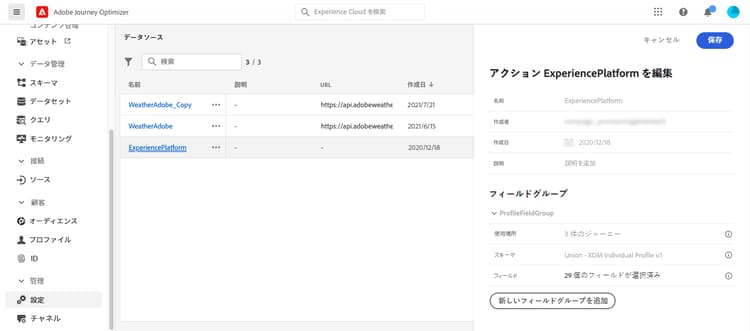
データソースのリストから、ビルトインの Adobe Experience Platform データソースを選択します。
画面の右側にデータソース設定ペインが開きます。
-
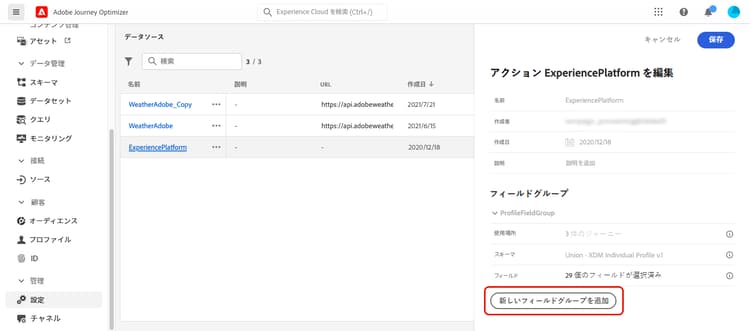
「新しいフィールドグループを追加」を選択して、新しく取得する一連のフィールドを定義します。
-
スキーマドロップダウンからスキーマを選択します。 スキーマの作成は、Adobe Journey Optimizer ではなく、Adobe Experience Platform で実行されます。
note NOTE Journey Optimizer データソース設定では XDM 個人プロファイルベースのスキーマのみがサポートされます。 詳しくは、XDM 個人プロファイルクラスを参照してください。 -
使用するフィールドを選択し、変更を保存します。
This section contains structured knowledge intended to support interpretation, retrieval, and question answering related to this topic.
For complete understanding, this information should be combined with the documentation on this page. Neither source is intended to stand alone; the page describes the feature, while this section provides additional context that helps disambiguate terminology, intent, applicability, and constraints.
- TL;DR: This page explains how to add field groups to the built-in, pre-configured Adobe Experience Platform data source so you can retrieve and use Real-time Customer Profile data in your journeys.
Intents:
- Add field groups to the built-in Adobe Experience Platform data source
- Select an XDM Individual Profile-based schema and choose the fields to retrieve
- Edit the pre-configured ProfileFieldGroup or create new field groups
- Remove field groups that are not used in any draft or live journeys
- Understand the key and namespace requirement for using this data source
Glossary:
- Adobe Experience Platform data source: The built-in, pre-configured data source that defines the connection to Adobe Real-time Customer Profile and cannot be deleted (product-specific)
- ProfileFieldGroup: The pre-configured field group on the Adobe Experience Platform data source that you can edit (product-specific)
- Key: The identifier used to identify a person for the connection to the Real-time Customer Profile Service (product-specific)
- Namespace: The value that contextualizes the key (product-specific)
Guardrails:
- This data source is built-in and pre-configured, and cannot be deleted.
- You can only use this data source if your journeys start with an event containing a key and a namespace.
- Only XDM Individual Profile-based schemas are supported in the Journey Optimizer Data Source configuration.
- Using experience events in journey expressions/conditions is not supported.
- Schema creation is performed in Adobe Experience Platform, not in Adobe Journey Optimizer.
- You can remove the field groups that are not used in any draft or live journeys.
- The Delete icon for a field group is only available if the field group is not used in any Live, Draft or Finished journey; check the Used in field.
Terminology:
- Canonical name: Adobe Experience Platform data source — Acronym: n/a — variants: built-in data source, pre-configured data source
- Synonyms: “Adobe Experience Platform data source” = “built-in data source”
- Do not confuse: “schema” (created in Adobe Experience Platform) ≠ “field group” (defined in Journey Optimizer to select which fields to retrieve)
FAQ:
- Q: Can this data source be deleted? — No, it is built-in and pre-configured and cannot be deleted.
- Q: What must my journey include to use this data source? — Your journey must start with an event containing a key and a namespace.
- Q: Which schemas can I select? — Only XDM Individual Profile-based schemas are supported in the Journey Optimizer Data Source configuration.
- Q: When can I delete a field group? — The Delete icon is only available if the field group is not used in any Live, Draft or Finished journey; refer to the Used in field to check if this is the case.
- Q: Can I use experience events in journey expressions or conditions with this data source? — No, using experience events in journey expressions/conditions is not supported; consider alternative methods for that use case.