このページ:以前の条件アクティビティに置き換わる最適化アクティビティを使用して、実験、ターゲティング、条件に基づいて、複数のジャーニーパスを作成する方法について説明します。
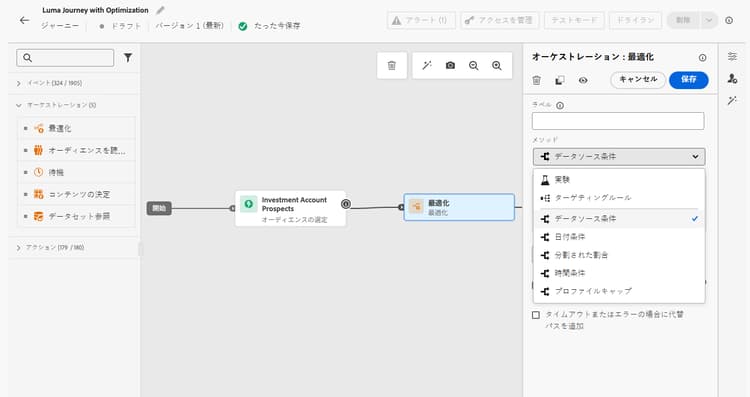
最適化アクティビティでは、実験、ターゲティング、特定の条件など、特定の条件に基づいて複数の パス を作成することで、個人がジャーニーをどのように進めるかを定義できます。これにより、最大限のエンゲージメントと成功が確保され、高度にカスタマイズされた効果的なジャーニーを作成できます。
ジャーニーパスとは journey-path
ジャーニー パス は、通信の順序、通信間の時間、通信の数またはこれら 3 つの変数の任意の組み合わせで構成できます。
例えば、1つのパスには1つの電子メール、別のパスには2つのモバイルメッセージ、3番目のパスには電子メール、2時間の待機ノード、およびモバイルメッセージを含めることができます。
ジャーニーを最適化する 3 つの方法 optimization-methods
最適化アクティビティを通じて、ジャーニーパスに対して次のアクションを実行できます。
-
パス実験を実行 - ランダム分割に基づいて様々なパスをテストし、事前定義済みの成功指標(例:コンバージョン率、売上高、エンゲージメント)に従って最もパフォーマンスが高いパスを判断できます。
-
ターゲティングルールを活用 - オーディエンスセグメント、プロファイル属性、コンテキストデータに基づいて、顧客がいずれかのジャーニーパスへのエントリ対象となるために満たす必要がある、特定のルールを定義します。 これにより、指定されたパスに適切なオーディエンスがエントリされます。
-
条件を適用 - データソース、時間、日付、割合の分割、プロファイルキャップなどの特定の条件に基づいて、条件付きパスを作成します。 これは、以前の条件アクティビティに相当します。
仕組み how-it-works
ジャーニーがライブになると、プロファイルは定義済み条件に照らして評価され、一致条件に基づいて、ジャーニーから適切なパスに送信されます。
次の手順 next-steps
ユースケースに最適な最適化方法を選択します。
This section contains structured knowledge intended to support interpretation, retrieval, and question answering related to this topic.
For complete understanding, this information should be combined with the documentation on this page. Neither source is intended to stand alone; the page describes the feature, while this section provides additional context that helps disambiguate terminology, intent, applicability, and constraints.
- TL;DR: This page introduces the Optimize activity, the replacement for the former Condition activity, which lets users create multiple journey paths using experimentation, targeting rules, or conditional logic.
Intents:
- Understand what the Optimize activity does and how it replaces the former Condition activity
- Create multiple journey paths using path experimentation (A/B testing)
- Define targeting rules to route specific audience segments or profile attributes down separate paths
- Apply conditional logic (if/then) using the Conditions method within the Optimize activity
- Migrate existing journeys that used the Condition activity to the new Optimize activity
Glossary:
- Optimize activity: The journey canvas activity that replaces the former Condition activity and enables creation of multiple paths via experimentation, targeting, or conditions. (product-specific)
- Journey path: A sequence within a journey that can consist of communications, wait times, number of messages, or any combination; profiles are routed to a path based on criteria defined in the Optimize activity. (product-specific)
- Path experimentation: An Optimize method that randomly splits profiles across paths to determine which performs best against predefined success metrics such as conversion rate or revenue. (product-specific)
- Path targeting: An Optimize method that routes profiles to paths based on audience segments, profile attributes, or contextual data. (product-specific)
- Conditions: An Optimize method equivalent to the former Condition activity, creating conditional paths based on data sources, time, date, percentage splits, or profile caps. (product-specific)
Guardrails:
- The former Condition activity has been removed from the UI; existing journeys using it continue to work and now display with a new icon as Optimize activities using the Conditions method
- Custom labels set on former Condition nodes are preserved after the migration to Optimize
Terminology:
- Canonical name: Optimize activity — Acronym: none — variants: journey path optimization, Optimize node
- Synonyms: “Optimize activity (Conditions method)” = “former Condition activity”
- Do not confuse: “Path experimentation” ≠ “Path targeting” — Path experimentation uses random splits to test which path performs best; path targeting uses defined rules to route specific audiences to specific paths
FAQ:
- Q: What happened to the Condition activity? — It has been replaced by the Optimize activity and removed from the UI. Existing journeys that used Condition activities continue to work unchanged; they now display with a new icon as Optimize activities using the Conditions method.
- Q: What are the three methods available in the Optimize activity? — Path experimentation (random A/B splits to find the best-performing path), Path targeting (rule-based routing by audience or profile attributes), and Conditions (if/then conditional logic equivalent to the former Condition activity).
- Q: How does path experimentation differ from path targeting? — Path experimentation randomly splits profiles to test and compare path performance against success metrics; path targeting routes specific audiences or profile types down designated paths based on defined criteria.
- Q: Is path targeting generally available? — Yes, as of June 8, 2026.
- Q: What is a journey path? — A path is a sequence within a journey that can include a combination of communications, wait periods, and message counts; profiles are evaluated and routed to the appropriate path by the Optimize activity criteria.