このページ:最適化アクティビティでターゲティングルールを使用し、特定のオーディエンスをオプションのフォールバックパスを使用して、適切なジャーニーパスに確定的にルーティングする方法について説明します。
ターゲティングルールを使用すると、特定のオーディエンスセグメントに基づいて、顧客がいずれかのジャーニーパスへのエントリ対象となるために満たす必要がある、特定のルールまたは選定を決定できます。
特定のパスをランダムに割り当てる実験とは異なり、ターゲティングは、適切なオーディエンスまたはプロファイルが指定されたパスに確実にエントリするという点で決定論的です。
ジャーニーでターゲティングを設定するには、次の手順に従います。
-
「オーケストレーション」セクションから、最適化アクティビティをジャーニーキャンバスにドラッグ&ドロップします。
-
レポートモードとテストモードのログでアクティビティを識別するのに役立つ、オプションのラベルを追加します。
-
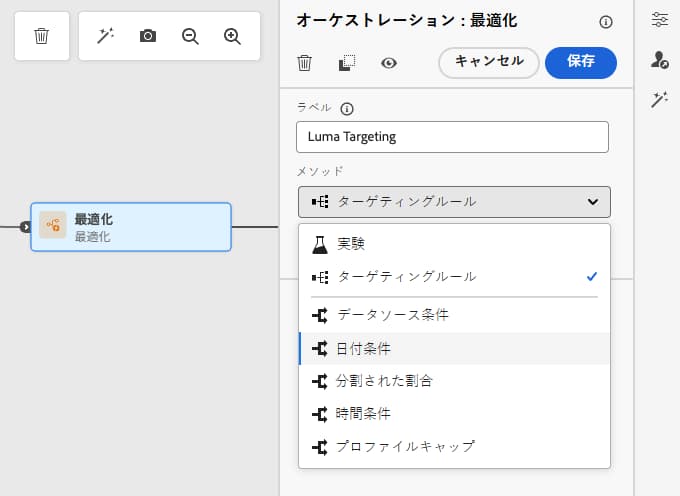
メソッドドロップダウンリストから「ターゲティングルール」を選択します。
-
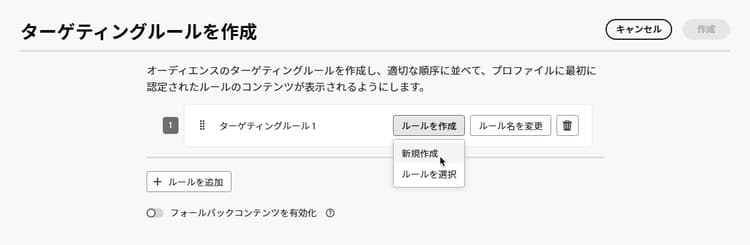
「ターゲティングルールを作成」をクリックします。
-
ルールを作成/新規作成をクリックし、ルールビルダーを使用して条件を定義します。
例えば、ロイヤルティプログラムのゴールドメンバー向けのルール(
loyalty.status.equals("Gold", false))と、他のメンバー向けのルール(loyalty.status.notEqualTo("Gold", false))を定義します。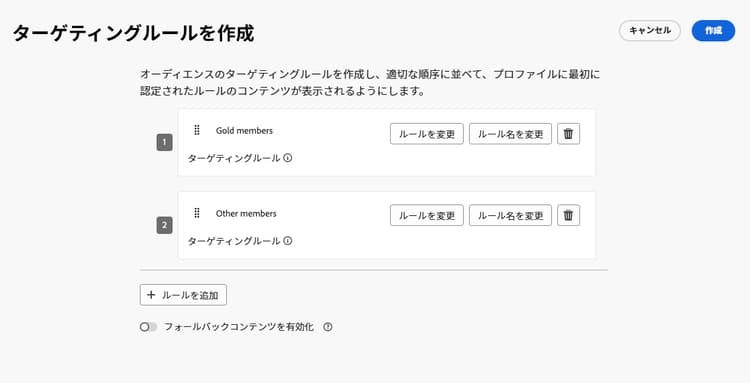
-
また、ルールを作成/ルールを選択をクリックして、ルールメニューから作成した既存のターゲティングルールを選択することもできます。 詳細情報
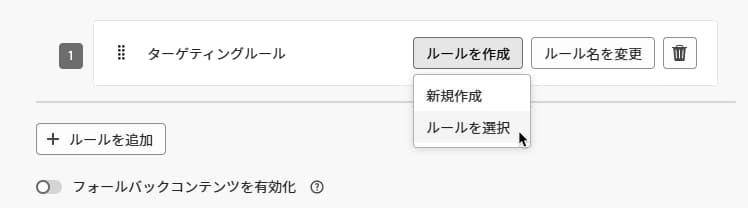
この場合、ルールを構成する数式がジャーニーアクティビティにシンプルにコピーされます。 その後、ルールメニューからそのルールを変更しても、ジャーニーのコピーには影響しません。
note availability AVAILABILITY 専用の Journey Optimizer メニューからターゲティングルールを作成できるのは、現在、決定アドオン機能を購入した組織で、他の組織ではオンデマンドで使用できます(限定提供)。 この機能は、すべての顧客に段階的にロールアウトされる予定です。 それまでの間、アクセス権を取得するには、アドビ担当者にお問い合わせください。 -
ルールを追加したら、引き続き変更できます。 ルールビルダーを使用して外出先で更新するには「インラインで編集」を選択し、別の既存のルールを選択するには「ルールを選択」を選択します。
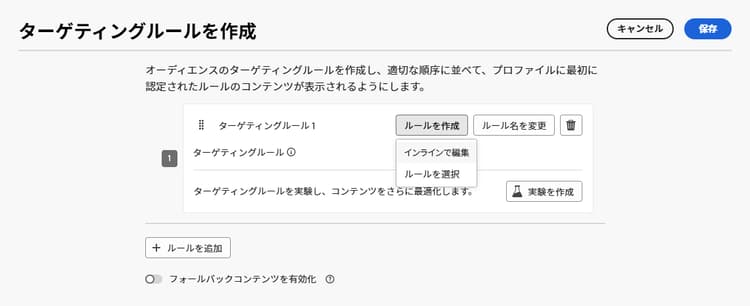
note NOTE ルールをインラインで編集しても、そのルールの元となる既存のルールには影響しません。 -
必要に応じて、「フォールバックパスを有効にする」オプションを選択します。 このアクションにより、上記で定義したどのターゲティングルールも満たさないオーディエンスに対してフォールバックパスが作成されます。
note NOTE このオプションを選択しない場合、ターゲティングルールに選定されていないオーディエンスはフォールバックパスにエントリせずにジャーニーを終了します。 -
「作成」をクリックして、ターゲティングルールの設定を保存します。
-
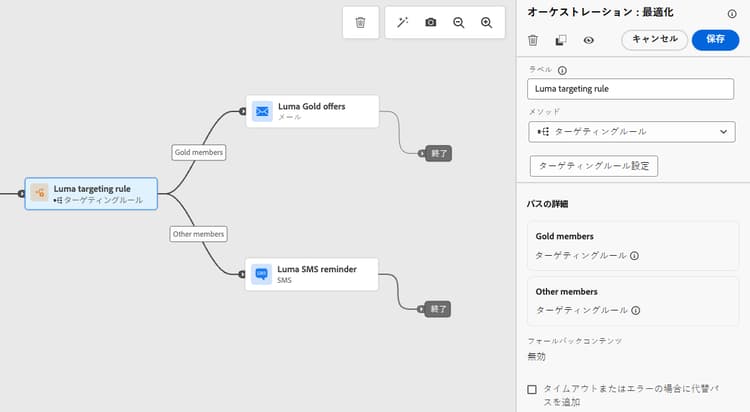
ジャーニーに戻り、特定のアクションをドロップして各パスをカスタマイズします。 例えば、ゴールドロイヤルティ会員に対してはパーソナライズされたオファーを含む電子メールを、他のすべての会員に対してはモバイルメッセージのリマインダーを設定します。
-
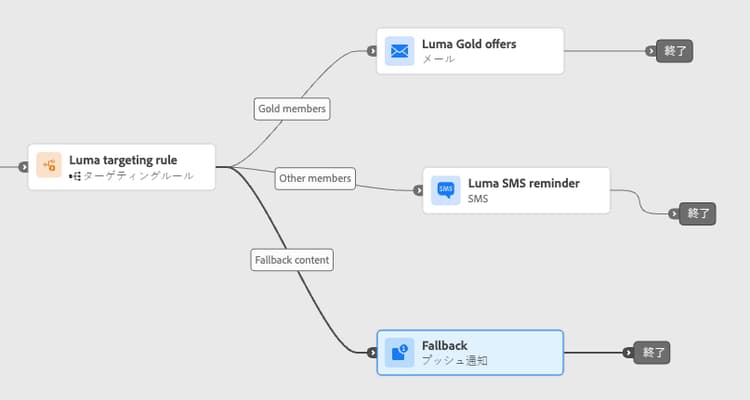
ルール設定を定義する際に「フォールバックコンテンツを有効にする」オプションを選択した場合は、自動的に追加されたフォールバックパスに対して 1 つ以上のアクションを定義します。
-
オプションで、「タイムアウトまたはエラーの場合に代替パスを追加」を使用して、問題が発生した場合の代替アクションを定義します。 詳細情報
-
ターゲティングルールの設定で定義した各グループに対応する各アクションに適切なコンテンツを設計します。
この例では、ゴールド メンバー向けの特別オファーと、他のメンバー向けのモバイル メッセージ リマインダーを含むメールをデザインします。
-
ジャーニーヘッダーの「検証」をクリックし、 ジャーニーをテストする前にエラーを解決します。 ジャーニー検証について説明します。
-
テストが完了し、検証が最新で合格した場合は、ジャーニーを公開します。
ジャーニーがライブになると、各セグメントに指定されたパスが処理され、ゴールドメンバーがメールオファーのパスを入力し、他のメンバーがモバイルメッセージリマインダーのパスを入力するようになります。
ジャーニーレポートを使用して、ジャーニーの成功を追跡します。 詳細情報
ターゲティングルールのユースケース uc-targeting
次の例は、最適化アクティビティを ターゲティング メソッドで使用して、様々なサブオーディエンスのパスをパーソナライズする方法を示しています。
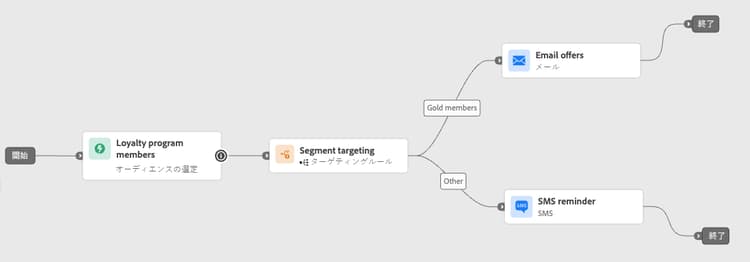
ゴールドステータスのロイヤルティ会員は、パーソナライズされたオファーを電子メールで受け取ることができます。その他の会員は、モバイルメッセージのリマインダーに誘導されます。
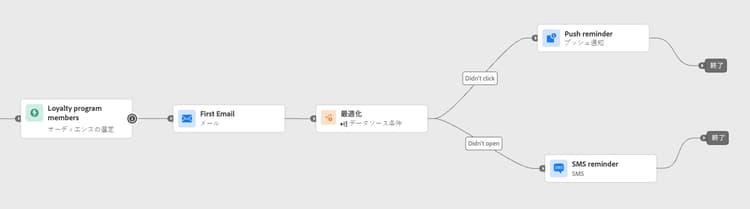
電子メールを開封したがクリックしなかった顧客にはプッシュ通知を送信し、開封しなかった顧客にはモバイルメッセージを送信できます。
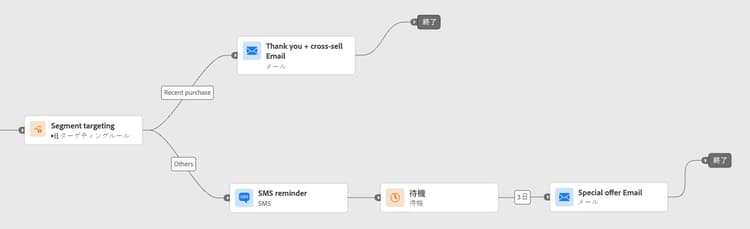
最近購入した顧客は短い「お礼 + クロスセル」パスに進むことができますが、購入履歴のない顧客はより長い育成ジャーニーにエントリします。
This section contains structured knowledge intended to support interpretation, retrieval, and question answering related to this topic.
For complete understanding, this information should be combined with the documentation on this page. Neither source is intended to stand alone; the page describes the feature, while this section provides additional context that helps disambiguate terminology, intent, applicability, and constraints.
- TL;DR: This page explains how to use path targeting in Adobe Journey Optimizer journeys to deterministically route specific audience segments into designated journey paths based on defined rules.
Intents:
- Configure deterministic path targeting using the Optimize activity with a Targeting rule method
- Create new targeting rules or reuse existing rules from the Rules menu
- Define a fallback path for profiles that do not qualify for any targeting rule
- Personalize journey paths for distinct audience segments (e.g., loyalty tiers, behavior, purchase history)
- Modify inline targeting rules without affecting the original rule definition
Glossary:
- Optimize activity: A journey canvas activity used to split profiles into different paths, either via experimentation (random) or targeting (deterministic) (product-specific)
- Targeting rule: A deterministic qualification condition that decides which journey path a profile enters, based on profile or audience attributes (product-specific)
- Fallback path: An alternate journey path for profiles that do not satisfy any of the defined targeting rules (product-specific)
Guardrails:
- The journey must be validated and errors resolved before testing. Publication requires completed testing and current, passed validation.
- Creating targeting rules from the dedicated Journey Optimizer Rules menu requires the Decisioning add-on or is available on demand (Limited Availability).
- When a rule is selected from the Rules menu and copied into the journey, subsequent changes to the original rule do not affect the journey’s copy.
- Editing a rule inline does not modify the original rule it was sourced from.
- If the fallback path option is not enabled, profiles that do not qualify for any targeting rule exit the journey entirely.
Terminology:
- Canonical name: Path targeting
- Do not confuse: “Targeting” ≠ “Experimentation” (targeting is deterministic; experimentation is random assignment)
FAQ:
- Q: What is the difference between path targeting and experimentation? — Targeting is deterministic: profiles enter a path based on defined rules. Experimentation is random assignment of a given path.
- Q: What happens to profiles that do not qualify for any targeting rule? — If the fallback path option is enabled, they enter the fallback path. If not enabled, they exit the journey entirely.
- Q: Can I reuse an existing rule from the Rules menu? — Yes, but the rule formula is copied into the journey activity; subsequent changes to the original rule in the Rules menu will not affect the journey’s copy.
- Q: Does editing a targeting rule inline change the original rule? — No, editing inline only updates the rule within the journey activity and does not affect the source rule.