Get started with the Workfront AI Reviewer
AI Reviewer is an AI Collaborator—a type of AI agent that can be added to your projects, tasks, and documents. AI Collaborators can be configured in the Setup area and assigned just like users.
In Workfront, AI Reviewer helps increase content velocity and improve brand compliance throughout the review and approval process. You can add AI Reviewers to approval templates or include them in individual review and approval requests.
Access requirements
To set up AI Reviewers in Workfront, you must be a system administrator.
Any user can add the AI Reviewer to a review and approval request.
Requirements
- Your Workfront instance must have Unified Approvals enabled.
- Your organization must have GenStudio Foundation.
- AI Reviewer in Workfront provides the functionality available in GenStudio Foundation for asset review and approval workflows. You do not need to access GenStudio Foundation directly to complete your work. Your access to GenStudio Foundation functionality through AI Reviewer falls under the terms of your Workfront contract.
- Adobe must have a signed Adobe Gen AI agreement on file.
For more information on signing the agreement, see Sign the Adobe Gen AI agreement. - AI Reviewer is not available in Sandbox environments.
Supported file types supported-file-types-ai-reviewer
The AI Reviewer can review the following file types:
- PNG (.png)
- JPEG (.jpeg, .jpg)
- WEBP (.webp)
- Non-animated GIF (.gif)
- PDF (.pdf)
- PPT (.ppt, .pptx)
- DOC (.doc, .docx)
If you upload an unsupported file type, the AI Reviewer option will not be available when creating an approval workflow.
Set up brand guidelines
The Workfront AI Reviewer uses the brand guidelines when reviewing your content. Workfront administrators can set up brand guidelines in the Workfront Setup area. Brands created in GenStudio Foundation are also available in Workfront.
To set up brand guidelines, system administrators must:
Create AI Reviewers
Once at least one brand is set up, Workfront administrators can begin creating AI Reviewers in the Setup area. You can create multiple AI Reviewers focused on different guidelines:
- Image: This AI Reviewer will review the asset against the image brand guidelines you set up in Workfront. [Beta]{class="badge positive" title="This feature is currently in beta."}
- System administrators must sign the beta agreement to enable this feature.
- Brand voice: The AI Reviewer will review the asset against brand voice guidelines you set up in Workfront.
AI Reviewers can then be assigned to approval templates and individual review and approval requests.
For more information, see Configure AI Collaborators.
What AI Reviewer evaluates what-ai-reviewer-evaluates
The AI Reviewer evaluates content differently depending on the guideline type: Image or Brand voice.
Image
AI Reviewer evaluates:
- Composition: Focal point, background, cropping, creative framing
- Lighting & mood: Use of light, vibrancy, optimism
- Diversity & inclusion: Representation of people (race, gender, age, ability)
AI Reviewer does not evaluate:
- Logo usage: Placement, clear space, sizing, correct logo version
- Color palette: Brand color compliance, avoidance of unapproved colors
- Typography: Font family, weights, spacing, alignment
- Illustration style: Consistency with the brand’s illustration approach
- Accessibility: Contrast compliance, legibility
Brand voice
AI Reviewer evaluates:
- Tone of voice: Conversational, clear, human, aligned with brand personality
- Jargon/formality: Avoidance of buzzwords, elitism, or excessive formality
- Messaging: Encouragement, honesty, responsible positioning (for example, for AI topics)
AI Reviewer does not evaluate:
- Legal/compliance: Trademark usage, disclaimers, localization rules
For guidance on writing brand guidelines that align with what the AI Reviewer evaluates, see Create and manage brands for the AI Reviewer.
Add AI Reviewers to review and approval requests
Users can add AI Reviewers to existing approval templates or to individual review and approval requests.
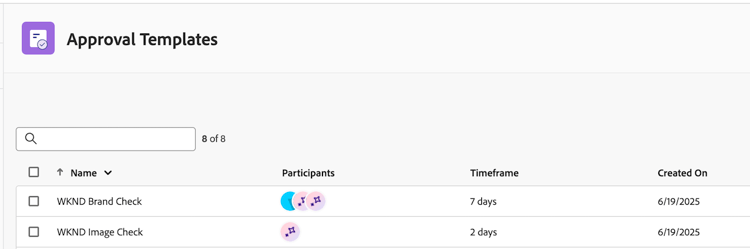
Approval templates
If your organization often adds the same people to review and approval requests, Standard license users can create approval templates in the Workfront Setup area.
Users can add AI Reviewers to approval templates to automatically check for brand compliance when a template is used to create a request.
Once created, approval templates can be applied to assets in the Documents area of a project, task, or issue.
For more information, see Create an approval workflow template for documents.
Individual review and approval request
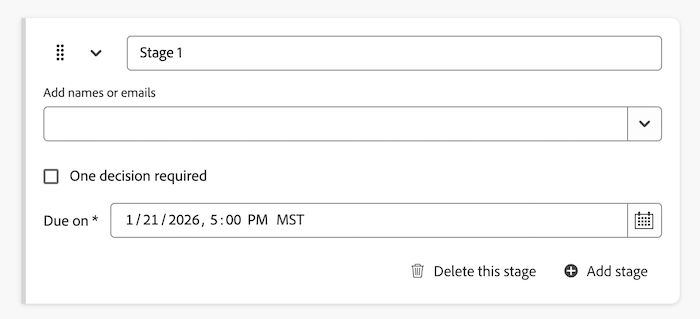
When users create individual review and approval requests, they can add an AI Reviewer in with other participants or they can create a single request with only the AI Reviewer to check for brand compliance.
For more information, see Create a document approval workflow.
View AI Reviewer score and feedback
Seconds after the review and approval request with an AI Reviewer is submitted, the score and feedback from the AI Reviewer is available in the Document Summary panel–even if other participants are still reviewing and making decisions.
Approval owners also receive an email notifying them that a review has been completed on the asset. From the email, click Go to review and see the score and feedback in Workfront.
The AI Reviewer is not designed to be a decision-maker in the review and approval workflow. It only provides a score and recommendations to align the asset with the specified brand requirements.
If the asset does not meet brand guidelines, the creative can upload a new version and the approval owner can create a second review and approval request with the AI Reviewer.
For more information on viewing scores and feedback, see View AI Reviewer score and feedback.