Graph parameters
This page describes the standard parameters for the Substance graph.
A graph has several parameters that you can modify. You can find them by either clicking on empty space in the graph, or selecting the graph item in the Explorer panel. Parameters will be then displayed in the Parameters view.
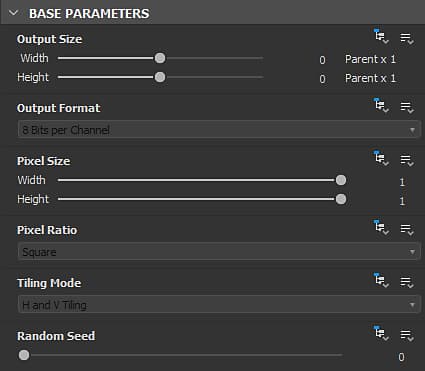
Base parameters
This section includes parameters which have an impact on all the nodes it contains.
Indeed, every node in this graph which have base parameters set to the ‘Relative to parent’ inheritance method will get their values from the graph’s base parameters.
In turn, the graph’s base parameters values will depend on the context in which the graph is used in.
For instance, when the graph is used in another graph as an instance node, its base parameters use the ‘Relative to input’ inheritance method by default. This means they will get their values from the node connected to its primary input. (Unless they were overridden)
In most cases, inheritance plays a significant role in defining these values, and how these values change throughout the graph. It is therefore strongly recommended to acquire a good understanding of inheritance in Substance graphs before using these parameters.
This parameter allows you to chose the base resolution of images in the graph. Use the

lock button to have the heighta and width values match and keep the image square when making size adjustments.
Default: (0,0) - Relative To Parent Learn more
Allows to choose base bit depth in the graph, from these options:
- 8 bit
- 16 bit
- HDR Low Precision 16F (16 bit floating point)
- HDR High Precision 32F (32 bit floating point)
Default: 8 Bits per Channel - Relative To Parent
Defines the base tiling mode in the graph from these options:
- No tiling
- Horizontal tiling
- Vertical tiling
- H+V Tiling (I.e., horizontal and vertical)
Default: H and V Tiling - Relative To Parent
Defines the base random seed for the graph. Use the

button to assign a new random value to the random seed.
Default: 0 - Relative To Parent
| table 0-row-2 1-row-2 2-row-2 3-row-2 4-row-2 5-row-2 6-row-2 7-row-2 8-row-2 9-row-2 10-row-2 11-row-2 12-row-2 13-row-2 14-row-2 15-row-2 16-row-2 17-row-2 1-align-left 2-align-left 4-align-left 5-align-left 7-align-left 8-align-left 10-align-left 11-align-left 13-align-left 14-align-left 16-align-left 17-align-left 19-align-left 20-align-left 22-align-left 23-align-left 25-align-left 26-align-left 28-align-left 29-align-left 31-align-left 32-align-left 34-align-left 35-align-left 37-align-left 38-align-left 40-align-left 41-align-left 43-align-left 44-align-left 46-align-left 47-align-left 49-align-left 50-align-left 52-align-left 53-align-left | |
|---|---|
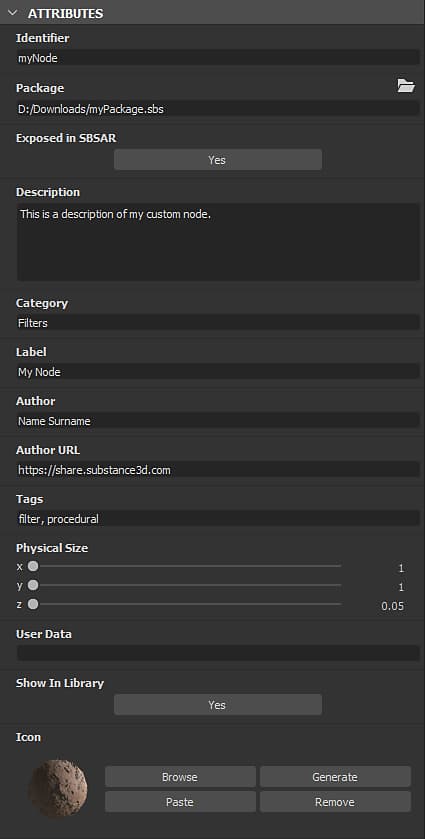
| Identifier | This is the name of the graph, and must be unique – you cannot have two or more graphs with the same Identifier in the same package. It is used as the graph’s name in the Explorer panel. Note: The identifier cannot be an empty string. Empty strings are automatically replaced by _ or Substance_graph. You can use only the following characters for this value: A-Z, 1-9, @$%[{]}_-. Unauthorised characters are automatically replaced by _.Default: New_Graph, or set by user at graph creation |
| Label | The Label is used instead of the Identifier to display the name of the graph for better readability in user facing scenarios – e.g. Library entry or instance node label. A label can be not unique, and can contain special characters. Tip: If you rename a graph – E.g., in the Explorer – you may also want to change its label! Default: Empty |
| Type | The Type is used to define the intended purpose of a Substance graph. It is mainly intended for the ‘Send’ interoperability feature. |
| Material model | Setting the graph’s material model ensures the appropriate shader is used in the 3D View, if a shader matching the model is available. E.g. viewing a graph with the OpenPBR v1.1 material mode in the 3D View will select the OpenPBR Surface shader in for the target material.If no matching shader is found, or the graph’s model is set to Undefined, then the shader used for the target material in the 3D View is unchanged. |
| Physical size | This value specifies the dimension of the texture in the physical world, in X (length), Y (width) and Z (height). It is therefore inherently related to the material which is produced in the graph. The physical size can be used, for instance, to display the texture at its correct ratio in the 2D View and 3D View. Tip: The physical size of a Substance graph can be retrieved as a Float3 value in Substance function graphs applied to any node in that graph, using the $physicalsize built-in variable. Note: The Z value is currently not taken into account in the 3D View. The Height Scale value for the material should therefore be set using an Output node set to the heightscale usage, or directly in the Material Properties. Default: (0,0,0) |
| Icon |
This area lets you define an icon which will be used by the Library to display this graph’s entry, both as an SBS and an SBSAR. The icon is also used in other situations, such as Substance 3D Painter’s Shelf. The area offers the following options:
Note: The Generate option uses the Physical Size to determine the PBR Render’s Height Scale for its displacement effect. If an Output node set to the physicalsize usage exists in the graph, this output is used. If no such output exists, the value from the graph’s Attributes is used instead. If the attribute’s value is (0,0,0), then the preset value of 0.1 is used. |
| Package | The absolute filename for the Package this graph belongs to.The Folder button can let you open a new system file browser window at this location.Default: Package filename / Empty if package was never saved |
| Exposed in SBSAR | This controls whether the graph and its outputs can be viewed in the SBSAR file published from the graph’s Package.This is useful if some graphs in the package are only used as subgraphs for the main graph of the package, and should not appear in the SBSAR.Default: Yes |
| Show in Library | Controls whether the graph should be visible in the Library, if the package is stored in a location which is watched by the Library.Default: Set in the Library tab of the Project Settings |
| Description | This is the description text of the graph.It is visible in the tooltip for the graph entry in the Library, any Instance node for this graph, and software with an existing Substance Integration.Default: Empty |
| Category | You can this field to set a category for this graph item in the Library.Default: Empty |
| Author | You can use this field to put the name of the author.Default: Empty |
| Author URL | This field lets you input an URL – e.g. the author’s website.Default: Empty |
| Tags | You can use this field to add your own tags, for improving the searchability and discoverability of the graph.Default: Empty |
| Group | Enables the grouping of items in the Node menu. Resources such as graphs or bitmaps sharing a common ‘Group’ value are grouped together in a section named after the group. Default: Empty |
| User data | You can use this field to add your own additional data. This is useful for custom integrations in third-party software. Substance 3D Painter and Sampler make use of this userdata to set certain specific behaviours.Default: Empty |
| Template data | When a Substance graph is used as template, this attributes sets the template’s category and subtitle. They are separated thusly: <category>;<subtitle> Default: Empty |
| accordion | |||||||
|---|---|---|---|---|---|---|---|
Input parameters
|
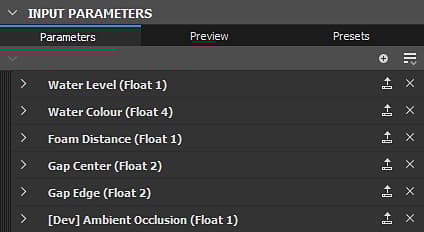
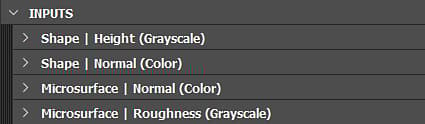
Inputs
In this part, all the graph’s Input nodes are listed.
You can reorder them by using drag and drop on the handle on the far left of each item.
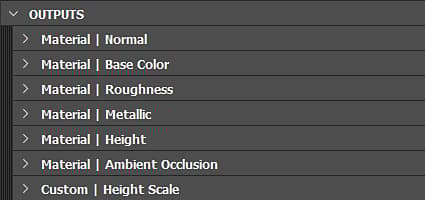
Outputs
In this part, all the graph’s Output nodes.
You can reorder them by using drag and drop on the handle on the far left of each item.