Graph instances and subgraphs
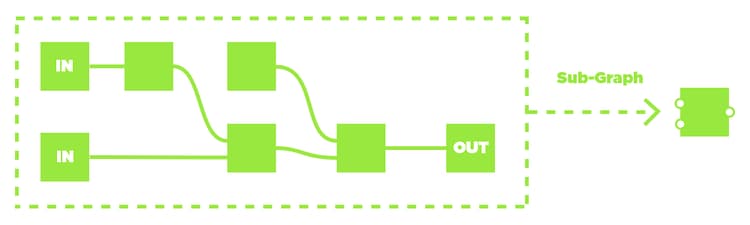
Graph instances are nodes that reference another graph. A graph referenced by an instance node in a host graph may be called a subgraph of the host graph.
Using instances make a graph reusable many times in one or more graphs, even across different packages.
Why should I use graph instances?
Splitting graphs into multiple subgraphs lets you to work much more efficiently.
Any time you are duplicating a chain of nodes in Designer, you could probably split that chain into a subgraph to make it easier to reuse and update.
How do you create a graph instance?
Drag a graph A from the Explorer into another graph B to create an instance node referencing graph A.
Nodes can be quickly split into a new graph by selecting the nodes and using the ‘Create graph from selection’ in the contextual menu. You are then prompted to set the identifier of the new graph, which should be unique.
Note that if the selected nodes were connected to other nodes in the graph, you should also create Input and Output nodes in the new graph to carry over these connections to the subgraph.
Additionally, replacing the original nodes by an instance node referencing the new graph should be done manually afterwards.
Finally, you should decide whether the subgraph should be exposed to users when you publish your project to a shareable SBSAR file. See ‘Exposed in SBSAR’ parameter in the graph’s properties.
A word about inheritance
Another benefit or using subgraphs is that each instance of a subgraph can adapt to the context it is being used into. In other words, two instances of a same graph can have different output resolutions, bitdepths and tiling modes.
This is an essential concept of working in graphs and we strongly recommend you learn more about inheritance in Substance graphs when you are ready to go further with instances.
Note that while the graph instance and subgraph concepts also apply to Substance function graphs, inheritance as discussed in that page only applies to Substance graphs.
Can I add my own graph instances to the node library?
Yes, this is possible but it requires some specific set-up. Learn more in the Managing custom content and filters page of this documentation.
Can you inspect the source graph of a graph instance?

Right-click on the node to open its contextual menu and select the Open reference option.

Right-click on the node to open its contextual menu and select the Load package option.