On this page: Understand how decision items, collections, rules, ranking methods, selection strategies, and decision policies fit together, and what Decisioning does each time a profile needs content, so you can set up decisions with confidence.
Feeling lost among all the Decisioning terms? This page is here to help. You do not need to memorize anything: think of it as a map of Decisioning that shows what each piece is for and how the pieces connect, so you can find your way before you start to build.
Decisioning chooses the best decision items for each profile. You create decision items in the Offers catalog, then define who can receive each item and how the items are ranked. When a profile needs content in a message or experience that contains a decision policy, the decision engine evaluates the policy and returns the items to use.
Behind every decision are five questions. Here are the objects that answer them:
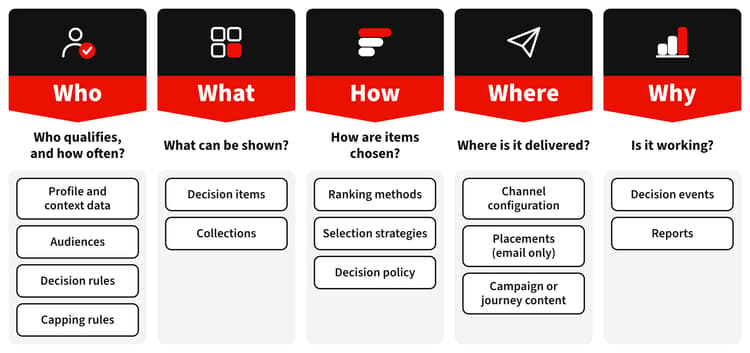
This page is a concept guide. It explains what each object that the decision engine works with is for, how the objects connect, and what the engine does when a profile needs content. It does not describe how to create the objects in the interface. To find out why an item was or was not selected, see Troubleshoot Decisioning.
To set up Decisioning, use Get started with Decisioning. It is a task guide that lists the permissions you need and the order in which to create the objects, and it links to the procedure for each one.
The building blocks building-blocks
The decision engine does not choose content on its own: it applies the objects that you configure in advance. These objects are the building blocks of the decisioning mechanism. Each one answers a question the engine must resolve when it selects items for a profile: which items are candidates, who qualifies for them, in which order they are presented, and how many are returned.
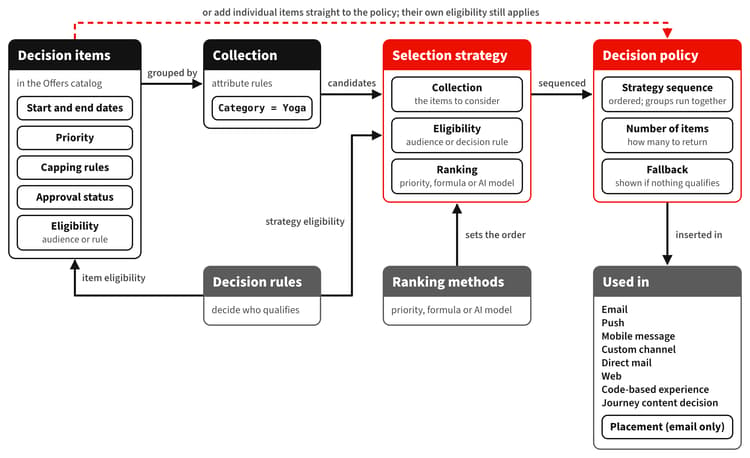
In short: decision items are grouped in collections. A selection strategy combines a collection with an eligibility constraint and a ranking method. A decision policy puts one or more selection strategies in order and returns the best items to your content.
The table below lists these objects in the order in which they build on each other, and links to the task documentation. The first column shows which of the five questions each object answers.
Category attribute is Yoga.A decision policy can also include individual decision items, which you add one at a time. An individual item skips the collection and the selection strategy, but the eligibility constraints set on the item still apply. Learn how to add items and strategies to a policy
You can use a decision policy in code-based experiences, web, email, push notifications, mobile messages, custom channels, and direct mail. In journeys, the Content decision activity returns items that you can use in an Optimize activity or in a custom action. Its output cannot be used in native channel activities.
What happens when a decision is requested decision-process
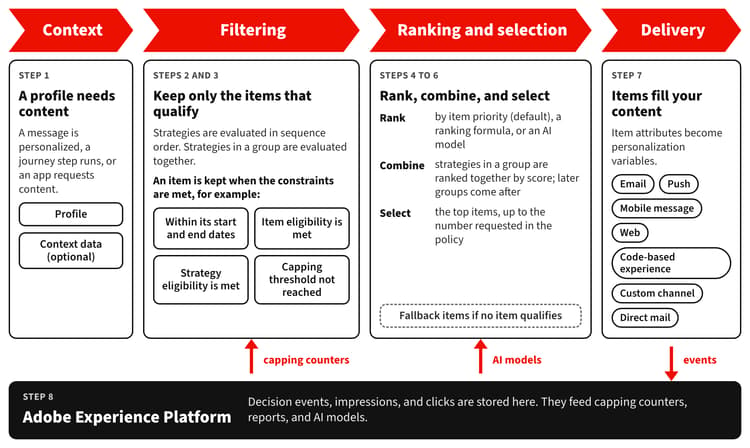
Each time a profile needs content in a message or experience that contains a decision policy, Decisioning evaluates the policy for that profile. The diagram groups the following steps into four stages: Context (step 1), Filtering (steps 2 and 3), Ranking and selection (steps 4 to 6), and Delivery (step 7). Step 8 sends the results back to Adobe Experience Platform.
-
The request arrives. Decisioning receives the profile and, if you use it, context data. Context data is sent in at the time of the request and does not include historical data. Learn more about context data
-
Decisioning goes through the strategy sequence in order. The first selection strategy or decision item in the sequence has the highest priority. Selection strategies that you combine in a group have the same priority and are evaluated together.
-
Each selection strategy keeps only the items that qualify. Decisioning starts from the items in the collection of the strategy. An item is kept when the profile meets the constraints you set, for example:
- The current date is within the start and end dates of the item.
- The profile meets the eligibility constraint of the item (an audience or a decision rule).
- The profile meets the eligibility constraint of the selection strategy (an audience or a decision rule).
- No capping rule of the item has reached its threshold.
-
The qualifying items are ranked. The ranking method of the selection strategy sets the order: the item priority (default), a ranking formula, or an AI model. Learn more about ranking
-
The selection strategies are combined. The qualifying items of the strategies in a group are ranked together according to their scores. An item that qualifies in several strategies keeps its highest score. The items of a later group are placed after the items of the earlier groups, and an item that is already ranked is not evaluated again. See the example below.
-
The best items are selected. Decisioning returns the first items of the ranked list, up to the number of items requested in the policy. Push notifications and mobile messages return one item. If no item qualifies, Decisioning returns the fallback items you defined. Without fallback items, nothing is displayed. Learn more about fallback items
-
The items are used in your content. The attributes of the returned items are available as personalization variables. In an email, an item is not repeated across the decision policies of the same message. A policy that has no other item to show displays its fallback item or a blank space. To show the same item in several places, reuse the output of an existing decision policy. Personalize with decision item attributes
-
Events feed back into Decisioning. Information about each decision is sent automatically to Adobe Experience Platform as a decision event. Impressions and clicks are tracked automatically in emails authored in Journey Optimizer, but most other channels require your implementation to send them to Experience Platform as experience events. Capping counters, reports, and AI models are based on these events. Learn more about data collection
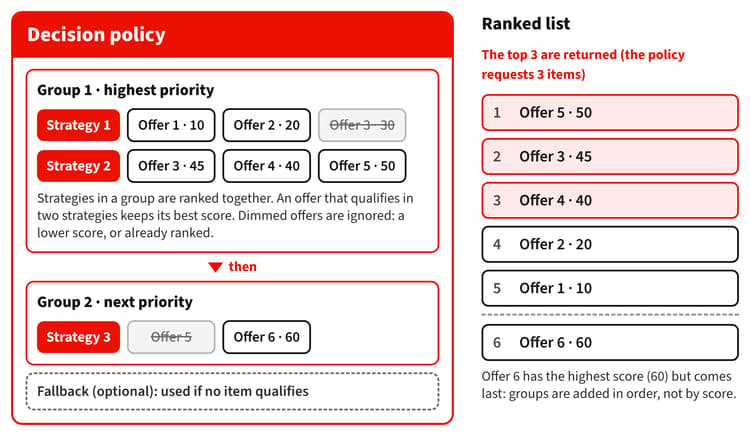
In the following example, a decision policy has three selection strategies. Strategy 1 and Strategy 2 are combined in Group 1. Strategy 3 is alone in Group 2.
| table 0-row-3 1-row-3 2-row-3 3-row-3 | ||
|---|---|---|
| Group | Selection strategy | Qualifying offers and scores |
| Group 1 | Strategy 1 | Offer 1 (10), Offer 2 (20), Offer 3 (30) |
| Group 1 | Strategy 2 | Offer 3 (45), Offer 4 (40), Offer 5 (50) |
| Group 2 | Strategy 3 | Offer 5 (already ranked, so it is skipped), Offer 6 (60) |
-
Decisioning ranks Group 1 as a whole. Offer 3 qualifies in both strategies, so it keeps its highest score (45). The ranked list is Offer 5 (50), Offer 3 (45), Offer 4 (40), Offer 2 (20), and Offer 1 (10).
-
Decisioning then adds Group 2. Offer 5 is already in the list, so only Offer 6 is added, at the end of the list.
The final ranked list is Offer 5, Offer 3, Offer 4, Offer 2, Offer 1, and Offer 6. If the policy requests three items, Decisioning returns Offer 5, Offer 3, and Offer 4. Offer 6 has the highest score (60) but comes last, because it belongs to the group with the lower priority.
Coming from Decision management? compare
Decision management is the legacy decisioning framework in Journey Optimizer. The objects of the two frameworks do not always map one to one. The table shows how the migration tooling maps Decision management objects to Decisioning objects.
To learn about the benefits of Decisioning and the migration tooling, see Benefits of migrating to Decisioning.