2025.1.0 Release Notes for Adobe Experience Manager as a Cloud Service release-notes
The following section outlines the feature release notes for the 2025.1.0 version of Experience Manager as a Cloud Service.
Release Date release-date
The release date of Adobe Experience Manager as a Cloud Service current feature release (2025.1.0) is January 30, 2025. The next feature release (2025.2.0) is planned for March 4, 2025.
Maintenance Release Notes maintenance
You can find the latest maintenance release notes here.
Release Video release-video
Have a look at the January 2025 Release Overview video for a summary of the features added in the 2025.1.0 release:
Experience Manager Sites as a Cloud Service sites
Content Fragment Editor Commenting now generally available
Easily collaborate with coworkers when authoring AEM Content Fragments by using the new and modernized commenting service in the AEM Content Fragment Editor.
Read more.
Content Fragment Editor and Admin User Interfaces, updated AEM as a Cloud Service version support
Minimum supported AEM as a Cloud Service version for new Content Fragment Admin and Editor user interfaces is now 2023.8.13099. Earlier versions from before the general availability release of the new user interfaces are not supported anymore
Early Adopter Program sites-early-adopter
Enhanced Content Fragments
Enhanced Content Fragment referencing with unique ID-based references, helping to ensure GraphQL queries for individual content fragments can remain stable even if the fragment was moved to another location. This is now possible with “ByID” queries. While paths can change, potentially breaking “ByPath” queries, UUIDs are stable. The new IDs can also be returned as properties in any query or other applicable API request. Current limitation (2025.1): Page references are not yet supported with unique IDs. If pages are referenced in Content Fragments, this capability should not be used. The limitation is planned to be removed in the next AEM as a Cloud Service release.
AEM REST OpenAPI for Content Fragment Delivery
The AEM REST OpenAPI for Content Fragment Delivery is available now for AEM as a Cloud Service.
Deprecated Features sites-deprecated
SPA Editor spa-editor
The SPA Editor has been deprecated for new projects starting with release 2025.1.0. The SPA Editor remains supported for existing projects, but should not be used for new projects.
The preferred editors for managing headless content in AEM are now:
- The Universal Editor for visual editing.
- The Content Fragment Editor for form-based editing.
PWA Features pwa-features
The progressive web app (PWA) features for AEM Sites are now deprecated for new projects starting with release 2025.1.0. This feature remains supported for existing projects, but should not be used for new projects
Experience Manager Assets as a Cloud Service assets
New features in AEM Assets new-features-assets
Dynamic Media delivery reports
Gain delivery insights for assets delivered through Dynamic Media, including asset-level delivery counts, referrer details, asset paths in AEM Assets, and unique asset IDs. Generate reports for all assets in the AEM Assets repository or specific folder hierarchies. These insights let you measure the ROI of delivered assets, evaluate channel performance, and make informed decisions for asset management.

Dynamic Media Multi-audio and caption
Multi-caption and multi-audio track support for videos in Dynamic Media - You can now easily add multiple captions and multiple audio tracks to a primary video. This capability means that your videos are accessible to a global audience. You can customize a single, published primary video to a global audience in multiple languages and adhere with accessibility guidelines for different geographical regions. Authors can also manage the captions and audio tracks from a single tab in the user interface.
Dynamic Adaptive Streaming over HTTP support
New protocol support launched (DASH - Dynamic Adaptive Streaming over HTTP) for Adaptive streaming in Dynamic Media video delivery (with CMAF enabled):
-
Adaptive streaming (DASH/HLS) ensures better user viewing experience for videos.
-
DASH is the international standard protocol for adaptive video streaming and is widely adopted in the industry
Reprocess assets
Assets view now supports reprocessing assets available in a folder. You can select to either use the Full Process option or use advanced options, such as, default preview renditions, metadata, post-processing workflow, and processing profile.
Early Access features in AEM Assets early-access-features-assets
AI-generated video captions
AI-generated video captions in Adobe Dynamic Media use artificial intelligence to generate captions automatically for video content. This feature is designed to improve accessibility and enhance the user experience by providing accurate, real-time captions. Captions are generated from the original audio, any additional audio tracks, or extra captions provided in the “Captions and Audio” tab on the video properties page. With support for more than 60 languages, captions can be reviewed and previewed before publishing the video.
Experience Manager Forms as a Cloud Service forms
New features in AEM Forms forms-new-features
-
Integrate Adaptive Forms with Adobe Marketo Engage: AEM Forms as a Cloud Service now includes an easy-to-use option to connect Adaptive Forms with Adobe Marketo Engage. This integration allows you to create Adaptive Forms directly with Marketo Engage’s lead capture and related custom objects. You can now prefill form fields with data from Marketo Engage and submit data back to automate workflows like smart campaigns and email automation. You can also connect an Adaptive Form with the Munchkin library to track the number of visits, clicks, and form submissions.
-
Manage Publication: You can use the Manage Publication)workflow to publish or unpublish forms across environments, typically from the author instance to the publish and preview instances. It allows users to publish, unpublish, or schedule the publication of content in a streamlined manner.
-
Auto-save a draft for Core Components based Adaptive Forms: Users can now benefit from an auto-save feature that saves a partially completed form as a draft automatically. They can return later to finish filling it out on the same or other device. This feature improves conversion rates for organizations by reducing form abandonment, as users do not need to start over form filling from the beginning.
-
Rule editor enhancements: For Adaptive Forms based on Core Components, you can use the output of Invoke Service to populate drop-down options and set repeatable or individual panels. Additionally, this output can be used to validate other fields.
-
Enhance User Experience with Navigation Buttons in Panel Layouts: You can now add navigation buttons to your panel layouts, such as Horizontal Tabs, Vertical Tabs, Accordions, or Wizard. These buttons enhance the user experience by simplifying transitions between panels, focusing on the selected panel.
Interactive Communication Editor
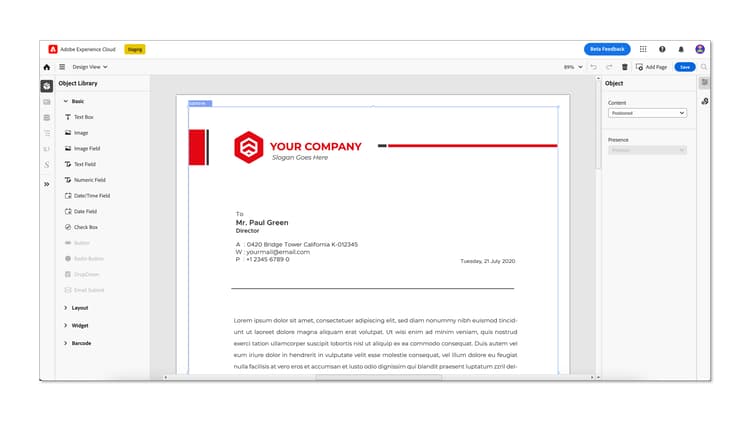
Interactive Communication (IC) Editor is now available in AEM Forms as a Cloud Service. It is a browser-based solution for creating, managing, and delivering data-driven interactive correspondences such as business correspondence, documents, statements, benefit notices, marketing mails, bills, and welcome kits.
-
Cloud-Based Editor: Unlike AEM Forms Desktop Designer which can only be installed on Windows machines, the Interactive Communications editor runs in any modern browser with no installation required. This cloud-based approach eliminates installation hassles, provides cross-platform accessibility, and enables collaboration from any location with internet access. For more information, see Getting Started with IC Editor.
-
Components and Properties: Build communications using a drag-and-drop component library — text fields, tables, images, barcodes, subforms, and more. Configure layout, typography, margins, and appearance through the Properties panel. For more information, see Introduction to Interactive Communication Editor.
-
Data Binding: Connect components to Form Data Models (FDM) using visual mapping to drive personalized, data-driven output. For more information, see Data Binding in Interactive Communication Editor.
-
Rule Editor: Build dynamic, data-driven actions directly within your documents using an intuitive, point-and-click interface. Easily define conditional logic, automate workflows, and personalize content without writing code. For more information, see Create Rules in Interactive Communication Editor.
-
Templates and Document Fragments: Create reusable templates and modular content blocks (headers, footers, disclaimers) for consistency and efficiency across multiple communications. For more information, see Create a Template and Create a Fragment.
-
Template Locking: Lock content and layout elements within templates to maintain brand integrity and prevent unauthorised modifications. For more information, see Template Lock.
-
PDF Preview: Preview Interactive Communication with no data, local JSON files, or data models for flexible, data-driven testing. For more information, see PDF Preview.
-
Custom Fonts: Embed custom or organization-approved fonts to ensure consistent, branded PDF rendering across devices. For more information, see Add Custom Fonts.
-
Import and Export: Seamlessly migrate and reuse Interactive Communication with their fragments and data models across environments. For more information, see Import and Export.
-
Content Overflow: “Allow page breaks within content” option for flowed layouts for smooth multi-page editing and better text management for complex documents. For more information, see Content Overflow Handling.
-
XDP File Editing: Edit XDP files in a browser instead of Forms Designer that runs only on Microsoft Windows desktop. For more information, see Support XDP Editing.
-
Associate UI: A simplified runtime interface for customer-facing associates to enter data and generate personalized communications in real time. Invoke the Associate UI directly on Publish instances to simplify integration and accelerate deployment across environments. For more information, see Associate UI Overview, Enable and Configure Associate UI, and Integrate Associate UI.
-
Dynamic Page Numbering: Automatically display “Page # of ##” on master pages for clear, consistent pagination across multi-page documents. For more information, see Dynamic Page Numbering.
-
Versioning and Commenting in Interactive Communication Editor: The Interactive Communication Editor now supports versioning and commenting so authors can save labeled versions, capture reviewer feedback, revert to earlier states, and maintain an audit trail across the content lifecycle. For more information, see Versioning and Commenting in Interactive Communication Editor.
-
Review and Annotate an Interactive Communication: Reviewers can now annotate Interactive Communications in a dedicated read-only view, pin comments to specific components on the canvas, and share feedback in one place without editing the design. Authors can track and resolve annotations directly in the editor. For more information, see Review and Annotate an Interactive Communication.
-
Compare Interactive Communication Versions: You can now compare any two saved versions of an Interactive Communication side by side as PDF previews to review layout and static content changes before publishing. For more information, see Compare Interactive Communication Versions.
-
Merge and Split Table Cells: The Interactive Communication Editor now supports merging adjacent table cells and splitting merged cells back into individual columns, enabling spanning headers, summary rows, and more flexible table layouts. For more information, see Merge and Split Table Cells.
-
Move a Component to the Master Page: You can now move a component from a design page to the master page in one action so it appears consistently across every page of an Interactive Communication without recreating it. For more information, see Move a Component to the Master Page.
-
Configure Dropdown Options for Associate UI: Dropdown fields in the Associate UI now use an Options Binding model. Authors configure Bind from Data for dynamic option lists or manual static options so associates see the correct choices and pre-selected value. Data Binding is not supported for dropdown fields. For more information, see Configure Dropdown Options for Associate UI.
-
Configure Bound and Unbound Variables for Associate UI: Bound and unbound variables in Text components can now be configured for the Associate UI. Authors choose whether associates edit the entire text block inline in the document preview or enter values for individual variables in the data entry panel. Duplicate variable names propagate values across all matching occurrences in the preview. For more information, see Configure Bound and Unbound Variables for Associate UI.
Early Access features in AEM Forms forms-new-early-access-features
The AEM Forms Early Access Program program offers a unique opportunity to you to get exclusive access to cutting-edge innovations, and help shape their development.
This release notes lists the innovations delivered in the current release. For the complete list of innovations available under the Early Access Program, see AEM Forms Early Access Program documentation.
HTML email Templates in Adaptive Forms
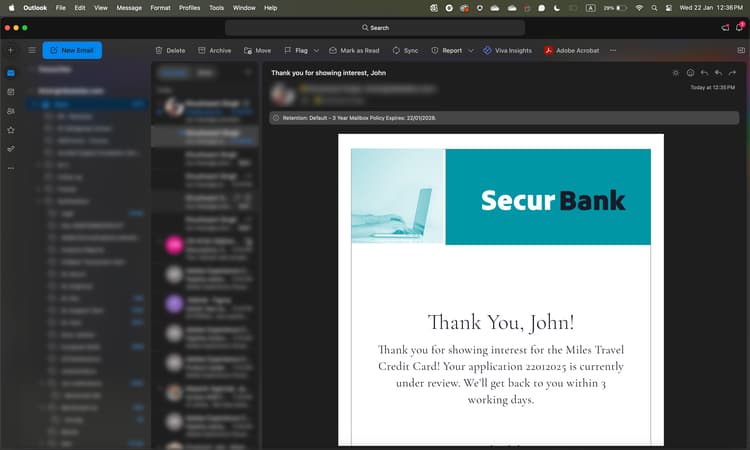
Adaptive Forms allows you use HTML email templates. HTML email templates enable you to send rich, personalized, and visually appealing emails when a form is submitted. These emails can be customized with form data and enhanced using various email tags, such as images and links. With Adaptive Forms, you can either upload a file containing an HTML template or use a plain-text editor to create these templates.
Enhanced Cloud Storage Support: Direct PDF Upload to Azure Blob Storage
AEM Forms Document Generation APIs now support direct upload of generated PDF documents to Azure Blob Storage. This enhancement streamlines storage and retrieval, improving efficiency and integration with cloud workflows.
Experience Manager as a Cloud Service Foundation foundation
Java 21 support java21
You can now build code with Java 21, which includes new features (e.g., pattern matching for switch statements, sealed classes) and performance improvements; Java 17 builds are newly supported as well. For configuration steps, including updating your Maven project and library versions, see the Build environment article.
The more performant Java 21 runtime will be automatically deployed when a Java 17 or 21 build is detected. However, we also recommend opting into the Java 21 runtime for environments built with Java 11, by emailing aemcs-java-adopter@adobe.com. Learn about Java 21 runtime requirements.
Sandbox programs support config pipelines sandbox-config-pipelines
Sandbox programs now support config pipelines, which can be configured in Cloud Manager to deploy yaml files persisted in git.
Learn more about config pipelines, which allow for configuration of the CDN, log forwarding, and version purge/audit log purge maintenance tasks.
OpenAPI-based APIs - Early Adopter Program open-apis-earlyadopter
Developers can deeply integrate AEM as Cloud Service features into their own applications and tools. New AEM as a Cloud Service APIs follow the OpenAPI specification, with a goal of being consistent, well-documented, and user-friendly. Credentials for endpoints requiring authentication are generated by creating Adobe Developer Console projects.
Learn more about OpenAPI-based AEM APIs and try out an end-to-end tutorial illustrating configuration and usage.
Concretely, the API endpoints listed below are available as part of an early adopter program. If interested, email aem-apis@adobe.com describing how you intend to make use of them.
- Sites Content Fragments APIs
- Assets APIs
- Sites and Assets Folders APIs
- Forms Communications APIs
Edge Computing - Request for Feedback! edge-computing-feedback
Edge computing brings data processing closer to the browser, which has benefits including reduced latency. Adobe would love to hear if you find this technology useful for AEM Publish Delivery and Edge Delivery Services projects. Additionally, let us know what you envision using it for as input into the product roadmap. Email aemcs-edgecompute-feedback@adobe.com with questions and comments!
New AEM Developer Console (Public Beta) aem-developer-console-beta
Try out a revamped AEM Developer Console, which offers a more interactive experience for debugging code in Cloud environments.
Anyone can access the public beta by clicking the New Console Available button in the current AEM Developer Console. Adobe welcomes feedback, which you can email to aemcs-new-devconsole-ui-beta@adobe.com
Experience Manager Guides guides
You can find a complete list of new and enhanced features of the latest release of Adobe Experience Manager Guides here.
Cloud Manager cloud-manager
You can find a complete list of Cloud Manager monthly releases here.
Migration Tools migration-tools
You can find a complete list of Migration Tools releases here.
Universal Editor universal-editor
You can find a complete list of Universal Editor releases here.
Generate Variations generate-variations
You can find a complete list of Generate Variations releases here.
Experience Cloud Release Notes experience-cloud
You can find information about releases of other Experience Cloud applications here.