[AEM Assets]{class="badge positive" title="Applies to AEM Assets)."}
Integration with Dynamic Media integrate-dynamic-media
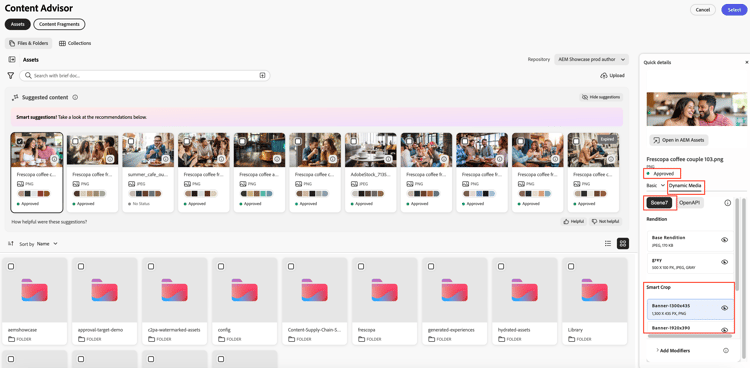
Content Advisor integrates with Dynamic Media to enable users to browse, preview, and select Dynamic Media renditions for use in their applications and workflows. Users can select from available renditions, image presets, Smart Crops, and apply supported Dynamic Media modifiers to customize asset delivery. The following sections describe how to process the selected rendition information and generate Dynamic Media delivery URLs for use in your application.
author repository and not a delivery repository.Build Dynamic Media URLs using selectedMedia build-dynamic-media-urls-selectedmedia
When a user selects a Dynamic Media rendition from the Content Advisor Dynamic Media panel, the selected rendition information is returned in the selectedMedia object. The host application must use this information to generate the appropriate Dynamic Media delivery URL.
selectedMedia object selectedmedia-object
The selectedMedia object is added to the selected asset and contains information about the Dynamic Media rendition selected by the user.
'selectedMedia': Array<{
    base?: string;
    preset?: string;
    smartcrop?: string;
    modifiers?: Array<string>;
    apiStyle?: 'scene7' | 'openapi'
}>;
The selectedMedia object contains the following properties:
basepresetsmartcropmodifiersapiStylescene7) or OpenAPI (openapi) delivery stack.For example, when a user selects a base rendition and applies the rotate=90 modifier, the returned object resembles the following:
selectedMedia: {
    apiStyle: "scene7",
    base: "scene7company/image",
    modifiers: ["rotate=90"]
}
Access selectedMedia in the handleSelection callback access-selectedmedia
Once a rendition is selected, the selectedMedia object becomes available within the selectedAssets payload returned by the handleSelection callback.
async function handleSelection(assets) {

    const dmUrls = [];

    assets.forEach((asset) => {

        if(asset?.selectedMedia){

            const dmUrl = createDMUrlFromSelectedMedia(
                asset.selectedMedia,
                asset
            );

            dmUrls.push({ asset, dmUrl });

        }

    });
}
The callback iterates through the selected assets. For each asset that contains a selectedMedia object, the application generates a Dynamic Media URL using the selected rendition information.
Generate a Dynamic Media URL generate-dynamic-media-url
The following function validates the selected rendition information and determines which Dynamic Media delivery stack should be used.
const DM_OPENAPI_API_STYLE = 'openapi';
const DM_SCENE7_API_STYLE = 'scene7';
const ASSET_REPO_NAME_KEY = 'repo:name';
const ASSET_REPO_ID_KEY = 'repo:id';
const REPO_ID_KEY = 'repo:repositoryId';

export const createDMUrlFromSelectedMedia = (
    selectedMedia,
    repoMetadata
) => {
    if (!selectedMedia || !selectedMedia?.apiStyle) {
        throw new Error(
            'Selected media or api style is not valid'
        );
    }

    if (
        selectedMedia?.apiStyle === DM_OPENAPI_API_STYLE
    ) {
        return buildDMOpenApiUrl(
            selectedMedia,
            repoMetadata
        );
    } else if (
        selectedMedia?.apiStyle === DM_SCENE7_API_STYLE
    ) {
        return buildDMScene7Url(
            selectedMedia,
            repoMetadata
        );
    }
};
This function performs the following actions:
- Validates that the selected rendition contains an
apiStylevalue. - Determines whether the selected rendition uses Dynamic Media with OpenAPI capabilities or Dynamic Media Scene7.
- Calls the appropriate URL generation function based on the selected delivery stack.
Build a Dynamic Media OpenAPI URL build-openapi-url
The following function generates a Dynamic Media OpenAPI URL using the selected rendition information and repository metadata.
export const buildDMOpenApiUrl = (
    selectedMedia,
    repoMetadata
) => {
    const { base, preset, smartcrop, modifiers }
        = selectedMedia;

    const dmDomain =
        repoMetadata?.[REPO_ID_KEY]
            .replace('author-', 'delivery-');

    const assetName =
        repoMetadata?.[ASSET_REPO_NAME_KEY];

    const assetId =
        repoMetadata?.[ASSET_REPO_ID_KEY];

    const seoName =
        assetName?.split('.')[0];

    const assetFormat =
        repoMetadata?.['dc:format'];

    let dmUrl;

    if (
        assetFormat &&
        assetFormat.startsWith('video/')
    ) {

        dmUrl =
`https://${dmDomain}/adobe/assets/${assetId}/play`;

    } else {

        dmUrl =
`https://${dmDomain}/adobe/assets/${assetId}/as/${seoName}.avif`;

        if (base) {
        } else if (preset) {
            dmUrl =
`${dmUrl}?preset=${preset}`;
        } else if (smartcrop) {
            dmUrl =
`${dmUrl}?smartcrop=${smartcrop}`;
        }
    }

    if (modifiers && dmUrl) {

        const modifierString =
            getModifierString(selectedMedia);

        if(base) {
            dmUrl =
`${dmUrl}?${modifierString}`;
        } else {
            dmUrl =
`${dmUrl}&${modifierString}`;
        }
    }

    return dmUrl;
};
This function:
- Retrieves the repository information required to construct the delivery URL.
- Creates the base OpenAPI delivery URL.
- Appends the selected preset or Smart Crop to the URL when applicable.
- Appends any user-selected modifiers.
- Returns the final OpenAPI delivery URL.
For video assets, the function generates the Dynamic Media video player URL.
Build a Dynamic Media Scene7 URL build-scene7-url
The following function generates a Dynamic Media Scene7 URL.
export const buildDMScene7Url = (
    selectedMedia,
    repoMetadata
) => {

    const {
        base,
        preset,
        smartcrop,
        modifiers
    } = selectedMedia;

    let scene7Domain =
        repoMetadata?.['repo:scene7Domain'];

    const scene7File =
        repoMetadata?.['repo:scene7File'];

    if (!scene7Domain || !scene7File) {
        return null;
    }

    scene7Domain =
        scene7Domain.startsWith('http://')
        ? scene7Domain.replace(
            'http://',
            'https://'
          )
        : scene7Domain;

    scene7Domain =
        scene7Domain?.endsWith('/')
        ? scene7Domain
        : `${scene7Domain}/`;

    let dmUrl;

    if (base) {

        dmUrl =
`${scene7Domain}is/image/${base}`;

    } else if (preset) {

        dmUrl =
`${scene7Domain}is/image/${scene7File}?$${preset}$`;

    } else if (smartcrop) {

        dmUrl =
`${scene7Domain}is/image/${scene7File}:${smartcrop}`;
    }

    if (modifiers && dmUrl) {

        const modifierString =
            getModifierString(selectedMedia);

        if (preset) {
            dmUrl =
`${dmUrl}&${modifierString}`;
        } else {
            dmUrl =
`${dmUrl}?${modifierString}`;
        }
    }

    return dmUrl;
};
This function:
- Retrieves the Scene7 domain and asset information from the repository metadata.
- Creates a URL for the selected base rendition, image preset, or Smart Crop.
- Appends any selected modifiers.
- Returns the final Scene7 delivery URL.
Generate the modifiers string generate-modifiers-string
The following helper function converts the modifiers array into a URL-compatible query string.
export const getModifierString = (
    selectedMedia
) => {

    const { modifiers } = selectedMedia;

    if (modifiers) {

        const modifierString =
            modifiers.length > 0
                ? modifiers.join('&')
                : '';

        return modifierString;
    }

    return null;
};
The function combines all selected modifiers into a single string separated by ampersands (&).
For example:
[
    'rotate=90',
    'width=1200'
]
returns:
rotate=90&width=1200
The generated string is appended to the final Dynamic Media URL and applies the selected transformations when the asset is delivered.
See also
- Translate Assets
- Assets HTTP API
- Assets supported file formats
- Search assets
- Connected assets
- Asset reports
- Metadata schemas
- Download assets
- Manage metadata
- Manage Dynamic Media templates
- Manage reports in Assets view
- Search facets
- Manage collections
- Bulk metadata import
- Publish Assets to AEM and Dynamic Media