[AEM Assets]{class="badge positive" title="Applies to AEM Assets)."}
Assets as a Cloud Service Ultimate assets-ultimate-user-types-privileges
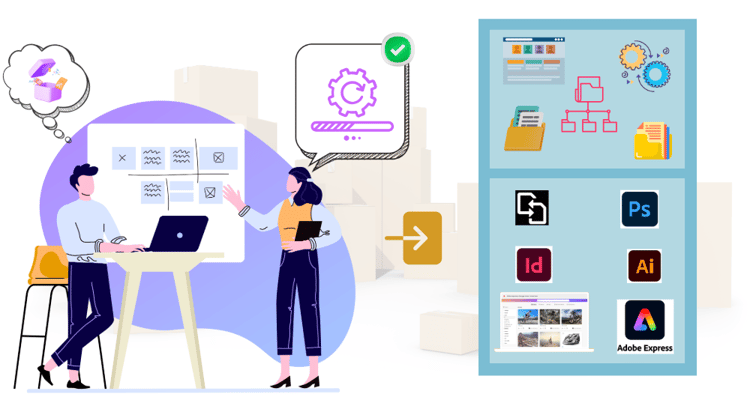
Assets as a Cloud Service Ultimate offers advanced DAM capabilities. AEM Assets Ultimate is engineered to manage complex content supply chains, ensuring that every piece of content performs well across all channels.
Why Assets Ultimate? why-ultimate-existing-new-users
Assets as a Cloud Service Ultimate offers various key benefits that help manage your organization’s asset needs effectively, such as:
-
Greater flexibility with more user types and privileges associated with those user types, such as Collaborator users, Power users, and Limited users.
-
Seamless asset distribution with Content Hub.
-
AI-powered content creation and remixing using Adobe Express with Firefly.
-
Smoother onboarding or upgrade experience for new and existing users.
Key capabilities of Assets Ultimate capabilities-assets-ultimate
Assets as a Cloud Service Ultimate includes the following key capabilities:
-
Asset management and library services: Tools that enable users to ingest, store, catalog, control, manage, and govern a brand’s digital assets in a centralized repository
-
Search, Discovery, and Collaboration: Tools that enable users to browse, discover, share, and collaborate on assets they need to create rich customer experiences.
-
Security & Rights Management: Tools to manage access, permissions, rights, and security to ensure compliance, consistency, and brand integrity.
-
Creative Cloud Connections: Tools that enable marketing & creative teams to collaborate with simplified access, comment, review, and annotations to update or finalize digital assets.
-
Experience Cloud Connections: Tools to support native access to digital assets from other Experience Cloud applications and services.
-
Distribution Portal Experience (Content Hub): Tools to expand access to a brand’s approved digital assets to extended stakeholders to ensure usage and brand consistency.
-
Integrations: integrations with other Adobe and non-Adobe applications.
-
Dynamic Media (add-on): Tools to transform and deliver images, videos, and other emerging content for rich, interactive, multimedia experiences for any device at scale.
-
Customization: Tools to customize the DAM User Interface access to APIs for further development.
-
Custom Extensibility: Extensive flexibility through its robust API-first platform, enabling seamless integration and customization to meet the customer complex IT infrastructure.
-
Content Automation (add-on): Tools to unify work management and automate digital asset transformation workflows for content production at scale.
The operations that you can perform within Assets as a Cloud Service depends on your user type. See Available user types for more information.
What are available user types and privileges? available-user-types
Assets as a Cloud Service offers four user types. Each user type provides a different set of privileges. The user types include:
-
Administrator: The standard administrator user, who configures the other three user types within the organization.
-
Limited Users: Limited users can access and leverage approved assets from your organization using AEM Assets Content Hub portal.
-
Collaborator users: As a Collaborator user, you can:
-
Work with assets from Experience manager via integrations of Assets available to your organization in other Adobe products and non-Adobe applications.
-
Create and edit assets using built-in Adobe Express and Firefly leveraging professionally designed templates, brand kits, Adobe Stock assets, and so on.
-
Access and leverage approved assets from your organization using AEM Assets Content Hub portal.
-
-
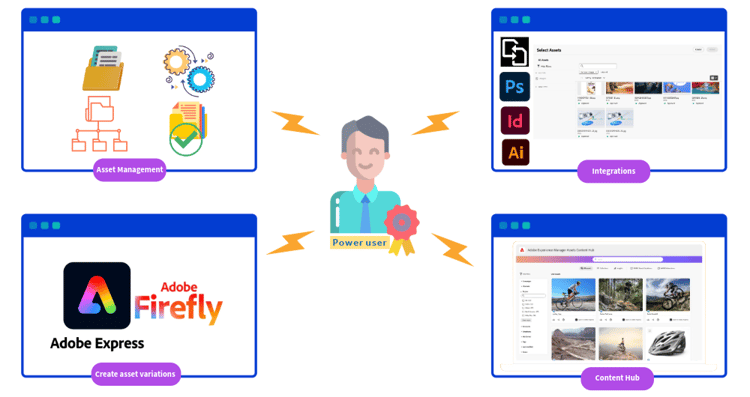
Power users: As a Power user, you can:
-
Access all AEM Assets capabilities including managing assets, metadata and the overall governance and automation around digital assets.
-
Work with assets from Experience manager via integrations of Assets available to your organization in other Adobe and non-Adobe applications.
-
Create and edit assets using built-in Adobe Express and Firefly leveraging professionally designed templates, brand kits, Adobe Stock assets, and so on.
-
Access and leverage approved assets from your organization using AEM Assets Content Hub portal.
-
The following table summarizes the available AEM Assets user types, the privileges they have, and the product profiles that are required to get those privileges:
For information on how to get started with Assets Ultimate, see Enable AEM Assets Ultimate. If existing AEM Assets users have queries on when you can upgrade to Assets Ultimate, contact your Adobe account representative. You can also see Enable Assets Ultimate for existing customers for more information.
AEM Assets also provides a lighter weight DAM for customers who do not have advanced requirements such as, UI extensibility, API-driven automation, and custom code deployment. For more information, see AEM Assets Prime.
Frequently Asked Questions frequently-asked-questions-assets-ultimate
What is AEM Assets Ultimate and what makes it different from other AEM Assets offerings? what-is-assets-ultimate
AEM Assets Ultimate is Adobe’s advanced Digital Asset Management offering within Adobe Experience Manager as a Cloud Service, engineered to manage complex content supply chains and ensure content performs well across all channels. It offers four distinct user types, Limited Users, Collaborator Users, Power Users, and Administrators, each with a defined set of capabilities and product profile assignments. AEM Assets Ultimate also includes seamless Content Hub distribution, AI-powered content creation via Adobe Express and Firefly, and integrations with Adobe and non-Adobe applications.
What can a Limited User do in AEM Assets Ultimate? limited-user-capabilities
A Limited User in AEM Assets Ultimate can access and use brand-approved assets from the organization through the AEM Assets Content Hub portal. Limited Users cannot create or edit assets, manage metadata, access the AEM Assets author environment, or integrate assets with other applications. Their access is scoped exclusively to discovering and leveraging approved assets through Content Hub, making this user type suitable for extended stakeholders who need governed access to finalized brand assets.
What product profile must a Limited User be added to in AEM Assets Ultimate? limited-user-product-profile
A Limited User in AEM Assets Ultimate must be added to the following product profile in Adobe Admin Console: AEM > Delivery instance > AEM Assets Limited Users. This is the only product profile required for Limited Users. It grants access to the AEM Assets Content Hub portal for approved asset discovery and usage. No Production Author instance profile is required for this user type.
What can a Collaborator User do in AEM Assets Ultimate? collaborator-user-capabilities
A Collaborator User in AEM Assets Ultimate can access brand-approved assets through the AEM Assets Content Hub portal, create and edit assets using Adobe Express and Firefly with professionally designed templates, and brand kits, and work with assets from Adobe Experience Manager via integrations available across other Adobe products and non-Adobe applications. Collaborator Users cannot manage assets at the DAM level, configure metadata governance, or manage permissions in the AEM Assets author environment, those capabilities are reserved for Power Users and Administrators.
What product profiles must a Collaborator User be added to in AEM Assets Ultimate? collaborator-user-product-profiles
A Collaborator User in AEM Assets Ultimate must be added to two product profiles in Adobe Admin Console: AEM > Delivery instance > AEM Assets Limited Users, and AEM > Production Author instance > AEM Assets Collaborator Users. The Delivery instance profile grants Content Hub access. The Production Author instance profile enables asset integrations and Adobe Express and Firefly-powered content creation. Both profiles are required for the full Collaborator User experience.
What can a Power User do in AEM Assets Ultimate? power-user-capabilities
A Power User in AEM Assets Ultimate has access to the full range of AEM Assets capabilities including asset ingestion, storage, cataloging, metadata management, governance, and automation around digital assets. Power Users can also create and edit assets using Adobe Express and Firefly, work with assets via integrations across Adobe and non-Adobe applications, and access brand-approved assets through the AEM Assets Content Hub portal. Power Users cannot manage permissions in the AEM Assets author environment — that capability is reserved for Administrators.
What product profiles must a Power User be added to in AEM Assets Ultimate? power-user-product-profiles
A Power User in AEM Assets Ultimate must be added to two product profiles in Adobe Admin Console: AEM > Delivery instance > AEM Assets Limited Users, and AEM > Production Author instance > AEM Assets Power Users. The Delivery instance profile grants Content Hub access. The Production Author instance profile unlocks the full AEM Assets DAM capabilities including asset management, metadata governance, and automation workflows. Both profiles are required for the complete Power User experience.
What can an Administrator do in AEM Assets Ultimate? administrator-capabilities
An Administrator in AEM Assets Ultimate has all the capabilities of a Power User and additionally manages permissions on content in the AEM Assets author environment. Administrators are responsible for configuring the other three user types — Limited Users, Collaborator Users, and Power Users — within the organization. This includes assigning product profiles in Adobe Admin Console, governing access rights, and ensuring the correct privilege structure is in place for each user type across the organization.
What product profile must an Administrator be added to in AEM Assets Ultimate? administrator-product-profiles
An Administrator in AEM Assets Ultimate must be added to two product profiles in Adobe Admin Console: AEM > Delivery instance > AEM Assets Limited Users, and AEM > Production Author instance > AEM Administrators. The Delivery instance profile grants Content Hub access. The Production Author instance profile grants full administrative control including permission management in the AEM Assets author environment and the ability to configure all other user types within the organization.
Which user types in AEM Assets Ultimate can access the Content Hub portal? content-hub-access-user-types
All four user types in AEM Assets Ultimate — Limited Users, Collaborator Users, Power Users, and Administrators — can access the AEM Assets Content Hub portal to discover and use brand-approved assets. Content Hub access is granted through the AEM > Delivery instance > AEM Assets Limited Users product profile in Adobe Admin Console, which is a required profile for every user type in AEM Assets Ultimate regardless of their additional capabilities.
Which user types in AEM Assets Ultimate can create and edit assets using Adobe Express and Firefly? express-firefly-access-user-types
Collaborator Users, Power Users, and Administrators in AEM Assets Ultimate can create and edit assets using the built-in Adobe Express and Firefly capabilities, including professionally designed templates, brand kits, and Adobe Stock assets. Limited Users do not have access to asset creation or editing capabilities — their access is scoped to discovering and using brand-approved assets through the AEM Assets Content Hub portal only.
Which user types in AEM Assets Ultimate can integrate assets with Adobe and non-Adobe applications? integration-access-user-types
Collaborator Users, Power Users, and Administrators in AEM Assets Ultimate can work with assets from Adobe Experience Manager via integrations available across other Adobe products and non-Adobe applications. Limited Users cannot access asset integrations — their capabilities are limited to Content Hub portal access for approved asset discovery and usage. Integration access is enabled through the AEM > Production Author instance product profiles assigned to each of these user types.
Which user type in AEM Assets Ultimate has full DAM management capabilities including metadata governance? dam-management-user-types
Power Users and Administrators in AEM Assets Ultimate have access to the full range of AEM Assets DAM capabilities including asset ingestion, storage, cataloging, metadata management, governance, and automation around digital assets. Collaborator Users and Limited Users do not have access to DAM-level management or metadata governance. Full DAM access is enabled through the AEM > Production Author instance > AEM Assets Power Users or AEM Administrators product profile in Adobe Admin Console.
Which user type in AEM Assets Ultimate can manage permissions in the AEM Assets author environment? permission-management-user-type
Only Administrators in AEM Assets Ultimate can manage permissions on content in the AEM Assets author environment. Power Users, Collaborator Users, and Limited Users do not have permission management capabilities. This exclusive capability is enabled through the AEM > Production Author instance > AEM Administrators product profile in Adobe Admin Console. Administrators are also responsible for configuring and assigning the correct product profiles to all other user types within the organization.
See also
- Translate Assets
- Assets HTTP API
- Assets supported file formats
- Search assets
- Connected assets
- Asset reports
- Metadata schemas
- Download assets
- Manage metadata
- Manage Dynamic Media templates
- Manage reports in Assets view
- Search facets
- Manage collections
- Bulk metadata import
- Publish Assets to AEM and Dynamic Media