Catalog view sync status monitoring
Use the Catalog View Sync Status page to monitor synchronization and troubleshoot catalog views that have been projected to Adobe Commerce Optimizer. For each custom shared catalog, the Adobe Commerce Optimizer Connector for B2B creates a catalog view for every store view within the shared catalog’s website scope. Each catalog view is configured with an assortment policy, its linked price book, and the public key used to validate restricted-access tokens. Adobe Commerce retains the corresponding catalog view metadata, including the private key and default Price Book ID.
Audience and availability audience
The Catalog View Sync Status page is available to Adobe Commerce on Cloud Infrastructure and on-premises merchants who use B2B shared catalogs with the Adobe Commerce Optimizer Connector for B2B integration. The page is installed and enabled automatically when the connector extension is installed.
Access the Catalog View Sync Status page access-catalog-view-sync-status-page
From the Admin area, navigate to System > Data Transfer > Catalog View Sync Status.
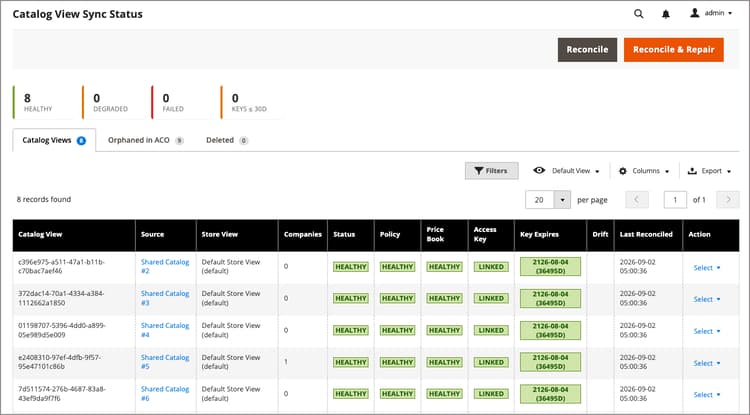
The page has three tabs:
- Catalog Views—Catalog views created by the connector, with sync health for each. See Catalog View Sync Status summary.
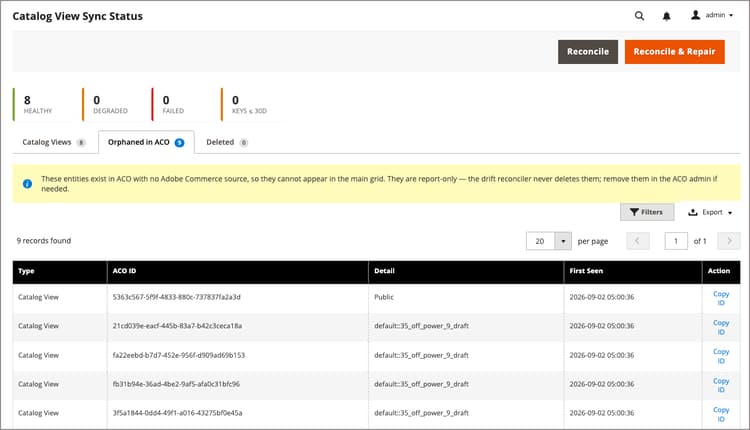
- Orphaned in ACO—Entities that exist in Adobe Commerce Optimizer with no corresponding Adobe Commerce source. See Orphaned in ACO tab.
- Deleted—A record of catalog view projections removed because their shared catalog was deleted. See Deleted tab.
Catalog View Sync Status summary catalog-view-sync-status-summary
Summary cards at the top of the page show the number of catalog views in each health state, plus a count of restricted access keys expiring within 30 days:
The grid lists one row per catalog view:
Sync status values sync-status-values
Configure the deletion grace period configure-the-deletion-grace-period
The deletion grace period specifies the data retention window for catalog views and associated data after the associated shared catalog is deleted. The value defaults to 7 days.
After the window expires, all data is removed.
Change the data retention setting
-
Open the Adobe Commerce Admin.
-
From the Stores menu, select Configuration > Services > ACO Catalog View Sync > Deletion > Deletion Grace Period (days).
-
Update the Deletion Grace Period (days) value as needed.
To remove a catalog view ACO projection immediately after deleting a shared catalog, set this value to
0. -
Select Save Config.
For details, see Services > ACO Catalog View Sync for all available sync and drift reconciler settings.
Reconcile and repair configuration differences reconcile-and-repair-drift
Adobe Commerce is the authoritative source for B2B shared catalog projection. Reconciliation compares your Adobe Commerce configuration against Adobe Commerce Optimizer and reports or repairs any differences.
Use the page-level buttons to reconcile:
-
Reconcile—Checks for configuration differences and updates the sync status without making any changes in Adobe Commerce Optimizer.
-
Reconcile & Repair—Checks for configuration differences and automatically restores the expected configuration for any repairable differences.
Selecting Reconcile & Repair sends an asynchronous reconcile request and returns before the repair runs. A confirmation message says the status refresh shortly, but the page does not reload automatically. Wait for processing to finish, then refresh the grid to check the result.
Use the Action menu on a row to:
- View details—Open the Catalog View Sync Status details page to view the current status, drift, access keys, and recent events.
- Open in ACO admin—Open the catalog view details page in Adobe Commerce Optimizer Studio.
- Copy ID—Copy the catalog view ID for reference.
Orphaned in ACO tab orphaned-in-aco-tab
The Orphaned in ACO tab lists catalog views and restricted access keys that exist in Adobe Commerce Optimizer but have no corresponding Adobe Commerce source—for example, entities created manually in Adobe Commerce Optimizer Studio rather than by the connector. These entities cannot appear in the main grid because there is no Adobe Commerce record to match them against.
Deleted tab deleted-tab
The Deleted tab lists catalog view projections that were removed because their shared catalog was deleted in Adobe Commerce. Because the shared catalog and its catalog view no longer exist, these rows do not link anywhere. They are kept only as a record of what was removed.
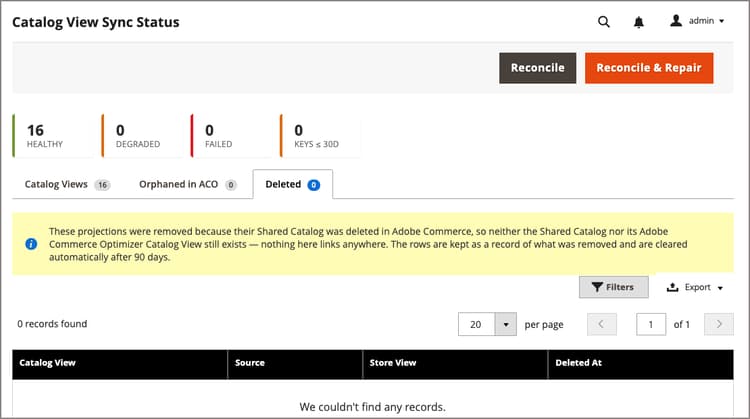
Rows on this tab are cleared automatically after 90 days.
Known limitations
- There is no visual indicator in Adobe Commerce Optimizer Studio that distinguishes connector-managed catalog views from manually created ones. Use this page, not the Adobe Commerce Optimizer Studio UI, to determine what the connector manages.
- The Orphaned in ACO tab’s ACO ID column identifies a catalog view, policy, or access key, not a unique identifier. Column naming is subject to change.