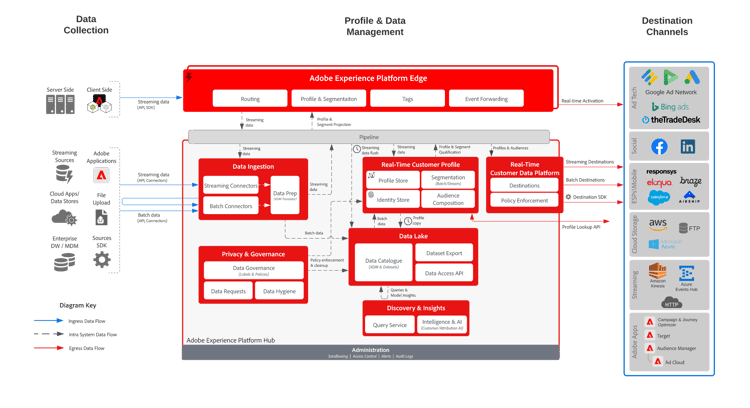
Audience activation to destinations
This guide provides a complete implementation reference for activating audiences from Adobe Real-Time Customer Data Platform (RT-CDP) to external destinations. It is designed for solution architects, marketing technologists, and implementation engineers who need to evaluate audience segments and publish them to ad platforms, cloud storage, CRM systems, or data partners for targeting, suppression, lookalike modeling, or analytics enrichment.
It presents all viable implementation options with trade-off analysis, decision guidance, UI navigation paths, and Experience League documentation references.
The guide covers the full lifecycle of audience activation – from defining and evaluating audience segments through configuring destination connections and publishing audiences, to monitoring activation health and enforcing governance compliance.
Use case overview
Organizations need to deliver audience data to external systems to power paid media campaigns, enrich CRM records, share data with partners, or feed downstream analytics. Audience Activation to Destinations is the foundational activation pattern in RT-CDP: it evaluates which profiles qualify for a target audience, connects to one or more external destinations, maps profile attributes to destination-specific fields, and publishes the audience for downstream consumption.
This pattern applies whenever the goal is to get audience data to an external system in the right format at the right time. It does not involve message delivery, on-site personalization, or analytics. It is the most common starting point for RT-CDP implementations and serves as a building block that other patterns compose on top of.
Typical stakeholders include digital marketing teams managing paid media, data teams enriching warehouses, CRM teams preparing contact lists for campaigns, and privacy teams ensuring governance compliance on outbound data flows.
Key business objectives
The following business objectives are supported by this use case pattern.
Acquire new customers
Expand the customer base through targeted acquisition campaigns, lookalike audiences, and paid media optimization.
KPIs: New Customers, Customer Acquisition Cost, Prospect/Lead Conversion
Learn more about acquiring new customers
Reduce customer acquisition cost
Improve targeting efficiency, suppress existing customers from acquisition campaigns, and optimize media spend.
KPIs: Customer Acquisition Cost, Cost Per Lead, Efficiency
Learn more about reducing customer acquisition cost
Optimize marketing spend and ROI
Improve return on marketing investment through better targeting, attribution, audience suppression, and budget allocation.
KPIs: Cost Savings, Customer Acquisition Cost, Incremental Revenue
Learn more about optimizing marketing spend and ROI
Example tactical use cases
- Ad platform audience targeting – Push qualified segments to paid media platforms for campaign targeting
- Paid media suppression of existing customers – Exclude known customers from acquisition campaigns on ad platforms to eliminate wasted spend
- Lookalike seed audiences – Push high-value customer segments to Facebook, Google Ads, or The Trade Desk as seed audiences for lookalike expansion
- CRM sync for sales enablement – Activate high-intent or high-value audiences so sales teams can prioritize outreach
- Data partner audience sharing – Share qualified audience segments with data partners for co-op targeting or measurement
- Cloud storage export for data warehouse enrichment – Export audience membership and profile attributes to Amazon S3, Azure Blob, Google Cloud Storage, or SFTP for downstream analytics
- Retargeting audience activation – Activate site visitors who did not convert to retargeting platforms
- Contact list sync to email service providers – Push audience membership to third-party email platforms for coordinated outreach
Key performance indicators
Use case pattern
Audience Activation to Destinations – Evaluate and publish an audience segment to external destinations for targeting or suppression.
Function Chain: Audience Evaluation > Destination Configuration > Audience Activation > Monitoring
Applications
- Adobe Real-Time Customer Data Platform (RT-CDP) – Audience evaluation, destination management, audience activation, consent and governance enforcement
- Adobe Experience Platform (AEP) – Profile store, identity service, segmentation engine, data governance
Foundational functions
The following foundational capabilities must be in place for this use case pattern. For each function, the status indicates whether it is typically required, assumed to be pre-configured, or not applicable.
Supporting functions
The following capabilities augment this use case pattern but are not required for core execution.
Application functions
This plan exercises the following functions from the Application Function Catalog. Functions are mapped to implementation phases rather than numbered steps.
Real-Time CDP (RT-CDP)
Prerequisites
- [ ] RT-CDP license is active with audience activation entitlements
- [ ] Target sandbox is provisioned and accessible to the implementation team
- [ ] User roles include destination management and audience activation permissions
- [ ] Authentication credentials for each target destination are available (OAuth tokens, API keys, S3 access keys, or service account credentials)
- [ ] Profile schema includes all attributes that need to be mapped to destination fields
- [ ] Identity namespaces required for destination matching are configured (e.g., hashed email, phone, device IDs)
- [ ] Data ingestion pipelines are operational and profiles are populating the profile store
- [ ] Data governance labels and policies are reviewed for the attributes being activated (especially for external destinations)
- [ ] Consent fields are populated on profiles if consent-based filtering is required
Implementation options
The following implementation options are available for this use case pattern. Review each option and the comparison table to determine the best approach for your requirements.
Option A: Streaming destination activation
Best for: Real-time audience membership updates to ad platforms or partner systems – Facebook Custom Audiences, Google Ads Customer Match, LinkedIn Matched Audiences, The Trade Desk, and similar streaming API-based destinations.
How it works:
Streaming destination activation delivers audience membership changes to the destination in near real-time as profiles qualify or disqualify from the segment. When a profile attribute changes or a behavioral event occurs that causes a profile to enter or exit an audience, the membership update is streamed to the destination within minutes.
This approach requires a streaming destination connector (most major ad platforms support this) and a streaming or edge audience evaluation method. The audience evaluation continuously monitors for qualifying profile changes and the activation dataflow pushes updates as they occur. The destination receives incremental membership changes rather than full audience snapshots.
Streaming activation is the default for most ad platform destinations in the RT-CDP catalog. The destination connector handles API authentication, rate limiting, and retry logic automatically.
Key considerations:
- Audience evaluation must use streaming or edge evaluation (batch-only audiences cannot feed streaming destinations in real-time)
- Not all segment expressions qualify for streaming evaluation – complex aggregations, multi-entity queries, and certain time-based functions require batch
- Destination partner API rate limits may affect throughput during large audience qualification events
- Profile attribute updates are sent alongside membership changes, keeping destination data current
Advantages:
- Near real-time audience freshness at the destination (minutes, not hours)
- Incremental updates reduce data transfer volume compared to full exports
- Automatic handling of both qualification and disqualification events
- Most ad platform destinations natively support streaming
Limitations:
- Requires streaming-eligible segment definitions (limited segment function set)
- No control over file format or export structure – data format determined by destination connector
- Cannot export to file-based storage destinations (S3, Azure Blob, SFTP)
- Destination API rate limits may throttle high-volume changes
Experience League:
Option B: Batch destination activation (file export)
Best for: Scheduled audience exports to cloud storage, data warehouses, or systems that consume file-based imports – Amazon S3, Azure Blob Storage, Google Cloud Storage, SFTP, Data Landing Zone.
How it works:
Batch destination activation evaluates audiences on a scheduled cadence and exports the results as files (CSV, JSON, or Parquet) to the configured storage destination. The export can include full audience snapshots or incremental changes (new qualifications and disqualifications since the last export).
The implementation involves configuring a file-based destination connection with storage credentials, file format preferences (delimiter, compression, naming convention), and an export schedule (daily, every 3 hours, every 6 hours, etc.). Each export run generates files containing the audience membership and any mapped profile attributes.
This approach supports the widest range of downstream consumers because file-based data exchange is universally supported. It is also the only option for cloud storage and data warehouse enrichment use cases.
Key considerations:
- Audience evaluation can use any method (batch, streaming, or edge) – the export itself runs on a schedule regardless
- File format, compression, and naming conventions are configurable per destination
- Supports both incremental exports (only changes) and full exports (complete audience snapshot)
- Export scheduling granularity ranges from every 3 hours to daily
Advantages:
- Full control over export file format (CSV, JSON, Parquet), compression, and naming
- Compatible with any downstream system that can consume files
- Supports both incremental and full export modes
- Can export audiences with any evaluation method (including batch-only segments with complex segmentation logic)
- Supports ad-hoc (on-demand) export runs outside the regular schedule
Limitations:
- Latency is inherently higher – audience data arrives at the destination on a schedule, not in real-time
- File-based exports require the destination system to process and ingest the files
- Storage costs at the destination for exported files
- Larger data volumes per export compared to incremental streaming updates
Experience League:
Option C: Multi-destination activation
Best for: Activating the same audience to multiple destinations simultaneously – for example, pushing a suppression list to all ad platforms, syncing a high-value segment to both CRM and ad platforms, or coordinating audience reach across multiple media partners.
How it works:
Multi-destination activation is not a separate technical mechanism but a composition of Options A and B applied to the same audience across multiple destination connections. The same audience is activated to two or more destinations, each with its own connection configuration, field mapping, and scheduling.
Each destination connection operates independently – a streaming activation to Facebook and a batch export to S3 can run simultaneously from the same source audience. Field mappings are configured per destination, so different attributes can be sent to different systems based on what each destination requires and what governance policies allow.
This is a common production pattern for organizations that operate across multiple ad platforms, maintain CRM synchronization alongside media activation, or need to distribute audience data to both operational and analytical systems.
Key considerations:
- Each destination has independent field mapping, scheduling, and governance evaluation
- Governance policies are enforced per destination – different attributes may be permitted for different destination types
- A single audience can be activated to a mix of streaming and batch destinations simultaneously
- Adding a new destination does not require changes to existing activations
Advantages:
- Coordinated audience distribution across all external systems from a single audience definition
- Independent configuration per destination allows optimized mappings and schedules
- Per-destination governance enforcement ensures compliance across different destination types
- Centralizes audience management while supporting distributed activation
Limitations:
- More destination connections to configure, authenticate, and maintain
- Monitoring complexity increases with each destination – activation failures must be tracked per destination
- License usage (activated profiles) may count per destination depending on entitlements
- Field mapping maintenance across multiple destinations requires coordination
Experience League:
Option comparison
Choose the right option
Use the following decision logic to select the right implementation approach:
-
How many destinations do you need? If you need to activate the same audience to two or more destinations, you are implementing Option C (which composes Options A and B per destination). Proceed to questions 2 and 3 for each destination.
-
Does the destination support streaming? If the destination is an ad platform (Facebook, Google Ads, LinkedIn, The Trade Desk) or partner integration with a streaming API, use Option A for that destination. If the destination is cloud storage (S3, Azure Blob, GCS, SFTP) or a system that consumes files, use Option B.
-
How quickly must the audience arrive at the destination? If audience membership must reflect at the destination within minutes (e.g., real-time suppression during active campaigns), use Option A. If daily or multi-hourly delivery is sufficient (e.g., weekly data warehouse refresh, CRM batch sync), use Option B.
-
Does your audience use complex segmentation logic? If the audience definition includes multi-event aggregations, large time windows, or functions that do not qualify for streaming evaluation, use Option B (batch destinations) or ensure Option A destinations also receive batch-evaluated audiences on a schedule.
Implementation phases
The implementation follows these phases. Each phase includes configuration details, decision points, and links to Experience League documentation.
Phase 1: Audience evaluation
Application function: RT-CDP: Audience Evaluation, RT-CDP: Audience Composition
What you will configure: Define the target audience that will be activated to destinations. This includes specifying the audience criteria (which profiles qualify), selecting the evaluation method (how quickly membership updates), and validating the audience population. This is the starting point for all activation – without a defined and evaluated audience, there is nothing to activate.
Decision points in this phase:
| table 0-row-3 1-row-3 2-row-3 3-row-3 | ||
|---|---|---|
| Option | When to choose | Considerations |
| Segment Builder (rule-based) | Standard audience definition using profile attributes, behavioral events, and segment membership conditions | Most flexible rule definition; supports streaming and edge evaluation for eligible expressions; ideal for single-condition or moderately complex audiences |
| Audience Composition | Audience requires combining, ranking, splitting, or excluding existing audiences | Visual canvas for sequential operations; results are batch-evaluated only; max 10 composition blocks per canvas |
| Federated Audience Composition | Audience criteria must be evaluated against data in external data warehouses without ingesting it into AEP | Queries external databases directly; avoids data duplication; requires Federated Audience Composition license |
| table 0-row-3 1-row-3 2-row-3 3-row-3 | ||
|---|---|---|
| Option | When to choose | Considerations |
| Batch | Scheduled campaigns, daily audience refreshes, or complex segmentation logic that does not qualify for streaming | Processes up to 24 million profiles per job; all segmentation functions supported; runs on a schedule (daily default or custom cron schedule) |
| Streaming | Real-time audience membership changes needed for streaming destination activation or event-triggered use cases | Near real-time (seconds to minutes); limited segmentation function set – simple events, attribute comparisons, and limited time windows only; no multi-entity queries |
| Edge | Same-page personalization or instant audience qualification needed at the edge | Millisecond latency; most restrictive rule set – profile attributes and simple segment membership checks only; primarily used for on-site personalization (less common for destination activation) |
| table 0-row-3 1-row-3 2-row-3 | ||
|---|---|---|
| Option | When to choose | Considerations |
| Timestamp ordered (default) | Most use cases – recent data should take priority when profile fragments conflict | Most common; uses the most recently updated attribute value |
| Dataset precedence | Specific data sources should override others regardless of timestamp | Requires defining a dataset priority order; useful when a CRM system of record should always override web-collected data |
UI navigation: Customer > Audiences > Create audience > Build rule (for Segment Builder) or Compose audience (for Audience Composition)
Key configuration details:
- Define audience criteria based on the use case – profile attributes, behavioral events, segment membership, or time-based conditions
- Apply suppression rules to exclude profiles that should not be activated (e.g., recently converted, globally unsubscribed)
- Validate the audience population size before proceeding to activation
- Confirm the evaluation method aligns with the destination type selected in Phase 2
Where options diverge:
For Option A (Streaming Destination Activation):
The audience must use streaming or edge evaluation to deliver real-time membership updates. Verify the segment rule expression qualifies for streaming evaluation – avoid time-based aggregation functions, multi-entity queries, and inSegment() references to batch-only segments.
For Option B (Batch Destination Activation):
Any evaluation method works. Batch evaluation is the most common choice since the export itself runs on a schedule. Confirm a batch evaluation schedule exists in the sandbox, or create one.
For Option C (Multi-Destination Activation):
The evaluation method should accommodate the most demanding destination. If any destination requires streaming, the audience should use streaming evaluation. If all destinations are batch, batch evaluation is sufficient.
Experience League documentation:
Phase 2: Destination configuration
Application function: RT-CDP: Destination Configuration
What you will configure: Establish authenticated connections to the external destinations where audiences will be published. This includes selecting the destination from the catalog, providing authentication credentials, and configuring destination-specific parameters such as file format, storage location, and export scheduling. Each destination requires its own connection configuration.
Decision points in this phase:
| table 0-row-3 1-row-3 2-row-3 3-row-3 4-row-3 5-row-3 | ||
|---|---|---|
| Option | When to choose | Considerations |
| Advertising destination (streaming) | Targeting or suppression on ad platforms (Facebook, Google Ads, LinkedIn, The Trade Desk, etc.) | Streaming connectors; membership updates in near real-time; identity matching via hashed email, phone, or device IDs |
| Cloud storage destination (batch) | Export to S3, Azure Blob, GCS, SFTP, or Data Landing Zone for data warehouse enrichment | File-based export; configurable format (CSV, JSON, Parquet); scheduled cadence |
| CRM destination | Sync audiences to Salesforce, Microsoft Dynamics, or HubSpot for sales enablement | Typically streaming; requires CRM-specific field mapping; may need CRM admin permissions |
| Data partner destination | Share audience data with measurement or targeting partners | Varies by partner; review governance implications of sharing data externally |
| Custom destination (Destination SDK) | Target system not available in the catalog | Requires building a custom destination using the Destination SDK; higher implementation effort |
| table 0-row-3 1-row-3 2-row-3 3-row-3 4-row-3 | ||
|---|---|---|
| Option | When to choose | Considerations |
| OAuth 2.0 | Ad platforms and SaaS destinations (Facebook, Google, Salesforce) | Requires initial authorization flow; tokens refresh automatically; most common for streaming destinations |
| Access key / Secret key | Cloud storage (S3, Azure Blob) | Static credentials; rotation should be planned; suitable for file-based destinations |
| Service account / API key | Partner APIs and custom integrations | Requires credential provisioning from the destination partner |
| Connection string | Azure-based destinations | Single string containing all connection parameters |
| table 0-row-3 1-row-3 2-row-3 | ||
|---|---|---|
| Option | When to choose | Considerations |
| Incremental export | Only new qualifications and disqualifications since last export | Smaller file sizes; faster processing at destination; requires destination system to maintain state |
| Full export | Complete audience snapshot on each run | Larger files; destination gets a complete picture each time; simpler for systems that do a full replace |
UI navigation: Connections > Destinations > Catalog > [Select destination] > Configure
Key configuration details:
- Browse the destination catalog and select the target destination
- Provide authentication credentials and test the connection
- For batch destinations: configure file format (CSV, JSON, Parquet), compression, file naming template, and export schedule
- For streaming destinations: connection is typically established via OAuth authorization flow
- Verify the destination connection status shows as active before proceeding to activation
Where options diverge:
For Option A (Streaming Destination Activation):
Select a streaming destination from the catalog (Advertising or Social categories). Complete the OAuth authorization flow. The connection is ready for activation once the authorization is confirmed.
For Option B (Batch Destination Activation):
Select a file-based destination from the catalog (Cloud Storage category). Configure the storage path, file format, compression, naming convention, and export schedule. Test the connection by verifying write access to the storage location.
For Option C (Multi-Destination Activation):
Repeat this phase for each destination. Each connection is independent – you may have a mix of streaming and batch destinations. Document each connection’s authentication and configuration for operational reference.
Experience League documentation:
Phase 3: Audience activation
Application function: RT-CDP: Audience Activation
What you will configure: Publish the evaluated audience to the configured destination by creating the activation dataflow. This involves selecting which audiences to activate, mapping profile attributes to destination fields, and configuring the export schedule. The activation dataflow connects the source audience to the target destination and manages ongoing data delivery.
Decision points in this phase:
| table 0-row-3 1-row-3 2-row-3 3-row-3 | ||
|---|---|---|
| Option | When to choose | Considerations |
| Identity fields only | Destination only needs to match profiles (e.g., audience membership in ad platforms) | Minimal data transfer; most privacy-safe; typical for ad platform targeting and suppression |
| Identity + profile attributes | Destination needs enrichment attributes for personalization or segmentation (e.g., CRM sync, partner sharing) | More data transferred; requires governance review for each attribute; check data usage labels against destination marketing action |
| Identity + computed attributes | Destination benefits from derived scores or aggregations (e.g., lifetime value tier, propensity score for partner targeting) | Requires computed attributes to be configured; high-value enrichment for downstream systems |
| table 0-row-3 1-row-3 2-row-3 3-row-3 | ||
|---|---|---|
| Option | When to choose | Considerations |
| Daily | Standard refresh cadence; most batch use cases | Balances freshness with processing cost; most common default |
| Every 3-6 hours | Higher-frequency use cases such as intra-day campaign optimization | More frequent file generation; higher storage and processing load at destination |
| On-demand (ad-hoc) | One-time export or urgent out-of-cycle activation | Manual trigger bypasses schedule; useful for testing or urgent campaign needs |
UI navigation: Connections > Destinations > Browse > [Select destination] > Activate audiences
Key configuration details:
- Select one or more audiences to activate to the destination
- Map profile attributes and identity fields to destination-specific fields
- For streaming destinations: confirm identity namespace mapping (e.g., hashed email to Facebook’s extern_id)
- For batch destinations: configure export schedule, select incremental or full export mode, and set the first export date
- Review the activation summary to confirm all mappings and schedules before publishing
Where options diverge:
For Option A (Streaming Destination Activation):
Select the audiences and map identity namespaces to destination identity fields. Activation begins immediately upon publishing – audience membership changes stream to the destination in near real-time. No export schedule is needed; the activation is continuous.
For Option B (Batch Destination Activation):
Select the audiences, map profile attributes, and configure the export schedule. Choose between incremental and full export modes. Optionally trigger an ad-hoc export for immediate delivery outside the regular schedule.
For Option C (Multi-Destination Activation):
Repeat the activation workflow for each destination. The same audience can be activated to multiple destinations with different attribute mappings per destination. For example, send only hashed email to ad platforms but include demographic attributes to the CRM.
Experience League documentation:
Phase 4: Governance validation
Application function: RT-CDP: Consent & Governance Enforcement
What you will configure: Validate that governance policies and consent preferences are correctly enforced before and during activation. This phase ensures that restricted data (PII, sensitive attributes) is not sent to unauthorized destinations and that profiles without valid consent are excluded from activation. Governance enforcement happens automatically at activation time, but proactive validation prevents blocked activations and compliance violations.
Decision points in this phase:
| table 0-row-3 1-row-3 2-row-3 | ||
|---|---|---|
| Option | When to choose | Considerations |
| Proactive (pre-activation) | Recommended for all implementations, especially when activating to external third-party systems | Review data usage labels and policies before configuring field mappings; prevents activation failures and ensures compliance from the start |
| Reactive (at activation time) | When governance policies are already well-established and the team is confident in compliance | Platform enforces policies automatically at activation; violations block the activation or exclude restricted attributes; may cause unexpected failures if policies are not well understood |
| table 0-row-3 1-row-3 2-row-3 | ||
|---|---|---|
| Option | When to choose | Considerations |
| Consent enforcement enabled | Required when activating to advertising or marketing destinations where consent is legally required | Profiles without valid consent (consents.marketing.{channel}.val = ‘y’) are automatically excluded from activation; requires consent data to be ingested |
| No consent filtering | Internal-use destinations or analytics exports where consent does not apply to the data transfer | Only appropriate when the data use does not constitute a marketing action requiring consent; consult legal/privacy team |
UI navigation: Privacy > Policies > Consent policies (for consent review); Data governance > Policies (for data usage policy review)
Key configuration details:
- Review data usage labels applied to the datasets and schema fields being activated
- Verify governance policies are active for the marketing action associated with the destination (e.g., “Export to Third Party” for ad platforms)
- Confirm consent fields are populated on profiles and that consent enforcement is enabled for the relevant channels
- If policy violations are detected, resolve by removing restricted fields from the destination mapping or selecting an alternative destination
Experience League documentation:
Phase 5: Monitoring and validation
Application function: Monitoring & Observability
What you will configure: Set up ongoing monitoring for activation dataflows, configure alerts for failures, validate audience population at destinations, and track license usage. Monitoring is critical for production activations where delivery failures directly impact campaign performance and media spend.
Key configuration details:
- Review dataflow run status for each active destination to confirm audiences are being delivered successfully
- Configure alerts for destination activation failures, dataflow delays, and audience population anomalies
- Track profiles exported vs. profiles failed per dataflow run
- Monitor audience match rates at the destination (where destination reporting is available)
- Review license usage to track activated profile volume against entitlements
UI navigation: Connections > Destinations > Browse > [Select destination] > Dataflow runs (for activation monitoring); Alerts > Alert rules > Subscribe (for alert configuration); Administration > License usage (for license tracking)
Experience League documentation:
Implementation considerations
Review the following considerations before and during implementation.
Guardrails and limits
- Segment definition limit: Maximum of 4,000 segment definitions per sandbox – Segmentation guardrails
- Dataflows per destination: Maximum of 100 dataflows per destination connection – Destinations guardrails
- Batch export file size: File-based destinations have maximum export file size limits; large audiences are automatically split across multiple files
- Streaming destination throughput: Per-second throughput limits are set by each destination partner; high-volume audience changes may be throttled
- Batch evaluation capacity: Up to 24 million profiles per segment evaluation job by default
- Audience Composition: Maximum of 10 composition blocks per canvas; composed audiences are batch-evaluated only
- Identity graph: Maximum of 50 identities per graph – Identity Service guardrails
- Computed attributes: Maximum of 25 computed attributes per sandbox – Computed attributes guardrails
- Activation guardrails overview: Activation guardrails
Common pitfalls
-
Streaming segment with ineligible rule logic: Defining an audience with complex aggregation functions or multi-entity queries and expecting streaming evaluation. These segments silently fall back to batch evaluation, causing unexpected latency. Prevention: review streaming eligibility requirements before defining the audience.
-
Zero profiles exported due to consent filtering: All profiles in the audience lack valid consent values, causing the entire audience to be filtered out at activation time. Prevention: verify consent data ingestion is operational and that consent fields are populated before activating.
-
Governance policy blocking activation unexpectedly: Data usage labels on schema fields trigger policy violations that prevent activation. Prevention: evaluate governance compliance proactively (Phase 4) before configuring field mappings. Review which labels are inherited from the schema.
-
Destination credential expiration: OAuth tokens or API keys expire, causing activation failures with no immediate alert. Prevention: configure alerts for destination activation failures and establish a credential rotation schedule.
-
Mismatched identity namespaces: The identity namespace configured in the activation mapping does not match what the destination expects (e.g., sending plain-text email when the destination requires SHA-256 hashed email). Prevention: review destination documentation for required identity formats before configuring the mapping.
-
Field mapping errors causing export failures: Mapping a profile attribute to a destination field with an incompatible data type or format. Prevention: test the activation with a small audience first and review the dataflow run details for mapping errors before scaling to production audiences.
-
Audience population drift between RT-CDP and destination: The audience count in RT-CDP does not match the count at the destination due to identity matching differences, destination deduplication logic, or timing. This is expected behavior – prevention: document expected match rate benchmarks per destination and monitor for significant deviations.
Best practices
-
Start with a test audience: Activate a small, well-understood test audience to each new destination before activating production audiences. Validate field mappings, identity matching, and delivery metrics with the test audience.
-
Layer governance early: Apply data usage labels and configure governance policies before configuring destination activations. This prevents blocked activations and ensures compliance from the start.
-
Use incremental exports for batch destinations: Incremental exports reduce file sizes, speed up processing at the destination, and minimize storage costs. Use full exports only when the destination system requires a complete audience replacement.
-
Standardize naming conventions: Establish consistent naming for audiences, destination connections, and dataflows across the organization. Include the use case, destination, and evaluation method in names (e.g., “Suppression_ExistingCustomers_Facebook_Streaming”).
-
Monitor match rates: Track the ratio of profiles exported from RT-CDP to profiles matched at each destination. Significant drops in match rate may indicate identity resolution issues, credential problems, or destination API changes.
-
Coordinate suppression across destinations: When using suppression audiences (e.g., excluding existing customers from acquisition campaigns), activate the suppression audience to all relevant ad platforms simultaneously to maintain consistency.
-
Review and prune inactive activations: Periodically review destination dataflows and deactivate audiences that are no longer needed. Inactive activations consume license capacity and add monitoring overhead.
Trade-off decisions
- Streaming favors: Real-time use cases where audience membership must reflect at the destination within minutes (active campaign suppression, real-time retargeting)
- Batch favors: Complex audience logic requiring aggregation functions, multi-entity queries, or large time-window conditions (lifetime value tiers, multi-touch behavioral segments)
- Recommendation: Use streaming evaluation for audiences activated to streaming destinations where real-time freshness drives business value. Use batch evaluation for complex audiences activated to file-based destinations or when daily refresh is sufficient. For audiences that need both, consider creating two versions: a simplified streaming segment for real-time activation and a comprehensive batch segment for periodic enrichment.
- Minimal export favors: Privacy-first approach; lower governance risk; simpler field mapping; sufficient for most ad platform targeting and suppression use cases
- Rich export favors: Downstream personalization at the destination; CRM enrichment; partner data sharing that requires attribute-level detail
- Recommendation: Default to minimal identity-only exports for advertising destinations. Add profile attributes only when the destination use case specifically requires them and governance review confirms compliance. Use computed attributes to provide aggregated, less-sensitive enrichment values instead of raw PII.
- Separate dataflows favor: Independent monitoring, easier troubleshooting, ability to pause individual audience activations without affecting others
- Consolidated dataflows favor: Fewer connections to maintain, simplified credential management, reduced operational overhead
- Recommendation: Use consolidated dataflows when activating multiple related audiences to the same destination (e.g., all suppression segments to Facebook). Use separate dataflows when audiences have different SLAs, different attribute mappings, or when failure isolation is critical.
Related documentation
Destinations
Audiences and segmentation
Identity and profile
Data modeling and schemas
Data governance
Monitoring and observability
Computed attributes
Data collection and sources
Administration
Guardrails