在此页面上:为API触发的营销活动激活高吞吐量模式,以便您能够以每秒最多5000个事务的速度发送非常大规模的实时事务性消息(电子邮件和推送),而无需依赖用户档案。
高吞吐量模式专为需要超大规模实时事务性消息传递(每秒最多5000个事务)的组织而设计。 与常规API触发的营销活动不同,高吞吐量营销活动独立于Adobe用户档案运行,需要不同的配置模型。
此页面说明了高吞吐量营销活动与标准API触发的营销活动、设置要求有何不同,以及何时选择每种模式。
护栏 & 限制 guardrails
-
访问 — 在除瑞士以外的所有区域均可用,适用于使用高吞吐量事务性消息传递加载项授权的组织。
-
渠道:电子邮件和推送通知。
-
高吞吐量营销活动中的Personalization:
- 所有个性化必须作为 上下文数据 包含在API有效负载中。 了解如何使用上下文数据个性化内容
- 基于个人资料的个性化是不支持。 如果使用配置文件变量,则会发生验证错误。
-
高吞吐量通道配置中的Personalization — 高吞吐量通道配置 不支持 上下文或基于配置文件的个性化。
-
匹配资源 — 高吞吐量营销活动、渠道配置和IP池只能相互使用。 不能混合使用标准和高吞吐量资源。
-
API端点 — 高吞吐量营销活动使用的端点与标准API触发的营销活动不同。 有关详细信息,请参阅执行API触发的营销活动。
-
促销活动独占性 — 高吞吐量促销活动不使用Adobe配置文件。 无论用户档案是否存在都会发送消息。
此外,营销策划不能同时用于启用用户档案和非用户档案用例。 如果您同时需要这两个活动,请创建两个单独的活动,并确保调用系统根据上下文决定要触发哪个活动。
-
用于反馈和跟踪的数据集 — 高吞吐量营销活动的反馈和跟踪数据存储在未为配置文件启用的专用数据集中。 因此,即使存在匹配的用户档案,这些事件也不会与用户档案拼合。
使用的数据集包括:
- AJO消息反馈事件数据集 — 非配置文件 — 用于电子邮件和推送反馈。
- AJO电子邮件跟踪体验事件数据集 — 非配置文件 — 仅用于电子邮件跟踪。 推送的专用非用户档案跟踪数据集尚不可用。
-
吞吐量分配 — 在高吞吐量加载项下配置的吞吐量专门为高吞吐量营销活动保留。 标准营销活动和高吞吐量API触发的营销活动之间不共享吞吐量。
-
不支持的功能:
-
个性化的PDF附件 — 通过辅助区域路由高吞吐量流量时不支持。 了解有关个性化PDF附件的更多信息
-
推送通知:
- Web推送 — 高吞吐量Web推送营销活动在共享基础架构上运行,不会从为高吞吐量移动推送保留的专用容量中获益。
- 有效负载大小 — 最大有效负载大小为5 KB。
- 阻止列表行为 — 当消息点击时,将保留投放反馈,但不生成配置文件更新反馈。 这意味着阻止列表响应不会在Adobe Experience Platform中触发配置文件更新或令牌失效。
在标准营销活动与高吞吐量营销活动之间进行选择
使用此表确定哪种API触发的营销活动类型适合您的用例:
换句话说:
-
选择 标准API触发的 营销活动,如果:
- 您未签订高吞吐量合同。
- 您的吞吐量需求低于500 TPS。
- 您需要基于Adobe配置文件进行个性化。
- 您希望将促销活动数据拼合到用户档案以供将来定位。
- 您希望使用除电子邮件或推送之外的其他渠道。
-
选择 高吞吐量 营销活动,如果:
- 您需要大于500 TPS的吞吐量。
- 您不需要配置文件拼接。
- 您可以在API有效负荷中传递所有个性化设置。
- 您希望使用电子邮件或推送渠道。
配置高吞吐量API触发的营销活动 configure-high-throughput
满足先决条件后,您可以在产品UI中为两个渠道自行设置高吞吐量:
先决条件 prerequisite
购买 高吞吐量事务型消息传递 加载项后,请联系Adobe客户关怀团队或您的Adobe代表,以便完成所需的后端激活。
设置高吞吐量API触发的电子邮件营销活动 setup-guidelines
要配置高吞吐量电子邮件营销活动,请执行以下步骤。
创建专用IP池 create-ip-pool
高吞吐量需要一个专用的IP池,因为构建该池的目的是跨两个区域保持高可用性和性能。
当您购买高吞吐量插件时,发送的IP除了在主区域中分配给您的IP之外,还会配置在辅助区域中。
- 故障转移 — 如果主区域不可用,则所有高吞吐量通信将自动切换到辅助区域,以便继续传递事务性消息。
- IP预热 — 为了确保辅助区域IP在需要时准备就绪,部分高吞吐量流量会持续通过辅助区域。 这可以让IP保持温暖。 从没有发送历史记录的IP发送,可能会导致Internet服务提供商(ISP)拒绝您的电子邮件。
按如下方式创建IP池。
-
创建IP池。 了解如何操作
-
选择 启用高吞吐量 选项。
-
为专用IP池选择一个或多个辅助区域IP。 这将确保高吞吐量流量的高可用性。
已选择“启用高吞吐量”选项的
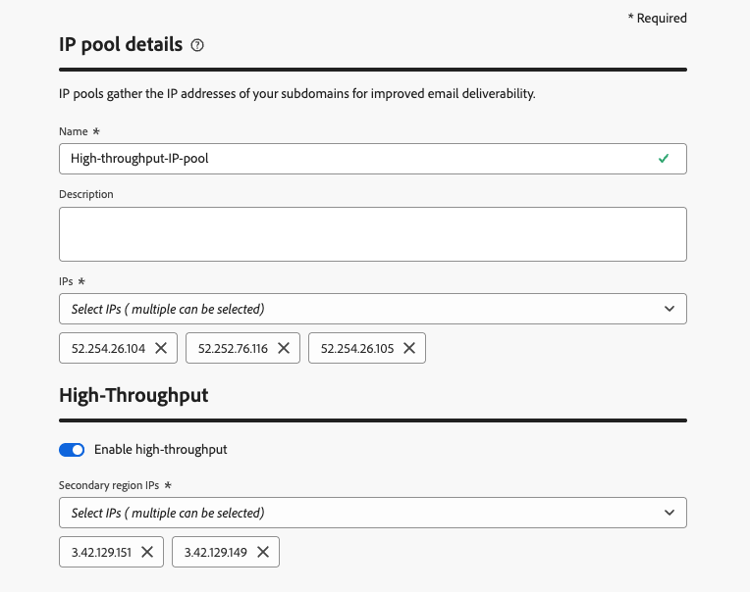
专用IP池现在可以与高吞吐量通道配置一起使用。
创建高吞吐量电子邮件渠道配置 configuration-guidelines
-
创建 电子邮件 渠道配置。 了解如何操作
-
在 电子邮件设置 中选择 事务型 电子邮件类型。
-
启用 创建为高吞吐量配置 切换开关。
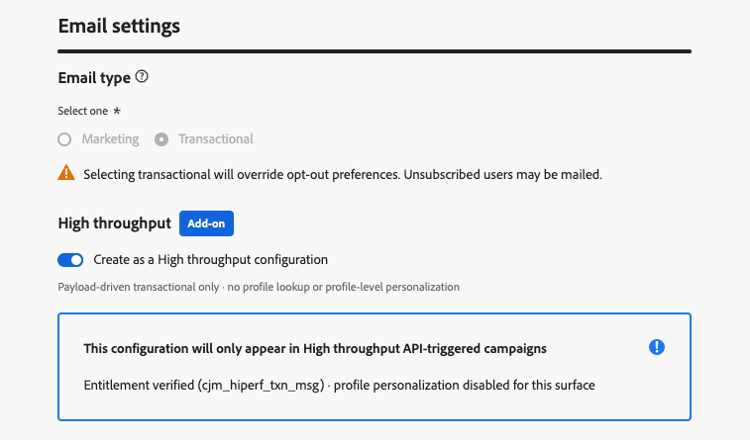
-
在 IP池详细信息 部分中,选择您创建的高吞吐量IP池。 仅列出高吞吐量IP池。
-
提交渠道配置。
您的高吞吐量电子邮件渠道配置现在可用于高吞吐量API触发的营销活动。
设置高吞吐量推送活动 setup-push
与电子邮件一样,您可以直接在界面中设置高吞吐量以便自行推送。 要实现此目的,请执行以下步骤。
-
创建 推送 渠道配置。 了解如何操作
-
启用 创建为高吞吐量配置 切换开关。
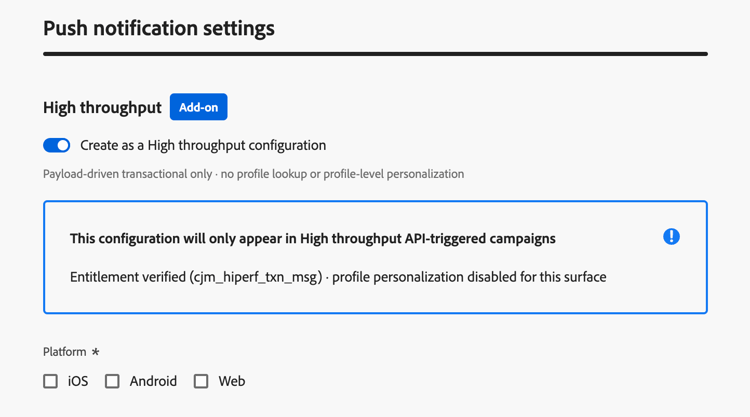
-
为您的推送配置选择平台和相应的应用程序ID。
note NOTE 启用高吞吐量切换后,推送应用程序ID个性化不可用。 -
提交渠道配置。
您的高吞吐量推送渠道配置现在已准备好用于高吞吐量API触发的营销活动。
This section contains structured knowledge intended to support interpretation, retrieval, and question answering related to this topic.
For complete understanding, this information should be combined with the documentation on this page. Neither source is intended to stand alone; the page describes the feature, while this section provides additional context that helps disambiguate terminology, intent, applicability, and constraints.
- TL;DR: This page explains how High throughput mode for API triggered campaigns differs from standard API triggered campaigns, its guardrails and setup requirements, and when to choose each mode for very large-scale, real-time transactional messages (email and push) without relying on profiles.
Intents:
- Decide between a standard API triggered campaign and a High throughput campaign
- Know the guardrails and limitations of High throughput campaigns
- Set up High throughput campaigns: a dedicated IP pool and a channel configuration for email, a channel configuration for push
- Know how to personalize a High throughput campaign (contextual data only)
- Know which datasets store feedback and tracking data for High throughput campaigns
Glossary:
- High throughput mode (also written High Throughput): A mode of API triggered campaigns designed for very large-scale, real-time transactional messaging, which operates independently of Adobe Profiles (product-specific)
- Standard API triggered campaign: An API triggered campaign that is not in High throughput mode
- High Throughput transactional messaging add-on: The add-on that organizations must be licensed with to use High throughput campaigns (product-specific)
- Contextual data: Personalization data passed in the API payload
- AJO Message Feedback Event Dataset - Non Profile: Dataset used for both email and push feedback of High throughput campaigns
- AJO Email Tracking Experience Event Dataset - Non Profile: Dataset used for email tracking only of High throughput campaigns
Guardrails:
- Throughput: High throughput campaigns support up to 5000 transactions per second; standard API triggered campaigns support up to 500 transactions per second.
- Channels: Email and push notifications for High throughput campaigns.
- Personalization: all personalization must be included in the API payload as contextual data. Profile-based personalization is not supported, and validation errors occur if profile variables are used.
- Channel configurations that use profile-based personalization cannot be used with High throughput campaigns. Only channel configurations without profile personalization can be used.
- High throughput campaigns use a different API endpoint than standard API triggered campaigns.
- High throughput campaigns do not use Adobe Profiles. Messages are delivered whether or not a profile exists.
- A campaign cannot be used for both profile-enabled and non-profile use cases. If you need both, create two separate campaigns, and make the calling system decide which one to trigger based on the context.
- Feedback and tracking data for High throughput campaigns are stored in dedicated datasets that are not enabled for profiles, so these events are not stitched to profiles, even if a matching profile exists. A dedicated non-profile tracking dataset for push is not yet available.
- The throughput provisioned under the High Throughput add-on is exclusively reserved for High throughput campaigns. There is no sharing of throughput between standard and High throughput API triggered campaigns.
- Personalized PDF attachments are not supported when a High throughput campaign fails over to another region.
- Web push: High Throughput web push campaigns run on shared infrastructure and do not benefit from the dedicated capacity reserved for High Throughput mobile push.
- Push payload size: the maximum payload size is 5 KB (hard limit).
- Denylist behavior for push: when a message hits a denylist, delivery feedback is retained but no profile-update feedback is produced, so denylist responses do not trigger profile updates or token invalidation in Adobe Experience Platform.
- High throughput channel configurations (and, for email, IP pools) can only be used with High throughput API triggered campaigns, and not with standard transactional messaging using API triggered campaigns or journeys.
- The type of a channel configuration or IP pool cannot be changed after creation: a standard resource cannot be converted to High throughput, and vice versa.
- Push App id personalization is not available in High throughput push channel configurations.
- When creating a High throughput API triggered campaign, only High throughput channel configurations are available for selection.
Prerequisites and permissions:
- The organization must be licensed with the High Throughput transactional messaging add-on.
- A one-time backend activation after purchasing the add-on, requested through Adobe Customer Care or your Adobe representative (not needed for each channel configuration).
- Email: a new dedicated High throughput IP pool, and a new email channel configuration with the Create as a High throughput configuration toggle enabled that uses this IP pool.
- Push: a new push channel configuration with the Create as a High throughput configuration toggle enabled, with the platform(s) and App id(s) selected. No IP pool is needed.
Applicability:
- Access: available across all regions except Switzerland.
- Applies to API triggered campaigns, in High throughput mode.
Terminology:
- Canonical name: High throughput mode — variants: High Throughput mode, High throughput campaigns
- Acronym: TPS — transactions per second (used on the page body)
- Do not confuse: “Standard API triggered campaign” (included in the base offering, standard entitlement and message packs, standard infrastructure, uptime 99,9%) ≠ “High throughput campaign” (requires the High Throughput transactional messaging add-on, separate tiered message volumes, enhanced infrastructure, uptime 99,99%); both have a health check API
FAQ:
- Q: When should I choose a standard API triggered campaign? — When you do not have High Throughput contracted, your throughput needs are under 500 TPS, you require personalization based on Adobe Profiles, you want campaign data stitched to profiles for future targeting, or you want to use another channel than Email or Push.
- Q: When should I choose a High throughput campaign? — When you need throughput over 500 TPS, you do not require profile stitching, you can pass all personalization in the API payload, and you want to use the Email or Push channel.
- Q: Can a High throughput campaign use profile attributes for personalization? — No. Profile-based personalization is not supported, and validation errors occur if profile variables are used. Pass all personalization as contextual data in the API payload.
- Q: Can one campaign serve both profile-enabled and non-profile use cases? — No. Create two separate campaigns, and make the calling system decide which one to trigger.
- Q: Is throughput shared between standard and High throughput campaigns? — No. The throughput provisioned under the High Throughput add-on is exclusively reserved for High throughput campaigns.
- Q: How do I set up High throughput campaigns? — Both email and push can be self-configured in the UI. For email, create a dedicated High throughput IP pool, then create a channel configuration with the Create as a High throughput configuration toggle enabled and select that IP pool. For push, create a push channel configuration with the toggle enabled and select the platform(s) and App id(s); no IP pool is needed. App id personalization is not available for High throughput push.
Related pages:
- Personalizing content with contextual data: Learn how to personalize content using contextual data (campaigns/api-triggered-campaign-content.md#contextual)
- Endpoint used by High throughput campaigns: Execute an API triggered campaign (campaigns/trigger-campaigns.md#trigger)
- Channel configurations with profile-based personalization: profile-based personalization (email/surface-personalization.md)
- Personalized PDF attachments: Learn more about personalized PDF attachments (email/pdf-attachments.md#personalized-attachments)
- Create IP pools: Learn how to create IP pools (configuration/ip-pools.md)
- Set up channel configurations: Learn how to set up channel configurations (configuration/channel-surfaces.md)
- Set up push channel configurations: Learn how to create a push channel configuration (push/push-configuration.md#message-preset)
- Push App id personalization: Learn about push App id personalization (push/push-configuration.md#app-id-personalization)
Personas:
- developer: Can pass all personalization for High throughput campaigns as contextual data in the API payload. Can call a different API endpoint than the one used for standard API triggered campaigns. Can use the AJO Message Feedback Event Dataset - Non Profile and the AJO Email Tracking Experience Event Dataset - Non Profile for feedback and tracking. The page states that profile variables cause validation errors, and push payload size is limited to 5 KB. Where: “Guardrails & limitations”.
Onboarding:
- Level: Experienced
- First minimal step: Create a new IP pool.
- Success check: The page states a Health check API is available for the High Throughput Campaign.
- Next: Learn how to personalize content using contextual data: Edit the API triggered campaign content (campaigns/api-triggered-campaign-content.md); Learn how to set up channel configurations: Set up channel configurations (configuration/channel-surfaces.md)