在此页面上:检索生成的cURL请求,并使用它通过API触发实时API触发的营销活动,并提供疑难解答指导,以便您解决投放延迟和身份验证错误。
激活营销活动后,您需要检索生成的示例cURL请求,并将其用于API中以构建有效负载并触发营销活动。
必读 must-read
-
促销活动开始/结束日期 — 如果您在创建促销活动时配置了特定的开始和/或结束日期,则不会在这些日期之外执行,并且API调用将失败。
-
调用超时 — 对交互式消息执行REST API的调用超时60秒。 但是,如果意外超时,则进行内部重试以确保投放。
触发活动 trigger
-
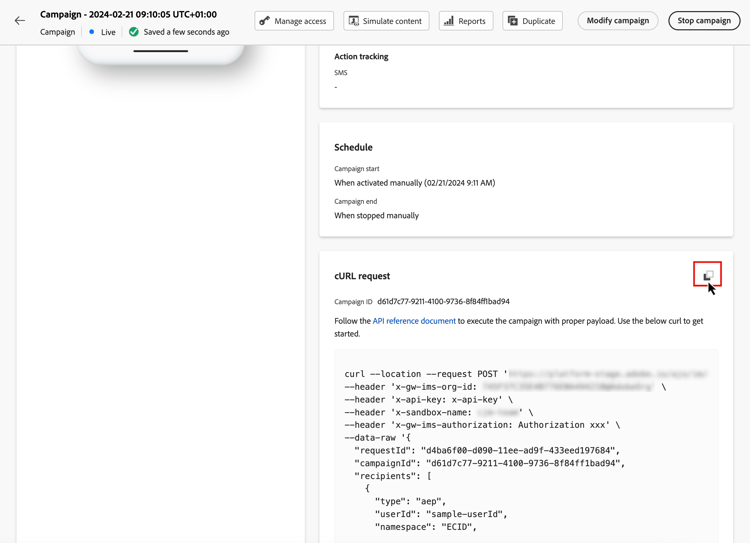
打开营销活动,然后从 cURL请求 部分复制并粘贴有效负载请求。 此有效负载包含消息中使用的所有个性化(用户档案和上下文)变量。 活动开始后,即可使用该功能。
note important IMPORTANT cURL部分中的端点在标准和高吞吐量营销活动之间有所不同。 -
将此cURL请求用到API中以构建有效负载并触发营销活动。 有关详细信息,请参阅交互式消息执行API文档,其中列出了标准和高吞吐量营销活动的所有端点。
此页面上也提供了API调用示例。
疑难解答 troubleshooting
电子邮件投放延迟 delivery-delays
如果电子邮件投放时间超过预期,请调查外部服务(如云基础架构提供商或电子邮件服务提供商)的潜在中断或性能问题。 Journey Optimizer日志记录消息出发时间戳,这有助于确定投放管道中下游是否发生了延迟。
Azure cosmos DB身份验证错误(500内部服务器错误) cosmosdb-auth-errors
如果您在触发API触发的营销活动时遇到500内部服务器错误,并且系统日志显示来自Azure Cosmos DB的 403禁止访问 错误,并显示一条消息,例如:
“由于Azure Cosmos DB服务无法获取帐户默认身份的AAD身份验证令牌,因此对您帐户的访问当前被撤销”
此错误通常发生于Cosmos DB身份验证所需的Azure服务主体已被禁用、删除或配置错误时。
-
验证您的Azure服务主体 — 确保您的Azure服务主体或托管标识已启用,并且尚未在Azure Active Directory中禁用或删除。
-
检查权限 — 确认服务主体具有访问Azure Key Vault和Cosmos DB资源的必要权限。 服务主体必须具有适当的角色分配,才能使用Azure Cosmos DB进行身份验证。
-
查看Azure Cosmos DB CMK配置 — 如果您使用的是客户管理的密钥(CMK),请查阅Azure Cosmos DB CMK疑难解答指南,以了解恢复AAD令牌获取的详细步骤。
-
重新启用并测试 — 更正配置后,重新启用服务主体(如果已禁用),并重新测试事务性营销活动API调用,以确认身份验证成功且消息已投放。
| note |
|---|
| NOTE |
| 此问题通常是由错误配置或意外禁用Cosmos DB身份验证所需的Azure服务主体导致的。 保持服务主体已启用且配置正确将防止将来出现此错误。 |
This section contains structured knowledge intended to support interpretation, retrieval, and question answering related to this topic.
For complete understanding, this information should be combined with the documentation on this page. Neither source is intended to stand alone; the page describes the feature, while this section provides additional context that helps disambiguate terminology, intent, applicability, and constraints.
- TL;DR: This page explains how to retrieve the generated cURL request of an activated API triggered campaign and use it in the APIs to trigger the campaign, with troubleshooting for email delivery delays and Azure Cosmos DB authentication errors.
Intents:
- Retrieve the generated sample cURL request of a live API triggered campaign
- Use the cURL request in the APIs to build the payload and trigger the campaign
- Know that campaign start and end dates and a call timeout apply to the API call
- Find the endpoints for standard and High throughput campaigns
- Troubleshoot email delivery delays and 500 Internal Server Errors caused by Azure Cosmos DB authentication
Glossary:
- cURL request: Section of the campaign that holds the generated sample request; its payload includes all personalization (profile and context) variables used in the message
- Interactive Message Execution REST API: The API into which you use the cURL request to build your payload and trigger the campaign (product-specific)
- Azure service principal: The identity required for Azure Cosmos DB authentication (product-specific)
Guardrails:
- If a specific start and/or end date was configured when creating the campaign, the campaign is not executed outside these dates, and API calls fail.
- The call to the Interactive Message Execution REST API has a timeout of 60 sec. Internal retries are in place in case of unexpected timeouts to guarantee the delivery.
- The endpoints in the cURL section differ between standard and High throughput campaigns.
Prerequisites and permissions:
- The campaign must be activated: the cURL request is available once the campaign is live.
Applicability:
- Applies to API triggered campaigns, both standard and High throughput.
Terminology:
- Canonical name: Execute an API triggered campaign
- Acronym: CMK — Customer-Managed Keys (used on the page body)
FAQ:
- Q: Where do I find the request to trigger my campaign? — Open the campaign, then copy-paste the payload request from the cURL request section. It is available once the campaign is live.
- Q: What does the cURL payload contain? — All personalization (profile and context) variables used in the message.
- Q: Why do my API calls fail? — If a specific start and/or end date was configured when creating the campaign, it is not executed outside these dates, and API calls fail.
- Q: Where are the endpoints for standard and High throughput campaigns listed? — In the Interactive Message Execution API documentation.
- Q: Where can I find API call examples? — On the messaging samples page of the Journey Optimizer APIs documentation.
Troubleshooting:
- Email delivery delays — If email delivery times exceed expectations, investigate potential outages or performance issues with external services, such as cloud infrastructure providers or email service providers. Journey Optimizer logs record message departure timestamps, which can help determine whether delays occurred downstream in the delivery pipeline.
- Azure cosmos DB authentication errors (500 internal server error) — Symptom: 500 Internal Server Errors when triggering API-triggered campaigns, and the system logs show a 403 Forbidden error from Azure Cosmos DB with a message such as “Access to your account is currently revoked because the Azure Cosmos DB service is unable to obtain the AAD authentication token for the account’s default identity”. Cause: the Azure service principal required for Cosmos DB authentication has been disabled, deleted, or misconfigured. Documented resolution: verify that the Azure service principal or managed identity is enabled and has not been disabled or deleted in your Azure Active Directory; check that the service principal has the necessary permissions and role assignments to access the Azure Key Vault and Cosmos DB resources; if you are using Customer-Managed Keys (CMK), consult the Azure Cosmos DB CMK troubleshooting guide; after correcting the configuration, re-enable the service principal if it was disabled, and re-test your transactional campaign API calls to confirm that authentication succeeds and messages are delivered.
Related pages:
- Differences between standard and High throughput endpoints: High throughput campaigns (campaigns/api-triggered-high-throughput.md)
- All endpoints for standard and High throughput campaigns: Interactive Message Execution API documentation (https://developer.adobe.com/journey-optimizer-apis/references/messaging#tag/execution)
- API call examples: page linked as “this page”, messaging samples of the Journey Optimizer APIs documentation (https://developer.adobe.com/journey-optimizer-apis/references/messaging-samples)
- Azure Cosmos DB CMK errors: Azure Cosmos DB CMK troubleshooting guide (https://learn.microsoft.com/en-us/azure/cosmos-db/cmk-troubleshooting-guide#azure-active-directory-token-acquisition-error)
Personas:
- marketer: Can open an activated campaign and copy the generated cURL request, since it is available once the campaign is live. Can use this request to build the payload and trigger the campaign through the Interactive Message Execution REST API. The page states that the call has a timeout of 60 sec, with internal retries in place to guarantee delivery. Where: “Trigger the campaign”.
Onboarding:
- Level: Intermediate
- First minimal step: Open the campaign, then copy-paste the payload request from the cURL request section.
- Success check: The cURL request section becomes available once the campaign is live.
- Next: The endpoints in the cURL section differ for a High throughput campaign: Activate High throughput mode for API triggered campaigns (campaigns/api-triggered-high-throughput.md)