在此页面上:了解如何将静态或个性化的PDF文件附加到电子邮件,包括支持的活动类型以及适用的计数、大小和卷限制。
您可以将静态PDF文件附加到您通过Journey Optimizer发送的电子邮件中。 如果您使用API触发的营销活动,则还可以为每个收件人附加个性化的PDF文件。
请注意,个性化的PDF附件需要额外的文件检索和处理。 使用它们的营销活动可能会比没有附件的营销活动具有更高的处理延迟和较低的吞吐量,尤其是在使用多个或更大的PDF文件时。
-
无论附件是静态的还是个性化的,您每年最多可以为每个用户档案发送6封包含PDF附件的邮件。
-
每个附件的最大文件大小为 5 MB。 对于包含个性化附件的电子邮件,默认情况下,电子邮件中所有静态和个性化的PDF附件共享合并的5 MB限制。
要将PDF文件附加到电子邮件,请执行以下步骤。
-
在历程或营销策划中创建电子邮件。 了解详情
-
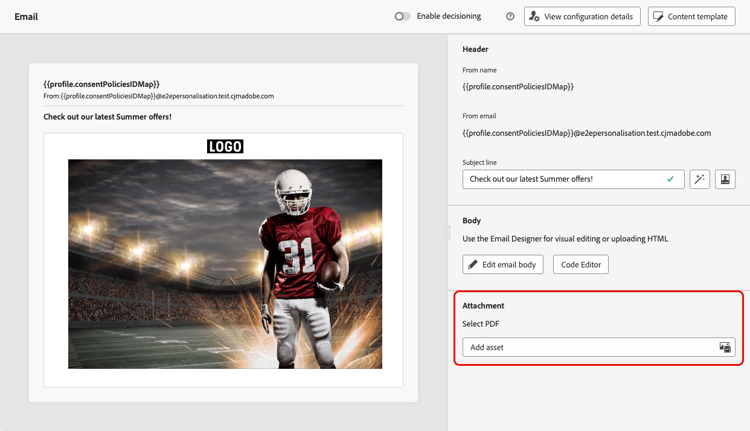
在历程或营销活动 内容 选项卡中,从 附件 部分选择添加资产。
-
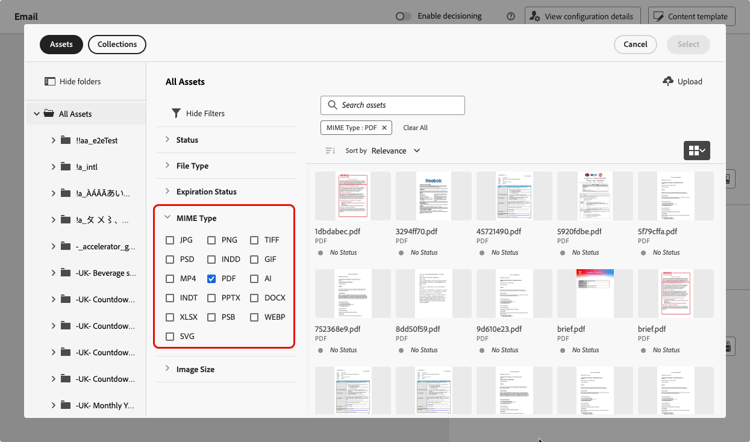
Assets Essentials存储库随即显示。
note NOTE 设计消息时,您可以直接从Journey Optimizer界面中访问Assets Essentials存储库。 要了解有关嵌入式Assets Essentials用户界面的更多信息,请参阅Experience Manager Assets Essentials文档。 -
使用 MIME类型 部分中的 PDF 筛选器将选择限制为正确的文件格式。
note NOTE 附件只允许使用PDF格式。 -
选择您选择的文件。
- 一次只能选择一个文件。
- 每个附件的最大文件大小为 5 MB。
-
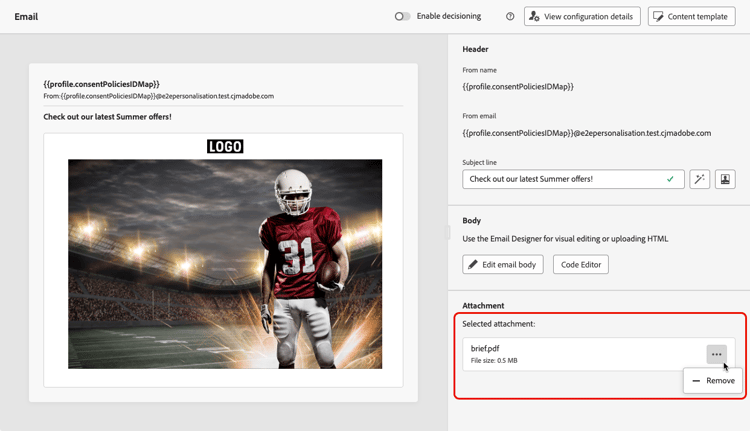
完成后,所选文件的名称和大小将显示在 附件 部分中。
您可以使用文件名旁边的更多操作图标删除所选文件。
为API触发的营销活动附加个性化的PDF文件 personalized-attachments
您还可以将特定于收件人的PDF文件附加到通过API触发的营销活动发送的单个电子邮件。 与静态附件不同,每个收件人可以收到不同的文件,例如发票、登机证、合同或装运标签。
默认情况下,电子邮件中所有静态和个性化PDF附件的组合大小限制为5 MB。 具有适用的PDF附件加载项的组织可以使用最多10 MB的组合限制。
-
仅事务性API触发的电子邮件营销活动支持个性化PDF附件。
-
一封电子邮件中最多可以包含五个PDF附件。 此限制包括静态附件和个性化附件。 例如,包含一个静态PDF的电子邮件最多可以包含四个个性化PDF。 如果您需要发送更多邮件,请将其拆分为多个通信。
-
个性化和静态PDF附件计入相同的配额。 了解详情
必须将个性化的PDF附件上传到特定于附件的数据登陆区域容器,然后在API有效负载中引用。 数据登陆区域是当前唯一支持个性化PDF附件的存储位置。
-
使用与执行请求相同的IMS组织和沙盒的
type=ajoemailattachments为沙盒检索数据登陆区域凭据,如Adobe Experience Platform文档中所述。 根据云提供商,使用Azure容器或API返回的AWS存储段和文件夹。 -
使用您选择的工具生成PDF文件,并将它们上传到您的数据登陆区容器。
请注意,数据登录区会在七天后自动删除文件,在消息投放和任何重试完成之前,请确保PDF文件在容器中保持可用。
-
在API有效负载中,为每个收件人添加一个
attachments数组,该数组包含要发送的PDF的文件名、内容类型和数据登陆区域路径。 了解如何个性化您的API触发的活动内容code language-json "attachments": [ { "name": "invoice-12345.pdf", "contentType": "application/pdf", "source": { "type": "dlzPath", "path": "attachments/invoice-12345.pdf" } } ]请注意,
source.path是使用type=ajoemailattachments检索到的相对于附件特定数据登陆区域容器的对象路径。 不包括Azure容器名称、AWS存储段或文件夹、凭据或完整存储URL。
在发送时,Journey Optimizer从指定位置获取文件并将其附加到收件人的邮件中。 主区域中的高吞吐量营销活动支持个性化的PDF附件。 在区域故障转移期间不支持它们。
有关完整的API有效负载引用,请参阅交互式消息执行API文档。
This section contains structured knowledge intended to support interpretation, retrieval, and question answering related to this topic.
For complete understanding, this information should be combined with the documentation on this page. Neither source is intended to stand alone; the page describes the feature, while this section provides additional context that helps disambiguate terminology, intent, applicability, and constraints.
- TL;DR: This page explains how to attach static PDF files to Journey Optimizer emails, and recipient-specific (personalized) PDF files for API-triggered campaigns, along with the applicable format, count, size, and per-profile volume limits.
Intents:
- Attach a static PDF file to an email in a journey or campaign
- Attach recipient-specific (personalized) PDF files through an API-triggered campaign
- Understand the PDF attachment count, size, and per-profile volume limits
- Set up the Data Landing Zone container and API payload for personalized attachments
- Raise the attachment size limit with the PDF Attachments add-on
Glossary:
- Static PDF attachment: A single PDF file attached to an email that is the same for every recipient (product-specific)
- Personalized PDF attachment: A recipient-specific PDF file (for example an invoice, boarding pass, contract, or shipping label) attached per recipient in an API-triggered campaign (product-specific)
- Data Landing Zone (DLZ): The attachment-specific cloud storage container (retrieved with
type=ajoemailattachments) where personalized PDFs are uploaded and then referenced from the API payload; the only supported storage location for them (product-specific) - PDF Attachments add-on: A purchasable add-on that raises the combined personalized-attachment size limit from 5 MB to 10 MB (product-specific)
Guardrails:
- Up to 6 messages with a PDF attachment per profile per year, whether the attachment is static or personalized.
- Maximum 5 MB per attachment; for emails with personalized attachments, all static and personalized PDFs share a combined 5 MB limit by default. The PDF Attachments add-on raises the combined personalized limit to 10 MB.
- Up to five PDF attachments per email, counting static and personalized together — for example, one static PDF plus up to four personalized PDFs.
- Only the PDF format is allowed for attachments.
- Personalized PDF attachments are supported only for transactional API-triggered email campaigns.
- Personalized PDFs must be uploaded to the attachment-specific Data Landing Zone container; it is currently the only supported storage location for them.
- Data Landing Zone automatically deletes files after seven days — keep the files available until delivery and any retries are complete.
- Personalized PDF attachments are supported for High Throughput campaigns in the primary region and are not supported during regional failover.
- A PDF attachment is not retained when the message is saved as a content template — reattach the file on any new email created from that template.
Terminology:
- Canonical name: PDF attachment — Acronym: n/a — variants: static PDF attachment, personalized PDF attachment
- Synonyms: “Data Landing Zone” = “DLZ”
- Do not confuse: “static PDF attachment” (same file for all recipients) ≠ “personalized PDF attachment” (per-recipient file, API-triggered campaigns only)
FAQ:
- Q: How many PDF attachments can one email include? — Up to five, counting static and personalized together (for example, one static plus up to four personalized).
- Q: What is the maximum PDF attachment size? — 5 MB per attachment; with personalized attachments, all static and personalized PDFs share a combined 5 MB limit by default, which the PDF Attachments add-on raises to 10 MB.
- Q: How many PDF-attachment messages can a single profile receive? — Up to 6 per profile per year, whether the attachments are static or personalized.
- Q: Are personalized PDF attachments available for any email? — No. They are supported only for transactional API-triggered email campaigns, and for High Throughput campaigns in the primary region; they are not supported during regional failover.
- Q: Where must personalized PDF files be stored? — In the attachment-specific Data Landing Zone container (retrieved with
type=ajoemailattachments) and referenced in the API payload; it is the only supported storage location, and files are automatically deleted after seven days. - Q: Is the PDF attachment kept when I save the email as a content template? — No, it is not retained; you must reattach the file on any new email created from the template.