在此页面上:定义受众、身份类型、自动配置文件创建和Webhook,以便您的API触发的活动能够联系到正确的个人并返回实时投放状态。
使用 受众 选项卡定义营销活动受众。
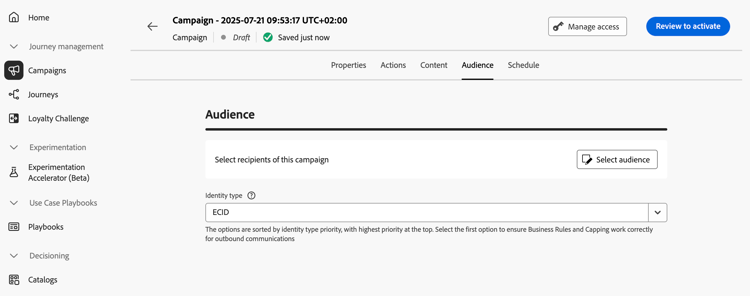
选择受众
对于营销API触发的营销活动,单击 选择受众 按钮以显示可用Adobe Experience Platform受众列表。 了解有关受众的详细信息。
对于事务性API触发的营销活动,需要在API调用中定义目标用户档案。 单个API调用最多支持20个唯一收件人。 每个收件人必须具有唯一的用户ID,不允许存在重复的用户ID。 请参阅交互式消息执行API文档以了解详情
选择身份标识类型
在 标识类型 字段中,选择要用于标识选定受众中个人的密钥类型。 您可以使用现有的身份类型,也可以使用Adobe Experience Platform Identity服务创建新身份类型。 此页面上列出了标准身份命名空间。
每个营销活动只允许一个标识类型。 如果属于区段的个人在不同的身份中没有选定的身份类型,则无法将该群体作为目标。 在Adobe Experience Platform文档中了解有关身份类型和命名空间的更多信息。
在活动执行时激活用户档案创建
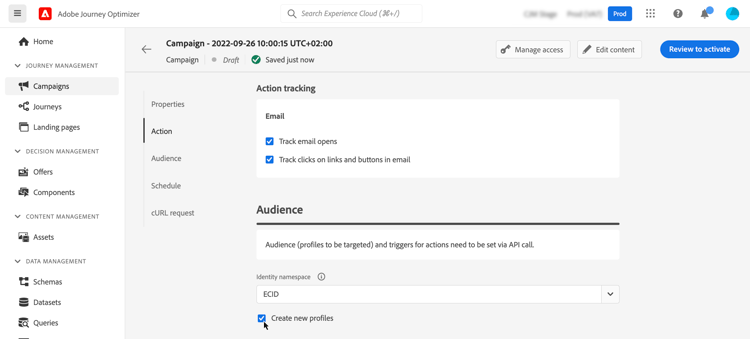
在某些情况下,您可能需要将事务型消息发送到系统中不存在的用户档案。 例如,如果未知用户尝试在您的网站上重置密码。 当数据库中不存在某个用户档案时,可使用Journey Optimizer在执行活动时自动创建该用户档案,以允许将消息发送到此用户档案。
要在营销活动执行时激活配置文件创建,请启用 创建新配置文件 选项。 如果禁用此选项,则任何发送都将拒绝未知配置文件,并且API调用将失败。
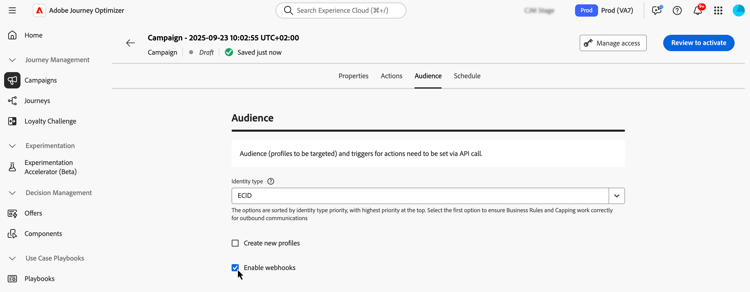
启用 Webhook webhook
对于事务性API触发的营销活动,可启用Webhook以接收有关消息执行状态的实时反馈。 为此,请切换 启用webhook 选项以将投放状态事件发送到配置的webhook。
Webhook配置在管理 / 渠道 / 反馈Webhook菜单中集中管理。 从该位置,管理员可以创建和编辑webhook端点。 了解如何创建反馈Webhook
后续步骤 next
准备好营销活动配置和内容后,即可计划其执行。 了解详情
This section contains structured knowledge intended to support interpretation, retrieval, and question answering related to this topic.
For complete understanding, this information should be combined with the documentation on this page. Neither source is intended to stand alone; the page describes the feature, while this section provides additional context that helps disambiguate terminology, intent, applicability, and constraints.
- TL;DR: This page explains how to define the audience of an API triggered campaign, including the identity type, automatic profile creation at campaign execution, and webhooks for delivery status.
Intents:
- Select the audience of a Marketing API triggered campaign
- Understand how recipients are defined for a Transactional API triggered campaign
- Select the identity type used to identify individuals
- Activate profile creation at campaign execution for unknown profiles
- Enable webhooks to receive delivery status events for Transactional API triggered campaigns
Glossary:
- Marketing API triggered campaigns: The audience is selected from the list of available Adobe Experience Platform audiences with Select audience (product-specific)
- Transactional API triggered campaigns: The targeted profiles are defined in the API call (product-specific)
- Identity type: The type of key used to identify the individuals from the selected audience; an existing identity type or a new one created with the Adobe Experience Platform Identity Service
- Create new profiles: Option that automatically creates a profile that does not exist in the database when the campaign is executed
- Enable webhooks: Option that sends delivery status events to a configured webhook
- Feedback Webhook: Menu under Administration / Channels where webhook configurations are managed centrally
Guardrails:
- A single API call supports up to 20 unique recipients, for Transactional API triggered campaigns.
- Each recipient must have a unique user ID; duplicate user IDs are not permitted.
- Only one identity type is allowed per campaign.
- Individuals belonging to a segment that does not have the selected identity type among their different identities cannot be targeted by the campaign.
- The use of audiences and attributes from audience composition is currently unavailable for use with Healthcare Shield or Privacy and Security Shield.
- If Create new profiles is disabled, unknown profiles are rejected for any sending and the API call fails.
- Create new profiles is provided for very small volume profile creation in a large volume transactional sending use case, with the bulk of profiles already existing in Platform.
- Unknown profiles are created in the AJO Interactive Messaging Profile Dataset dataset, in three default namespaces (email, phone and ECID) respectively for each outbound channel (Email, Mobile and Push). With a custom namespace, the identity is created with the same custom namespace.
- Profile creation at execution is not available for High Throughput campaigns, as this mode does not rely on Adobe profiles. The system does not check whether the profiles exist or not.
Applicability:
- Audience selection with Select audience: Marketing API triggered campaigns
- Targeted profiles defined in the API call: Transactional API triggered campaigns
- Enable webhooks: Transactional API triggered campaigns
Terminology:
- Canonical name: API triggered campaign audience
- Acronym: AEP — Adobe Experience Platform
- Short name: Platform — Adobe Experience Platform
- Do not confuse: “Marketing API triggered campaigns” (audience selected with Select audience) ≠ “Transactional API triggered campaigns” (profiles defined in the API call)
FAQ:
- Q: How are recipients defined for a Transactional API triggered campaign? — The targeted profiles need to be defined in the API call. A single API call supports up to 20 unique recipients, each with a unique user ID.
- Q: How many identity types can a campaign use? — Only one identity type is allowed per campaign.
- Q: What happens to an unknown profile? — If Create new profiles is on, the profile is created when the campaign is executed. If it is disabled, unknown profiles are rejected for any sending and the API call fails.
- Q: Can I create profiles at execution in High Throughput campaigns? — No. Profile creation at execution is not available for High Throughput campaigns.
- Q: Where are webhook configurations managed? — In the Administration / Channels / Feedback Webhook menu, where administrators can create and edit webhook endpoints.
Related pages:
- Audiences available for Marketing campaigns: Learn more about audiences (audience/about-audiences.md)
- Audience composition: audience composition (audience/get-started-audience-orchestration.md)
- Transactional recipients in the API call: Interactive Message Execution API documentation (https://developer.adobe.com/journey-optimizer-apis/references/messaging#operation/postIMUnitaryMessageExecution)
- Standard Identity namespaces: this page (https://experienceleague.adobe.com/en/docs/experience-platform/identity/features/namespaces#standard)
- Identity types and namespaces: Adobe Experience Platform documentation (https://experienceleague.adobe.com/docs/experience-platform/identity/home.html)
- High Throughput campaigns: High Throughput campaigns (campaigns/api-triggered-high-throughput.md)
- Creating Feedback Webhooks: Learn how to create Feedback Webhooks (configuration/feedback-webhooks.md)
- Next step, scheduling: Learn more (campaigns/api-triggered-campaign-schedule.md)
Personas:
- developer: Can define recipients for a Transactional API triggered campaign directly in the API call. The page states that a single API call supports up to 20 unique recipients, each with a unique user ID, and duplicate user IDs are not permitted. Where: “Select the audience”.
Onboarding:
- Level: Experienced
- First minimal step: Use the Audience tab to define the campaign audience.
- Success check: Delivery status events are sent to the configured webhook.
- Previous: Selecting an Adobe Experience Platform audience for a Marketing API triggered campaign: About Adobe Experience Platform audiences (audience/about-audiences.md)
- Next: Scheduling the API triggered campaign after audience configuration is complete: Schedule an API triggered campaign (campaigns/api-triggered-campaign-schedule.md); Enabling webhooks to receive delivery status events for a Transactional API triggered campaign: Create feedback webhooks for API triggered campaigns in Journey Optimizer (configuration/feedback-webhooks.md)