在此页面上:在“计划”选项卡中设置开始和结束日期以及速率控制,以便您的API触发的活动在正确的时间发送,而不会使下游系统不堪重负。
使用 计划 选项卡定义营销活动计划。
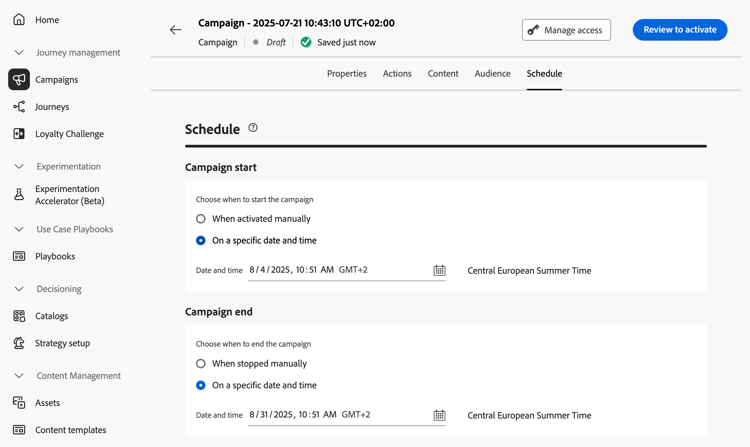
设置开始和结束日期
默认情况下,API触发的营销活动在触发后立即开始,在发送消息后立即结束。 如果不想在营销活动触发后立即执行,则可以使用 营销活动开始 选项指定发送消息的日期和时间。
利用 营销活动结束 选项,可指定何时应停止执行营销活动。 在指定的日期之外,将不会执行营销活动。
设置速率控制
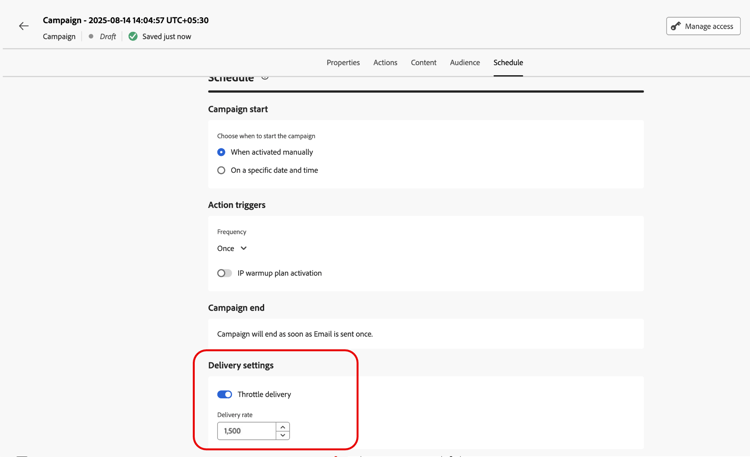
Journey Optimizer允许您为出站操作(电子邮件、移动消息、推送通知)启用速率控制。
此功能对于防止下游系统(如登陆页面或客户服务平台)过载尤为实用。 例如,您可以将速率限制设置为每秒165条消息,以确保平稳投放而不会淹没下游系统。
要设置速率控制,请在 投放设置 部分中启用 节流投放 选项,并指定所需的每秒投放速率。
- 支持的最低投放率:每秒1个。
- 支持的最大投放率:启用“限制投放”选项时,每秒投放2000次。
后续步骤 next
准备好营销活动配置和内容后,即可对其进行查看和激活。 了解详情
This section contains structured knowledge intended to support interpretation, retrieval, and question answering related to this topic.
For complete understanding, this information should be combined with the documentation on this page. Neither source is intended to stand alone; the page describes the feature, while this section provides additional context that helps disambiguate terminology, intent, applicability, and constraints.
- TL;DR: This page explains how to schedule an API triggered campaign with start and end dates in the Schedule tab, and how to set rate control with the Throttle delivery option.
Intents:
- Understand when an API triggered campaign starts and ends by default
- Set a start date and time with Campaign start
- Set an end date and time with Campaign end
- Set a delivery rate per second with Throttle delivery
- Understand which profiles are excluded when the delivery rate is too low
Glossary:
- Campaign start: Option to specify a date and time at which the message is sent
- Campaign end: Option to specify when a campaign stops being executed
- Rate control: Feature that limits the delivery rate of outbound actions, to prevent overload on downstream systems such as landing pages or customer care platforms
- Throttle delivery: Option in the Delivery settings section that enables rate control
- Delivery rate: The number of messages per second specified when Throttle delivery is enabled
Guardrails:
- By default, API triggered campaigns start once they are triggered, and end as soon as the message has been sent once.
- Outside of the specified dates, the campaign is not executed.
- Minimum delivery rate supported: 1 per second (hard limit).
- Maximum delivery rate supported: 2000 per second when the Throttle delivery option is enabled (hard limit).
- When a delivery rate is set, the maximum timeframe for which the campaign audience can execute is 12 hours (hard limit).
- If the delivery rate does not allow all the audience to be sent the message in the 12 hour timeframe, the remaining profiles are excluded from the campaign. The count of these excluded profiles is visible in the campaign report.
Applicability:
- Rate control: outbound actions (Email, Mobile messages, Push notifications)
Terminology:
- Canonical name: API triggered campaign schedule
- Do not confuse: Campaign start (when the message is sent) ≠ Campaign end (when the campaign stops being executed)
FAQ:
- Q: When does an API triggered campaign start by default? — Once it is triggered. It ends as soon as the message has been sent once.
- Q: How do I send the message at a specific time? — Use the Campaign start option to specify a date and time.
- Q: How do I limit the delivery rate? — Enable Throttle delivery in the Delivery settings section and specify the Delivery rate per second.
- Q: What is the supported range for the delivery rate? — From 1 per second to 2000 per second.
- Q: What happens to profiles that cannot be reached in 12 hours? — They are excluded from the campaign, and their count appears in the campaign report.
Examples:
- A rate limit of 165 messages per second ensures steady delivery without overwhelming downstream systems.
Related pages:
- Next step, review and activation: Learn more (campaigns/review-activate-api-triggered-campaign.md)
Personas:
- developer: Can enable Throttle delivery in Delivery settings and set a Delivery rate per second for Email, Mobile messages, and Push notifications. Can apply rate control to prevent overload on downstream systems such as landing pages or customer care platforms. The page states that the delivery rate supports 1 to 2000 messages per second, with a 12 hour maximum execution timeframe for the campaign audience. Where: “Set rate control”.
Onboarding:
- Level: Experienced
- First minimal step: Enable the Throttle delivery option in the Delivery settings section and specify the desired Delivery rate per second.
- Success check: You can see the count of these excluded profiles in the campaign report.
- Next: When your campaign configuration and content are ready: Review & activate the API triggered campaign (campaigns/review-activate-api-triggered-campaign.md)