在此页面上:了解如何创建和配置反馈Webhook,以便为在Adobe Journey Optimizer中由API触发的事务性营销活动向系统提供实时消息状态更新。
利用反馈Webhook,可接收通过事务性API触发的营销活动发送的消息的实时状态更新。 通过配置webhook,您可以自动将投放结果直接接收至您的系统,从而实现监控、日志记录和自动处理。
您可以从管理 / 渠道 / 反馈webhook设置菜单管理webhook配置。
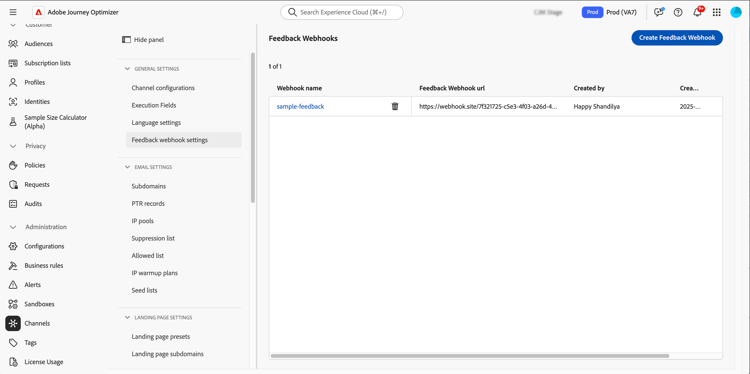
创建反馈 Webhook feedback-webhook
要创建webhook,请执行以下步骤:
-
导航到管理 / 渠道 / 反馈webhook设置。
-
单击创建反馈Webhook。
-
在 基本配置 部分中,提供以下详细信息:
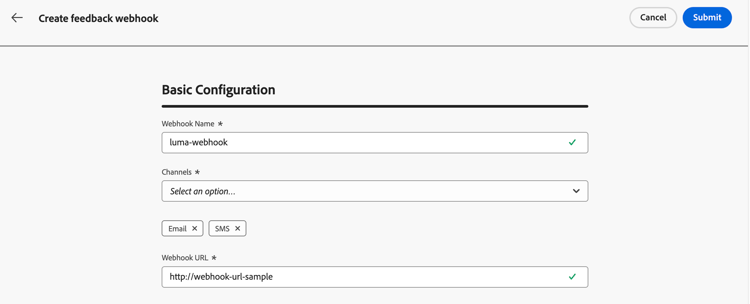
- Webhook名称 — 输入描述性名称以标识webhook。
- 渠道 — 选择此webhook应接收其反馈的渠道(电子邮件和/或移动设备)。
- Webhook URL — 提供必须向其传递反馈事件的HTTPS终结点。
-
在 身份验证 部分中,选择身份验证方法:
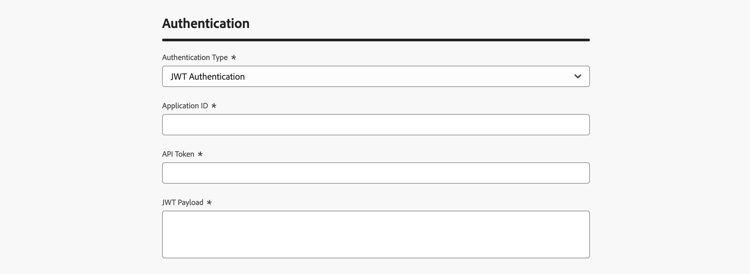
- 无身份验证 — 未添加身份验证标头。
- JWT身份验证 — 如果您的端点需要JWT身份验证,请提供所需的详细信息。
-
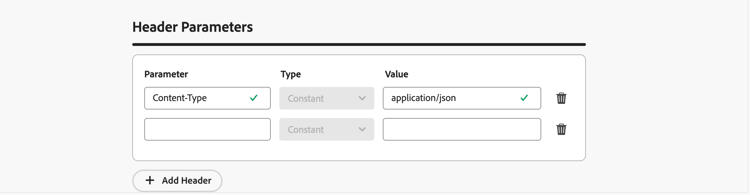
在 标头参数 部分中,配置要随每个webhook请求发送的其他自定义标头。
-
单击 提交 以保存配置。
Webhook有效载荷结构
消息执行后,Journey Optimizer将以下有效负载发送到配置的终结点。
有关消息反馈事件字段(如messageExclusion)的定义,请参阅Adobe Journey Optimizer架构引用。
有效负载包括以下营销活动和移动投放详细信息:
messageExecution.campaignType— 营销活动类型:Scheduled或ApiTriggered。messageDeliveryFeedback.encoding— 提供商报告的短信编码,如GSM或UNICODE。messageDeliveryFeedback.numberOfMessageParts— 消息被拆分为的SMS部分(区段)的数量,以字符串形式发送。messageDeliveryFeedback.deliveryTimestamp— 提供程序报告的ISO-8601格式的事件时间。
encoding、numberOfMessageParts和deliveryTimestamp字段。 没有值的字段将作为null发送。电子邮件有效负载示例
{
  "requestId": "8NoByJneShCdCGRnrGS1t1m3CdA73dhR",
  "imsOrg": "myImsOrg",
  "sandbox": {
    "id": "068abf40-575e-11ea-8512-9b1bfdb82603",
    "name": "prod"
  },
  "channel": "email",
  "eventType": "message.feedback",
  "messageExecution": {
    "messageExecutionID": "HUMA-26362805",
    "messageType": "transactional",
    "campaignID": "16f24a15-7e21-477c-848a-d5695ca7f137",
    "campaignVersionID": "2ca10c10-56dd-4505-87cd-fa5da84e7a5d",
    "campaignType": "ApiTriggered"
  },
  "messageDeliveryFeedback": {
    "feedbackStatus": {
      "value": "bounce"
    },
    "offers": null,
    "messageExclusion": null,
    "messageFailure": {
      "category": "sync",
      "type": "Ignored",
      "code": "25",
      "reason": "Admin Failure"
    },
    "retryCount": 0,
    "encoding": null,
    "numberOfMessageParts": null,
    "deliveryTimestamp": null
  },
  "identityMap": {
    "email": [
      {
        "id": "john.doe@luma.com",
        "primary": true
      }
    ]
  }
}
SMS有效负载示例
以下示例显示通过Sinch发送的短信消息的投放反馈:
{
  "requestId": "4f1c2d9e-...",
  "imsOrg": "XXXX@AdobeOrg",
  "sandbox": {
    "id": "...",
    "name": "prod"
  },
  "channel": "sms",
  "eventType": "message.feedback",
  "channelContext": {
    "profileAddress": null,
    "profileNumber": "+15555550123"
  },
  "messageExecution": {
    "messageExecutionID": "UMA-...",
    "messageType": "marketing",
    "campaignID": "...",
    "campaignVersionID": "...",
    "messageID": "...",
    "messageProfileID": "...",
    "campaignType": "ApiTriggered"
  },
  "messageDeliveryFeedback": {
    "feedbackStatus": {
      "value": "delivered"
    },
    "offers": null,
    "messageExclusion": null,
    "messageFailure": null,
    "retryCount": null,
    "responseCode": null,
    "responseDurationMillis": null,
    "encoding": "GSM",
    "numberOfMessageParts": "2",
    "deliveryTimestamp": "2026-10-06T18:22:41.512Z"
  },
  "identityMap": {
    "Phone": [
      {
        "id": "+15555550123"
      }
    ]
  }
}
webhook可以捕获以下事件:
- 已发送
- 已送达
- 跳出(请参阅以上示例)
- 错误
每个传入请求还包括一个发送回webhook的唯一requestId。