このページ:実際の顧客への連絡やプロファイルの更新を行うことなく、実際の本番データを使用してジャーニーをテストするドライランモードでの公開方法について説明します。これにより、公開前にデザインを検証できます。
ドライランが適切な方法であるかわからないですか? ジャーニーシミュレーションやジャーニーテストモードとは異なり、ドライランは誰にも連絡することなく、実際のプロダクションオーディエンスを使用します。 3 つの検証オプションをすべて比較します。
ジャーニーのドライランは、Adobe Journey Optimizer における特別なジャーニー公開モードです。このモードでは、ジャーニーの実務担当者は実際の顧客に連絡したり、プロファイル情報を更新したりすることなく、実際の本番データを使用してジャーニーをテストできます。 この機能により、ジャーニー実務担当者は、ジャーニーをライブで公開する前に、ジャーニーのデザインとオーディエンスのターゲティングに自信を持つことができます。
➡️ ジャーニーのドライランについて詳しくは、このビデオをご覧ください
主なメリット journey-dry-run-benefits
ジャーニーのドライランは、顧客に連絡したり、プロファイル情報を変更したりするリスクを伴わずに、実際の実稼動データを使用してカスタマージャーニーを安全にデータ駆動型のテストできるようにすることで、実務担当者の信頼性とジャーニーの成功を向上させます。 この機能により、ジャーニー実務担当者は、ライブになる前にオーディエンスのリーチと分岐ロジックを検証し、ジャーニーが意図したビジネス目標と一致していることを確認できます。
ジャーニーのドライランを使用すると、問題を早期に特定し、ターゲティング戦略を最適化し、前提ではなく実際のデータに基づいてジャーニーのデザインを改善できます。 ジャーニーキャンバスに直接統合されたドライランでは、主要業績評価指標に対する直感的なレポートと表示を提供することで、チームが自信を持って反復処理を行い、承認ワークフローを効率化できます。 これにより、運用効率が向上し、ローンチのリスクが軽減され、顧客エンゲージメントの結果が向上します。
最終的には、この機能により価値実現までの時間が短縮され、ジャーニーの失敗が減少します。
ジャーニーのドライランでは、以下を実現できます。
- 安全なテスト環境:ドライランモードのプロファイルには連絡しないので、通信を送信したり、ライブデータに影響を与えたりするリスクはありません。
- オーディエンスインサイト:ジャーニー実務担当者は、ジャーニーの条件に基づいてオプトアウトや除外を含む様々なジャーニーノードでオーディエンスの到達可能性を予測できます。
- リアルタイムフィードバック:指標は、ライブレポートと同様に、ジャーニーキャンバスに直接表示され、ジャーニー実務担当者はジャーニーのデザインを調整できます。
ドライランの実行ロジック journey-dry-run-exec
ドライラン中、ジャーニーはシミュレーションモードで実行され、実際のアクションをトリガーせずに各ジャーニーアクティビティに次の特定の動作が適用されます。
-
チャネルアクション ノード(電子メール、モバイルメッセージ、プッシュ通知など)は実行されません。
-
カスタムアクションは、ドライラン中は無効になり、その応答は null に設定されます。
読みやすさを向上させるために、ドライランの実行中はカスタムアクションとチャネルアクティビティがグレー表示されます。

-
ドライラン中は、外部データソースを含む データソース と 待機 アクティビティはデフォルトで無効になります。 ただし、ドライランモードをアクティブ化すると、この動作を変更できます。
-
反応ノードは実行されません。反応ノードにエントリするすべてのプロファイルは正常に終了します。 ただし、次の優先度ルールが適用されます。
- 反応ノードが 1 つまたは複数の 単一イベント ノードと並行して使用される場合、プロファイルは常に反応イベントを通過します。
- 反応 ノードを1つまたは複数の反応イベント ノードと並行して使用すると、プロファイルは常にキャンバスの最初のノード(上部のノード)を通過します。
-
スケジュールされた実行時間(毎日、毎週、毎月)を持つ オーディエンスを読み取り アクティビティは、ジャーニーで設定された時間に従いません。スケジュールは、ドライランがアクティブ化された時点に固定されます。 例えば、ジャーニーが毎日午前 10 時に実行するように設定されているが、午前 8 時にドライランをアクティブ化した場合、ドライラン中にスケジュールされた後続の読み取りはすべて午前 8 時に実行されます。
-
ドライランを開始する権限は、Publish journeys の上位権限を持つユーザーに制限されます。 ドライランを停止する権限は、Manage journeys の上位権限を持つユーザーに制限されます。 Journey Optimizer ユーザーのアクセス権の管理について詳しくは、この節を参照してください。
-
ドライラン機能の使用を開始する前に、ガードレールと制限のトピックに目を通してください。
ドライランの開始 journey-dry-run-start
エラーのない任意のドラフトジャーニーで、ドライラン機能を使用できます。
ドライランをアクティブ化するには、次の手順に従います。
-
テストするジャーニーを開きます。
-
ジャーニーヘッダーの「検証」をクリックします。 アラートパネルでエラーを解決し、続行する前に再度検証します。 ジャーニー検証について説明します。
-
「ドライラン」ボタンを選択します。

-
待機 アクティビティと 外部データソース 呼び出しを有効または無効にするかどうかを選択し、ドライランの公開を確認します。

トランジション中は、ドライランをアクティブ化中というステータスメッセージが表示されます。
-
アクティブ化すると、ジャーニーは ドライラン モードにエントリします。
ドライランの監視 journey-dry-monitor
ドライランモードのパブリケーションが開始されると、ジャーニーの実行と、ジャーニーブランチとノードを通じたプロファイルの進行状況を視覚化できます。
指標は、ジャーニーキャンバスに直接表示されます。 ジャーニーライブレポートと指標について詳しくは、ジャーニーキャンバスのライブレポートを参照してください。

また、ドライランの 過去 24 時間のレポート と 全期間レポート にアクセスすることもできます。 これらのレポートにアクセスするには、ジャーニーキャンバスの右上隅にある「レポートを表示」ボタンをクリックします。

ドライランの停止 journey-dry-run-stop
14 日後、ドライランのジャーニーは自動的に ドラフト ステータスに移行します。
ドライランのジャーニーは、手動で停止することもできます。 ドライランモードを非アクティブ化するには、次の手順に従います。
-
停止するドライランのジャーニーを開きます。
-
「閉じる」ボタンを選択して、テストを終了します。
確認画面で、過去 24 時間および全期間のレポートへのリンクを使用できます。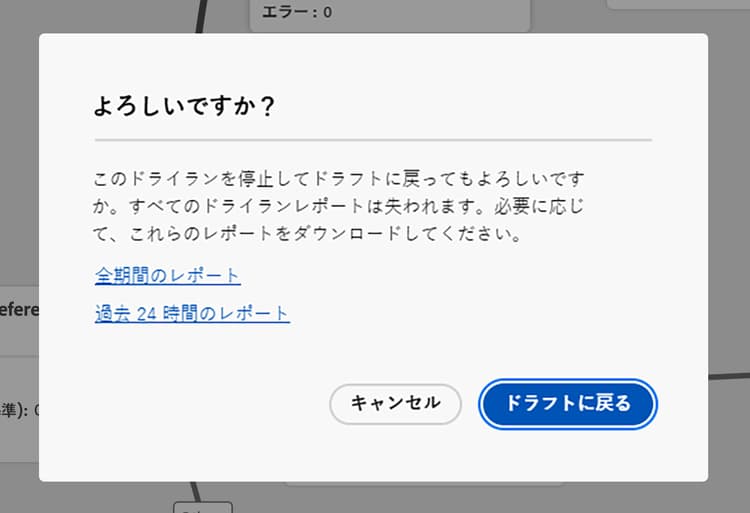
-
「ドラフトに戻る」をクリックして確定します。
ガードレールと制限 journey-dry-run-limitations
- ドライランモードのプロファイルは、エンゲージ可能なプロファイルにカウントされます
- ドライランモードのジャーニーは、ライブジャーニーの割り当て量にカウントされます。 ジャーニーガードレール の詳細
- ドライランのジャーニーは、ビジネスルールには影響しません
- ジャンプアクションは、ドライランでは有効になりません。
ソースジャーニーが宛先ジャーニーへの ジャンプ イベントをトリガーした際、そのジャンプイベントはドライランのジャーニーバージョンには適用されません。 例えば、ジャーニーの最新バージョンがドライランで、以前のバージョンが ライブ である場合、ジャンプイベントはドライランバージョンを無視し、ライブバージョンにのみ適用されます。
ジャーニーのステップイベントとドライラン journey-step-events
ジャーニーのドライランでは、stepEvents が生成されます。 ジャーニーステップイベントの詳細。 これらの stepEvents には、特定のフラグとドライラン ID(inDryRun と dryRunID)があります。

_experience.journeyOrchestration.stepEvents.inDryRunは、ジャーニーがドライランモードの場合にtrueを返し、テストジャーニーやライブジャーニー(ドライラン以外)の場合にnullを返します。_experience.journeyOrchestration.stepEvents.dryRunIDは、ドライランモードの場合にドライランインスタンスの ID を返し、テストジャーニーやライブジャーニーの場合にnullを返します。
stepEvent データを 外部システム に書き出す場合は、inDryRun フラグを使用してドライラン実行をフィルタリングできます。
Adobe Experience Platform クエリサービスを使用して ジャーニーレポート指標 を分析する場合、ドライ実行生成ステップイベントを除外する必要があります。 これを行うには、inDryRun が true であるステップイベントを除外します(つまり、inDryRun が null または false であるイベントのみを含めます)。
ドライ実行時にレポートできないステップイベントが生成されない。 これは、ドライランのステップイベントタイプに基づいて作成されたカスタムレポートにのみ影響し、標準のジャーニー実行には影響しません。 カスタムレポートがこれらのステップイベントに依存している場合は、ドライランを再トリガーしてデータを再生成します。
よくある質問 faq
ドライランでは、実際の顧客にメッセージが送信されますか?
いいえ。 ドライランでは実際の本番データを使用しますが、プロファイルへの連絡やプロファイル情報の更新は行いません。 チャネルアクション(電子メール、モバイルメッセージ、プッシュ)は実行されず、カスタムアクションは応答がnullに設定されて無効になります。
ドライランの開始や停止に必要な権限は何ですか?
ドライランを開始するには、Publish journeys という高レベルの権限が必要です。 ドライランを停止するには、Manage journeys という高レベルの権限が必要です。 詳しくは、権限の節を参照してください。
ドライランを実行できるジャーニーはどれですか?
エラーのない任意の ドラフト ジャーニーで、ドライランを使用できます。
ドライランはどのくらいの時間続きますか?
14 日後、ドライランのジャーニーは自動的に ドラフト ステータスに戻ります。 また、ドライランは、いつでも手動で停止することもできます。
ドライラン中に待機アクティビティや外部データソースは実行されますか?
デフォルトでは、ドライラン中、待機アクティビティおよびデータソース(外部データソースを含む)は無効になります。 ドライランモードをアクティブ化する際、この動作を変更できます。
ドライランのプロファイルとジャーニーは、割り当て量にカウントされますか?
はい。 ドライランモードのプロファイルはエンゲージ可能なプロファイルにカウントされ、ドライランモードのジャーニーはライブジャーニーの割り当て量にカウントされます。 ただし、ドライランのジャーニーは、ビジネスルールには影響しません。
テストを停止した後、ドライランのレポートに引き続きアクセスできますか?
いいえ。 レポートデータは、ドライランが アクティブ の間にのみ使用できます。 停止すると、データにアクセスできなくなります。必要に応じて、レポートの上部にある「エクスポート」ボタンを使用して、事前にデータをダウンロードしてください。
レポートからドライランのデータを除外するにはどうすればよいですか?
ドライランでは、inDryRun と dryRunID のフラグが付けられた stepEvents を生成します。 Adobe Experience Platform クエリサービスを使用してジャーニーレポート指標を分析する際は、inDryRun が true であるステップイベントを除外してください(inDryRun が null または false であるイベントのみを含めてください)。
ドライランでは、オーディエンスを読み取りアクティビティのスケジュールされた実行時間は変更されますか?
はい。 スケジュールされた時間(毎日、毎週、毎月)を持つ オーディエンスを読み取り アクティビティを使用するジャーニーの場合、ドライランでは、スケジュールは、ジャーニーで設定された時間ではなく、ドライランがアクティブ化された時点に固定されます。 例えば、ジャーニーが午前 10 時に実行するように設定されているが、午前 8 時にドライランをアクティブ化した場合、ドライラン中の毎日の読み取りはすべて午前 8 時に実行されます。
チュートリアルビデオ dry-run-video
ジャーニーのドライラン方法について詳しくは、このビデオを参照してください。
This section contains structured knowledge intended to support interpretation, retrieval, and question answering related to this topic.
For complete understanding, this information should be combined with the documentation on this page. Neither source is intended to stand alone; the page describes the feature, while this section provides additional context that helps disambiguate terminology, intent, applicability, and constraints.
- TL;DR: This page explains Journey Dry run, a special publication mode that lets practitioners test a journey using real production data without contacting customers or modifying profiles, and covers how to start, monitor, stop, and filter Dry run step events.
Intents:
- Activate Dry run mode on a Draft journey to validate audience reach and branch logic with real production data
- Monitor journey execution metrics in the canvas during a Dry run
- Stop a Dry run manually and return the journey to Draft status
- Filter Dry run step events out of reporting queries using the
inDryRunflag - Understand which activities are disabled or simulated during a Dry run
Glossary:
- Dry run: A special journey publication mode that executes the journey against real production data without sending any communications or updating profile information (product-specific)
- stepEvent: Journey step events; Journey Dry run generates stepEvents that have a specific flag,
inDryRun, and a Dry run ID,dryRunID(product-specific) - inDryRun flag: A flag on stepEvents that is
truefor Dry run executions andnullfor live or test journeys (product-specific)
Guardrails:
- The Dry run capability can be used in any Draft journey with no error
- Starting a Dry run requires the Publish journeys permission; stopping it requires Manage journeys
- Dry run journeys automatically exit Dry run mode and return to Draft status after 14 days.
- Profiles in Dry run mode are counted towards Engageable Profiles; journeys in Dry run mode are counted towards the live journey quota
- Channel action nodes (Email, Mobile message, Push) are not executed during Dry run; Custom actions are disabled and their responses are set to null
- Data sources (including external data sources) and Wait activities are disabled by default during Dry run; this behavior can be changed when activating the Dry run mode
- Jump actions are not enabled in Dry run
- Reaction nodes are not executed during Dry run; profiles exit successfully, with priority rules for parallel unitary and reaction branches
- Reporting data is only available while the Dry run is active; once stopped, the data is no longer accessible
- Dry run journeys do not impact business rules
- For journeys using a Read Audience activity with a scheduled time (daily, weekly, or monthly), the Dry run does not follow the configured journey schedule — the schedule is anchored to the moment Dry run was activated (e.g. journey set to 10 AM, Dry run activated at 8 AM → all reads during Dry run execute at 8 AM)
Terminology:
- Canonical name: Journey Dry run — Acronym: none — variants: Dry run mode, Dry run publication
- Do not confuse: “Dry run” mode ≠ “Draft” status — a journey enters Dry run mode from a Draft journey and transitions to Draft status after 14 days or when stopped manually
- Do not confuse: “Dry run” ≠ “Journey Simulation” ≠ “Journey Test mode” — the page states that, unlike Journey Simulation and Journey Test mode, Dry run uses the real production audience without contacting anyone; the page links to a comparison of all three validation options
- Do not confuse: “inDryRun” ≠ “dryRunID” —
inDryRunis the flag that istruefor Dry run executions;dryRunIDis the ID of the Dry run instance
FAQ:
- Q: Does Dry run actually send emails or push notifications to customers? — No; channel action nodes (Email, Mobile message, Push) are not executed, and custom actions are disabled with their responses set to null.
- Q: How long does a Dry run last before it automatically stops? — 14 days, after which the journey automatically transitions back to Draft status.
- Q: How do I exclude Dry run data from my journey reporting metrics? — When analyzing journey reporting metrics with Query service, exclude step events where
inDryRunistrue; include only events whereinDryRunisnullorfalse. - Q: Do Dry run profiles and journeys count towards quotas? — Yes; profiles in Dry run mode are counted towards Engageable Profiles, and journeys in Dry run mode are counted towards the live journey quota.
- Q: Can I enable Wait activities and external data source calls during a Dry run? — Both are disabled by default, but you can choose to enable or disable them when activating the Dry run.
- Q: Does Dry run respect the scheduled execution time configured in a Read Audience journey? — No. The Dry run anchors the schedule to the activation time, not the configured journey time. If the journey is set to run at 10 AM but Dry run is activated at 8 AM, all scheduled reads during Dry run execute at 8 AM.