このページ: Adobe Journey Optimizer ライセンス使用状況ダッシュボードを操作する方法と、エンゲージ可能プロファイル数の予期しない増加をトラブルシューティングする方法について説明します。
Adobe Journey Optimizer ユーザーインターフェイスは、毎日のスナップショットでキャプチャされた、組織のライセンス使用状況に関する重要な情報を表示するダッシュボードを提供します。
このダッシュボードにアクセスするには、管理/ライセンスの使用状況に移動します。 これにより、ダッシュボードに表示される「概要」タブが開きます。
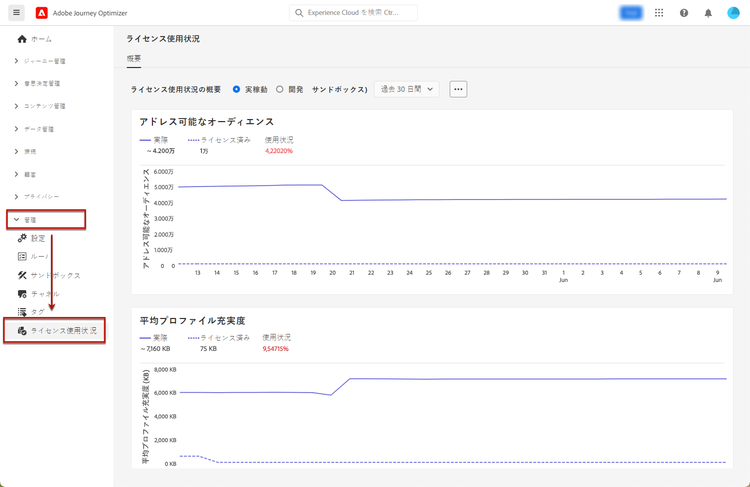
-
ダッシュボードを表示するには、ライセンス使用状況ダッシュボードを表示権限を付与されている必要があります。
-
開発サンドボックスの場合、割り当て量列に
N/Aと示されるので、特定の指標(例:計算時間、メールなど)は表示されません。 ダッシュボードには、null 以外の値のみが表示されます。指標がゼロまたはゼロに近い場合、これらの値は入力されません。
Adobe Journey Optimizer の場合、ダッシュボードを使用すると、エンゲージ可能なプロファイル数を確認できます。これは、12 か月間のローリング期間のジャーニー、キャンペーン、決定を通じてエンゲージメントがあった一意のプロファイル数です。 エンゲージ可能なプロファイルの定義と計算方法について詳しくは、エンゲージ可能なプロファイルとライセンス使用状況を参照してください。
トラブルシューティング:エンゲージ可能なプロファイル数の大幅な増加 troubleshooting-engageable-profiles
エンゲージ可能なプロファイル数の急激な増加があった場合(例えば、1 日以内にプロファイル数が数十万から数百万に増加した場合)、この節では、問題を理解し、対処するためのガイダンスを提供します。
増加について
エンゲージ可能なプロファイル指標は、過去 12 か月間にジャーニーまたはキャンペーンによって関与された一意のプロファイルの数を反映します。 突然の増加は次の要因から生じる場合があります。
- 新しいジャーニーやキャンペーンでターゲットにしている大規模なオーディエンス
- プロファイルサービスに対して有効になっているデータセットの変更
- 最近エンゲージしていないオーディエンスのバッチ処理
解決手順
この問題に対処するには、次の手順に従います。
-
プロファイル数のロジックについて:
- エンゲージ可能なプロファイル数は、過去 12 か月間にジャーニーまたはキャンペーンによって関与された一意のプロファイルに基づいて計算されます。
- プロファイルが複数のジャーニーにエントリした場合、そのサンドボックスの 1 つのエンゲージ可能なプロファイルとしてカウントされます。
- 特定のプロファイルとのエンゲージメントが 12 か月以上ない場合や、偽名プロファイルが既知のプロファイルとステッチされる場合を除き、この指標が減少することはありません。
- エンゲージ可能なプロファイル数は、顧客のアドレス可能なオーディエンスを使用して計算されます。
- アドレス可能なオーディエンス全体のうち、過去 12 か月間に Journey Optimizer のいずれかの機能を使用して関与したオーディエンスが、エンゲージ可能なプロファイル数を決定します。
-
大規模なオーディエンスをターゲットにしたジャーニー、キャンペーン、決定を調査:
- エンゲージ可能なプロファイルクエリやクエリサービスを使用して、多数のプロファイルをターゲットにした最近のジャーニーとキャンペーンを確認します。
- プロファイル数の急増に貢献した特定のジャーニーバージョンを特定します。
- 新規プロファイルが関与するジャーニー、キャンペーン、決定は、ジャーニーデータセットのイベント数の増加につながる可能性が高く、エンゲージ可能なプロファイル数の増加に貢献します。
-
ジャーニーおよびキャンペーンレベルでオーディエンスをフィルタリング:
- ジャーニーやキャンペーンを開始する前にオーディエンスレベルでフィルターを適用し、エンゲージ可能なプロファイルの不要な増加を防ぎます。
- エンゲージメント中は、関連オーディエンスのみがターゲットにされるようにします。
-
アドレス可能なオーディエンスサイズを削減:
- 必要に応じて、偽名プロファイルを削除します。 このアクションは、Journey Optimizer と Real-Time Customer Data Platform の両方に影響を与えることに注意してください。
- 詳しくは、リアルタイム顧客プロファイルガイドの偽名プロファイルデータの有効期限を参照してください。
- メモ:偽名プロファイルデータの有効期限は、Platform UI または API を通じて設定できません。 この機能を有効にするには、サポートにお問い合わせください。
-
データセットの変更を監視:
- プロファイリングが有効になっているデータセットを確認し、過剰な ECID(Experience Cloud ID)が含まれていないことを確認します。
- 必要に応じて、ECID 数の多いデータセットを削除し、レコードを削減して再作成します。
-
長期的な削減戦略を策定:
- 特定のプロファイルが 12 か月以上にわたって関与されていない状態が続くと、エンゲージ可能なプロファイル数は自然に減少します。
関連トピック:
- エンゲージ可能なプロファイルクエリの例 - エンゲージ可能なプロファイルを監視および分析するサンプルクエリ
- Adobe Experience Platform クエリサービスの概要
関連ドキュメント related-documentation
詳しくは、Adobe Experience Platform ドキュメントを参照してください。
This section contains structured knowledge intended to support interpretation, retrieval, and question answering related to this topic.
For complete understanding, this information should be combined with the documentation on this page. Neither source is intended to stand alone; the page describes the feature, while this section provides additional context that helps disambiguate terminology, intent, applicability, and constraints.
- TL;DR: The License usage dashboard in Adobe Journey Optimizer displays your organization’s license usage from a daily snapshot, centered on the Engageable Profiles metric, and provides guidance to troubleshoot sudden increases in that count.
Intents:
- Navigate the license usage dashboard from Administration > License Usage
- Check the number of Engageable Profiles engaged over a rolling 12-month window
- Understand why the Engageable Profiles count may suddenly increase
- Follow the resolution steps to address a spike in Engageable Profiles
Glossary:
- License usage dashboard: A dashboard displaying important information about your organization’s license usage, captured during a daily snapshot (product-specific)
- Engageable Profiles: Unique profiles engaged through journeys, campaigns, or decisioning over a rolling 12-month window (product-specific)
- Addressable Audience: The total audience used to calculate Engageable Profiles (product-specific)
Guardrails:
- To view the dashboard, you must have the View License Usage Dashboard permission.
- Certain metrics (for example compute hours, emails) are not displayed for development sandboxes and are shown as
N/Ain the quota column. - Only non-null values are displayed; when metrics are zero or close to zero they are not populated.
- The Engageable Profiles metric cannot decrease unless there is no engagement with certain profiles for over 12 months, or if pseudonymous profiles are stitched to known ones.
- Pseudonymous Profile data expiration cannot be configured through the Platform UI or APIs; you must contact support to enable this feature.
- Deleting pseudonymous profiles affects both Journey Optimizer and Real-Time Customer Data Platform.
Terminology:
- Canonical name: License usage dashboard — menu: License Usage
- Do not confuse: “Engageable Profiles” (unique profiles engaged through journeys, campaigns, or decisioning) ≠ “Addressable Audience” (the total audience the count is calculated from)
FAQ:
- Q: Where do I access the license usage dashboard? — Go to Administration > License Usage, which opens the Overview tab displaying the dashboard.
- Q: What permission do I need to view the dashboard? — The View License Usage Dashboard permission.
- Q: What can cause a sudden spike in the Engageable Profiles count? — Large audiences targeted by new journeys or campaigns, changes in datasets enabled for Profile Service, or batch processing of audiences not engaged recently.
- Q: Can the Engageable Profiles count decrease? — Only if certain profiles have no engagement for over 12 months, or when pseudonymous profiles are stitched to known ones.
- Q: Why are some metrics shown as N/A? — Certain metrics such as compute hours and emails are not displayed for development sandboxes.
Personas:
- marketer: Can select Administration, then License Usage, to open the Overview tab displaying the license usage dashboard. Can check the number of Engageable Profiles, unique profiles engaged through journeys, campaigns, or decisioning over a rolling 12-month window. The page states that you must have the View License Usage Dashboard permission to view the dashboard. Where: “License usage dashboard”.
Onboarding:
- Level: Beginner
- First minimal step: Select Administration, then License Usage, to open the Overview tab.
- Success check: The Overview tab displays the dashboard, showing the number of Engageable Profiles captured in the daily snapshot.
- Previous: Learn how to navigate the Journey Optimizer user interface before accessing the dashboard: Navigate the interface (start/user-interface.md)
- Next: Learn how Engageable Profiles are defined and calculated: Get Started with Profiles in Journey Optimizer (audience/get-started-profiles.md); Run Engageable Profiles queries to investigate a spike in the count: Examples of queries (reports/query-examples.md)