このページ:役割、権限、サンドボックス、オブジェクトおよび属性ベースのアクセス制御など、Journey Optimizer の主要なアクセス制御の概念について説明します。これにより、ユーザーに適切なアクセス権を付与する方法を計画できます。
Journey Optimizer を使用すると、様々なユーザーに割り当てる権限を定義して管理できます。 権限とは、製品内の機能へのアクセスを許可または拒否する一連の権利と制約です。
Journey Optimizer のアクセス制御は、Adobe CX Enterprise の 権限 を通じて提供されます。 この機能では、ユーザーを権限とサンドボックスにリンクさせる、役割とポリシーを活用します。
Journey Optimizer のアクセス制御を設定するには、組織のシステム管理者権限または製品管理者権限が必要です。 権限を付与または取り消すことができる最小の役割は、製品管理者です。 権限を管理できる他の管理者の役割は、システム管理者です(制限なし)。 詳しくは、管理者の役割に関するアドビヘルプセンターの記事を参照してください。
Journey Optimizer のユーザー管理は、次の主な概念に基づいています。
-
役割:役割は、同じ権限とサンドボックスを共有するユーザーのコレクションを指します。 これらの役割を使用すると、組織内の様々なユーザーグループのアクセスと権限を簡単に管理できます。 役割には、ユーザーがインターフェイス内の特定の機能やオブジェクトにアクセスできるようにするための、一連の単一の権利(権限)が付属しています。
Journey Optimizer を使用すると、権限レベルの異なる既存の様々な 役割 から選択して、ユーザーに割り当てることができます。 使用可能な ビルトインの役割 について詳しくは、このページを参照してください。 -
権限:権限は、役割に割り当てられる許可を定義できる、単一の権利です。 各権限は、リソース(Journey Optimizer の様々な機能やオブジェクトに相当するジャーニーやオファーなど)の下に集約されています。 詳しくは、権限レベルの節を参照してください。
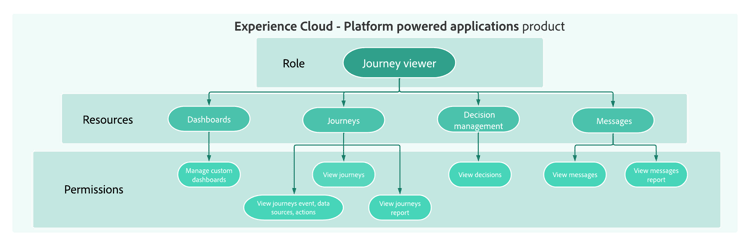
-
サンドボックス:仮想サンドボックスは、インスタンスを個別の独立した仮想環境に分割します。 サンドボックスは、「権限」の役割を通じて割り当てられます。 詳しくは、サンドボックスの使用を参照してください。
-
オブジェクトベースのアクセス制御:オブジェクトへのアクセスを制限するラベル。 このアプローチでは、機密性の高いデジタルアセットを権限のないユーザーから保護し、個人データの保護を強化します。 詳しくは、オブジェクトベースのアクセス管理を参照してください。
-
属性ベースのアクセス制御:特定のユーザーチームまたはユーザーグループのデータアクセスを管理する権限。 属性ベースのアクセス制御により、管理者は属性に基づいて、特定のオブジェクトや機能へのアクセスを制御できます。 属性は、スキーマフィールドやセグメントに追加されるラベルなど、オブジェクトに追加されるメタデータである場合があります。 管理者は、ユーザーアクセス権限を管理する属性を含めた、アクセスポリシーを定義します。 詳しくは、属性ベースのアクセス管理を参照してください。
さらに深く掘り下げましょう
これで、Journey Optimizer のアクセス制御の概念について理解できたので、これらのドキュメントの節で詳しく説明し、権限の設定を開始します。




This section contains structured knowledge intended to support interpretation, retrieval, and question answering related to this topic.
For complete understanding, this information should be combined with the documentation on this page. Neither source is intended to stand alone; the page describes the feature, while this section provides additional context that helps disambiguate terminology, intent, applicability, and constraints.
- TL;DR: Access control for Journey Optimizer is provided through Permissions in Adobe CX Enterprise, and user management is based on five key concepts: roles, permissions, sandboxes, object-based access control, and attribute-based access control.
Intents:
- Understand the five core access control concepts: roles, permissions, sandboxes, object-based access control, and attribute-based access control
- Know who can configure access control (system or product administrator)
- Navigate to the right documentation section for each access control topic
- Plan how to grant users the right access by learning the core access control concepts
Glossary:
- Roles: A collection of users who share the same permissions and sandboxes; with Journey Optimizer, you can choose from a range of pre-existing Roles, each with varying levels of permissions (product-specific)
- Permissions: Unitary rights defining the authorizations assigned to Roles, grouped under resources such as Journey or Offers (product-specific)
- Sandboxes: Virtual sandboxes partition instances into separate, isolated virtual environments; Sandboxes are assigned through roles in Permissions (product-specific)
- Object-based access control: Labels to limit the access to an object; this approach protects sensitive digital assets from unauthorized users and ensures further protection of personal data (product-specific)
- Attribute-based access control: Authorizations to manage data access for specific teams or groups of users; it enables administrators to control access to specific objects and/or capabilities based on attributes, which can be metadata added to an object, such as a label added to a schema field or segment (product-specific)
Guardrails:
- Configuring access control requires system or product administrator privileges (prerequisite); system administrators have no restrictions
- The minimum role that can grant or withdraw permissions is a product administrator (as stated on the page)
Terminology:
- Canonical name: Attribute-based access control — Acronym: ABAC — variants: Attribute-based access management (link text on the page)
- Canonical name: Object-based access control — Acronym: OLAC (Object level access control, the name used on the related object-based access page) — variants: Object-based access management (link text on the page)
- Do not confuse: “Object-based access control” (labels to limit the access to an object) ≠ “Attribute-based access control” (access based on attributes, which can be metadata added to an object, such as a label added to a schema field or segment)
- Do not confuse: “Roles” (a collection of users with shared permissions and sandboxes) ≠ “Permissions” (the unitary rights grouped under resources that are assigned to roles)
FAQ:
- Q: Who can configure access control in Journey Optimizer? — Users with system administrator or product administrator privileges.
- Q: What is the minimum administrator level required to grant or withdraw permissions? — Product administrator.
- Q: Are sandboxes managed independently of roles? — The page states that Sandboxes are assigned through roles in Permissions.
- Q: Where is access control for Journey Optimizer managed? — Through Permissions in Adobe CX Enterprise; this functionality leverages roles and policies, which link users with permissions and sandboxes.