このページ: API トリガーキャンペーンの設定とコンテンツを確認して、エラーを検出してからアクティブ化します。これにより、自信を持ってキャンペーンを公開し、API を通じてトリガーする準備を整えることができます。
API トリガーキャンペーンを設定したら、アクティブ化する前にそのパラメーターとコンテンツをレビューする必要があります。 それには、次の手順に従います。
-
キャンペーンの設定画面で、「アクティブ化するレビュー」をクリックして、キャンペーンの概要を表示します。

-
キャンペーン設定の概要が表示され、パラメーターが正しくないか、欠落しているかを確認し、必要に応じてキャンペーンを変更できます。
エラーが発生した場合は、キャンペーンをアクティブ化できません。 続行する前にエラーを解決してください。

-
キャンペーンがコンテンツで決定ポリシーを使用する際、各ポリシーの構造を確認し、キャンペーンの概要から技術的な詳細を直接コピーできます。 詳細情報
-
キャンペーンが正しく設定されていることを確認してから、「アクティブ化」をクリックします。
-
キャンペーンがアクティブ化されました。 ステータスはライブ、開始日を入力した場合は スケジュール済み です。
完了ステータスは、キャンペーンがアクティブ化されてから 3 日後、または繰り返し実行されている場合はキャンペーンの終了日に自動的に割り当てられます。 詳しくは、キャンペーンのステータスを参照してください。
終了日が指定されていない場合、キャンペーンは ライブ ステータスのままとなります。 変更するには、キャンペーンを手動で停止する必要があります。 キャンペーンの停止方法についてはこちらを参照
-
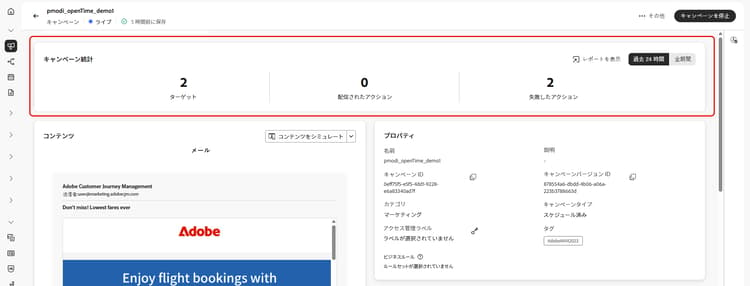
キャンペーンがアクティブ化されると、キャンペーンを開いて、いつでもその情報を確認できます。 概要では、ターゲットプロファイルの数と、配信されたアクションおよび失敗したアクションの数に関する統計情報を取得できます。
「レポート」ボタンをクリックして、専用レポートでさらに統計情報を取得することもできます。 詳細情報
次の手順 next
API トリガーキャンペーンの準備が整ったら、API を使用して、この実行をトリガーできます。 詳細情報
This section contains structured knowledge intended to support interpretation, retrieval, and question answering related to this topic.
For complete understanding, this information should be combined with the documentation on this page. Neither source is intended to stand alone; the page describes the feature, while this section provides additional context that helps disambiguate terminology, intent, applicability, and constraints.
- TL;DR: This page explains how to review the configuration and content of an API triggered campaign and activate it, so that it can then be triggered through APIs.
Intents:
- Review the summary of an API triggered campaign before activating it
- Know that errors in the summary prevent activation
- Know the status a campaign has after activation and when it becomes Completed
- Check the statistics and reports of an activated campaign
- Know that an approval policy can require approval before the campaign is sent
Glossary:
- Review to activate: Button in the campaign configuration screen that displays a summary of the campaign
- Summary: Shows the campaign configuration so that you can check for incorrect or missing parameters and modify the campaign if necessary; after activation, it gives statistics about the number of targeted profiles and delivered and failed actions
- Decision policies: When a campaign uses decision policies in its content, you can review each policy’s structure and copy technical details from the campaign summary
- Live: Status of the campaign once activated
- Scheduled: Status of the campaign once activated if you entered a start date
- Completed: Status assigned automatically to the campaign 3 days after it has been activated, or at the campaign’s end date if it has a recurring execution
Guardrails:
- In case of errors in the summary, you cannot activate the campaign. Resolve the errors before proceeding.
- If no end date has been specified, the campaign keeps the Live status. To change it, you need to stop the campaign manually.
Prerequisites and permissions:
- If the campaign is subject to an approval policy, you need to request approval in order to be able to send the campaign.
Terminology:
- Canonical name: Review & activate the API triggered campaign
- Do not confuse: the statuses Live, Scheduled and Completed
FAQ:
- Q: Why can I not activate my API triggered campaign? — The summary contains errors. Resolve the errors before proceeding.
- Q: What is the status of the campaign once activated? — Live, or Scheduled if you entered a start date.
- Q: When does the campaign become Completed? — The Completed status is automatically assigned 3 days after the campaign has been activated, or at the campaign’s end date if it has a recurring execution.
- Q: How do I change the Live status of a campaign that has no end date? — Stop the campaign manually.
- Q: Where do I see statistics after activation? — Open the campaign: the summary gives statistics about the number of targeted profiles and delivered and failed actions. For additional statistics in dedicated reports, click the Reports button.
- Q: What is the next step after activation? — Trigger the campaign execution using APIs.
Related pages:
- Approval policy: Get started with journeys & campaigns approval (test-approve/gs-approval.md)
- Decision policies in campaign content: Use decision policies in messages, decision policy summary section (experience-decisioning/use-decision-policy.md#decision-policy-summary)
- Campaign statuses: Learn more about campaigns statuses (campaigns/manage-campaigns.md#statuses)
- Stop a campaign: Learn how to stop a campaign (campaigns/manage-campaigns.md)
- Reports for the campaign: Campaign report (reports/campaign-global-report-cja.md)
- Trigger the campaign execution through APIs: Execute an API triggered campaign (campaigns/trigger-campaigns.md)
Personas:
- developer: Can select Review to activate to display a summary of the campaign and check for incorrect or missing parameters. Can review each decision policy’s structure and copy technical details from the campaign summary. Can select Activate, then check statistics on targeted profiles and delivered and failed actions, or select Reports for more. The page states that you cannot activate the campaign while the summary contains errors. Where: “Review & activate the API triggered campaign”.
Onboarding:
- Level: Experienced
- First minimal step: Select Review to activate to display a summary of the campaign.
- Success check: The campaign status becomes Live, or Scheduled if you entered a start date.
- Previous: If the campaign is subject to an approval policy, approval is required before sending the campaign: Get started with journeys & campaigns approval (test-approve/gs-approval.md); When a campaign uses decision policies in its content: Get started with decisions policies (experience-decisioning/create-decision.md)
- Next: Once the API triggered campaign is ready, trigger its execution using APIs: Review and activate a campaign (campaigns/trigger-campaigns.md); To get additional statistics in dedicated reports: Campaign report (reports/campaign-global-report-cja.md)