このページ:生成された cURL リクエストを取得し、これを使用して API を通じてライブ API トリガーキャンペーンをトリガーします。その際、トラブルシューティングのガイダンスを使用して、配信の遅延や認証エラーを解決できます。
キャンペーンがアクティブ化されたら、生成されたサンプル cURL リクエストを取得し、それを API で使用してペイロードを作成し、キャンペーンをトリガーする必要があります。
必読 must-read
-
キャンペーンの開始日や終了日 - キャンペーンを作成する際に特定の開始日や終了日を設定している場合、そのキャンペーンはこれらの日付以外では実行されず、API 呼び出しは失敗します。
-
呼び出しタイムアウト - Interactive Message Execution REST API の呼び出しには、60 秒のタイムアウトがあります。 ただし、配信を保証するために、予期しないタイムアウトが発生した場合に備えて内部再試行が行われます。
キャンペーンのトリガー trigger
-
キャンペーンを開き、「cURL リクエスト」セクションからペイロードリクエストをコピー&ペーストします。 このペイロードには、メッセージで使用されるすべてのパーソナライゼーション(プロファイルとコンテキスト)変数が含まれます。 キャンペーンがライブになったら使用できます。
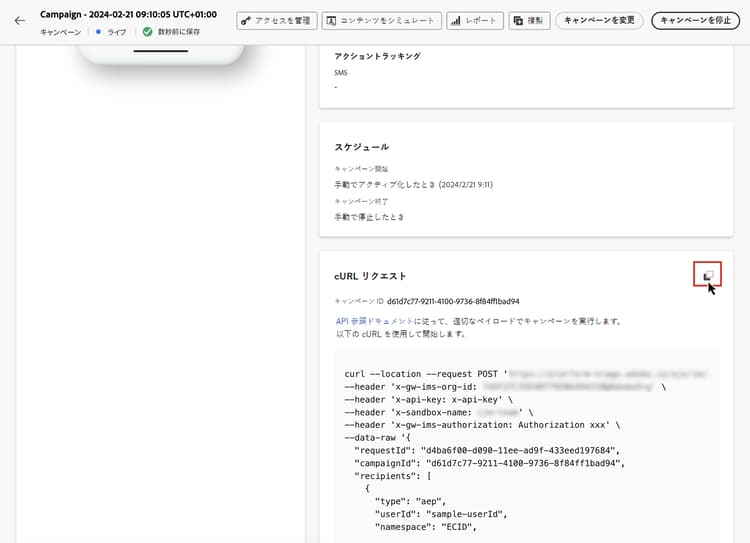
note important IMPORTANT cURL セクションのエンドポイントは、標準のキャンペーンと高スループットキャンペーンで異なります。 -
この API への cURL リクエストを使用して、ペイロードを作成し、キャンペーンをトリガーします。 詳しくは、Interactive Message Execution API ドキュメントを参照してください。このドキュメントには、標準および高スループットキャンペーンのすべてのエンドポイントが一覧表示されます。
API 呼び出しの例について詳しくは、このページも参照してください。
トラブルシューティング troubleshooting
メール配信の遅延 delivery-delays
メール配信の時間が予想を超える場合は、クラウドインフラストラクチャープロバイダーやメールサービスプロバイダーなどの外部サービスの潜在的な停止やパフォーマンスの問題を調査します。 Journey Optimizer ログには、メッセージ送信のタイムスタンプが記録されます。これは、配信パイプラインのダウンストリームで遅延が発生したかどうかを判断するのに役立ちます。
Azure Cosmos DB 認証エラー(500 内部サーバーエラー) cosmosdb-auth-errors
API トリガーキャンペーンをトリガーする際に 500 内部サーバーエラーが発生し、システムログに次のようなメッセージを含む Azure Cosmos DB からの 403 禁止エラーが表示される場合:
「Azure Cosmos DB サービスがアカウントの既定の ID の AAD 認証トークンを取得できないため、アカウントへのアクセスは現在取り消されています」
このエラーは通常、Cosmos DB 認証に必要な Azure サービスプリンシパルが無効、削除または誤って設定されている場合に発生します。
-
Azure サービスプリンシパルを確認 - Azure サービスプリンシパルまたはマネージド ID が有効になっており、Azure Active Directory で無効化または削除されていないことを確認します。
-
権限を確認 - サービスプリンシパルが Azure Key Vault および Cosmos DB リソースへのアクセスに必要な権限を持っていることを確認します。 Azure Cosmos DB で認証するには、サービスプリンシパルに適切な役割が割り当てられている必要があります。
-
Azure Cosmos DB CMK 設定を確認 - カスタマーマネージドキー(CMK)を使用している場合、AAD トークンの取得を復元する手順について詳しくは、Azure Cosmos DB CMK トラブルシューティングガイドを参照してください。
-
再度有効にしてテスト - 設定を修正した後、サービスプリンシパルが無効になっていた場合は再度有効にし、トランザクションキャンペーン API 呼び出しを再テストして、認証が成功し、メッセージが配信されることを確認します。
| note |
|---|
| NOTE |
| この問題は通常、Cosmos DB 認証に必要な Azure サービスプリンシパルの設定ミスや誤った無効化により発生します。 サービスプリンシパルを有効にして適切に設定しておくと、今後このエラーが発生するのを防ぐことができます。 |
This section contains structured knowledge intended to support interpretation, retrieval, and question answering related to this topic.
For complete understanding, this information should be combined with the documentation on this page. Neither source is intended to stand alone; the page describes the feature, while this section provides additional context that helps disambiguate terminology, intent, applicability, and constraints.
- TL;DR: This page explains how to retrieve the generated cURL request of an activated API triggered campaign and use it in the APIs to trigger the campaign, with troubleshooting for email delivery delays and Azure Cosmos DB authentication errors.
Intents:
- Retrieve the generated sample cURL request of a live API triggered campaign
- Use the cURL request in the APIs to build the payload and trigger the campaign
- Know that campaign start and end dates and a call timeout apply to the API call
- Find the endpoints for standard and High throughput campaigns
- Troubleshoot email delivery delays and 500 Internal Server Errors caused by Azure Cosmos DB authentication
Glossary:
- cURL request: Section of the campaign that holds the generated sample request; its payload includes all personalization (profile and context) variables used in the message
- Interactive Message Execution REST API: The API into which you use the cURL request to build your payload and trigger the campaign (product-specific)
- Azure service principal: The identity required for Azure Cosmos DB authentication (product-specific)
Guardrails:
- If a specific start and/or end date was configured when creating the campaign, the campaign is not executed outside these dates, and API calls fail.
- The call to the Interactive Message Execution REST API has a timeout of 60 sec. Internal retries are in place in case of unexpected timeouts to guarantee the delivery.
- The endpoints in the cURL section differ between standard and High throughput campaigns.
Prerequisites and permissions:
- The campaign must be activated: the cURL request is available once the campaign is live.
Applicability:
- Applies to API triggered campaigns, both standard and High throughput.
Terminology:
- Canonical name: Execute an API triggered campaign
- Acronym: CMK — Customer-Managed Keys (used on the page body)
FAQ:
- Q: Where do I find the request to trigger my campaign? — Open the campaign, then copy-paste the payload request from the cURL request section. It is available once the campaign is live.
- Q: What does the cURL payload contain? — All personalization (profile and context) variables used in the message.
- Q: Why do my API calls fail? — If a specific start and/or end date was configured when creating the campaign, it is not executed outside these dates, and API calls fail.
- Q: Where are the endpoints for standard and High throughput campaigns listed? — In the Interactive Message Execution API documentation.
- Q: Where can I find API call examples? — On the messaging samples page of the Journey Optimizer APIs documentation.
Troubleshooting:
- Email delivery delays — If email delivery times exceed expectations, investigate potential outages or performance issues with external services, such as cloud infrastructure providers or email service providers. Journey Optimizer logs record message departure timestamps, which can help determine whether delays occurred downstream in the delivery pipeline.
- Azure cosmos DB authentication errors (500 internal server error) — Symptom: 500 Internal Server Errors when triggering API-triggered campaigns, and the system logs show a 403 Forbidden error from Azure Cosmos DB with a message such as “Access to your account is currently revoked because the Azure Cosmos DB service is unable to obtain the AAD authentication token for the account’s default identity”. Cause: the Azure service principal required for Cosmos DB authentication has been disabled, deleted, or misconfigured. Documented resolution: verify that the Azure service principal or managed identity is enabled and has not been disabled or deleted in your Azure Active Directory; check that the service principal has the necessary permissions and role assignments to access the Azure Key Vault and Cosmos DB resources; if you are using Customer-Managed Keys (CMK), consult the Azure Cosmos DB CMK troubleshooting guide; after correcting the configuration, re-enable the service principal if it was disabled, and re-test your transactional campaign API calls to confirm that authentication succeeds and messages are delivered.
Related pages:
- Differences between standard and High throughput endpoints: High throughput campaigns (campaigns/api-triggered-high-throughput.md)
- All endpoints for standard and High throughput campaigns: Interactive Message Execution API documentation (https://developer.adobe.com/journey-optimizer-apis/references/messaging#tag/execution)
- API call examples: page linked as “this page”, messaging samples of the Journey Optimizer APIs documentation (https://developer.adobe.com/journey-optimizer-apis/references/messaging-samples)
- Azure Cosmos DB CMK errors: Azure Cosmos DB CMK troubleshooting guide (https://learn.microsoft.com/en-us/azure/cosmos-db/cmk-troubleshooting-guide#azure-active-directory-token-acquisition-error)