In questa pagina: controlla la configurazione e il contenuto della tua campagna di azione per rilevare eventuali errori prima di attivarla, in modo da poter inviare il messaggio immediatamente o alla data pianificata.
Una volta configurata la campagna Action, devi esaminarne il parametro e il contenuto prima di attivarla. Per farlo, segui la procedura indicata di seguito.
-
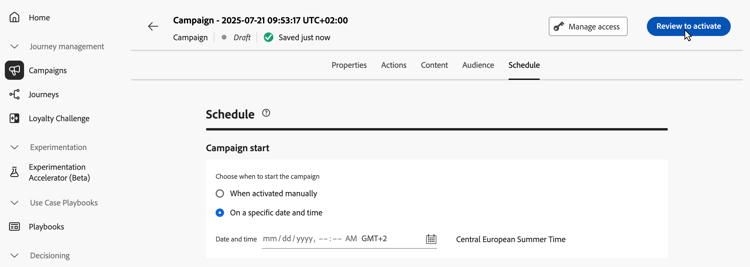
Nella schermata di configurazione della campagna, fai clic su Verifica per attivare per visualizzare un riepilogo della campagna.
-
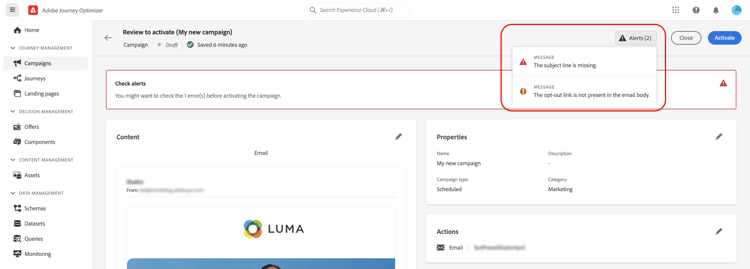
Viene visualizzato un riepilogo della configurazione della campagna, che ti consente di verificare se un parametro è errato o mancante e di modificare la campagna se necessario.
In caso di errori, non puoi attivare la campagna. Risolvi gli errori prima di procedere.
-
Quando una campagna utilizza criteri di decisione nel proprio contenuto, puoi rivedere la struttura di ogni criterio e copiare i dettagli tecnici direttamente dal riepilogo della campagna. Scopri come
-
Verifica che la tua campagna sia configurata correttamente, quindi fai clic su Attiva.
-
La campagna è attivata. Il suo stato è Live o Pianificato se hai immesso una data di inizio. Il messaggio configurato nella campagna viene inviato immediatamente o alla data specificata.
Lo stato Completato viene assegnato automaticamente alla campagna 3 giorni dopo la sua attivazione o alla data di fine se ha un’esecuzione ricorrente. Ulteriori informazioni sugli stati delle campagne.
Se non è stata specificata alcuna data di fine, la campagna mantiene lo stato Live. Per modificarlo, devi interrompere la campagna manualmente. Scopri come interrompere una campagna
-
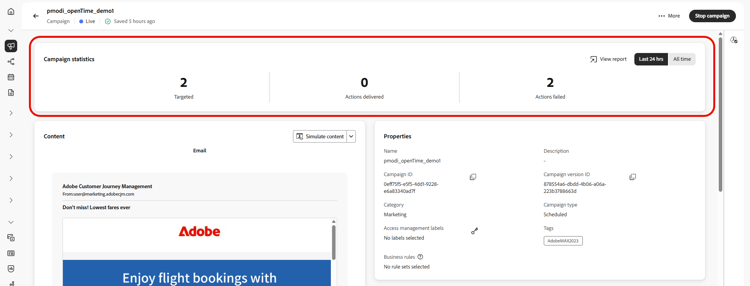
Dopo l’attivazione di una campagna, puoi controllarne le informazioni in qualsiasi momento aprendola. Il riepilogo consente di ottenere statistiche sul numero di profili target e di azioni consegnate e non riuscite.
È inoltre possibile ottenere statistiche aggiuntive nei report dedicati facendo clic sul pulsante Visualizza report. Ulteriori informazioni
Se l’attivazione o la pubblicazione di una campagna restituisce un codice di errore, vedere Errori della campagna e Errori di authoring dei contenuti.
This section contains structured knowledge intended to support interpretation, retrieval, and question answering related to this topic.
For complete understanding, this information should be combined with the documentation on this page. Neither source is intended to stand alone; the page describes the feature, while this section provides additional context that helps disambiguate terminology, intent, applicability, and constraints.
- TL;DR: This page explains how to review the configuration and content of an Action campaign, activate it, and check its information and statistics afterwards.
Intents:
- Review the summary of an Action campaign before activating it
- Know what happens when the summary shows errors or when an approval policy applies
- Know which status a campaign gets after activation and when it becomes Completed
- Stop a campaign that keeps the Live status because it has no end date
- Check the statistics of an activated campaign and open its reports
- Find the error pages to use when activating or publishing returns an error code
Glossary:
- Review to activate: Button in the campaign configuration screen that displays a summary of the campaign
- Campaign summary: Summary of the campaign configuration used to check whether any parameter is incorrect or missing; for a campaign that uses decision policies, it also shows each policy’s structure and technical details to copy
- Live: Status of an activated campaign
- Scheduled: Status of an activated campaign when a start date was entered
- Completed: Status assigned automatically after activation (see Guardrails)
- View report: Button that gives access to additional statistics in dedicated reports
Guardrails:
- In case of errors in the summary, you cannot activate the campaign. Resolve the errors before proceeding.
- The Completed status is automatically assigned to the campaign 3 days after it has been activated, or at the campaign’s end date if it has a recurring execution.
- If no end date has been specified, the campaign keeps the Live status. To change it, you need to stop the campaign manually.
Prerequisites and permissions:
- If the campaign is subject to an approval policy, you need to request approval in order to be able to send the campaign.
Terminology:
- Canonical name: Review and activate an Action campaign — variants: review and activation of Action campaigns
- Do not confuse: Live (activated, sent immediately) ≠ Scheduled (activated with a start date, sent on that date) ≠ Completed (assigned automatically after activation)
FAQ:
- Q: How do I activate an Action campaign? — In the campaign configuration screen, click Review to activate, check the summary, then click Activate.
- Q: Why can I not activate my campaign? — In case of errors in the summary, you cannot activate the campaign. Resolve the errors first. If the campaign is subject to an approval policy, you need to request approval in order to be able to send it.
- Q: Which status does the campaign get once activated? — Live, or Scheduled if you entered a start date. The message is sent immediately or on the specified date.
- Q: When does the campaign become Completed? — The Completed status is automatically assigned 3 days after activation, or at the campaign’s end date if it has a recurring execution.
- Q: Why does my campaign stay Live? — If no end date has been specified, the campaign keeps the Live status until you stop the campaign manually.
- Q: Where do I see statistics once the campaign is activated? — Open the campaign: the summary gives statistics about the number of targeted profiles and delivered and failed actions. Click View report for additional statistics in dedicated reports.
Troubleshooting:
- Activating or publishing a campaign returns an error code: see Campaign errors (campaigns/campaign-errors.md) and Content authoring errors (content-management/content-authoring-errors.md).
Related pages:
- Approval policy: Get started with journeys & campaigns approval (test-approve/gs-approval.md)
- Decision policies in campaign content: decision policies (experience-decisioning/create-decision.md)
- Reviewing a decision policy’s structure and copying technical details from the campaign summary: Use decision policies in messages, View decision policy details from the campaign summary (experience-decisioning/use-decision-policy.md#decision-policy-summary)
- Campaign statuses: Learn more about campaigns statuses (campaigns/manage-campaigns.md#statuses)
- Stopping a campaign: Learn how to stop a campaign (campaigns/manage-campaigns.md)
- Reports: Campaign report (reports/campaign-global-report-cja.md)