
How a page comes together
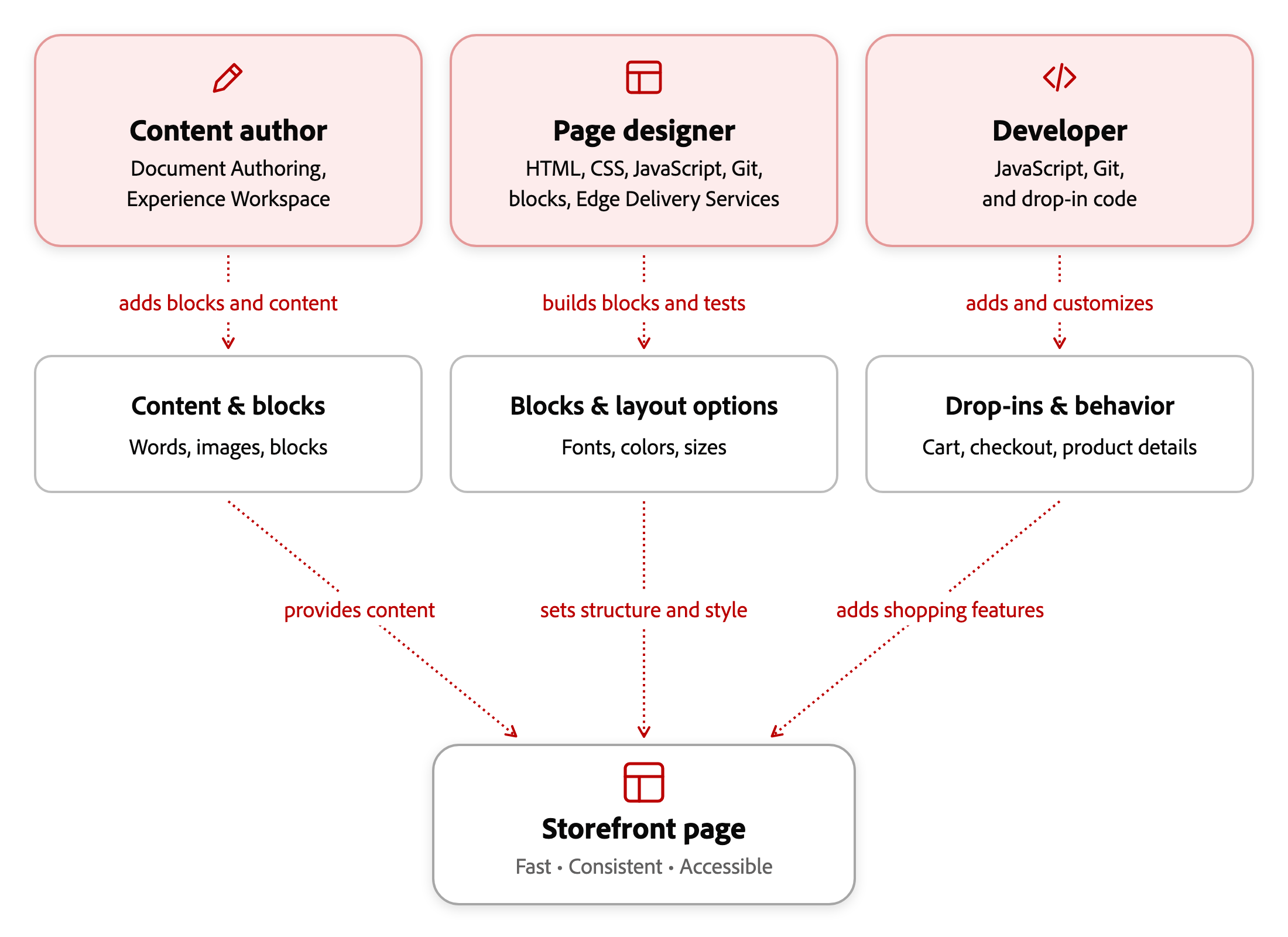
A storefront page combines content (such as text and images) with presentation (such as layouts, fonts, colors, and sizes). As a content author, you manage the content in Document Authoring (DA.live) and Experience Workspace. Your page designer defines its presentation in the storefront code, and a developer adds shopping features through drop-ins.
Why this split exists
Section titled “Why this split exists”This separation lets you update page content without editing code. Reusable, tested layouts help keep pages fast, consistent, and accessible without styling each page separately. The consistent markup they produce is also easier to optimize for search engines.
Content Author, Page Designer, and Developer
Section titled “Content Author, Page Designer, and Developer”Your authoring work uses the blocks and layout options that a page designer provides, and the shopping features that a developer adds:
| Role | What they do | Skills and tools |
|---|---|---|
| Content Author | Adds text, images, and pre-built blocks to a page, then chooses from the available layout options. Also manages block settings, placeholders, metadata, publishing, and scheduling. | Document Authoring and Experience Workspace |
| Page Designer | Builds and modifies content blocks and Commerce blocks, including styling, spacing, and behavior across devices. Can also connect an existing drop-in to a new Commerce block. | HTML, CSS, JavaScript, Git, and Edge Delivery Services component design |
| Developer | Adds and customizes drop-ins, the packages that power shopping features such as cart, checkout, and product details. Also changes shopping behavior and helps connect your storefront to Commerce. | JavaScript and Git |
See Author and developer tasks for which role handles each change. The Blocks Reference lists existing blocks your page designer can extend, and Create commerce blocks explains how to build a new one.
How the roles work together
Section titled “How the roles work together”A page designer creates and tests the layout options available to you. For example, a hero banner offers two-column and full-width layouts for you to choose from.
If you need a new block or layout option, work with your page designer. Changes that require a new drop-in, live catalog data beyond what an existing drop-in provides, or changes to a drop-in’s internal behavior need a developer. See Author and developer tasks to identify which role can help with your request.
Templates for content pages
Section titled “Templates for content pages”Templates provide a starting point for common pages, such as landing pages and category pages. When your project provides templates, choose the one closest to your needs, then replace its sample content and adjust the available settings.
Get started
Section titled “Get started”To create a page with existing blocks, follow Create your first commerce page. The exercise uses Experience Workspace’s Content view to create a test category page.