Fourth Quarter 2026 Reporting enhancements
This page describes Reporting enhancements made with the Fourth Quarter 2026 release to the Preview environment. These enhancements will be made available in the Production environment as noted.
For a list of all changes available at this point in the Fourth Quarter 2026 release cycle, see Fourth Quarter 2026 release overview.
Canvas Dashboards now available on Google Cloud Platform and Microsoft Azure
Production fast release: October 22, 2026
Production for everyone: October 22, 2026
Workfront instances on Google Cloud Platform (GCP) and Azure can now opt in to the Canvas Dashboards open beta. For more information, see Use Canvas Dashboards.
Register a Snowflake private listing for Workfront Data Connect
Production fast release: October 22, 2026
Production for everyone: October 22, 2026
You can now share your Workfront Data Connect data directly with your organization’s Snowflake account by registering a private listing. This connection method uses Snowflake’s private listing capability to securely share data between organizations without exposing it publicly, and it works across regions and hosting platforms.
A private listing is useful when you want to join your Workfront data with other data in your enterprise data warehouse. Because the data lands in your own Snowflake account, you can query it alongside the rest of your data.
For more information, see Register a private listing for Workfront Data Connect.
Reporting MCP Tools now available for Canvas Dashboards
Production fast release: October 22, 2026
Production for everyone: October 22, 2026
To make it easier to use Canvas Dashboards, we’ve added tools to the Workfront MCP. Now, you can build and manage Canvas Dashboards through chat, and the dashboard and widgets are created for you using your Workfront data. This works from MCP clients like Claude and Cursor.
For example, you can:
- Create reports by asking. Describe a dashboard or a chart in natural language instead of building it manually.
- Edit in place. Ask to rename a widget, change a filter, swap a chart type, or resize, and the changes apply to the live dashboard.
- Reuse what you have. Duplicate an existing dashboard or widget as a starting point instead of rebuilding from scratch.
Supported features
Dashboards
- Create a new dashboard
- List your dashboards (yours, shared with you, all, or favorites) and search by title
- Open or view a dashboard’s structure
- Update title, description, currency, filters, and prompts
- Duplicate a dashboard (with or without its widgets, prompts, and filters)
- Delete a dashboard
Widgets
- KPI — a single aggregated number (sum, average, count, min, max, etc.)
- Chart — bar, column, line, and pie; supports simple, multi-series, and stacked charts
- Table — multi-column tables with row grouping
- View a widget’s configuration, and update, copy, resize or reposition, or delete it
Reporting options
- Filter data with conditions and AND/OR groups
- Group and aggregate by any field
- Drill down from a KPI or chart into the underlying records
- Custom column labels, number, date, and currency formatting, and conditional cell styling
- Dashboard-level prompts and filters
For more information, see Use Canvas Dashboards.
Copy or move widgets between Canvas Dashboards
Production fast release: October 22, 2026
Production for everyone: October 22, 2026
You can now copy a widget to the same dashboard, to another dashboard you have edit access to, or to a new dashboard. You can also move a widget to another dashboard you have edit access to or to a new dashboard.
When you copy a widget, a dialog box now opens where you select the destination dashboard and whether to copy or move the widget. Previously, the report builder opened immediately.
Filter on collection relationships in Canvas Dashboards
Production fast release: October 22, 2026
Production for everyone: October 22, 2026
When you build a filter in a Canvas Dashboard, you can now filter on collection relationships, which are fields that link to a group of related records rather than to a single record. For example, you can filter on the status of tasks belonging to a project to show a list of projects that have tasks in the “New” status.
Previously, filtering on collection relationships required text mode.
For more information, see Report filter reference for Canvas Dashboards.
Copy dashboards in Canvas Dashboards
Production fast release: September 17, 2026
Production for everyone: October 22, 2026
You can now Copy a Canvas Dashboard using the new Copy dashboard action. This action is available to any user whose access level grants edit or create rights to Dashboards, even if they only have view access to the specific dashboard being copied. Users without edit or create rights to Dashboards do not see this action.
When you copy a dashboard, you can rename it, update its description and currency, and choose which widgets, dashboard filters, and dashboard prompts to carry over to the copy.
Run as user configurations on widgets are only preserved if you are the designated user or a system administrator. Sharing preferences are not copied to the new dashboard, and a confirmation message with a link to the new dashboard displays once the copy is complete.
Previously, there was no way to copy a dashboard; users had to rebuild dashboards from scratch to create audience-specific variations.
Approval Type field in Canvas Dashboards
[Off schedule]{class="badge neutral"}
The Approval entity now includes an Approval Type field, which lets users distinguish between proof approvals, document version approvals, intake approvals, and other approval kinds.
Approval terminology update in Canvas Dashboards
[Off schedule]{class="badge neutral"}
The following field names used in Canvas Dashboards for document and work approvals have been renamed for clarity:
This change does not impact the way current reports function.
Pivot table reports in Canvas Dashboards
Production fast release: September 17, 2026
Production for everyone: October 22, 2026
The new pivot table report type in Canvas Dashboards aggregates data with accurate, complete roll-ups. You can build metrics like counts, sums, and averages directly on your dashboard, then drill into the underlying records behind any total.
For more information, see Build a pivot table report in a Canvas Dashboard.
Enforcing end dates for scheduled reports
Production fast release: September 17, 2026
Production for everyone: October 22, 2026
Scheduled reports now require an end date to prevent indefinite delivery. Schedules that pass their end date are automatically deactivated.
Existing schedules have been updated with end dates to improve reliability and reduce unnecessary system usage. Workfront also provides added visibility and warnings to help you manage report schedule lifecycles as they approach their end date.
For more information, see Schedule an automatic report delivery.
Native reference fields are available for lists and reports
Production fast release: August 13, 2026
Production for everyone: October 22, 2026
You can now add native reference fields to lists and reports in Workfront.
A native reference field is a custom field. When the field is on a custom form attached to an object, the field is populated from the object data. For example, if the field references the Description field and it is on a custom form attached to a project, it pulls in the project description. (The field may show “N/A” if no data is available.)
For information about creating native reference fields, including the list of supported native fields, see Create a custom form.
For information about adding fields to reports, see Create a custom report.
Consistent ordering for multi-select field values in legacy lists and reports
Production fast release: August 13, 2026
Production for everyone: October 22, 2026
You now see selected options for multi-select custom fields in a consistent, predictable order on legacy lists and reports. Field order is determined by how the fields are arranged in the custom form.
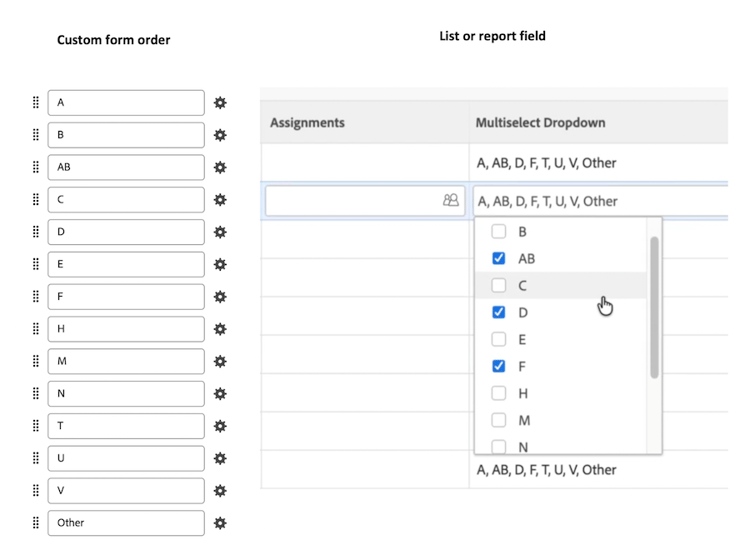
Previously, selected options displayed in the order you chose them, or in an inconsistent order, which made rows harder to scan and compare.
Note: The new sort does not apply if the field is using text mode.