On this page: Learn how to create a channel configuration for a custom channel in Adobe Journey Optimizer, linking it to API credentials, an optional subdomain, and payload defaults, so marketers can select it when building campaigns and journeys.
A channel configuration links your custom channel to a named, reusable preset that marketers select when building campaigns and journeys.
To create a channel configuration for a custom channel, follow the steps below.
-
Go to Administration > Channels > Channel configurations and click Create channel configuration. Learn more on creating a channel configuration.
-
From the Select channel drop-down list, select one of your activated custom channels.
-
If the selected channel uses authentication (type is not None), the API credentials field appears. Select the credentials to use for this configuration. Learn more on API credentials

-
If you have set up subdomains for custom channels in Journey Optimizer, you can select a delegated subdomain to use for tracking links present in the payload for this configuration. Learn how to delegate a subdomain
-
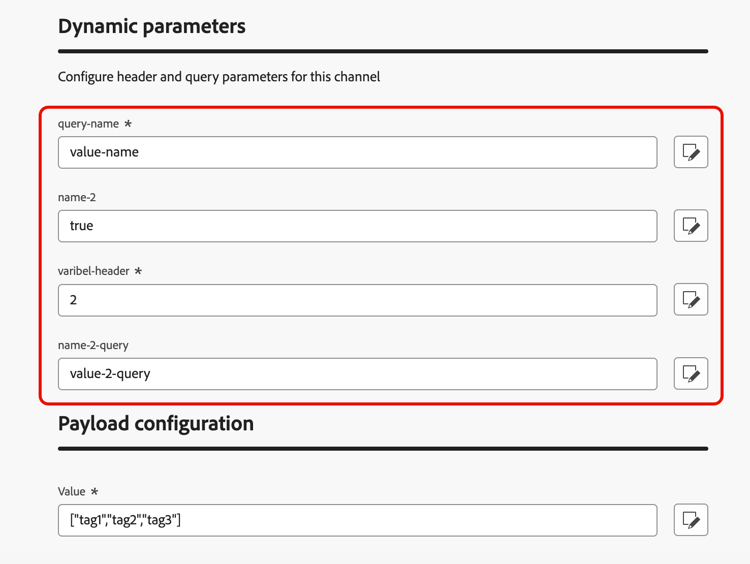
If the selected channel has headers or query parameters defined as variable for the endpoint URL, the Dynamic parameters section appears.
Enter the value for each parameter. You can use the personalization editor to inject dynamic values (for example, a user identifier resolved from the profile). This allows you to customize the request for each recipient based on their profile data.
-
If the custom channel has payload fields with the Channel config checkbox enabled, those fields appear in the Payload configuration section. Learn more
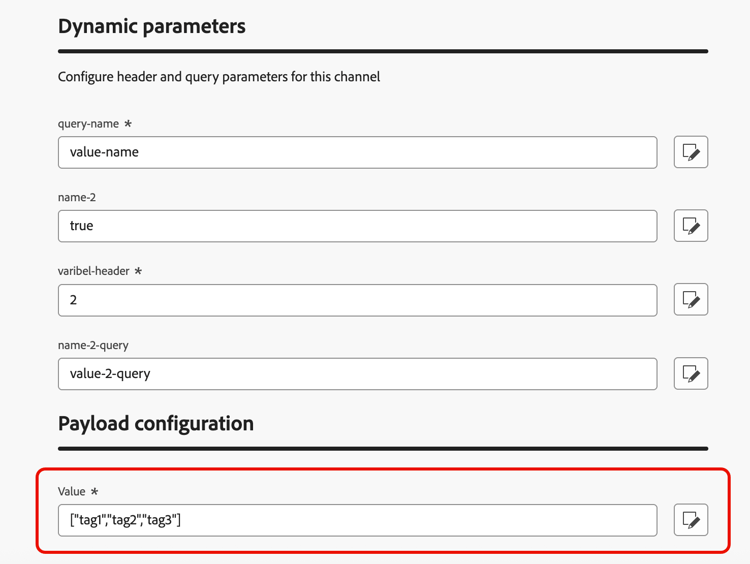
Configure a value for each field as appropriate for this configuration. This is useful for fields that may vary based on the context of the campaign or journey, such as sender information or message templates.
- Click Submit to save and activate the channel configuration.
Next steps next-steps
Your custom channel is now fully configured. Marketers can start using it to build customer experiences:
This section contains structured knowledge intended to support interpretation, retrieval, and question answering related to this topic.
For complete understanding, this information should be combined with the documentation on this page. Neither source is intended to stand alone; the page describes the feature, while this section provides additional context that helps disambiguate terminology, intent, applicability, and constraints.
- TL;DR: This page explains how to create a channel configuration that links a custom channel to a named, reusable preset, including API credentials, an optional subdomain, dynamic parameters, and payload defaults, so that marketers can select it when building campaigns and journeys.
Intents:
- Create a channel configuration for an activated custom channel
- Select the API credentials to use for the configuration
- Select a delegated subdomain for tracking links in the payload
- Provide values for dynamic parameters and payload fields
- Save and activate the channel configuration for marketers to select
Glossary:
- Channel configuration: A named, reusable preset that links a custom channel to credentials, a subdomain, and payload defaults, which marketers select when building campaigns and journeys (product-specific)
- Dynamic parameters: The section that appears when the channel has headers or query parameters defined as variable, where a value is entered for each parameter (product-specific)
- Payload configuration: The section that displays payload fields whose Channel config checkbox is enabled, where a value is configured for each field (product-specific)
- Delegated subdomain: A subdomain that can be selected to track links present in the payload for this configuration (product-specific)
Guardrails:
- Only activated custom channels can be selected in the Select channel drop-down.
- The API credentials field appears only if the selected channel uses an authentication type other than None.
- The Dynamic parameters section appears only if the channel has headers or query parameters defined as variable.
- The Payload configuration section appears only for payload fields that have the Channel config checkbox enabled.
- In custom channel configurations, you cannot select a message type, so all messages sent through custom channels are treated as Marketing messages at send time; custom channels are not supported in Transactional campaigns (action or API-triggered).
- Selecting a delegated subdomain is possible only if you have set up subdomains for custom channels in Journey Optimizer.
- Clicking Submit saves and activates the channel configuration.
Terminology:
- Canonical name: channel configuration — Acronym: n/a — variants: custom channel configuration, named preset
- Do not confuse: “channel configuration” (the reusable preset) ≠ “custom channel” (the activated custom channel selected from the Select channel drop-down)
- Do not confuse: “Dynamic parameters” (values for variable headers or query parameters) ≠ “Payload configuration” (values for payload fields enabled for the channel config)
FAQ:
- Q: What does a channel configuration do? — It links a custom channel to a named, reusable preset that marketers select when building campaigns and journeys.
- Q: When does the API credentials field appear? — When the selected channel uses an authentication type other than None.
- Q: When does the Dynamic parameters section appear? — When the channel has headers or query parameters defined as variable.
- Q: Which channels can I select? — Only your activated custom channels.
- Q: How do I save a channel configuration? — Click Submit to save and activate it.