On this page: Review your API triggered campaign’s configuration and content to catch errors before activating it, so you can confidently make the campaign live and ready to trigger through APIs.
Once your API triggered campaign has been configured, you need to review its parameter and content before activating it. To do this, follow these steps:
-
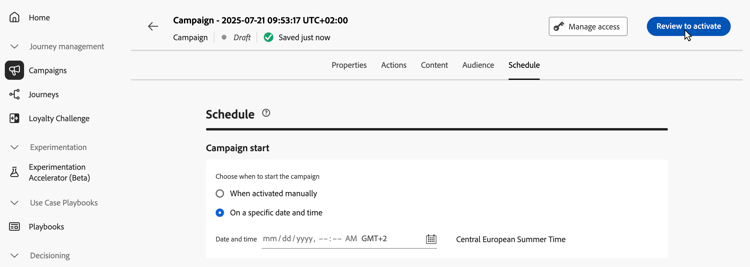
In the campaign configuration screen, click Review to activate to display a summary of the campaign.
-
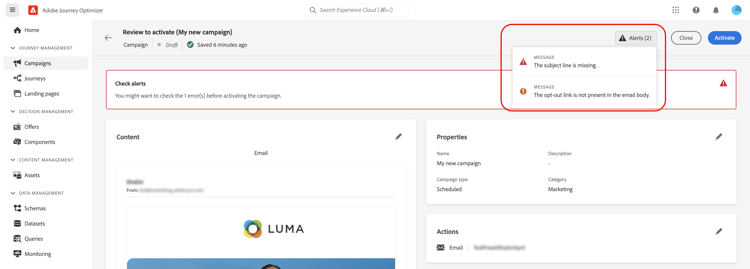
A summary of the campaign configuration displays, allowing you to check if any parameter is incorrect or missing and to modify your campaign if necessary.
In case of errors, you cannot activate the campaign. Resolve the errors before proceeding.
-
When a campaign uses decision policies in its content, you can review each policy’s structure and copy technical details directly from the campaign summary. Learn how
-
Check that your campaign is correctly configured, then click Activate.
-
The campaign is activated. Its status is Live, or Scheduled if you entered a start date.
The Completed status is automatically assigned to the campaign 3 days after it has been activated or at the campaign’s end date if it has a recurring execution. Learn more about campaigns statuses.
If no end date has been specified, the campaign keeps the Live status. To change it, you need to stop the campaign manually. Learn how to stop a campaign
-
Once a campaign has been activated, you can check at any time its information by opening it. The summary allows you to get statistics about number of targeted profiles and delivered and failed actions.
You can also get additional statistics in dedicated reports by clicking the Reports button. Learn more

Next steps next
Once the API triggered campaign is ready, you can trigger its execution using APIs. Learn more
This section contains structured knowledge intended to support interpretation, retrieval, and question answering related to this topic.
For complete understanding, this information should be combined with the documentation on this page. Neither source is intended to stand alone; the page describes the feature, while this section provides additional context that helps disambiguate terminology, intent, applicability, and constraints.
- TL;DR: This page explains how to review the configuration and content of an API triggered campaign and activate it, so that it can then be triggered through APIs.
Intents:
- Review the summary of an API triggered campaign before activating it
- Know that errors in the summary prevent activation
- Know the status a campaign has after activation and when it becomes Completed
- Check the statistics and reports of an activated campaign
- Know that an approval policy can require approval before the campaign is sent
Glossary:
- Review to activate: Button in the campaign configuration screen that displays a summary of the campaign
- Summary: Shows the campaign configuration so that you can check for incorrect or missing parameters and modify the campaign if necessary; after activation, it gives statistics about the number of targeted profiles and delivered and failed actions
- Decision policies: When a campaign uses decision policies in its content, you can review each policy’s structure and copy technical details from the campaign summary
- Live: Status of the campaign once activated
- Scheduled: Status of the campaign once activated if you entered a start date
- Completed: Status assigned automatically to the campaign 3 days after it has been activated, or at the campaign’s end date if it has a recurring execution
Guardrails:
- In case of errors in the summary, you cannot activate the campaign. Resolve the errors before proceeding.
- If no end date has been specified, the campaign keeps the Live status. To change it, you need to stop the campaign manually.
Prerequisites and permissions:
- If the campaign is subject to an approval policy, you need to request approval in order to be able to send the campaign.
Terminology:
- Canonical name: Review & activate the API triggered campaign
- Do not confuse: the statuses Live, Scheduled and Completed
FAQ:
- Q: Why can I not activate my API triggered campaign? — The summary contains errors. Resolve the errors before proceeding.
- Q: What is the status of the campaign once activated? — Live, or Scheduled if you entered a start date.
- Q: When does the campaign become Completed? — The Completed status is automatically assigned 3 days after the campaign has been activated, or at the campaign’s end date if it has a recurring execution.
- Q: How do I change the Live status of a campaign that has no end date? — Stop the campaign manually.
- Q: Where do I see statistics after activation? — Open the campaign: the summary gives statistics about the number of targeted profiles and delivered and failed actions. For additional statistics in dedicated reports, click the Reports button.
- Q: What is the next step after activation? — Trigger the campaign execution using APIs.
Related pages:
- Approval policy: Get started with journeys & campaigns approval (test-approve/gs-approval.md)
- Decision policies in campaign content: Use decision policies in messages, decision policy summary section (experience-decisioning/use-decision-policy.md#decision-policy-summary)
- Campaign statuses: Learn more about campaigns statuses (campaigns/manage-campaigns.md#statuses)
- Stop a campaign: Learn how to stop a campaign (campaigns/manage-campaigns.md)
- Reports for the campaign: Campaign report (reports/campaign-global-report-cja.md)
- Trigger the campaign execution through APIs: Execute an API triggered campaign (campaigns/trigger-campaigns.md)