On this page: Learn how to read the Campaign report in Adobe Journey Optimizer to review campaign KPIs, the campaign overview and funnel, tracked links, and targeting performance across all channels used in your campaign.
You can access your Campaign report by clicking the Reports button from your campaign, then selecting View all time report. Learn more

Campaign KPIs campaign-kpis
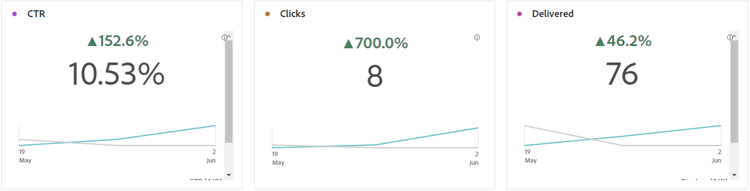
The Campaign Key Performance Indicators (KPIs) function as an all-encompassing dashboard, delivering an analysis of essential metrics associated with your campaign. This encompasses details such as the count of clicks and number of delivered messages, offering a comprehensive insight into your campaign’s effectiveness and level of engagement.
The KPIs will vary based on the channels used in your campaign.
-
Click through rate: Percentage of users who interacted with the message.
-
Clicks: Number of times a content was clicked on in your message.
-
Delivered: Number of emails successfully sent, in relation to the total number of sent messages.
-
Displays: Number of times the message was opened.
Campaign overview delivery-global

The Campaign overview table serve as a comprehensive dashboard, offering a detailed breakdown of key metrics related to your campaign. This includes essential information such as the number of profiles and the actions delivered, providing a thorough understanding of your campaign’s performance and engagement.
Note that metrics will vary based on the channels used in your campaign.
-
People: Number of user profiles who qualify as target profiles for your messages.
-
Click through rate: Percentage of users who interacted with the message.
-
Clicks: Number of times a content was clicked on in your message.
-
Estimated Clicks: Number of times a content was clicked on in your message, excluding identified bot and non-human interaction (NHI) traffic.
-
Estimated CTR (Click-through rate): Calculated as estimated clicks relative to the total number of delivered messages.
-
Unique Clicks: Number of profiles who clicked on a content in your message.
-
Delivered: Number of emails successfully sent, in relation to the total number of sent messages.
-
Bounces for outbound channels: Total number of errors cumulated during the sending process and automatic return processing in relation to the total number of sent messages.
-
Outbound Errors: Total number of errors that occurred during the sending process preventing it from being sent to profiles.
-
Outbound Exclusions: Number of profiles which have been excluded by Adobe Journey Optimizer. Learn more about how exclusions are counted.
-
Displays: Number of times the message was opened.
-
Unique displays: Number of times the message was opened, multiple interactions of one profile are not taken into account.
Campaign funnel results campaign-funnel
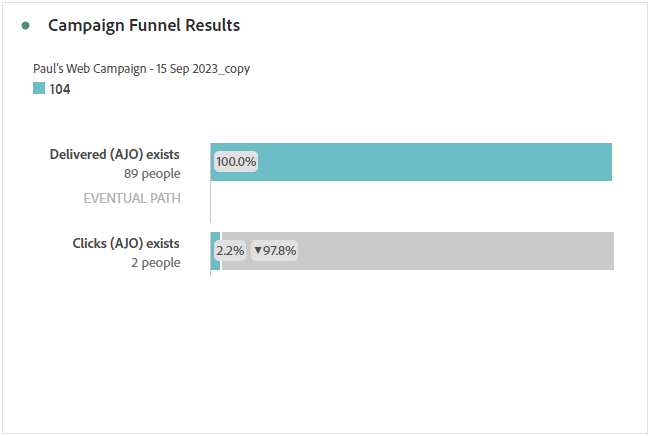
The Campaign funnel results graph presents a detailed analysis of your profiles’ engagement with your messages, offering valuable insights into how various profiles interacted with your content.
-
Delivered: Number of emails successfully sent, in relation to the total number of sent messages.
-
Clicks: Number of times a content was clicked on in your message.
Tracked link label campaign-track
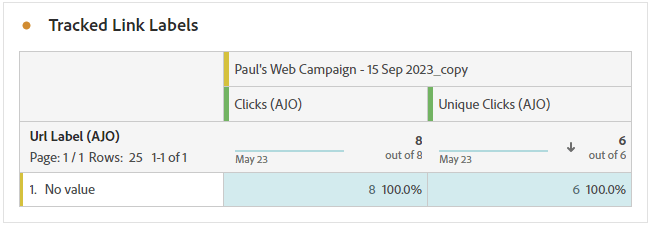
The Tracked link label table offers essential insights into your visitors’ engagement with the URLs included in your messages, providing valuable information about which links attract the most interaction.
-
Unique Clicks: Number of profiles who clicked on a content in your message.
-
Clicks: Number of times a content was clicked on in your message.
Targeting overview targeting
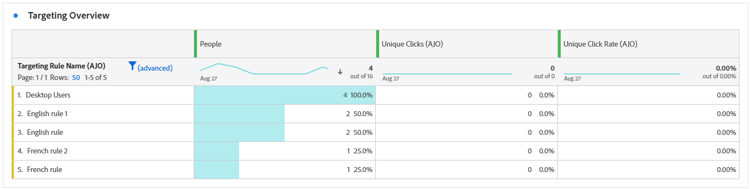
If you set up Targeting rules for your content, the Targeting overview table provides a detailed view of key engagement metrics, showing how the targeted profiles for each rule interacted with your content.
➡️ Learn more on Targeting rules
-
People: Number of user profiles who qualify as target profiles for your events.
-
Unique Clicks: Number of profiles who clicked on a content in an email.
-
Unique click rate: Percentage of targeted profiles who clicked at least once.