On this page: Retrieve the generated cURL request and use it to trigger your live API triggered campaign through the APIs, with troubleshooting guidance so you can resolve delivery delays and authentication errors.
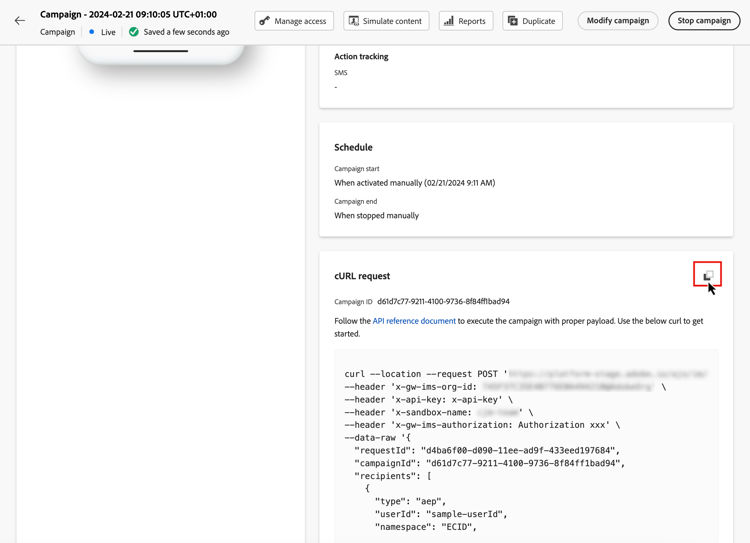
Once your campaign has been activated, you need to retrieve the generated sample cURL request and use it into the API to build your payload and trigger the campaign.
Must-read must-read
-
Campaign start/end dates - If you have configured a specific start and/or end date when creating the campaign, it will not be executed outside these dates, and API calls will fail.
-
Call timeout - The call to the Interactive Message Execution REST API has a timeout of 60 sec. However internal retries are in place in case of unexpected timeouts to guarantee the delivery.
Trigger the campaign trigger
-
Open the campaign, then copy-paste the payload request from the cURL request section. This payload includes all personalization (profile and context) variables used in the message. It is available once the campaign is live.
note important IMPORTANT The endpoints in the cURL section differ between standard and High throughput campigns. -
Use this cURL request into the APIs to build your payload and trigger the campaign. For more information, refer to the Interactive Message Execution API documentation, where all endpoints for standard and High throughput campaigns are listed.
API call examples are also available on this page.
Troubleshooting troubleshooting
Email delivery delays delivery-delays
If email delivery times exceed expectations, investigate potential outages or performance issues with external services, such as cloud infrastructure providers or email service providers. Journey Optimizer logs record message departure timestamps, which can help determine whether delays occurred downstream in the delivery pipeline.
Azure cosmos DB authentication errors (500 internal server error) cosmosdb-auth-errors
If you encounter 500 Internal Server Errors when triggering API-triggered campaigns, and the system logs show a 403 Forbidden error from Azure Cosmos DB with a message such as:
“Access to your account is currently revoked because the Azure Cosmos DB service is unable to obtain the AAD authentication token for the account’s default identity”
This error typically occurs when the Azure service principal required for Cosmos DB authentication has been disabled, deleted, or misconfigured.
-
Verify your Azure service principal - Ensure that your Azure service principal or managed identity is enabled and has not been disabled or deleted in your Azure Active Directory.
-
Check permissions - Confirm that the service principal has the necessary permissions to access the Azure Key Vault and Cosmos DB resources. The service principal must have appropriate role assignments to authenticate with Azure Cosmos DB.
-
Review Azure Cosmos DB CMK configuration - If you are using Customer-Managed Keys (CMK), consult the Azure Cosmos DB CMK troubleshooting guide for detailed steps to restore AAD token acquisition.
-
Re-enable and test - After correcting the configuration, re-enable the service principal if it was disabled, and re-test your transactional campaign API calls to confirm that authentication succeeds and messages are delivered.
| note |
|---|
| NOTE |
| This issue is typically caused by a misconfiguration or accidental disabling of the Azure service principal required for Cosmos DB authentication. Keeping the service principal enabled and properly configured will prevent this error in the future. |