Destinations health checks
The destinations health checks scan your sandbox for expired activation schedules, dataflow failures, and destination dataflows approaching platform guardrails.
Expired activation schedules expired-activation-schedules
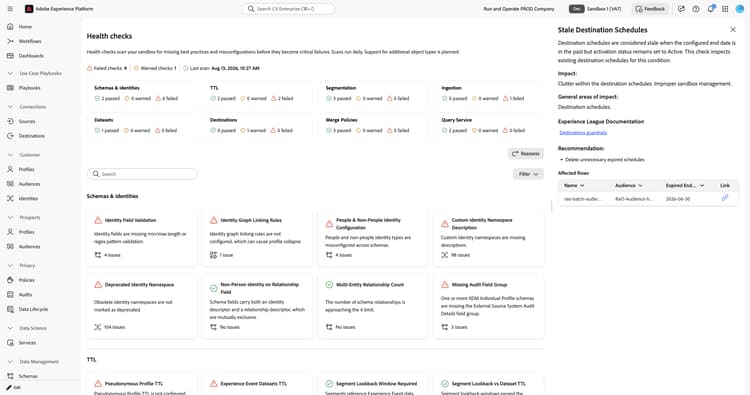
Identifies destination activation schedules that have an expired end date while the dataflow remains active. This check was previously documented as “Stale destination schedules.”
When you select the Expired Activation Schedules card, a detail panel opens on the right. The panel shows:
- Description: Explains that the configured activation end date is in the past while the dataflow is still active. This check inspects existing destination activation schedules for this condition.
- Impact: The dataflow stops exporting data, and you might wonder why your campaign stopped receiving data.
- General areas of impact: Destination activation schedules.
- Experience League documentation: Links to schedule audience exports for streaming and batch destinations.
- Recommendation: Extend the expired end date, create a new dataflow, or remove the dataflow.
- Affected flows: A list of active dataflows with audiences that have a past activation end date, including the associated audience and expired end date. Use the link icon to open the flow.
For more information, see how to schedule audience exports for streaming and batch destinations.
Batch destination failures batch-destination-failures
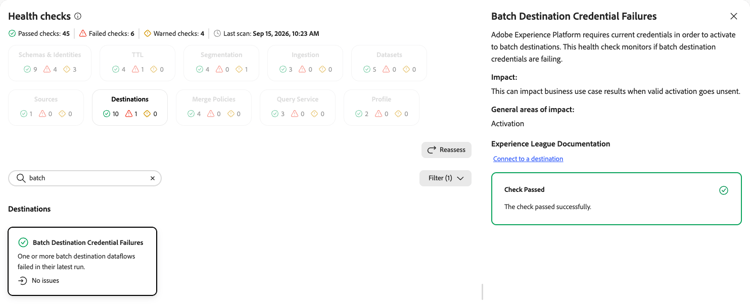
Monitors whether batch destination credentials are current and destination dataflows are activating successfully.
When you select the Batch Destination Credential Failures card, a detail panel opens on the right. The panel shows:
- Description: Explains that Experience Platform requires current credentials to activate batch destinations. This check monitors whether batch destination credentials are failing.
- Impact: This can impact business use case results when valid activation goes unsent.
- General areas of impact: Activation.
- Experience League Documentation: A link to connecting to a destination.
For more information, see Connect to a destination.
Inactive dataflows inactive-dataflows
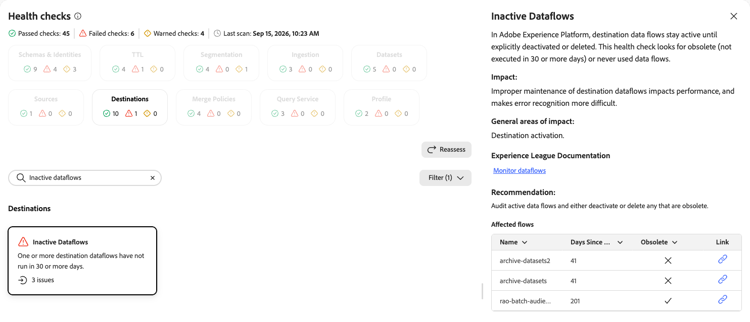
Detects destination dataflows that are obsolete or have never run.
When you select the Inactive Dataflows card, a detail panel opens on the right. The panel shows:
- Description: Explains that destination dataflows stay active until explicitly deactivated or deleted. This check looks for obsolete dataflows that have not run in 30 or more days, or that have never run.
- Impact: Improper maintenance of destination dataflows impacts performance and makes error recognition more difficult.
- General areas of impact: Destination activation.
- Experience League Documentation: A link to monitoring dataflows.
- Recommendation: Audit active dataflows and either deactivate or delete any that are obsolete.
- Affected flows: A list of affected dataflows with the number of days since the last run and whether the flow is obsolete. Use the link icon to open the flow.
For more information, see Monitor dataflows.
Audiences per destination audiences-per-destination
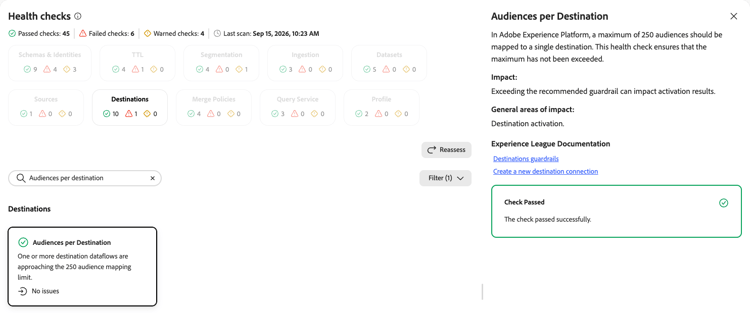
Ensures that the number of audiences mapped to a single destination has not exceeded the platform maximum.
When you select the Audiences per Destination card, a detail panel opens on the right. The panel shows:
- Description: Explains that a maximum of 250 audiences should be mapped to a single destination. This check ensures that the maximum has not been exceeded.
- Impact: Exceeding the recommended guardrail can impact activation results.
- General areas of impact: Destination activation.
- Experience League Documentation: Links to destinations guardrails and creating a new destination connection.
For more information, see the destinations guardrails.
Attributes per destination attributes-per-destination
Ensures that the number of attributes mapped to a destination has not exceeded the platform maximum.
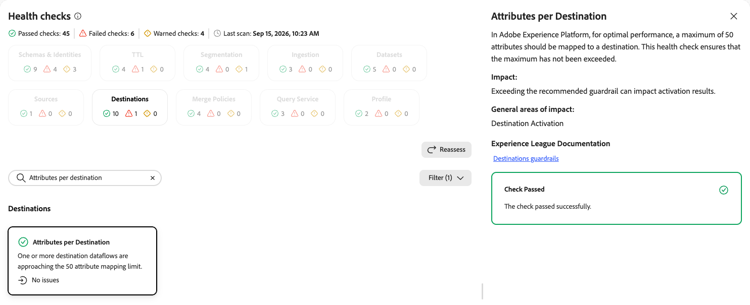
When you select the Attributes per Destination card, a detail panel opens on the right. The panel shows:
- Description: Explains that for optimal performance, a maximum of 50 attributes should be mapped to a destination. This check ensures that the maximum has not been exceeded.
- Impact: Exceeding the recommended guardrail can impact activation results.
- General areas of impact: Destination activation.
- Experience League Documentation: A link to destinations guardrails.
For more information, see the destinations guardrails.
Activated destinations per sandbox activated-destinations-per-sandbox
Inspects whether the number of destinations connected and activated per sandbox has exceeded the platform guardrail.
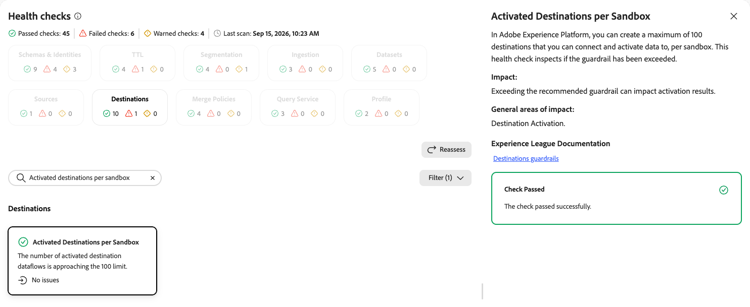
When you select the Activated Destinations per Sandbox card, a detail panel opens on the right. The panel shows:
- Description: Explains that you can create a maximum of 100 destinations that you can connect and activate data to, per sandbox. This check inspects whether the guardrail has been exceeded.
- Impact: Exceeding the recommended guardrail can impact activation results.
- General areas of impact: Destination activation.
- Experience League Documentation: A link to destinations guardrails.
For more information, see the destinations guardrails.
Activated audience pairs activated-audience-pairs
Ensures that the number of audiences added to batch destination dataflows has not exceeded the recommended maximum.
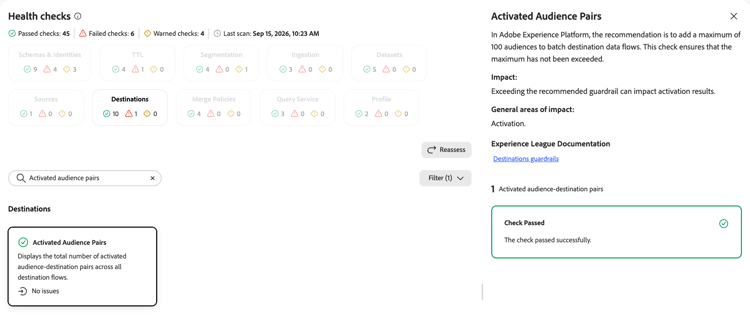
When you select the Activated Audience Pairs card, a detail panel opens on the right. The panel shows:
- Description: Explains that the recommendation is to add a maximum of 100 audiences to batch destination dataflows. This check ensures that the maximum has not been exceeded.
- Impact: Exceeding the recommended guardrail can impact activation results.
- General areas of impact: Activation.
- Experience League Documentation: A link to destinations guardrails.
For more information, see the destinations guardrails.
Attributes per personalization destination attributes-per-personalization-destination
Inspects whether the number of attributes mapped to a personalization destination has exceeded the platform maximum.
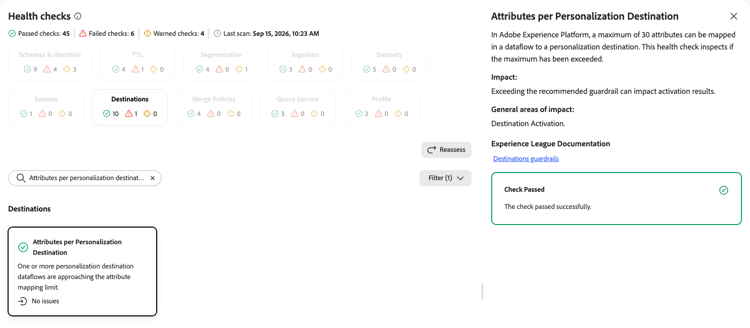
When you select the Attributes per Personalization Destination card, a detail panel opens on the right. The panel shows:
- Description: Explains that a maximum of 30 attributes can be mapped in a dataflow to a personalization destination. This check inspects whether the maximum has been exceeded.
- Impact: Exceeding the recommended guardrail can impact activation results.
- General areas of impact: Destination activation.
- Experience League Documentation: A link to destinations guardrails.
For more information, see the destinations guardrails.
Audiences to Adobe Target audiences-to-adobe-target
Inspects whether the number of audiences activated to a single Adobe Target destination has exceeded the platform guardrail.
When you select the Audiences to Adobe Target card, a detail panel opens on the right. The panel shows:
- Description: Explains that you can activate a maximum of 50 audiences in an activation flow to a single Adobe Target destination. This check inspects whether the guardrail has been exceeded.
- Impact: Exceeding the recommended guardrail can impact activation results.
- General areas of impact: Destination activation.
- Experience League Documentation: A link to the Adobe Target connection.
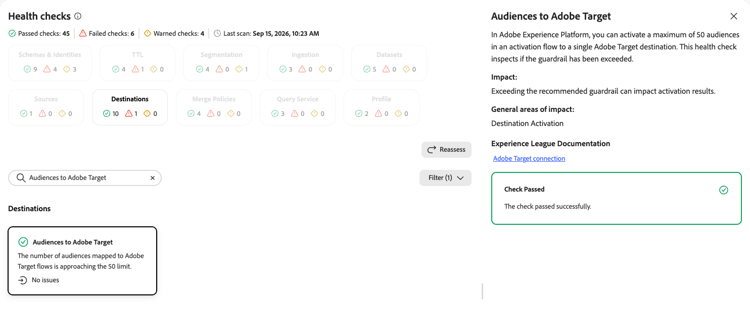
For more information, see the Adobe Target connection documentation.
Edge personalization destinations edge-personalization-destinations
Inspects whether the number of edge personalization destinations per sandbox has exceeded the platform guardrail.
When you select the Edge Personalization Destinations card, a detail panel opens on the right. The panel shows:
- Description: Explains that you can set up dataflows to 10 custom personalization destinations per sandbox. This check inspects whether the guardrail has been exceeded.
- Impact: Exceeding the recommended guardrail can impact activation results.
- General areas of impact: Destination activation.
- Experience League Documentation: A link to destinations guardrails.
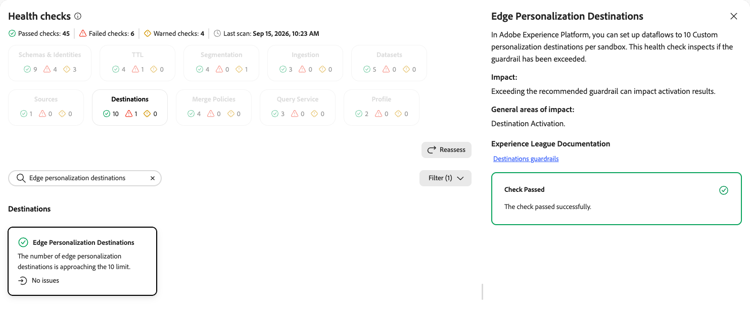
For more information, see the destinations guardrails.
Custom destination count custom-destination-count
Inspects whether the number of private custom destinations per sandbox has exceeded the platform guardrail.
When you select the Custom Destination Count card, a detail panel opens on the right. The panel shows:
- Description: Explains that you can create a maximum of 5 private custom streaming or batch destinations per sandbox using Destination SDK. This check inspects whether the guardrail has been exceeded.
- Impact: Exceeding the recommended guardrail can impact activation results.
- General areas of impact: Destination activation.
- Experience League Documentation: A link to destinations guardrails.
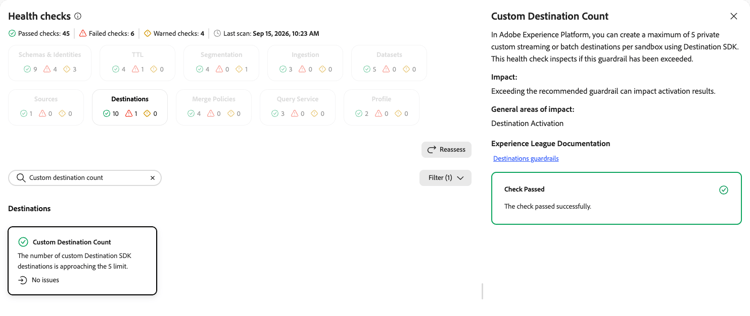
For more information, see the destinations guardrails.
Next steps next-steps
- Return to the health checks overview to explore other check categories.
- Review the scheduling documentation for streaming and batch destinations to manage your destination dataflow schedules.