[AEM Forms]{class="badge positive" title="Applies to AEM Forms)."}
Date/Time Field Component in Interactive Communication Editor
1. Introduction
The Date/Time Field component in the Interactive Communication (IC) editor enables authors to insert fields where users can select or enter date and/or time values. This component is commonly used for capturing information like date of birth, appointment schedules, booking slots, or document issue/expiry dates.
The field supports various formatting options (e.g., DD/MM/YYYY, 24-hour or 12-hour formats), validation constraints, and customization of appearance to match the communication design. It enhances user experience by reducing manual input errors and promoting consistency in data collection.
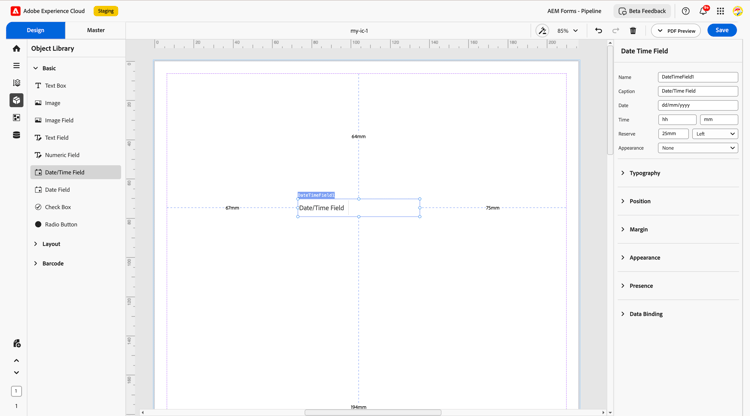
2. Display Pattern
You can assign a display pattern to a Date/Time field from the Properties panel — for example: 04/01/2007 2:30 PM.
The configured pattern is immediately reflected in the canvas preview and is preserved across save and reload cycles. For advanced use cases, you can define a custom XFA picture clause to achieve any desired output format.
Configure a display pattern
- Select the Date/Time Field component on the design canvas.
- Open the Properties panel.
- In the Display Pattern section, choose a predefined pattern or enter a custom picture clause.
- Preview the formatted value on the canvas.
Custom pattern example (Date/Time)
date{MM/DD/YYYY} time{HH:MM}Common time tokens:
2007-04-01T14:30). Values that do not follow this format are displayed as-is, without pattern formatting applied.3. Properties
The Date/Time Field component includes several configurable properties:
2.1. Basic Field
-
Name: A unique identifier for the field. Used for referencing in rules, expressions, and data bindings.
-
Caption: The label displayed alongside the field to indicate its purpose (e.g., “Date of Birth”).
-
Date: Allows users to pick or input a calendar date.
-
Time: Enables entry or selection of specific time values if configured.
-
Reserve: A fallback value displayed when no input is provided, useful for read-only or print scenarios.
-
Appearance: Select a visual style such as underlined, bordered, or flat for consistent UI rendering.
2.2. Typography
Controls the style of the text inside the date/time field:
-
Font variation: Options include Regular, Bold, Italic depending on theme requirements.
-
Font size: Default set to 10 pt to maintain consistency with form layout.
2.3. Position
-
Description: Defines the placement of the date/time field on the form layout.
-
Settings:
-
X and Y coordinates
-
Height and width (measured in mm or pixels) for sizing the field precisely.
-
2.4. Margin
Defines spacing around the field for clean alignment and layout flexibility:
-
Top (Up)
-
Bottom (Down)
-
Left
-
Right
2.5. Appearance
Defines the container’s styling to maintain visual consistency and clarity:
-
Fill: Background color of the field.
-
Stroke: Border color around the field.
-
Width: Thickness of the border.
-
Style: Border types such as solid, dashed, or none.
-
Edges: Choose from sharp or rounded corners depending on form theme.
2.6. Presence
Determines how the field behaves at runtime:
-
Visible: The field is shown to users and occupies layout space.
-
Hidden (keeps space): The field is not visible but space is still reserved for it in the layout.
2.7. Data Binding
Links the field to a data source to store or retrieve values.
-
Data Binding Type: Specifies how the field connects to data.
-
Use Name: Binds the field using the field name defined in the schema.
-
Use Global Data: Connects the field to global-level data shared across the communication.
-
No Data Binding: Field is not connected to any backend data (used for visual only or calculated values).
4. Usage
The Date/Time Field is ideal in scenarios where consistent temporal data is required. Common use cases include:
-
Capturing Date of Birth, Appointment Date, or Event Time
-
Logging Document Issue/Expiry Dates
-
Selecting Delivery or Pickup Slots
-
Recording Transaction Timestamps
Authors can combine the field with layout containers, validations, or conditional rules to control format, required fields, and context-sensitive visibility.
5. Best Practices
-
Use clear captions such as “Select a date” or “Appointment Time” to guide users.
-
Enable date/time picker for better UX and fewer input errors.
-
Apply format restrictions (e.g., future dates only) when needed.
-
Provide a reserve value for accessibility or print fallback.
-
Keep typography and appearance consistent with the overall form design.
-
Bind the field to a valid schema path to ensure proper data capture and processing.
The Date/Time Field component in the Interactive Communication editor is a powerful and user-friendly component that streamlines time-based input. With the right configuration of styling, data handling, and layout controls, it enables clean, reliable, and intuitive form experiences for both users and backend systems.