[AEM Forms]{class="badge positive" title="Applies to AEM Forms)."}
Date Field Object in Interactive Communication Editor
1. Introduction
The Date Field component in the Interactive Communication (IC) editor enables authors to insert a calendar-based date selection field into a document. This allows users to easily pick a date from a date picker or enter it manually in a predefined format.
Ideal for capturing birthdates, appointment schedules, application dates, or policy start/end dates, the Date Field improves accuracy and reduces input errors. It supports formatting, styling, and data binding for seamless integration with data models and backend systems.
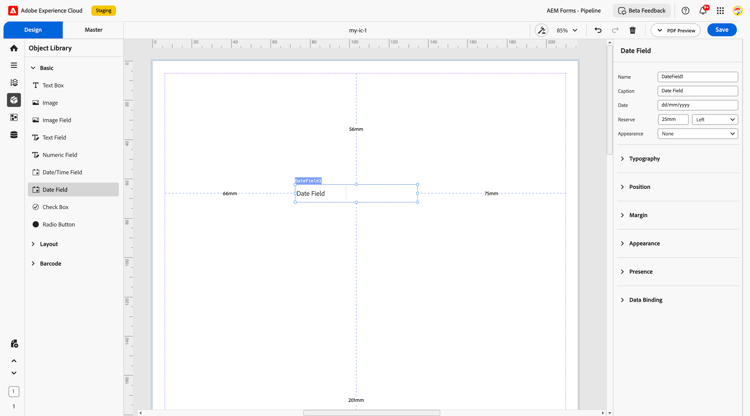
2. Display Pattern
You can assign a display pattern to a Date field from the Properties panel — for example: April 01, 2007 or 01/04/2007.
The configured pattern is immediately reflected in the canvas preview and is preserved across save and reload cycles. For advanced use cases, you can define a custom XFA picture clause to achieve any desired output format.
Configure a display pattern
- Select the Date Field component on the design canvas.
- Open the Properties panel.
- In the Display Pattern section, choose a predefined pattern or enter a custom picture clause.
- Preview the formatted value on the canvas.
Custom pattern example (Date)
date{DD/MM/YYYY}Common date tokens:
2007-04-01). Values that do not follow this format are displayed as-is, without pattern formatting applied.3. Properties
The Date Field object includes several configurable properties:
2.1. Basic Field
-
Name: A unique identifier used for referencing the field within rules, scripts, and data models.
-
Caption: The display label shown to the user (e.g., “Date of Birth”).
-
Date: The actual date value, which may be empty by default or pre-populated using dynamic data.
-
Reserve: An optional fallback date (displayed if no date is selected or data is unavailable).
-
Appearance: A quick style preset (e.g., underlined, flat, bordered) for visual consistency.
2.2. Typography
Controls how the date appears visually within the field:
-
Font Variation: Choose font family, weight (e.g., Regular, Bold), and style (e.g., Italic).
-
Size: Typically set to 10 pt by default, but customizable for consistency with surrounding content.
2.3. Position
Defines spatial placement within the document layout:
-
X and Y coordinates: Determines horizontal and vertical placement.
-
Width and Height: Set in millimeters or percentages to align with other form elements.
2.4. Margin
Specifies spacing around the field’s boundaries:
-
Top (Up)
-
Bottom (Down)
-
Left
-
Right
These values help with precise alignment within subforms or layout grids.
2.5. Appearance
Defines the visual styling of the field container:
-
Fill: Background color of the field (e.g., white, light gray).
-
Stroke: Border color or outline.
-
Width: Thickness of the field border.
-
Style: Solid, dashed, or dotted line options.
-
Edges: Customize corners as rounded or sharp for different design preferences.
2.6. Presence
Determines how and when the field appears:
-
Visible: Default setting where the field is shown at runtime.
-
Hidden (keeps space): Field remains invisible, but layout space is preserved.
This is helpful when toggling visibility dynamically based on user input or rules.
2.7. Data Binding
Connects the Date Field to data structures for storing or pre-filling values.
Data Binding Type:
-
Use Name: Binds the field to the schema using its name attribute.
-
Use Global Data: Binds using a predefined data model or schema element.
-
No Data Binding: The field remains static, not connected to any data source.
This allows dynamic date values to be fetched, displayed, or stored based on application logic.
4. Usage
The Date Field is particularly useful in the following scenarios:
-
Capturing date of birth or joining date in onboarding forms.
-
Selecting start and end dates for services, subscriptions, or events.
-
Inputting application deadlines, appointment slots, or verification dates.
Authors can place the Date Field inside layout containers or subforms and configure validation (e.g., date format, range limits) to improve data quality.
5. Best Practices
-
Use clear captions like “Start Date” or “Select Appointment Date” for better UX.
-
Set minimum and maximum date ranges to prevent invalid input (e.g., future DOB).
-
Apply consistent font styles (10 pt recommended) for readability.
-
Bind fields to the schema wherever backend data integration is needed.
-
Hide non-relevant date fields dynamically using visibility rules.
The Date Field object in the Interactive Communication editor is a powerful tool for capturing time-sensitive data with accuracy and ease. When styled thoughtfully and connected to meaningful data paths, it supports a seamless user experience and efficient processing of time-based entries.