[AEM Forms]{class="badge positive" title="Applies to AEM Forms."}
Associate UI in Interactive Communication Editor
The Associate UI is a specialized, simplified interface built on top of Interactive Communications (IC) editor. It is designed for customer-facing professionals, such as field associates and service representatives, to generate personalized, compliant, and accurate communications in real time during live interactions.
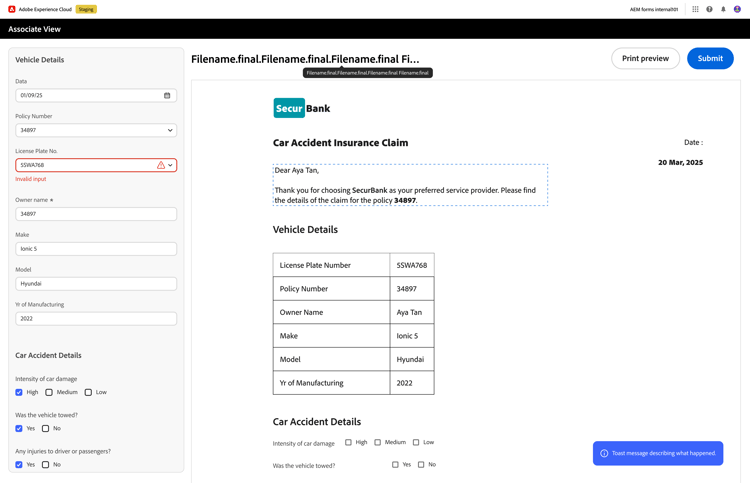
Associate UI Interface
The Associate UI provides a clean, two-panel workspace that enables fast and secure communication generation:
Left Panel: Data Entry
- Associates enter or confirm customer-specific information.
- Validations, helper texts, and mandatory fields guide accurate input.
Right Panel: Real-Time Preview
- Displays an instant preview of the final document.
- Automatically updates as the associate fills in data.
Instant Document Generation
- Generate or download the finalized communication.
User Personas and Responsibilities
The Associate UI is driven by three core roles, each with distinct responsibilities:
1. Administrator
Responsible for system setup, governance, backend integrations, and user access.
2. Author
Designs and manages the Interactive Communication and configures it for Associate UI (including enabling Associate View and optional workflow).
3. Associate
Uses the Associate UI to assist customers, update information and generate compliant communications.
Dynamic Use Cases
The Associate UI supports instant, personalized document generation, crucial for industries with real-time servicing needs.
Enabling the Associate UI
Authors enable the Associate UI and optionally configure a workflow for submissions in Interactive Communication Settings:
- Enable Associate View — In Associate Properties, check Enable Associate View Editing, then click Apply Changes and save the document.
- Configure workflow (optional) — In Workflow, turn Configure Workflow for Update On, select a workflow model, and optionally set a success message and redirection URL.
- Configure editable fields — Enable the fields that associates can edit and set validations.
- Publish and share — Publish the IC and share the link with associates.
For step-by-step instructions with screenshots and submission/workflow behavior (Author on Author vs Associate on Publish), see Enable and configure Associate UI for Interactive Communications. To build a workflow that generates PDF from IC submissions, see Submission workflow for Associate UI — IC Generate PDF Output.
The Associate UI bridges the gap between structured content authoring and real-time customer engagement.
By combining intuitive design, robust backend configuration, and strict compliance controls, organizations can deliver fast, accurate, and personalized communications at scale.